How-to · ITSM · ServiceNow AI · Oct 11, 2026
Design ServiceNow ITSM triage labels and a QA sample before enablement
“Triage labels + QA before enablement” means locking a ServiceNow ITSM label/category set and scoring a sample before AI triage assists run wide. Humans still own priority for unknown-severity incidents and security. This is not an Intercom-style support bot guide. Terms: ITSM means IT service management, the IT help desk for incidents and requests; QA means a quality check done by a person.
Who this is for
ITSM owners whose incident/request system of record is already ServiceNow and who want AI triage assists without silent mis-routes. If Jira Service Management / Atlassian Intelligence is the ITSM home, see Atlassian Intelligence and Jira AI. If you are stacking a second ITSM AI for the same queue, read three checks before an AI seat first.
How to do it
This page is a how-to. It is not a ranking of ITSM AI. Product detail and dated packaging notes live on ServiceNow AI. Confirm Now Assist / AI features on your ServiceNow product variants before you pilot.
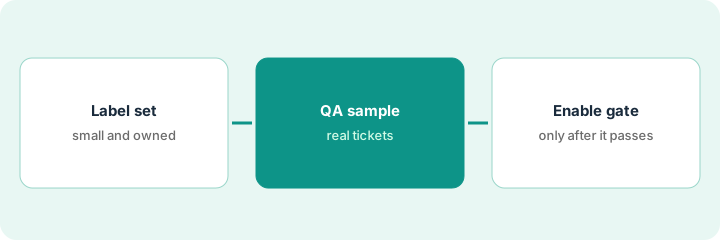
1. Step 1 — Design the triage label set
What it is: Define the categories/assignment groups/priority rules AI may propose — from your existing ServiceNow taxonomy, not a new invented tree.
- Reuse current category → assignment group maps.
- Add an explicit Needs-human-triage label for unknown-severity incidents, security, privacy, and VIP break-glass.
- Cap the AI-ok label set (e.g. The 15 most common categories by volume).
- Document who may change the set (ITSM process owner).
AI-ok propose: Password reset → Service Desk; Laptop hardware → End User Compute; SaaS access → IAM (identity and access management) queue. Always Needs-human-triage: security incidents, data loss reports, unknown-severity incidents outages, exec-assist. No new shadow taxonomy.
Table: Category | Assignment group | AI may propose Y/N | Always human Y/N. Fill from last 90 days volume. Invented categories forbidden.
2. Step 2 — Build the QA sample
What it is: Pre-commit sample size, mix, and severity before scoring AI triage proposals.
- Example: 50 historical incidents — 35 AI-ok categories, 15 always-human.
- Score: correct group, correct priority band, false “AI-ok” on always-human (Critical fail).
- Two reviewers on Critical fails.
- Blind to AI vs historical human where practical.
50 tickets. Results target before enable: ≥90% correct group on AI-ok, 0 always-human auto-routed without human flag, priority within one band. Sheet ready with Incident # | AI propose | Human correct | Fail type.
Write pass thresholds on one page. Pull the 50 IDs before turning any AI triage toggle on.
3. Step 3 — Enable only after the gate
What it is: Dated pass required; scope stays limited until proven.
- Enable AI propose on AI-ok categories only; always-human still forces human assignment.
- Watch a hypercare week: daily fail log.
- Expand categories only with a new sample pass.
- Do not dual-enable Jira AI triage on the same ServiceNow incident system of record.
Pass signed Oct 11, 2026: 92% group accuracy, 0 always-human misses. AI propose on for 12 categories. Security still human. Hypercare Slack channel live. Atlassian Intelligence not pointed at the same ServiceNow queue.
Enable checklist: QA pass link | Scope list | Hypercare owner | Rollback step. Missing rollback → do not enable.
Pricing context (October 2026)
This how-to is not a price sheet. Plan notes live on ServiceNow AI. Recheck ServiceNow commercial terms and your product variant entitlements before you budget. Related paths: Atlassian Intelligence, Jira AI. Dated October 2026.
Checked Oct 11, 2026 on the vendor’s own pricing page: ServiceNow shows no public price. Its IT Service Management pricing page offers packages through a “Get Custom Quote” form rather than list prices. This page quotes no ServiceNow dollar figure.
Uncertainty: ServiceNow AI features are product variant- and plugin-heavy. If an invoice and a review disagree, trust the invoice. Do not paste a marketing list price you did not pay. The only prices this site sells here are the optional $9 AI toolkit spreadsheet and $19 AI toolkit audit.
When this helps (honest take)
Useful when ServiceNow is ITSM system of record, taxonomy is real, and always-human labels exist.
Not useful when categories are chaos, you want AI to set Sev-1 alone, or Jira already owns the same incidents.
Related options (educational)
| Need | Where to look | Why |
|---|---|---|
| ServiceNow AI | ServiceNow AI | Primary path |
| Atlassian Intelligence job map | Atlassian Intelligence | Jira/Confluence AI homes |
| Jira AI | Jira AI | When Jira is ITSM/work system of record |
| Before another seat | Three checks before an AI seat · Find unused AI seats | Live how-tos |
Related reviews: ServiceNow AI · Atlassian Intelligence · Jira AI. Free: seat-waste calculator if multiple ITSM AI seats triage the same queue.
FAQ
Can AI set Priority 1 without a human?
Not in this pattern. Unknown-severity incidents and security stay Needs-human-triage.
Is this the same as a support-bot FAQ scope?
No. This is ITSM triage labels + assignment QA inside ServiceNow — different job than help-center Answers.
Where do dated prices live?
On the ServiceNow AI review plus your ServiceNow commercial terms. This October 2026 how-to does not invent list prices. Our Oct 11, 2026 check of the vendor’s own pricing page is summarized in the pricing section above.
Which ServiceNow package includes AI triage?
ServiceNow sells packages by quote, so the answer depends on your contract. Confirm with your account team before the enable gate in Step 3.
Optional next step
Free reviews stay free. Neither offer is required to use this page. If ServiceNow and another ITSM AI seat already triage the same queue, optional help: $9 AI toolkit spreadsheet or $19 AI toolkit audit when you want a written memo.