Tool · Ops & automation · Atlassian · Umbrella · Oct 2026
Atlassian Intelligence review (Oct 2026): umbrella AI across Jira and Confluence
Cross-product Atlassian Intelligence overview — complements Jira AI and Confluence AI. Map which jobs live in Jira, Confluence, or both before you buy more seats. Peers: Linear AI, Asana Intelligence, ServiceNow AI, monday.com AI.
What this umbrella covers
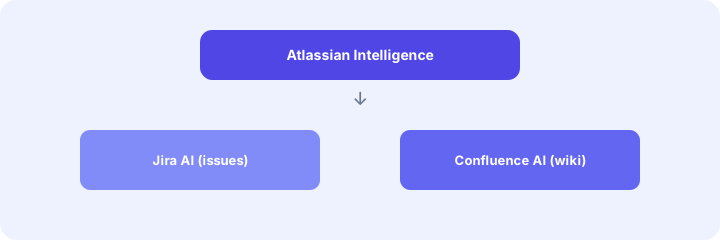
This page is the cross-product map for Atlassian AI assists that touch Jira and Confluence. It does not replace the product deep-dives — use Jira AI for issue hygiene and Confluence AI for wiki/runbook drafts. Names and packaging (Atlassian Intelligence and related surfaces) change; confirm on atlassian.com. Diagrams are educational, not screenshots.
Major features (with how someone uses them)
Examples at a glance: each feature has a concrete ops example plus a short Try this.
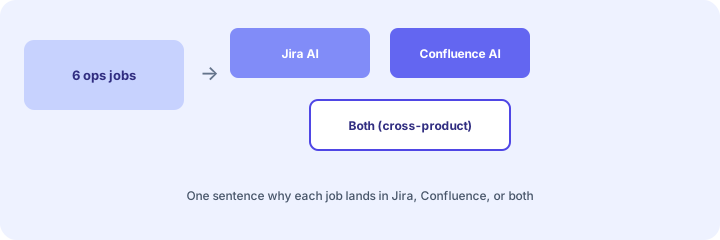
1. Map 6 jobs to Jira AI, Confluence AI, or both (primary)
What it is: Before enabling more AI seats, list six recurring ops jobs and assign each a home: Jira AI, Confluence AI, or both — with one sentence why. Avoids duplicate drafting in the wrong product.
2. Umbrella vs product deep-dives
What it is: Use this page to decide where a job lives. Use the product pages to run Try this workflows inside that home. Do not treat the umbrella as a substitute for issue or wiki hygiene practice.
3. Cross-product change + runbook jobs
What it is: Some jobs need tickets and documentation. AI drafts can start in either product, but humans keep a single source of truth and avoid inventing ticket IDs or page titles.
4. Vs Linear / Asana / ServiceNow / monday
What it is: Stay on Atlassian Intelligence when Jira/Confluence is already SoR. Prefer peer AI pages when another platform is home — do not migrate “for AI” alone.
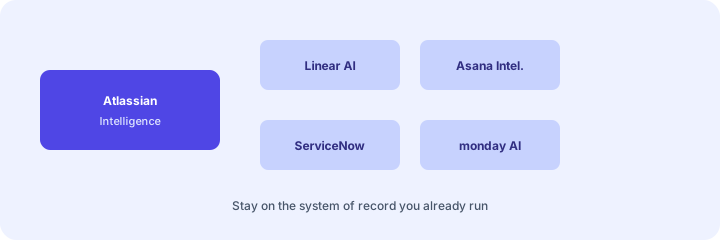
- Jira AI / Confluence AI — product deep-dives under this umbrella
- Linear AI — eng+ops when Linear is SoR
- Asana Intelligence — work management in Asana
- ServiceNow AI — ITSM when ServiceNow is standardized
- monday.com AI — board-first ops trackers
Pricing context (Oct 2026)
Atlassian AI packaging and entitlements change by product, cloud edition, and add-on. We do not invent list prices. Confirm on Jira pricing, Confluence pricing, and admin docs for Atlassian Intelligence / Rovo-family surfaces as named in your tenant. Dated October 2026.
When useful / when not
Useful when: You already run Jira and/or Confluence and need a clear job map before enabling more AI. Less useful when: Work lives in ServiceNow, Linear, Asana, or monday — improve that home first. Educational — not a scorecard.
Paying for Atlassian Intelligence and a few other AI tools? The $9 AI toolkit spreadsheet lists every AI subscription you have, what each one costs, and how fast it pays for itself, so you can see which ones are worth the money.
Want someone to do it for you? AI toolkit audit — $19
FAQ
What is Atlassian Intelligence in this review?
An umbrella map across Jira and Confluence AI — not a replacement for the product deep-dives.
When Jira vs Confluence vs both?
Issues → Jira AI; wiki/runbooks → Confluence AI; jobs that need both → both, with a human linking SoR.
How does it relate to ServiceNow or Linear AI?
Different systems of record. Prefer the platform you already run.
What does it cost?
Confirm on Atlassian pricing for your plans — we do not invent prices.
Optional next step (if seats overlap)
If several AI seats would cover the same jobs, optional help mapping overlap: $19 AI toolkit audit or $9 AI toolkit spreadsheet. Email Audit $19 or Toolkit spreadsheet $9.
Checkout is live via Stripe. After you pay, we email delivery (spreadsheet) or intake next steps (audit).