How-to · FP&A / planning · Pigment AI · Oct 13, 2026
Schedule one Pigment Analyst Agent mission for the Monday variance question
Most FP&A teams get the same question at the start of every week, in slightly different words: "Where are we against plan, and why?" This page shows an FP&A lead on Pigment how to turn that one recurring question into a scheduled Mission, so the first pass is ready before the Monday meeting. An analyst still checks the answer before it travels.
Who this is for
FP&A leads and finance business partners whose plan already lives in Pigment, who answer the same variance question every week, and who want the first draft waiting instead of rebuilt. If you're comparing planning platforms, Pigment vs Anaplan covers how each AI explains a variance.
How to do it
This is a how-to, not a ranking of planning tools. Feature detail lives on the Pigment AI review. Per Pigment, any Analyst Agent conversation can be saved as a Mission: a natural-language task the agent re-runs on a schedule. A Mission can produce one report, or a Multi-Report with one output per item of a dimension (up to 60). This page uses one question, one report.

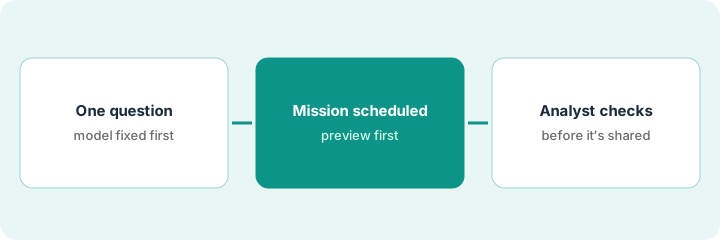
1. Step 1 — Write the one question, and fix the model under it
What it is: One question, worded the same way every week, scoped to the versions and periods leadership actually uses.
- Write the question the way it gets asked on Monday, then make it specific: which version (budget or latest reforecast), which period (last week, month to date), which cost centers.
- Check each Metric the question touches has the right default time aggregator. Pigment warns the agent "may sum together non-cumulative data points such as FTEs or exchange rates" otherwise.
- Don't point the question at pre-calculated variance Metrics. Pigment says the agent computes variances itself.
- Ask it once by hand in the Analyst Agent and open every driver it names. If the one-off answer isn't right, a scheduled one won't be either.
The Monday question is usually "Are we on track?" She rewrites it: "Month to date, compare actual opex with the latest reforecast for the five largest cost centers. Name the top three drivers of any variance over 5%." She asks it once, finds the headcount Metric was summing monthly FTEs, fixes the aggregator to take the last value, and asks again.
Write your Monday question in one sentence with four parts: version, period, scope, threshold. Ask it by hand once, and open every driver before you save anything.
2. Step 2 — Save it as a Mission, preview, then schedule
What it is: Save the working conversation as a Mission, preview its full instructions and output, set access on where the output lands, and only then turn the schedule on.
- Pigment's doc says you can preview a Mission's full instructions and output before saving.
- Missions take 5 to 15 minutes to run, per Pigment. Set the run time so the output is ready before Monday's meeting, with room for Step 3. Confirm the schedule options you have in your workspace.
- A Mission runs with the access rights of the Member who runs it, and those rights aren't re-checked when others open the output. If you export the output to a text Metric for a Board, set access rights on that Metric.
- The Analyst Agent draws on AI credits. Admins see usage by Member and feature on the AI Credits page (added 17 September 2026).
She saves the conversation as a Mission and previews it. The saved instructions say "latest version" instead of "latest reforecast," so she corrects the wording. She schedules it to finish early Monday morning, exports the output to a text Metric on the leadership Board, and restricts that Metric to the leadership group, since she, the Mission's runner, can see every cost center.
Save one variance conversation as a Mission. Preview the instructions and output, fix any wording that drifted, set access rights on the output Metric, and only then turn on scheduling.
3. Step 3 — An analyst checks the output before it's shared
What it is: The Mission drafts the answer; a named analyst confirms it each week before it goes into the meeting or a message. Pigment says Analyst outputs can be refined or overwritten, so correcting the draft is part of the process.
- The analyst opens the output before the meeting and opens every driver it names in the model.
- Each driver is marked "confirmed" or "not supported." Only confirmed drivers are repeated.
- If the same driver is wrong two weeks running, fix the instructions or the model, not just the output.
The Mission names contractor spend, travel, and a software renewal. The analyst confirms the first two. The "renewal" is a reclass the controller already reversed, so she marks it not supported and keeps it out of the meeting.
Add a line at the top of the shared output each week: "Checked by: [analyst], [date]. Confirmed drivers: [list]. Not supported: [list, or none]." If that line is empty, the output isn't shared.
Pricing context (October 2026)
This how-to isn't a price sheet. Pigment doesn't publish prices. When the Pigment AI review checked on 7 October 2026, pigment.com/pricing returned a "page not found" error, and the site offered a demo and a free trial: 14 days from first login, no credit card, AI agents included with some features limited, read-only after it ends. AI use is metered in AI credits, which the Analyst Agent and other AI features draw on; when you reach the limit, Pigment says to contact your customer success manager. No credit price is published. Dated October 2026.
Checked Oct 13, 2026 on the vendor’s own pricing page: Pigment shows no public list price. Pigment’s pricing address returned a page-not-found response on our check, and the site offers a demo. This page quotes no Pigment dollar figure; confirm what your contract includes with Pigment or your admin.
Uncertainty: Pigment ships agent changes monthly; a separate Mission Builder is on its roadmap as of 7 October 2026. If your contract and our review disagree, trust your contract. The only prices this site sells here are the optional $9 AI toolkit spreadsheet and $19 AI toolkit audit.
When this helps (honest take)
Useful when your plan lives in Pigment, the same variance question comes up every week, and one analyst is willing to own the weekly check. The Mission saves the rebuild, not the review.
Not useful when the question changes every week, or when Metric aggregators and hierarchies are mid-reorg. And if nobody will check the output, a schedule just spreads an unchecked answer faster.
Related options (educational)
| Need | Where to look | Why |
|---|---|---|
| Pigment AI features | Pigment AI | Primary path on this page |
| Comparing planning platforms | Pigment vs Anaplan | Missions vs Anaplan Analyst's Show data sources |
| Answers with visible sources | Anaplan AI | Analyst shows module and line item behind each answer |
| What changed in Pigment in September | What's new in Pigment (Sep 2026) | Modeler modes, Frames, AI Credits page |
| A weekly metrics pull outside planning | Turn the weekly metrics pull into one Hex notebook with a named owner | Live how-to (same habit, different tool) |
FAQ
What is a Pigment Mission?
A saved Analyst Agent conversation that the agent re-runs on a schedule. It can produce one report or a Multi-Report with one output per dimension item, up to 60.
Who can see a Mission's output?
A Mission runs with the access rights of the Member who runs it, and Pigment says those rights aren't re-checked when others open the output. Set access rights on the output Metric yourself.
Where do current prices live?
With Pigment's sales team. Pigment published no prices when we checked on 7 October 2026, and this page doesn't invent any. Our Oct 13, 2026 check of the vendor’s own pricing page is summarized in the pricing section above.
Can the Mission output go straight to the Monday meeting?
Not in this routine. An analyst reads it against the model before anyone shares it.
Optional next step
Free reviews stay free. If finance pays for a planning platform, a BI tool, and chat assistants that all answer the same Monday question, the $9 AI toolkit spreadsheet helps you lay them out, or the $19 AI toolkit audit gets you a written memo.