Compare · Finance · FP&A planning AI · Oct 2026
Pigment vs Anaplan (Oct 2026): AI planning platforms for finance teams
Pigment and Anaplan are both planning platforms where finance teams build budgets, forecasts, and scenarios in a shared model instead of linked spreadsheets. Both now ship AI agents that answer questions about the model and help build it. This page compares them by model size, who builds and changes models, and how the AI explains a variance — not as a ranking — with a Try this for each.
What this comparison covers
This page is for the FP&A lead, finance systems owner, or CFO choosing a planning platform — or renewing one — who wants to know where each product’s AI does real work in the monthly cycle, and where an analyst or model builder still has to check it.
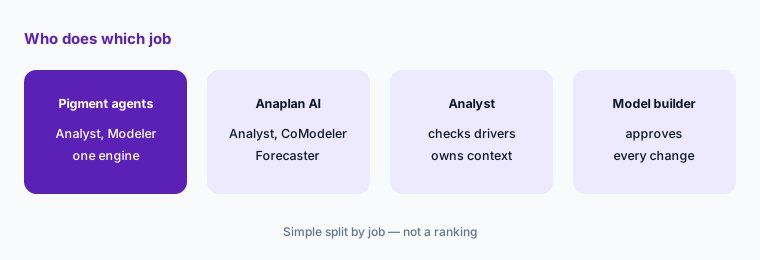
The short version: both put AI on two jobs — explaining numbers and building the model — and both keep a person approving model changes. Pigment’s agents (Analyst, Modeler, plus Predictions for forecasts) work inside one engine and are metered in AI credits. Anaplan’s AI sits under its Intelligence family: Anaplan Analyst for questions, CoModeler for model builders, and Forecaster for machine-learning forecasts, with Analyst and CoModeler sold as separate subscriptions. Anaplan documents an AI Admin role and per-workspace switches in Agent Studio aimed at large, multi-model estates; Pigment puts more of its pitch on getting a finance team to a working model quickly, starting with a self-serve trial.
Facts come from Pigment’s and Anaplan’s public product pages, trial page, and help documentation, re-checked on 7 October 2026, and match our Pigment AI and Anaplan AI reviews from the same day. Customer time-savings and forecast-accuracy figures on either site are vendor claims, not our measurement.
| Question | Pigment | Anaplan |
|---|---|---|
| Published prices | None — pricing page returned “page not found”; demo or 14-day free trial | None — the pricing address serves a “Connect with us” contact page |
| Calculation engine | One engine (Pigment’s description) | Classic and Polaris engines; AI tools documented for both |
| AI that builds the model | Modeler Agent: Ask, Build, and Plan & Build modes | CoModeler: step-by-step build plan for approval; workspace admins only |
| AI that explains numbers | Analyst Agent: drill-downs, editable reports, scheduled Missions | Anaplan Analyst: answers with “Show data sources”; Forecaster driver explanations |
| How AI use is metered | AI credits across agents and Predictions | Analyst credits; Forecaster prediction points; Analyst and CoModeler need separate subscriptions |
| Changes in production models | Ask mode only in managed Applications when you promote between environments | CoModeler for development environments only; Analyst write-back follows privileges |
Major features (with how someone uses them)
Examples at a glance: each feature has a concrete example from a real job plus a short Try this you can run this week.
1. Start from the three questions your CFO asks every month (primary)
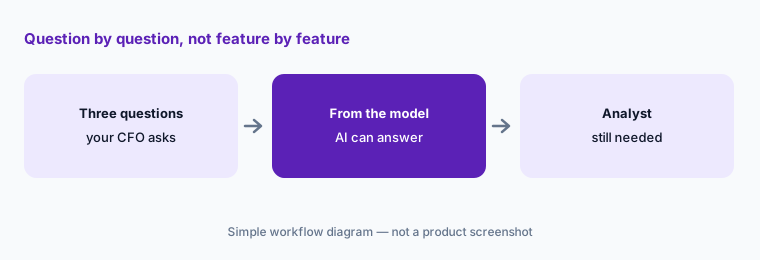
What it is: Feature lists for two planning platforms look alike. The useful test is the questions you already answer every month — “why did operating expenses miss plan?”, “what does the revised headcount plan do to Q4?”, “where will we land on revenue?” — and, for each, whether the AI could answer it from what is already in the model, or whether an analyst still has to pull data, fix the model, or explain the context. That second column is where the work stays.
Primary workflow:
List the three planning questions your CFO asks monthly. Note which product’s AI answers each from the model and which still need an analyst.
2. Model size and shape: one engine vs Classic and Polaris
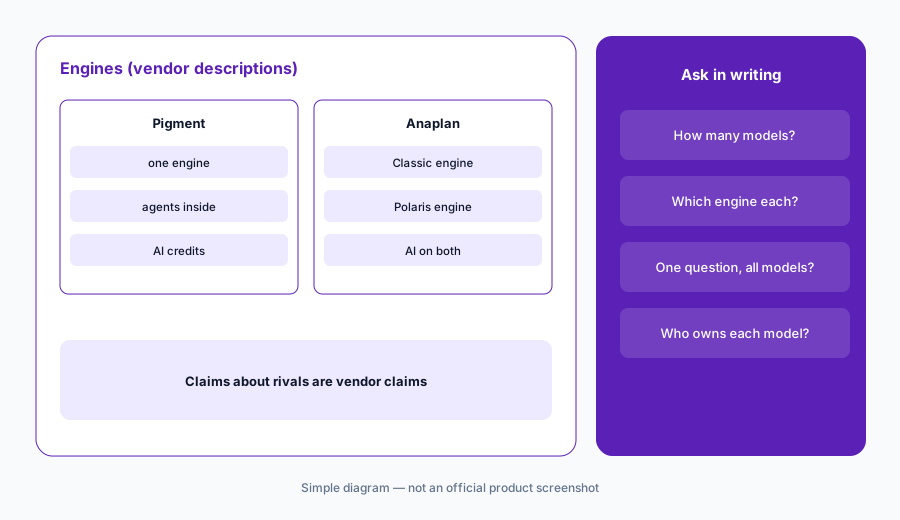
What it is: Anaplan runs models on two calculation engines, Classic and Polaris; Anaplan describes Polaris as the engine for scaling multi-dimensional models with high-performance calculations, and its documentation says Forecaster and CoModeler work in both. Pigment says it runs a single engine. Pigment’s own comparison page (last updated 21 January 2026) goes further and claims Anaplan’s Classic engine is limited to 720GB per workspace while Polaris is not, and that Anaplan users must set up imports to move data between models — those are Pigment’s claims about a competitor, so ask Anaplan to answer them for your model.
For AI, model shape matters more than raw size. An assistant can only explain what is in the model it can see: if your plan is split across several models, ask each vendor whether one question can span them. Anaplan’s product page says Analyst “connects multiple data sources to explain the ‘why’”; Pigment says data is shared across business functions without managing imports between models. Test both claims with your own structure.
Same written questions:
List the planning models you run today and who owns each. Ask both vendors in writing how they would structure them, which engine or workspace each would use, and whether one AI question can read across all of them.
3. Who builds the model: Modeler Agent vs CoModeler
What it is: Pigment’s Modeler Agent builds and edits Lists, Metrics, formulas, Views, and Boards from plain-language requests or files. It has three modes: Ask (explains and proposes, no changes), Build, and Plan & Build (an action plan that waits for your go-ahead at each waypoint). An Auto-accept actions setting skips those waypoints, but Pigment says deletions always need your approval. Members need the Access AI Agents and Configure Blocks permissions, and if you promote models between environments, the agent works in Ask mode only on managed Applications. Anaplan CoModeler builds models from plain-text specs, edits lists, modules, line items, and formulas, and explains formulas. Anaplan says it “presents a step-by-step build plan for user review and approval. It never makes changes automatically,” that you must be a workspace administrator to use it, and that it should only change models in development environments.
So both keep a person approving model changes and both push changes into development first. The difference is who that person usually is. Pigment pitches its agent at finance people who start “from intent” — its 14-day trial says you need no Pigment experience. Anaplan’s CoModeler is aimed at the model builders and workspace administrators who already own Anaplan models. Decide which of your people will approve AI-built changes before choosing.
Name the approver:
Pick one model change you made last quarter, such as a new cost center. Write who would request it from each product’s AI, who would approve the plan, and where it would be tested before it reaches the live model.
4. How the AI explains a variance
What it is: Pigment’s Analyst Agent answers questions in conversation, drills down to find drivers, and turns the chat into an editable report; Pigment says it “writes and executes code on the fly” using your metrics, dimensions, and business logic, shows the data and logic behind each insight, and lets you refine, adjust, or overwrite any output. Conversations can become scheduled Missions. Pigment’s help center warns that a Metric with the wrong default time aggregator may lead the agent to sum non-cumulative data such as FTEs or exchange rates, and to avoid pointing it at pre-calculated variance Metrics. Anaplan Analyst answers natural-language questions with charts and follows the model’s access controls; a Show data sources button shows the workspace, model, module, line item, and dimension behind an answer, and Anaplan says Analyst can write data back to your live model based on your privileges. For forecasts, Forecaster’s Advanced tier shows each driver’s contribution per item and per period; the Standard tier shows the relative impact of each driver.
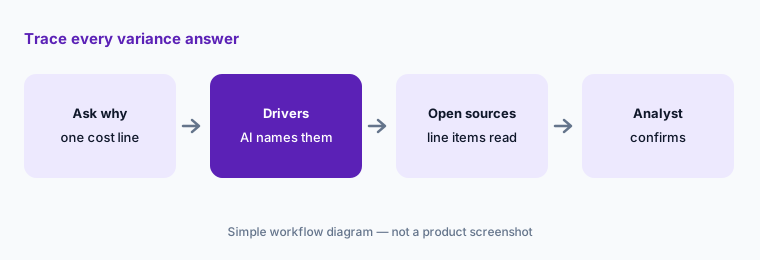
The practical check is the same in both: an answer is only useful if you can trace it to the line items it came from. In Anaplan, make “Show data sources” a required step and decide who may write back from the chat. In Pigment, check time aggregators and access rights before the first Mission, because a Mission runs with the access of the Member who runs it.
Trace one answer:
Ask each product’s AI why one cost line missed plan last month. Open the data sources or drill-down behind each answer, and write down any line item you would have chosen differently.
5. AI meters and add-on subscriptions
What it is: Pigment meters AI in AI credits: its help center says credits are used by the Analyst, Modeler, Custom, and Documentation Agents, Predictions, the MCP server, and features such as the Formula Explainer. Admins see the quota and usage by Member and feature on an AI Credits page, and when the limit is reached Pigment says to contact your customer success manager. Anaplan says Anaplan Analyst and CoModeler are each an “entitled service” that needs a separate subscription; Analyst usage is measured in credits shown in Agent Studio’s Usage tab, and Forecaster usage is measured in prediction points (items forecast × successful forecast runs) against a monthly quota set by your subscription.
Neither publishes a credit or tier price, so the only way to compare is on your own usage. Estimate how many people will ask questions weekly, how many scheduled reports or Missions you want, and how many items you would forecast monthly — then ask both vendors to quote against those numbers.
Price your own usage:
Write how many people would ask the AI questions each week, how many scheduled reports you want, and how many items you forecast monthly. Ask both vendors to quote AI usage against those three numbers.
6. Where each fits, and when neither is the answer
What it is: Pigment fits finance teams replacing linked spreadsheets with one planning model who want agents that work inside that model and a trial they can start themselves. Anaplan fits large organizations with dedicated model builders running connected plans across finance, supply chain, sales, and workforce, who want AI tools with separate subscriptions and administrator controls. If your team wants to stay in Excel or Google Sheets, a spreadsheet-first tool may suit better — see Datarails vs Cube, Vena, or Planful — and for a growing company moving off spreadsheets, Abacum or Drivetrain.
Both vendors have announced more agents than they document today: Pigment’s roadmap lists a Planner Agent, and Anaplan announced skills-based agents for the office of the CFO “by October this year” in June 2026. Judge each product on what your account team can show working on your data, not the roadmap.
Judge what works today:
Ask each account team to show your three CFO questions answered on a sanitized copy of your data. Count only answers you can trace to line items, and mark every roadmap feature as “not yet.”
Pricing context (October 2026)
Pigment does not publish prices (as of 7 October 2026). pigment.com/pricing returned a “page not found” error when we checked, and the site offers “Request a demo” and a free trial: 14 days from first login, no credit card, a private workspace with modeling, planning, and AI agents, usage limits on storage, calculation capacity, and AI credits, and read-only access when it ends. No AI credit price is published.
Anaplan does not publish prices either (as of 7 October 2026). Its /pricing/ address served Anaplan’s contact page (“Connect with us”) when we checked. Anapedia says Anaplan Analyst and CoModeler each need a separate subscription arranged through your Customer Success Business Partner; Forecaster has Standard and Advanced tiers with monthly prediction-point quotas. Those quotas are usage allowances, not prices.
Uncertainty: Neither vendor showed prices on 7 October 2026, so we quote none; any figure elsewhere is someone’s quote, not a list price. AI features change monthly on both sides — Pigment’s Planner Agent is on its roadmap, and Anaplan’s skills-based CFO agents were announced but not documented when we checked. Claims each vendor makes about the other are theirs, not our findings.
When it’s useful (honest take)
Pigment is useful when a finance team wants to replace linked spreadsheets with one model, wants AI that explains numbers and drafts model changes inside it, and is comfortable approving those changes itself — and can try it first with sanitized data.
Anaplan is useful when you already run large or connected Anaplan models with dedicated model builders, want AI with separate subscriptions and administrator controls, and value features such as Show data sources and Forecaster’s backtests and driver explanations.
Less useful when (either one) nobody owns the model’s definitions — time aggregators, access rights, line items — because both AIs answer from the model as built, or when your team plans to keep working in Excel or Google Sheets anyway (see Datarails vs Cube).
Still choosing between Pigment and Anaplan? The $19 AI toolkit audit gives you a written plan for which tools to keep using and which to drop across your whole AI stack, including this pair.
Prefer to do it yourself? Spreadsheet — $9
Related options (educational)
| Need | Better home | Why |
|---|---|---|
| Agents inside one planning model | Pigment AI | Analyst, Modeler, Predictions; AI credits |
| Connected planning across large models | Anaplan AI | Analyst, CoModeler, Forecaster; separate subscriptions |
| Stay in Excel or Google Sheets | Datarails vs Cube | Spreadsheet-first FP&A with AI assists |
| Excel-native planning in Microsoft 365 | Vena AI | Copilot agents on an Excel front end |
| Growing company moving off spreadsheets | Abacum or Drivetrain | Mid-market planning with AI help |
| Month-end close and reconciliations | FloQast or Numeric | Different job: close, not planning |
FAQ
Is Pigment or Anaplan better for AI planning?
Neither in general, and this page is not a ranking. Both use AI to explain numbers and to draft model changes a person approves. Pigment runs one engine and meters AI in credits; Anaplan offers Analyst, CoModeler, and Forecaster with separate subscriptions. Test both on the three questions your CFO asks monthly.
How are Pigment and Anaplan priced?
Neither published prices on 7 October 2026. Pigment offers a demo and a 14-day free trial and meters AI in credits. Anaplan’s pricing address served its contact page; Analyst and CoModeler are separate subscriptions and Forecaster has tiers with prediction-point quotas.
Can either AI change my live model on its own?
Both are designed not to. Pigment’s Modeler Agent waits for your go-ahead at waypoints in Plan & Build mode, always asks before deletions, and runs in Ask mode only on managed Applications. Anaplan’s CoModeler presents a build plan for approval and is meant for development environments. Anaplan Analyst can write back to a live model based on your privileges, so set those first.
How do I check an AI variance explanation?
Open what it read. In Anaplan, use Show data sources to see the module, line item, and dimension behind an answer. In Pigment, open the report’s drill-down and check Metric time aggregators and access rights. An analyst confirms the driver before it reaches the CFO.
Is our planning data used to train their AI?
Both say no. Pigment says its LLMs do not train on or store customer information. Anaplan says planning data, model structures, and metadata are not used to train external public LLMs. These are vendor statements; ask for them in your contract.
Optional next step (if seats overlap)
If finance pays for a planning platform’s AI add-on, a general chat assistant, and spreadsheet copilots that all answer the same variance questions, that overlap is worth mapping before renewal. Map the overlap with the $19 AI toolkit audit or the $9 AI toolkit spreadsheet. Email Audit $19 or Toolkit spreadsheet $9.
Checkout is live via Stripe. After you pay, we email delivery (spreadsheet) or intake next steps (audit).