Feature how-to · Ops bots · Copilot Studio · Sep 2026
Microsoft Copilot Studio how-to (Sep 2026): ops bots with guardrails
Feature how-to — building guarded ops bots in Microsoft Copilot Studio (knowledge sources, denied actions, escalation) and when not to build a bot. Companion to Microsoft 365 Copilot.
What this how-to covers
This page teaches ops teams already in the Microsoft stack how to design a small guarded bot in Copilot Studio — topics, knowledge, denied actions, escalation — using “Where is PO #?” as the worked example. It is not a full product catalog, not a Power Automate tutorial, and not a replacement for the Microsoft 365 Copilot in-app seat review. Cross-app automation peers: Zapier / Make.

How to design a guarded ops bot
Examples at a glance: each step has a concrete ops example plus a short Try this.
1. Where is PO #? design (primary)
What it is: A narrow bot that answers status questions about purchase orders from approved knowledge — and refuses to approve, pay, or edit. Start with one topic, one knowledge set, an explicit deny list, and a human escalation path.
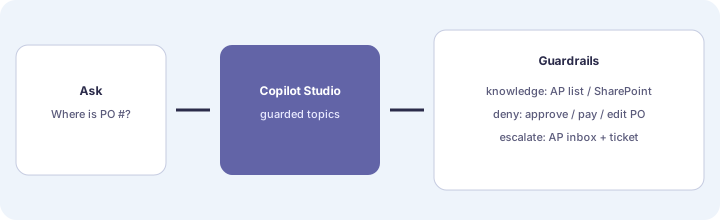
Primary SoT workflow:
Design a bot for Where is PO #?: knowledge sources, denied actions, escalation path.
2. Knowledge sources (what the bot may read)
What it is: Explicit allow-list of sources — e.g. an AP status SharePoint list, a published FAQ for PO stages. Exclude bank files, payroll, and raw email dumps. If the answer is not in the allow-list, the bot says Unknown and escalates.
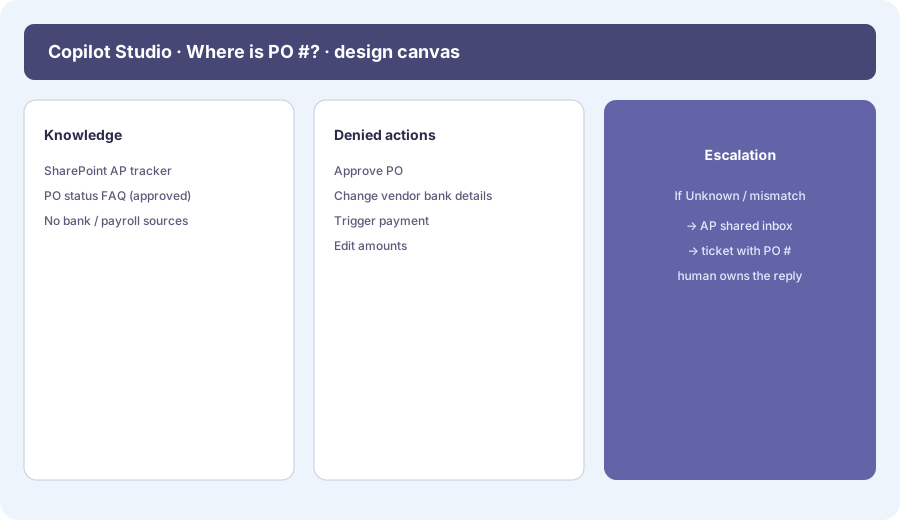
Knowledge allow-list:
For Where is PO #?, list 3 knowledge sources we will allow and 3 we will never connect. For each denied source, write one sentence why.
3. Denied actions (what the bot must never do)
What it is: A hard deny list in design notes and (where the product allows) action/tool configuration: no approve PO, no edit amounts, no change vendor bank details, no trigger payment, no delete rows. Status answers only.
Denied actions draft:
Write a deny list for the PO status bot (at least 5 actions). Add the exact refusal sentence the bot should say before escalating.
4. Escalation path + when not to build a bot
What it is: When status is Unknown, mismatched, or the user asks for a write action — escalate to AP shared inbox or a ticket that includes the PO # and the user’s ask. When not to: skip Studio if a FAQ page, a simple Power Automate reminder, or in-file M365 Copilot already solves the job; or if leadership wants the bot to approve spend without a human.
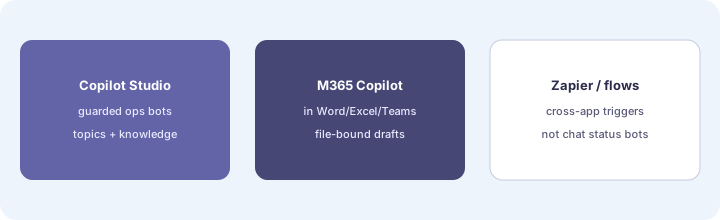
Escalation + go/no-go:
Write the escalation path for Unknown/mismatch (channel, owner, SLA, required fields). Then list 3 reasons we would NOT build this bot yet.
Pricing / licensing context (September 2026)
Copilot Studio and Microsoft 365 Copilot packaging, message packs, and tenant prerequisites are documented on Microsoft’s public Copilot / Power Platform pages (start from microsoft.com/microsoft-365-copilot and related Copilot Studio docs). Qualifying Microsoft 365 plans and Studio capacity often apply. This page is dated September 2026 and is not a price sheet — we do not invent exact per-message or per-bot prices.
Uncertainty: Studio vs M365 Copilot SKUs, included capacity, and Teams channel hosting options change. Always verify on live Microsoft pages and your admin center before budgeting.
When Copilot Studio is useful (honest take)
Useful when ops already lives in Microsoft 365, needs a narrow status bot with clear knowledge/deny/escalate rules, and will keep humans on money-moving actions. Less useful when the “bot” is really a one-time FAQ, when Zapier/Make should own a cross-app trigger, or when you hoped Studio would replace approvals. Soft $19/$9 below only if Studio, M365 Copilot, ChatGPT, and Zapier seats overlap on the same status job.
Paying for Microsoft Copilot Studio and a few other AI tools? The $9 AI toolkit spreadsheet lists every AI subscription you have, what each one costs, and how fast it pays for itself, so you can see which ones are worth the money.
Want someone to do it for you? AI toolkit audit — $19
Related options (educational)
| Need | Better home | Why |
|---|---|---|
| Guarded status bot with topics + knowledge | Copilot Studio (this page) | Explicit deny + escalate design |
| In-file Word/Excel/Outlook/Teams assists | Microsoft 365 Copilot | Seat inside Office apps |
| Cross-app triggers / approvals | Zapier · Make · Make scenarios | Flow automation, not chat status |
| ChatGPT / Claude for ops synthesis | ChatGPT for ops · Claude for ops | When the job is draft/synthesis, not a Teams status bot |
FAQ
What is Microsoft Copilot Studio for ops?
A surface for custom bots/topics with knowledge and actions — useful for guarded status bots, not a substitute for in-file M365 Copilot.
How do I design a Where is PO #? bot safely?
Allow-list knowledge, deny approve/pay/edit, escalate Unknown to AP with the PO #. Humans own money-moving replies.
When should we not build a Copilot Studio bot?
When a FAQ, Power Automate alert, or M365 Copilot already solves it — or when the bot would write payments/approvals without a human gate.
How does Studio relate to Microsoft 365 Copilot?
M365 Copilot = in-app seat. Studio = build custom bots. See microsoft-365-copilot.html.
Optional next step (if seats overlap)
If Copilot Studio would sit beside M365 Copilot, Zapier, ChatGPT, and Claude on the same ops status jobs, optional help mapping overlap: $19 AI toolkit audit or $9 AI toolkit spreadsheet. Email Audit $19 or Toolkit spreadsheet $9.
Checkout is live via Stripe. After you pay, we email delivery (spreadsheet) or intake next steps (audit).