Feature how-to · Make
Make scenarios how-to (Nov 2026): finance approvals + Slack alerts
Feature how-to patterns — approval + alert scenarios; link Make review; ownership of failures. Build a Sheet → Slack button → writeback flow, and design what happens if nobody clicks in 24 hours.
Who this page helps
Ops and finance leads who already (or will) use Make and need a concrete approval + alert pattern — not another abstract “automate everything” pitch. If you have never opened Make, read the deep-dive first, then come back here to design one production-shaped scenario.
What Make scenarios are
A scenario is Make’s visual automation: trigger → modules → (optional) routers and error handlers. Credits / operations meter runs. This how-to focuses on finance approvals with Slack interactive buttons, Sheet writebacks, and a named failure path — the patterns that usually break when nobody owns them.

Major features (with how someone uses them)
Examples at a glance: each feature has a concrete finance/ops example plus a Try this mini-workflow.
1. Finance approval + Slack buttons
What it is: Watch a Sheet (or CRM) for Approval=needed, post a Slack message with Approve / Reject actions, and only then continue. Keep the message short: vendor, amount, requester, link back to the row.
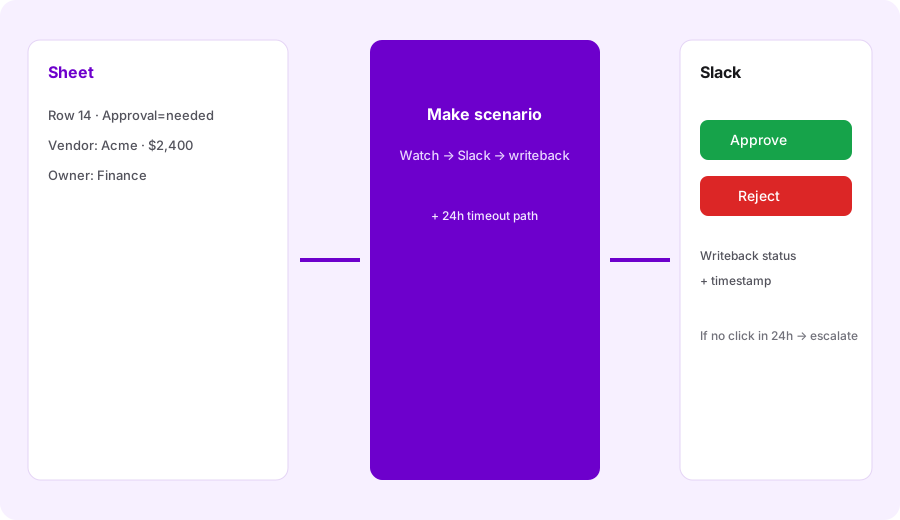
Design one production-shaped scenario (even on paper first):
Design a Make scenario: Sheet row Approval=needed → Slack button → writeback Approved/Rejected + timestamp. Include failure path if nobody clicks in 24h.
2. Writeback status + timestamp
What it is: After a Slack action, update the Sheet columns for Status and Approved_at (or Rejected_at), plus Approver identity if available. Never leave “needed” hanging after a click — that is how double-approvals start.
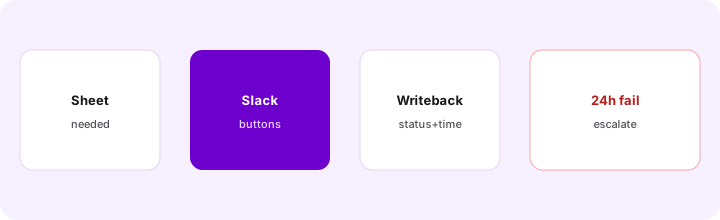
Before enabling the scenario:
List Sheet columns Status, Approved_at, Rejected_at, Approver. Map Slack Approve → Approved + timestamp; Reject → Rejected + timestamp. Add a filter so rows not equal to needed never re-post to Slack.
3. 24h failure / escalate path
What it is: If nobody clicks, finance still needs a path: escalate to a second Slack channel/DM, mark Status=escalated, or create a follow-up task. Silent timeouts are the most common approval-automation failure mode.
Add the timeout branch explicitly:
If Status is still needed 24 hours after the Slack post: notify #finance-leads, set Escalated=true + Escalated_at, and stop re-pinging the original approver more than once per day.
4. Ownership of failures
What it is: Scenarios need a named human: who gets Make error emails, who can pause the scenario, who fixes broken Slack apps or Sheet permissions. Without an owner, “automation” becomes unowned finance risk.
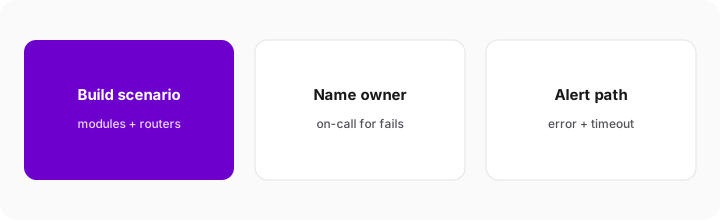
Before turning the scenario on:
Write a 4-line runbook: scenario name, owner + backup, what “failed” looks like (error email / missing writeback), and the pause steps. If no owner is named, do not enable the scenario.
Pricing context (November 2026)
This is a feature how-to — full dated pricing lives on the Make deep-dive. As of Nov 1, 2026, Make’s official comparison page lists Free ($0, 1,000 credits a month) for learning, Core at $9/month starting at 10,000 credits a month, Pro at $16 and Teams at $29 for the same credits, then custom Enterprise for volume and collaboration (lower than the figures we listed on Oct 8; Make says annual billing is cheaper than monthly, so confirm which period applies). Approval scenarios with Slack + Sheet usually fit Free learning or Core once you know monthly runs. Confirm on make.com/pricing — credit burn per module type is the uncertainty that bites.
Uncertainty flags: Operations/credits per Slack interactive step and Sheet update vary. Budget from your run count × modules, not from a blog table. Plan names and bundles change.
When this pattern is useful (honest take)
Make approval + Slack alert scenarios help when finance already lives in Sheets (or a simple CRM), approvers hang out in Slack, and you can name an owner for failures and the 24h path. They tend not to help when approvals need deep ERP workflow, when nobody will watch error emails, or when you hoped automation would invent missing approval policy. Prefer native Slack/Sheet workflows only when the path stays linear and volume stays tiny — see also Zapier and the Make deep-dive alternatives.
Paying for Make scenarios and a few other AI tools? The $9 AI toolkit spreadsheet lists every AI subscription you have, what each one costs, and how fast it pays for itself, so you can see which ones are worth the money.
Want someone to do it for you? AI toolkit audit — $19
Alternatives compared: Make scenario vs other glue
| Axis | Make scenario | Zapier | Native Slack/Sheet | Retool / internal app |
|---|---|---|---|---|
| Best when… | Branching + credit control + Slack buttons. | Simple linear paths your team already knows. | Tiny volume; no extra automation seat. | Multi-role UI + audit on your data. |
| Cost shape | Free/Core credits (see Make). | Task plans — confirm zapier.com/pricing. | Near $0 tooling; human time. | Builder seats (see Retool AI). |
| Less useful when… | No owner for failures. | Heavy branching burns tasks. | You need routers + timeouts. | You only need one Slack ping. |
Also see Make, n8n, Zapier, Retool AI, and the ops & automation hub.
FAQ
What is a Make scenario?
A visual automation: trigger plus modules. This how-to uses Sheet → Slack Approve/Reject → writeback, with a 24h escalate path.
How does this relate to the Make deep-dive?
This page is the feature how-to. Product overview, credits, and broader alternatives: /reviews/make.
Who should own scenario failures?
A named human (plus backup) before go-live — error alerts, pause rights, and the 24h path.
Do I need Make Pro for approval scenarios?
Not always. Many fit Free learning or Core. Confirm connectors and credit burn on make.com/pricing.
Optional next step (if seats overlap)
If Make is one of several automation/AI seats and you want a written pass across the whole list, the optional $19 AI toolkit audit produces a short memo. Prefer an editable grid? The $9 AI toolkit spreadsheet is a one-time CSV. Soft offer only — this how-to stands alone.
Checkout is live via Stripe. After you pay, we email delivery (spreadsheet) or intake next steps (audit).