Ops · Internal tools · AI builder
Retool AI review (Sep 2026): internal ops apps — when to build vs buy another SaaS seat
For ops teams with messy intake and approvals: Retool AI helps you ship a thin internal app on data you already own — with one AI assist such as “summarize packet” — instead of buying another niche SaaS seat. This page maps the AI app builder, AI Actions, Agents honesty, and when buy still wins.
Who this page helps
Ops leads on small teams drowning in intake/approvals — vendor packets, access requests, exception queues — who keep almost buying “one more” niche SaaS. If you already have systems of record (Sheets, Postgres, Salesforce, Slack) and need a shared UI with roles plus one AI assist, this is the build-vs-buy page. If you need a full marketplace, deep compliance product, or you have zero builder time, start elsewhere.
What Retool AI is
Retool AI is Retool’s AI layer on top of its internal-apps platform: prompt-to-app building on your live resources, AI Actions inside apps and workflows (including RAG-style steps), and production Agents that connect to business systems. Public packaging (Sep 2026) includes monthly AI credits on cloud plans for app building and AI Actions; Agents are billed separately by runtime hours. This review focuses on when a thin Retool app beats another SaaS seat for ops intake — not on rebuilding every vendor product in Retool.
Major features (with how someone uses them)
Examples at a glance: each feature has a concrete ops example plus a Try this mini-workflow.
1. AI app builder for internal tools
What it is: Retool’s AI-native builder lets you describe an internal app and get a working starting point connected to your resources (databases, APIs, SaaS). You refine with visual selection and @mentions rather than guessing in a detached chat. Generated apps are meant to respect org policies (SSO/RBAC) already configured on the platform. Treat model behavior and credit burn as moving targets; confirm on Retool’s AI product and pricing pages.
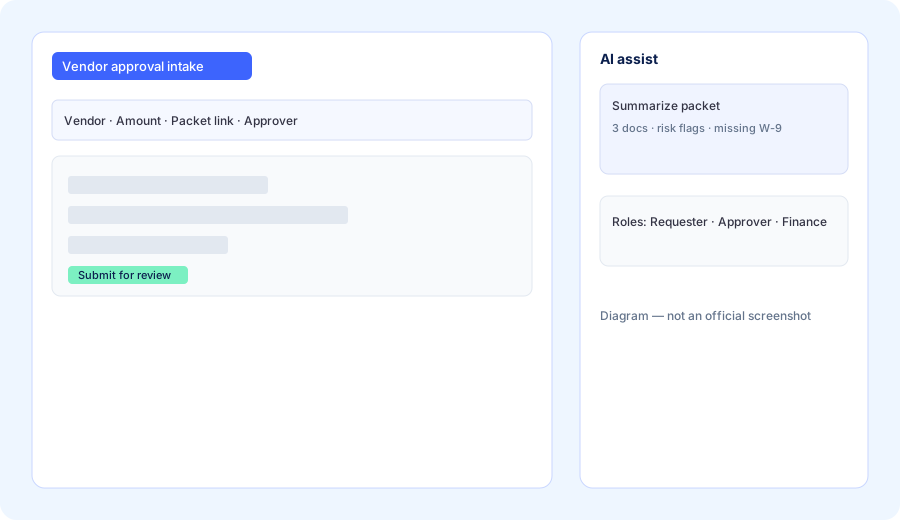
Spec a Retool app for vendor-approval intake before you buy another seat:
Spec a Retool app for vendor-approval intake: fields, roles, one AI assist (“summarize packet”), and why this shouldn’t be a new SaaS subscription.
2. AI Actions in apps & workflows
What it is: Inside apps and Workflows, Retool supports AI steps — summarize, classify, generate, RAG against your data — with monitoring/audit trails on higher plans. The high-ROI ops pattern is one assist that reduces human reading time (packet summary, risk flags) while humans still click Approve.
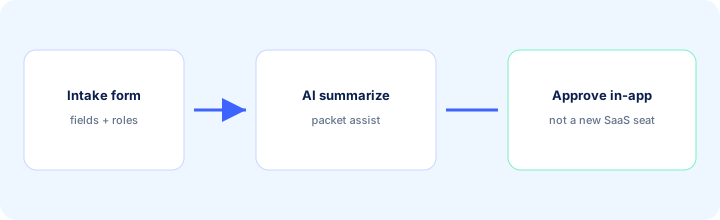
On one real packet (or a redacted sample):
Summarize this vendor packet in 5 bullets: scope, amount, risks, missing docs, suggested next human action. Do not approve or invent missing fields — mark Unknown.
3. Agents (separate from credits)
What it is: Retool Agents are AI workers that can run multi-step jobs against connected systems. Public pricing (Sep 2026) includes a small free monthly hour pool on plans and bills additional agent runtime by the hour (rates vary by model). Agents do not draw from the AI credit pool used for app building / AI Actions. Ops should treat write-backs (refunds, access grants, vendor creates) as human-approved until evaluation harnesses exist.
Before enabling Agents beyond a trial hour:
List three Retool Agent jobs that must stay human-approved (vendor create, payment, access grant). List two jobs that may draft only (Slack digest, packet summary). Do not enable write-backs for the first list.
4. Build vs buy another SaaS seat
What it is: The decision frame this page owns. A thin Retool app wins when the workflow is yours, data already lives in systems you connect, and the “product” is mostly forms + roles + one AI assist. Niche SaaS wins when the vendor’s domain logic, network effects, or compliance pack would take months to recreate — or when nobody on the team will own the Retool app after week two.
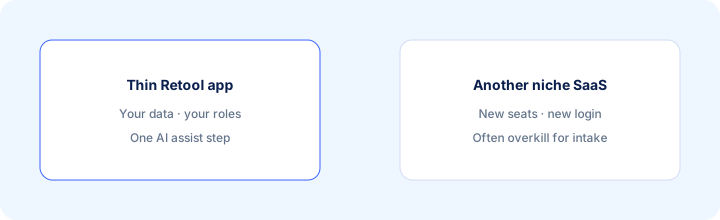
Before renewing or buying the niche tool:
Write a one-page build-vs-buy note: job, fields, roles, AI assist needed, owner who will maintain the Retool app for 90 days. If we cannot name an owner, do not build — and do not buy either until ownership is clear.
Public pricing (September 2026)
Retool prices builders and internal users separately on cloud plans; AI credits are included in plan pools (not a separate Brain-style add-on). From public retool.com/pricing we cross-checked in September 2026:
- Free: up to 5 users; limited workflow runs; includes a starter AI credit pool and limited agent hours for exploration.
- Team: builders about $10 / user / month annuallyually ($12 monthly); internal users about $5 / $7; higher AI credit pool (publicly framed around ~1,000 credits/month including bonus — confirm live).
- Business: builders about $50 / $65; internal users about $15 / $18; richer permissions/audit; higher AI credit pool (publicly framed around ~3,000 credits/month including bonus — confirm live).
- Enterprise: custom; SSO/SCIM, source control, BYOK for AI, larger pooled credits.
- AI credits: pooled at account level for app building and AI Actions; renew monthly; extra packs on paid plans; do not cover Agents.
- Agents: billed by runtime hour (model-dependent rates); free monthly hour allotment on plans for light use — confirm live agent pricing docs.
Uncertainty flags: Credit pools, bonus credits, agent hourly rates, and builder vs internal-user definitions can change. Self-host vs cloud feature gates differ. Never budget from a blog table alone — open Retool’s live pricing and your usage dashboard.
When Retool AI is useful (honest take)
Retool AI tends to help when ops owns a recurring intake/approval job, data already lives in connectable systems, someone will maintain the app, and the alternative is another niche SaaS for a thin workflow. It tends not to help when nobody will own the app, when you need a deep vertical product (full AP automation suite, marketplace, regulated vendor network), or when a Sheet + LLM memo would finish the job this week without a multi-user UI. Building Retool “for AI demos” while still buying the niche SaaS is usually the expensive parallel stack this page warns against.
Paying for Retool AI and a few other AI tools? The $9 AI toolkit spreadsheet lists every AI subscription you have, what each one costs, and how fast it pays for itself, so you can see which ones are worth the money.
Want someone to do it for you? AI toolkit audit — $19
Alternatives compared: build native vs parallel tools
| Axis | Retool AI | Niche SaaS (vendor/intake) | Zapier / Make + forms | Sheets + LLM |
|---|---|---|---|---|
| Best when… | Shared UI + roles on your data. | Deep domain / compliance pack. | Glue between existing UIs. | One-off hygiene / memos. |
| Cost shape (Sep 2026) | Builder + internal seats + AI credits; Agents hourly. | Per-seat niche pricing. | Automation tasks/ops + form tool. | Near $0 tooling; human time. |
| Less useful when… | No owner to maintain the app. | Job is thin intake you can build. | You need a real multi-role UI. | You need permissions + audit UI. |
Also see Make, n8n, Cursor, Claude for ops, and the ops & automation hub.
FAQ
What is Retool AI?
Retool’s AI layer for internal apps, workflows, and agents on your data: AI-assisted building, AI Actions, and separately billed Agents — not a single-purpose niche SaaS.
How much does Retool cost in September 2026?
Public cloud: Free; Team builders ~$10/user/mo annual; Business builders ~$50; Enterprise custom. AI credits included in pools; Agents billed by hour. Confirm on retool.com/pricing.
Should we buy niche SaaS or build in Retool?
Build when the job is thin intake/approvals you own and someone will maintain the app. Buy when the vendor’s domain depth would take months to recreate.
Will Retool AI auto-approve spend?
It should not for this page’s job. Keep Approve human; use AI for summarize/classify drafts only until you have evaluations and audit ownership.
Optional next step (if seats overlap)
If Retool is one of several AI/internal-tool seats and you want a written pass across the whole list, the optional $19 AI toolkit audit produces a short memo. Prefer an editable grid? The $9 AI toolkit spreadsheet is a one-time CSV. Soft offer only — this deep-dive stands alone.
Checkout is live via Stripe. After you pay, we email delivery (spreadsheet) or intake next steps (audit).