Tool · Insurance ops · Gradient AI · Oct 2026
Gradient AI review (Oct 2026): SAIL underwriting, Renewal Analytics, and claims triage for group health and workers' comp insurers
Gradient AI sells prediction models to insurers in two areas: group health (including stop-loss), where SAIL supports new-business underwriting and Renewal Analytics projects each group’s next twelve months, and workers’ comp and P&C, where its models flag claims likely to become severe and help set reserves. Its outputs are risk signals and predictions, not decisions. This page explains what each part predicts, how a team checks it, and which licensed person signs off. Each section has a Try this.
What this Gradient AI page covers
This page is for underwriters, actuaries, and underwriting managers at group health carriers, stop-loss carriers, and MGUs, and for claims leaders at workers’ comp carriers, TPAs, and self-insured employers. The question it answers: what Gradient’s models predict, where those predictions show up in the work, and who must check them before money moves.
Sources are Gradient AI’s own pages, read on 18 October 2026: its group health page (SAIL, Renewal Analytics, the Risk Management Life-Cycle Solution), its P&C and workers’ comp page, how it works, who we are, and its newsroom: the Renewal Analytics upgrade (9 September 2026), the ClaimVoyant announcement (8 October 2026), and The MEMIC Group’s results (12 May 2026).
On naming: Gradient names SAIL on its group health page as its new-business underwriting suite. Its workers’ comp and P&C page describes underwriting, claims, and portfolio tools without using the SAIL name, so ask which product your line would actually buy. Gradient says its models draw on proprietary medical, Rx, and lab data (it cites “325M+ integrated US medical records”), plus economic, geographic, and demographic signals.
Ground rules: the underwriter approves every price and every renewal action; the claims supervisor approves every reserve change and every severity-based assignment; medical and Rx data stay inside the agreed data-use terms; and Gradient’s results figures are its and its customers’ claims, not our measurement. This page explains features. It is not coverage, underwriting, claims, or legal advice.
Major features (with how someone uses them)
Examples at a glance: each feature has a concrete example from a real job plus a short Try this you can run this week.
1. SAIL and Renewal Analytics: risk signals on group health business (primary)
What it is: On Gradient’s group health page, SAIL for New Business gives predictive insights for underwriting and decision support, and Renewal Analytics does the same for existing groups: it shows performance by portfolio, group, and member, isolates the conditions and drugs driving cost, projects each group’s risk for the next twelve months, and turns that projection into a renewal price with a built-in calculator. The Risk Management Life-Cycle Solution combines the two so the same risk logic runs from new-business quotes to renewal pricing.
A model flag is a reason to look, not a reason to reprice. Last year’s actual claims are the first test of whether a flag was right for your book.
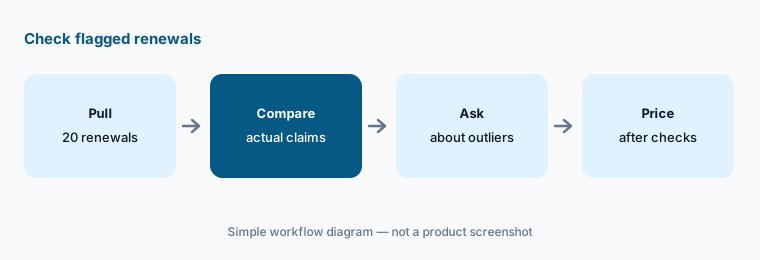
Primary workflow:
Pull twenty group renewals SAIL flagged as higher risk. Have the underwriter compare each flag with last year's actual claims before any renewal price changes.
2. The September 2026 Renewal Analytics release: IBNR, peer benchmarks, and client PDFs
What it is: Gradient’s 9 September 2026 release lets users apply IBNR adjustments (incurred but not reported) at the portfolio and group level, with adjusted and unadjusted trend lines side by side; adds peer benchmarking on cost drivers such as condition prevalence and drug use; and adds a Group Summary PDF for brokers, employer HR leaders, and consultants.
An IBNR assumption can move a loss ratio a long way, and a branded PDF can reach a broker the same afternoon. Both need an actuary’s or underwriter’s check before they leave the building.
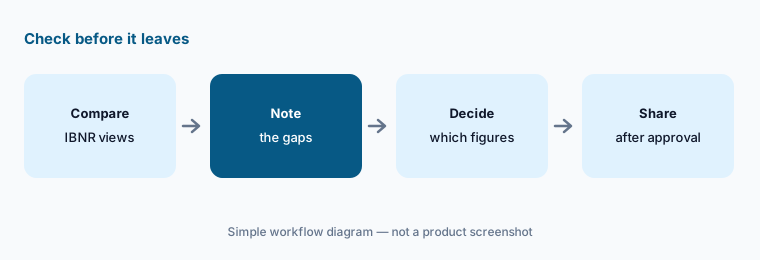
Check before it leaves:
Have an actuarial analyst compare Gradient’s IBNR-adjusted loss ratios for ten groups with your own reserving view. Have the underwriting manager approve each Group Summary PDF before it goes to a broker.
3. Group termination model and a blended risk signal for thin data
What it is: The 9 September 2026 Renewal Analytics release added two models. A group termination model flags, before a rate action is set, how likely each group is to leave, so teams can decide where to focus retention and discounts. A blended member-level risk signal combines the insurer’s own claims data with third-party data sources, which Gradient says helps most with new groups and groups with high member turnover. Gradient says the termination model “supports underwriters’ judgments rather than replacing them”.
A model that predicts who will leave can quietly turn into a rule for who gets the bigger increase. That trade-off is a pricing and fairness decision, so the underwriting manager should write down how the flag may be used.
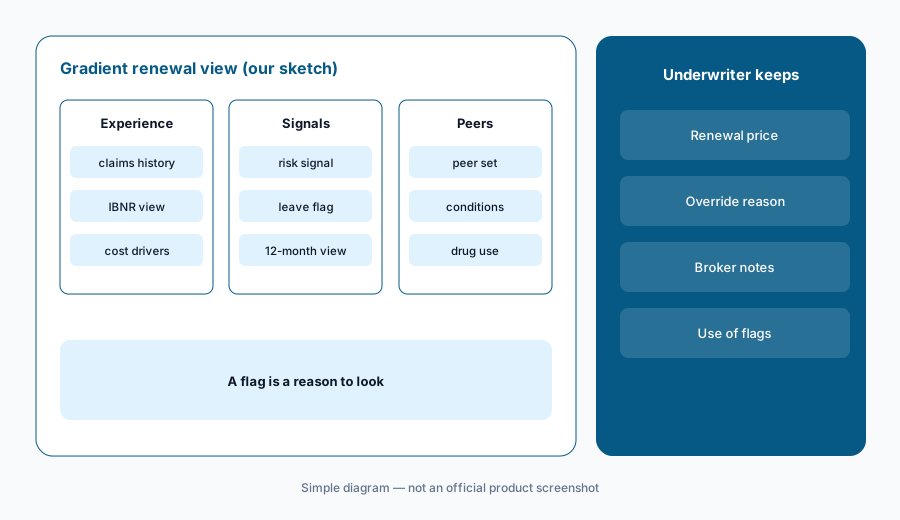
Write how the flag is used:
Have the underwriting manager compare Gradient’s termination flags on forty renewals with broker notes. Write down how the flag may and may not affect a renewal price before anyone uses it.
4. Workers’ comp claims triage: flags for claims likely to become severe
What it is: Gradient’s P&C and workers’ comp page describes claims tools that flag claims with potentially high severity so they can go to experienced adjusters early. Its 8 October 2026 announcement says ClaimVoyant, a workers’ comp triage tool that uses data captured at first notice of loss to flag claims likely to be expensive, complex, or slow to recover, will be added “later this year” to its tools inside Guidewire ClaimCenter (the Claims Solutions Accelerator), with a preview at Guidewire Connections (26–29 October 2026). Gradient cites a claimant match rate “exceeding 90%”.
A severity flag decides which adjuster sees a claim and how early a nurse case manager calls. A wrong flag costs money in either direction, and an injured worker should never feel the label.
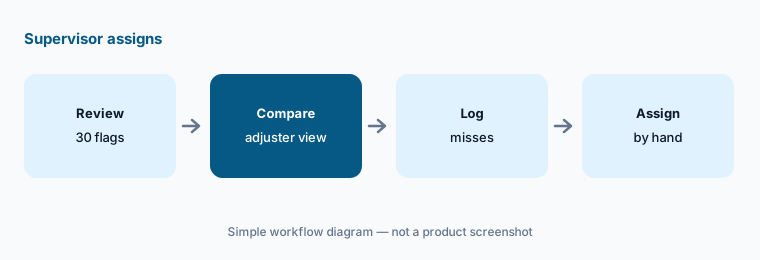
Supervisor assigns:
Have the claims supervisor compare thirty Gradient severity flags with her senior adjusters’ own view. Log every miss in both directions before flags change who handles a claim.
5. Total Incurred Prediction: reserve support for workers’ comp
What it is: Gradient’s Total Incurred Prediction (TIP) model predicts the total cost of a claim earlier in its life. In a 12 May 2026 release, The MEMIC Group said it went live with a TIP-driven process in May 2025 and that a six-month study showed reserve changes driven by TIP led to more timely experience modification (X Mod) updates and more accurate pricing at renewal. Gradient’s P&C page cites a “10% reduction in average total incurred” and “44 days” shorter lost-time claims for clients. These are vendor and customer claims.
Reserves feed X Mods, and X Mods feed an employer’s premium. A model-suggested reserve change reaches a customer’s bill, so it needs a named approver.
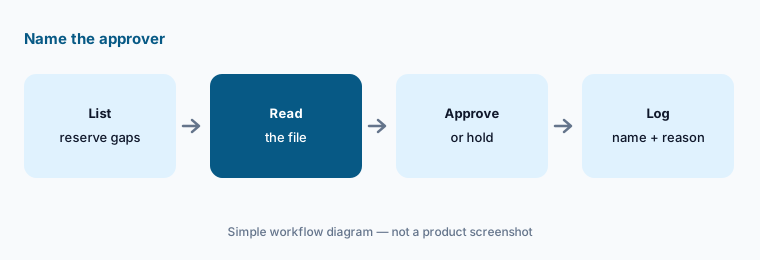
Name the approver:
List every open claim where Gradient’s predicted total differs from the adjuster’s reserve by a set amount. Have the claims supervisor read each file and approve or reject the change, with a reason, before any reserve moves.
6. Governing AI-assisted underwriting: who may challenge a prediction
What it is: Gradient lists “Strengthen judgment, don’t replace it” among its values, and its health general manager argued in a post on governing AI-assisted decisions that AI “should not occupy” the driver’s seat: underwriters need the authority and the expectation to challenge a recommendation, escalate a case, or ask for more evidence, and organisations should document when and why. Gradient says its outputs explain why a risk moves, not just by how much.
Without a written override process, people either follow every flag or ignore the model. Both waste the purchase.
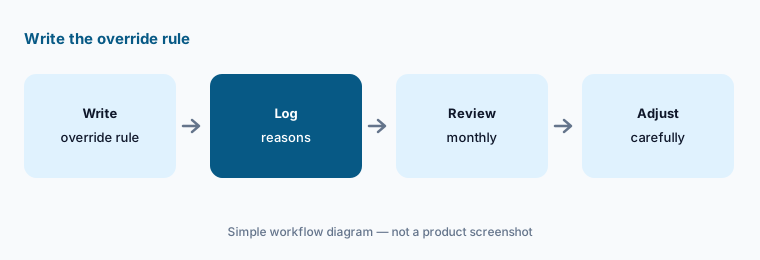
Write the override rule:
Have the underwriting operations lead write how an underwriter overrides a Gradient signal and where the reason is logged. Review every override monthly with the underwriting manager.
Pricing context (October 2026)
Gradient AI does not publish prices; its /pricing address returns “not found”, and its pages ask buyers to request a demo. Pricing is quote-only as of 18 Oct 2026. Ask whether it is priced by covered lives, by policy or claim volume, or by module (SAIL, Renewal Analytics, claims tools); what data you must send and how medical and Rx data are handled; and whether its ClaimCenter tools need a separate licence.
Gradient cites 300+ enterprise deployments and a 95%+ client retention rate, an “80% decrease in quote turnaround time”, and, for its ClaimCenter tools against a control group, a 44-day reduction in lost-time claim duration, a 15% drop in attorney representation, and a 55% decrease in ultimate total incurred on complex claims. These are vendor claims, not our measurement.
Uncertainty: We read Gradient AI’s own pages only. SAIL is named on its group health page; its workers’ comp page does not use the SAIL name, so we did not assume SAIL covers workers’ comp. ClaimVoyant’s ClaimCenter version is announced for later in 2026, not yet available. Gradient’s pages give different founding years (2012 on its about page, 2018 in a July 2026 release). Results figures are vendor and customer claims. We could not confirm prices, and we did not test Gradient ourselves.
When it’s useful (honest take)
Useful when you underwrite group health, stop-loss, or workers’ comp with enough volume that a better view of hidden risk matters, your underwriters and claims supervisors will check predictions against files, and your data-use terms allow medical and Rx data to be used this way.
Less useful when you mainly need actuarial pricing models for commercial P&C (see hyperexponential AI), submission intake and triage for commercial lines (see Kalepa AI or Sixfold AI), a claims core system (see Guidewire vs Duck Creek), or auto claims estimating (see Tractable AI or CCC AI).
Paying for Gradient AI and a few other AI tools? The $9 AI toolkit spreadsheet lists every AI subscription you have, what each one costs, and how fast it pays for itself, so you can see which ones are worth the money.
Want someone to do it for you? AI toolkit audit — $19
Related options (educational)
| Need | Better home | Why |
|---|---|---|
| Group health and workers’ comp risk signals, renewal projections, severity flags | Gradient AI (this page) | Quote only |
| Commercial P&C pricing models and governed price changes | hyperexponential AI | Quote only |
| Commercial submission intake, research, and triage | Kalepa AI or Sixfold AI | Quote only |
| Claims summaries and agents inside a carrier core | Guidewire AI or Duck Creek AI | Quote only; several items early or restricted access |
| Underwriting workbench with portfolio guardrails | Federato AI | Quote only |
FAQ
What is Gradient AI?
A company that sells AI prediction models to insurers: SAIL and Renewal Analytics for group health and stop-loss underwriting, and underwriting, claims triage, and reserve-support models for workers’ comp and P&C. Its outputs are risk signals and predictions for people to act on.
What did the September 2026 Renewal Analytics release add?
IBNR adjustments, peer benchmarking, a group termination model, a blended member-level risk signal for groups with thin data, and a client-ready Group Summary PDF (Gradient release, 9 September 2026).
Is ClaimVoyant available in Guidewire ClaimCenter?
Not yet. Gradient said on 8 October 2026 that ClaimVoyant will be added to its ClaimCenter tools later this year, with a preview at Guidewire Connections. Ask Gradient for a date.
How much does Gradient AI cost in October 2026?
Gradient does not publish prices. Treat it as quote-only and ask how volume is counted and which modules you need.
Who should approve Gradient AI output?
The underwriter for every price and renewal action, the claims supervisor for every reserve change and severity-based assignment, and the underwriting manager for how flags may be used.
Optional next step (if seats overlap)
If your underwriting and claims teams pay for a prediction model, a data vendor, a claims system add-on, and chat seats that all read the same files, that overlap is worth mapping. Map the overlap with the $19 AI toolkit audit or the $9 AI toolkit spreadsheet. Email Audit $19 or Toolkit spreadsheet $9.
Checkout is live via Stripe. After you pay, we email delivery (spreadsheet) or intake next steps (audit).