Role guide · IT ops · Claude · Oct 2026
Claude for IT ops (Oct 2026): runbooks, onboarding checklists, and script reviews with Projects
IT ops role guide — an IT runbooks Project in Claude that drafts runbooks from your own notes, finds missing steps in onboarding and offboarding checklists, and explains a script line by line before anyone runs it. Claude reads what you paste and drafts text; technicians test and run, and system owners approve. Companion to ChatGPT for IT ops and the other Claude role guides.
Who this guide is for
IT admins, help-desk leads, and the one-person IT team at a growing company who already have Claude (or are deciding on it) and want help with the written side of IT: runbooks, joiner-and-leaver checklists, and understanding a script before it touches a device. If your team uses ChatGPT instead, a parallel job is covered in ChatGPT for IT ops. Product deep-dive: Claude. Sibling role guides: Claude for security ops, Claude for incident ops, Claude for ops.
How Projects work (from Anthropic’s help center, read 7 October 2026): a project is a self-contained workspace with its own chat history and knowledge base. Anything you add to project knowledge is used across every chat in that project, and project instructions apply to all of them. Projects are available on every plan; Free accounts can create up to five, and paid plans expand project knowledge with retrieval when it nears the context limit. On Team and Enterprise you can share a project with specific colleagues as Can view or Can edit. Anthropic also notes a new version of projects is in beta, starting with Claude Code, where work runs as threads in the cloud — this guide uses the current chat projects.
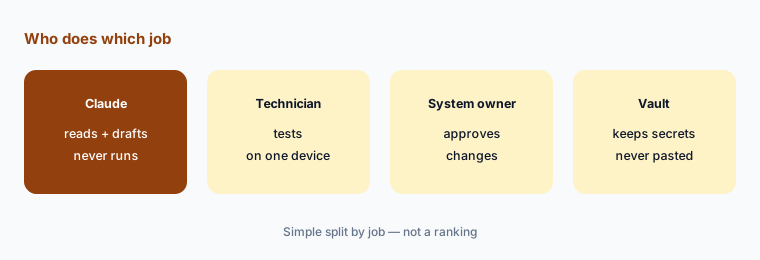
Ground rules for this guide: Claude never runs a command, script, or change — a technician tests it on one device and the system owner approves anything that touches production or access. Never paste passwords, API keys, tokens, recovery codes, or private keys; replace them with <REDACTED> before pasting, and rotate any secret that slips in. Sanitize names, serial numbers, and internal hostnames when they aren’t needed. Keep IT work out of personal accounts; use a Team or Enterprise workspace, where Anthropic says your content is not used for model training by default.
Major features (with how someone uses them)
Examples at a glance: each feature has a concrete example from a real job plus a short Try this you can run this week.
1. Project IT runbooks + offboarding gaps (primary)
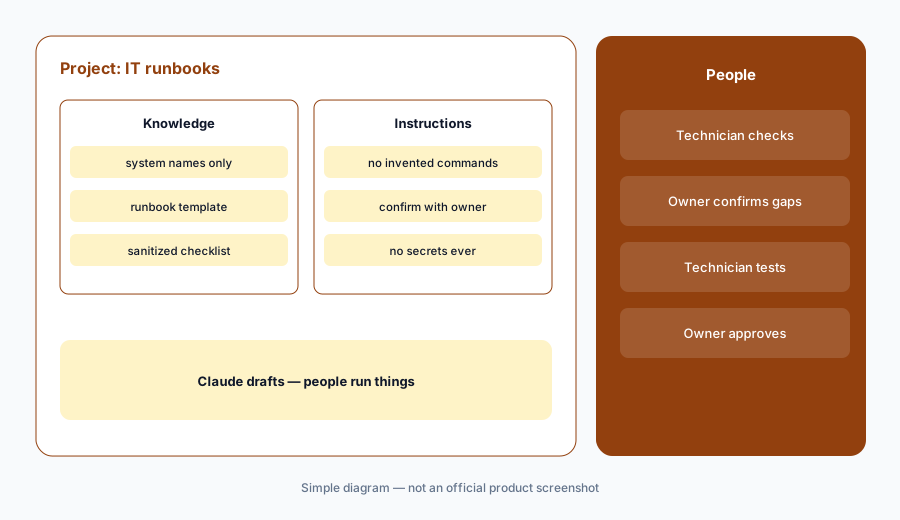
What it is: Create a project called IT runbooks. In project instructions, write the rules once: work only from what is pasted or in project knowledge; never invent commands, menu paths, or settings; mark every step you are unsure of “confirm with owner”; and never ask for or repeat passwords, keys, or tokens. Add your current system list (names only — HR system, identity provider, email, device management, the main SaaS apps) to project knowledge. Then paste one sanitized offboarding checklist and ask Claude for the steps it is missing, each marked “confirm with owner,” with the system each step touches.
Primary workflow:
Project IT runbooks. Paste one sanitized offboarding checklist. Ask for missing steps, each marked “confirm with owner”.
2. Runbooks from your own notes
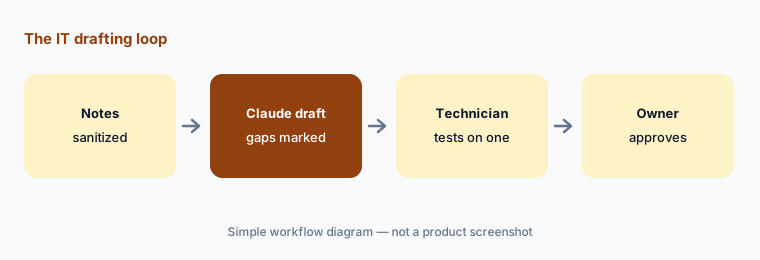
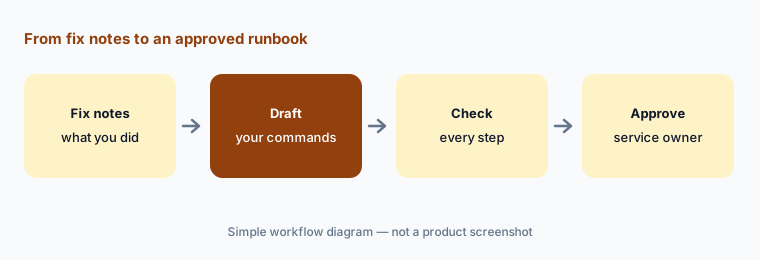
What it is: Most IT runbooks exist as a technician’s memory and a few old tickets. Paste the notes from a fix you just did — what broke, what you checked, what you changed, how you confirmed it worked — and ask Claude to draft a runbook: symptoms, checks in order, the fix, how to confirm, and when to escalate. Tell it to keep your exact commands and menu paths and to mark anything it filled in as “confirm with owner.” The technician who did the work reads every step and the service owner signs off before it goes into your knowledge base.
One fix, one runbook:
Paste your sanitized notes from one fix you did this week. Ask Claude for a runbook that keeps your exact commands and marks anything it added “confirm with owner,” then have the service owner approve it.
3. Onboarding checklists by role
What it is: New-hire setup goes wrong when access is copied from “someone like them.” Paste a sanitized access list for one role — which groups, apps, and devices that role gets and who approves each — and ask Claude for a day-one checklist: hardware, accounts, groups, apps, and the approver for each item. Ask it to list anything in the access list with no named approver, and anything that looks broader than the role needs, as questions for the manager. Claude drafts; the hiring manager and each app owner approve access, and IT provisions it in your identity and device tools.
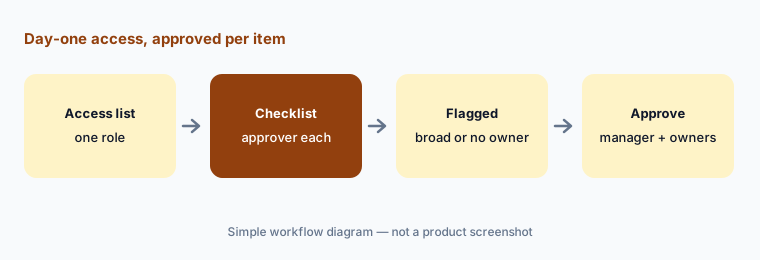
Flag the broad access:
Paste one role’s sanitized access list. Ask Claude for a day-one checklist with an approver per item, and to list every item with no approver or broader access than the role needs. Send those to the manager.
4. Read a script before anyone runs it
What it is: Paste a sanitized script — a PowerShell cleanup, a shell script from a vendor forum, a scheduled task someone left behind — and ask Claude to explain what each line does, what it changes, what it deletes, what it sends over the network, and what could go wrong if a path or variable is empty. Ask it to point out anything that looks like a hard-coded credential so you can remove it. Claude reads; it does not run the script. A technician tests it on one test device, and the owner of the affected system approves before it runs anywhere else. For deeper script work, see Claude vs Cursor for ops scripts.
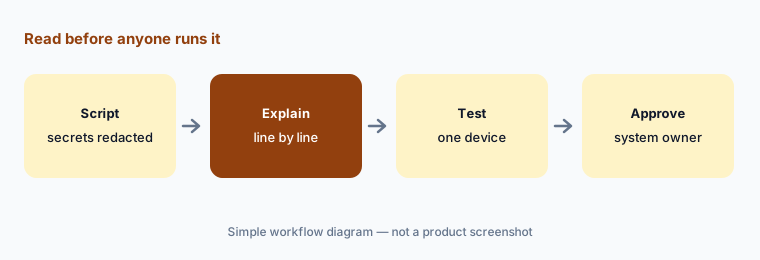
Read before you run:
Replace every secret in one script with <REDACTED>, then paste it. Ask Claude what each line changes or deletes and what happens if any variable is empty. Test on one device before the owner approves wider use.
5. Secrets, accounts, and what Claude may touch
What it is: Anthropic says that by default it does not use inputs or outputs from its commercial products, such as Team and Enterprise, to train its models; on Free, Pro, and Max the pricing page lists model training as opt-out. If someone uses the thumbs-up or thumbs-down feedback button, Anthropic stores that whole conversation for up to five years; Team and Enterprise owners can turn that off with the Rate chats setting under Organization settings > Data and Privacy. Claude plans also include tools that act, not just chat: Claude Code and Claude Cowork, connectors, and code execution for creating files. Team plans list admin controls for remote and local connectors, and Enterprise adds audit logs, SCIM, custom data retention, and IP allowlisting.
Practical rule for IT: keep these jobs in chat projects where Claude only reads what you paste. Don’t connect Claude to your identity provider, device management, or production servers for this work, don’t let it run commands on admin machines, and never paste a secret. If a secret slips in, rotate it — deleting the chat does not un-share it.
Check accounts and settings:
List everyone using Claude for IT work and which plan each account is on. Move IT work out of personal accounts, turn off the Rate chats feedback setting in your Team or Enterprise organization settings, and list any connectors to IT systems for review.
6. One home per job: Claude, ChatGPT, or your IT tools
What it is: Many IT teams pay for a general assistant, the AI in their help desk or ITSM, and AI in their device tools — and all three draft the same knowledge articles. Pick one drafting home per job. Claude Projects suit long checklists and reading scripts; ChatGPT Business suits shared help-desk macros and knowledge-base drafts from tickets; your service desk — ServiceNow, Freshdesk, or a front door such as Moveworks or Atomicwork — is where answers employees see should live. Device AI such as Atera or NinjaOne is where device actions are approved.
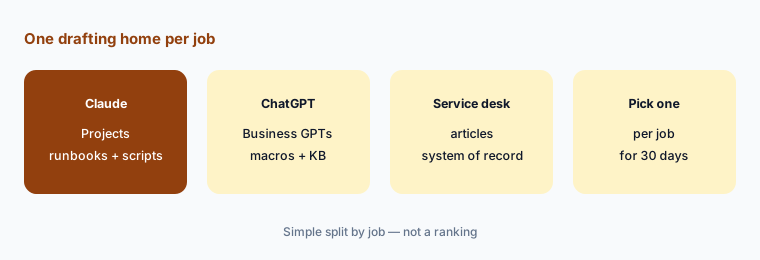
One home per job:
List your IT drafting jobs — runbooks, checklists, script reviews, macros, knowledge articles — and which tool each technician used for each last month. Pick one home per job for 30 days, then check which seats nobody missed.
Pricing context (October 2026)
On Anthropic’s pricing page (as of 7 October 2026, USD, before tax): Free $0 (Projects up to 5); Pro $17 per month with the annual discount ($200 billed up front) or $20 billed monthly; Max from $100 per month. Team (2 to 150 people): Standard seat $20 per seat per month billed annually or $25 monthly; Premium seat $100 per seat per month billed annually or $125 monthly. Enterprise: $20 per seat per month billed annually plus usage at API rates.
For IT work the plan matters more than the price: Team and Enterprise are Anthropic’s commercial plans, with no model training on your content by default, SSO, project sharing, and admin controls for connectors; Enterprise adds audit logs, SCIM, and custom data retention. Full dated notes are on the Claude deep-dive.
Uncertainty: Anthropic says prices and plans are subject to change and usage limits apply. Its pricing page also says “Claude Cowork is now just Claude,” rolling out to Pro and Max first, and its help center says a new version of projects is in beta — so screens and names may change. This is product education, not security advice for your environment.
When it’s useful (honest take)
Useful when your team already has Claude Team or Enterprise, runbooks and checklists live in people’s heads or old tickets, and a technician and system owner will check every draft before it is used.
Useful when you inherit scripts nobody fully understands and want a line-by-line read before testing on one device.
Less useful when technicians would paste secrets or customer data into personal accounts, your service desk already drafts the same knowledge articles well, or anyone expects Claude to run the fix. People run things: technicians test, owners approve.
Paying for Claude and a few other AI tools? The $9 AI toolkit spreadsheet lists every AI subscription you have, what each one costs, and how fast it pays for itself, so you can see which ones are worth the money.
Want someone to do it for you? AI toolkit audit — $19
Related options (educational)
| Need | Better home | Why |
|---|---|---|
| Help-desk macros and KB drafts in a Business workspace | ChatGPT for IT ops | Shared GPTs (moving to plugins) and Projects |
| Answers employees see, inside the service desk | ServiceNow AI or Freshdesk Freddy | System of record for tickets and articles |
| Employee front door for IT requests | Moveworks vs Atomicwork | Requests, approvals, and answers |
| Device scripts with admin pre-approval | NinjaOne vs Atera | Device actions approved in the RMM |
| Writing and testing ops scripts | Claude vs Cursor for ops scripts | Code editor workflows |
| Security reviews and alerts | Claude for security ops | Sibling role guide |
FAQ
How should an IT team set up Claude?
Create an IT runbooks project in a Team or Enterprise workspace, write instructions that forbid invented commands and require “confirm with owner” on uncertain steps, add a names-only system list to project knowledge, and paste sanitized checklists, notes, or scripts. A technician tests and an owner approves every draft.
Can Claude run scripts or make changes for IT?
Not in this guide. Claude reads what you paste and drafts text. Claude Code, Cowork, and connectors can act on computers and systems, so keep them away from identity, device, and production tools for this work. Technicians test on one device and system owners approve.
What if someone pastes a password or token?
Rotate it. Deleting the chat does not undo the exposure. Replace secrets with <REDACTED> before pasting, and keep IT work in a Team or Enterprise workspace with the Rate chats feedback setting turned off.
Is IT data used to train Claude?
Anthropic says it does not use inputs or outputs from commercial products such as Team and Enterprise for training by default; Free, Pro, and Max list training as opt-out. Feedback you submit with the thumbs buttons is stored for up to five years, and Team and Enterprise owners can disable it.
What does Claude cost for an IT team in October 2026?
As of 7 October 2026, Claude Team listed Standard seats at $20 per seat per month billed annually ($25 monthly) and Premium seats at $100 ($125 monthly), for 2 to 150 people; Enterprise was $20 per seat per month billed annually plus usage at API rates. Check claude.com/pricing before budgeting.
Optional next step (if seats overlap)
If IT pays for Claude, ChatGPT, a help-desk AI add-on, and device-tool AI that all draft the same runbooks and articles, fix that overlap before adding another seat. Map the overlap with the $19 AI toolkit audit or the $9 AI toolkit spreadsheet. Email Audit $19 or Toolkit spreadsheet $9.
Checkout is live via Stripe. After you pay, we email delivery (spreadsheet) or intake next steps (audit).