How-to · Wiki & runbooks · Confluence · Oct 7, 2026
Turn one Confluence runbook into an FAQ without new steps
“FAQ from a runbook” here does not mean an assistant writes the process your team never documented. It means one existing Confluence page becomes a short set of questions and answers — each pointing back to a section on that page — with honest blanks where the page is silent.
Who this is for
Ops leads, support leads, and on-call owners (whoever answers when something breaks after hours) whose procedures already live in Confluence and who keep answering the same three questions in Slack because the runbook is twelve screens long. If your procedures are scattered across Google Docs and memory, Confluence AI cannot fix that — move one runbook into the wiki first, or start somewhere simpler.
How to do it
This page is a how-to. It is not a ranking of wiki tools. Product detail and dated pricing live on the Confluence AI review. Rovo is the name Atlassian uses for its AI search, chat, and agents inside Confluence and Jira.
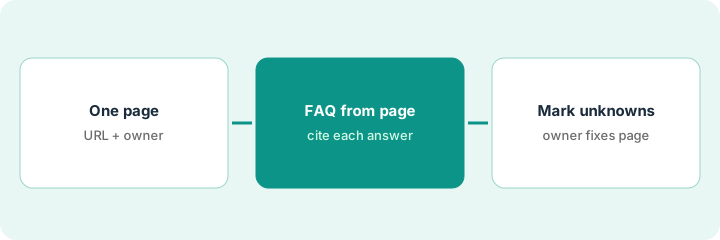
1. Step 1 — Pick one runbook URL
What it is: Choose exactly one Confluence page — not a space, not “everything about payments.” One URL keeps the answers traceable.
- Pick the runbook people ask about most (check Slack for repeat questions).
- Confirm the page has an owner and a last-updated date you can live with. A runbook untouched for a year will produce a confident FAQ about an old process.
- Check page permissions. Answers should come from a page the FAQ readers can open themselves.
- Note any child pages or linked docs the runbook depends on — and decide whether they are in scope.
The payments incident runbook gets asked about four times a week: “Who do I page after hours?”, “When do we post to the status page?”, “Do we roll back or hotfix?” The lead picks that single page, confirms it was updated last month, and leaves the separate vendor-escalation page out of scope for now.
Search your team’s Slack for the last 30 days of “where is the runbook for…” questions. Pick the one page that answers most of them. Write its URL, owner, and last-updated date at the top of a scratch note before you open any AI panel.
2. Step 2 — FAQ only from the page
What it is: Use Confluence AI / Rovo page answers (see the Confluence AI review) on that one page and ask for a short FAQ with a hard rule: every answer must point to a section that exists on the page.
- Ask for five to eight questions, phrased the way a new on-call person would ask them.
- Require a section reference for each answer (heading name is enough).
- Forbid new steps, tools, or contacts that are not on the page.
- Ask it to list contradictions it finds — two sections that disagree are more useful to catch now than at 2 a.m.
The draft returns seven questions. Six cite a heading. The seventh — “Should I notify Finance?” — answers “yes, via the finance alias,” but the page never mentions Finance. That answer is deleted and the question moves to Step 3. The draft also flags that one section says “roll back within 15 minutes” and another says “30 minutes.”
On your chosen page, ask: Using only this Confluence page, write a 5–8 question FAQ for a new on-call person. For each answer, name the section heading it comes from. Do not add steps, tools, or contacts that are not on the page. After the FAQ, list any contradictions between sections.
3. Step 3 — Mark unknowns and hand them to an owner
What it is: Anything the page does not answer becomes an explicit Unknown with an owner — not a filled-in guess.
- Keep a short “Not covered by this runbook” list under the FAQ.
- Assign each Unknown and each contradiction to the page owner (or Unknown if the page has no owner — that is its own finding).
- Publish the FAQ only after the owner resolves contradictions. Unknowns can ship as Unknowns.
The FAQ is a view of the runbook, not a replacement. If the runbook changes, regenerate or edit the FAQ; do not let the two drift.
The FAQ ships with six answered questions and two Unknowns: “Notify Finance?” and “Who approves a hotfix after hours?” The runbook owner fixes the 15-vs-30-minute contradiction on the page itself, then answers the hotfix question by adding a line to the runbook — so the next FAQ draft can cite it.
Under your FAQ draft, add a heading “Not covered by this runbook.” Move every uncited answer there as a question. Send that list plus any contradictions to the page owner with one ask: fix the page, not the FAQ.
Pricing context (October 2026)
This how-to is not a price sheet. Plan detail for Confluence AI lives on that review. Recheck the vendor’s site before you budget. Dated October 2026.
Checked Oct 18, 2026 on the vendor’s own pricing page: atlassian.com/software/confluence/pricing lists Free at $0 for up to 10 users, Standard at $5.78 per user per month, and Premium at $11.16 per user per month in its default view (up from $5.42 and $10.44 when we checked on Oct 7); Enterprise is quote-only and annual. The page calculates the price from your team size and billing period, so enter yours. Its comparison table lists Rovo (search, chat, and agents) from Standard up, with 25 Rovo credits per user per month on Standard, 70 on Premium, and 150 on Enterprise. Free shows no Rovo allowance.
Uncertainty: What Rovo includes by plan, agent credit rates, and admin settings change. If an invoice and a review disagree, trust the invoice. Do not paste a marketing list price you did not pay. The only prices this site sells here are the optional $9 AI toolkit spreadsheet and $19 AI toolkit audit.
When this helps (honest take)
Useful when Confluence is where procedures live, the runbook has an owner, and the same questions keep landing in Slack.
Not useful when the runbook is stale, nobody owns it, or you want AI to write the process the team should have. That is a documentation problem first. If a second knowledge tool already answers the same questions from the same pages, look at that overlap before adding seats.
Related options (educational)
| Need | Where to look | Why |
|---|---|---|
| Page answers, rewrite, AI search, credits | Confluence AI | Overview when Confluence is already the wiki |
| Atlassian-wide AI context | Atlassian Intelligence | When Jira and Confluence share the same work |
| Verified answer cards | Guru AI | When support wants card-level verification |
| Other wiki homes | GitBook vs Confluence · Notion AI for ops | Only if procedures already live there |
| Files + instructions outside the wiki | Claude Projects | For a recurring loop that is not wiki-shaped |
Related reviews: Confluence AI · Atlassian Intelligence · Guru AI · Knowledge ops stack map. Related how-to: Stop rewriting the SOP. Capture the clicks once.
FAQ
Can Confluence AI add missing steps to the runbook?
It can draft text, but this pattern forbids it. Missing steps go to the page owner as Unknowns.
Why one page instead of a whole space?
One URL keeps every answer traceable. Space-wide answers are harder to check and easier to drift.
Should the FAQ replace the runbook?
No. It is a short view on top of the page. Fix the runbook when the FAQ exposes a gap.
Where do dated prices live?
On the Confluence AI review and Atlassian’s Confluence pricing page. This October 2026 how-to only repeats prices we checked on the vendor’s own pricing page on Oct 18, 2026.
Optional next step
Free reviews stay free. Neither offer is required to use this page. If two knowledge tools already answer the same runbook questions, optional help: $9 AI toolkit spreadsheet (seats, spend, owner, cancel-by, overlap) or $19 AI toolkit audit when you want a written memo.