How-to · Knowledge ops · Oct 4, 2026
Stop rewriting the SOP. Capture the clicks once
If the same process still lives in someone’s head, another wiki page written from memory will drift by next quarter. Capture the real clicks once, then edit like an adult.
Who this is for
Ops leads and people-ops or finance teammates who train the same flow every month (vendor intake, refund exception, seat provisioning). If the process changes weekly on purpose, a loose Loom may be enough — see Loom AI.
How to do it
Write the outcome in one line before you record. Example: “New vendor reaches ‘approved’ with tax form attached.”
1. Step 1 — Pick one non-production path
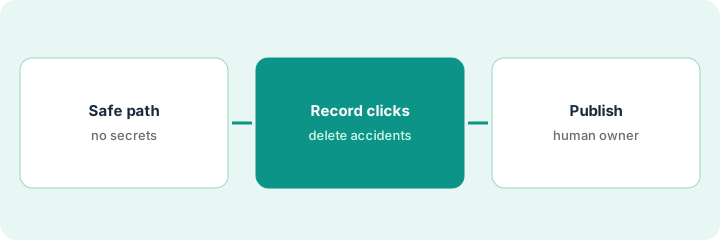
What it is: Choose a flow you can run in a sandbox, staging, or with fake data. Do not teach production secrets in a shared guide.
Write the outcome in one line: “New vendor reaches ‘approved’ with tax form attached.”
Three candidates: vendor intake, refund exception, seat provisioning. Vendor intake drew the most Slack questions, so that is the recording. Fake vendor data only.
List three candidate flows. Pick the one that caused the most Slack questions last month.
2. Step 2 — Record the clicks and delete the accidents
What it is: Use Scribe (or your existing click-path tool if you already standardized on one) to record the path once. Then:
- Delete steps you did not mean to teach (wrong tab, password manager popup, personal bookmarks).
- Rename steps in plain language.
- Mark any step that must stay human (approvals, payments, access grants).
The draft includes a password-manager popup and a personal bookmark. Both get deleted. The approval click is marked “human required.”
After recording, watch the draft once without clicking along. Every confusing step gets a one-line rewrite or a delete.
3. Step 3 — Publish a checklist a human owns
What it is: Put the cleaned guide where people already look (Guru cards, Confluence, Notion, GitBook — whichever is already the library). Assign an owner and a review date. AI can help rewrite; humans own “still true.”
The guide footer reads: Owner — review by — last verified path. The review date is on the calendar the same day the guide is published.
Add a footer: Owner — review by — last verified path. Calendar the review date the same day you publish.
Pricing context (October 2026)
Scribe packaging and prices are on the Scribe review and on Scribe’s site. This how-to does not restate or invent them. Dated October 2026. Guru, Confluence, Notion, and GitBook prices likewise stay on their reviews.
Uncertainty: Click-capture plans, seat minimums, and which library you already pay for change. Do not buy a second docs tool just to publish one checklist. If two libraries already publish the same procedure, the optional $9 spreadsheet is for listing that overlap — not required to capture the clicks.
When this helps (honest take)
Useful when the same how-to gets re-explained in chat every week.
Not useful when the UI changes daily or the “SOP” is really a judgment call — then write decision rules, not click theater.
Related options (educational)
| Need | Where to look | Why |
|---|---|---|
| Click path, recorded once | Scribe | Then edit out accidents |
| Process changes weekly on purpose | Loom AI | A loose clip may be enough |
| Cards people already open | Guru AI | Publish where the library already is |
| Wiki you already pay for | Confluence, Notion, or GitBook | Do not start a second library |
| Rewrite help, not a new tool | ChatGPT for knowledge ops | Humans still own “still true” |
Related: Scribe · Guru AI · ChatGPT for knowledge ops.
FAQ
Should we record a production account?
No. Use a sandbox, staging, or fake data. Do not teach production secrets in a shared guide.
What do we delete after the recording?
Wrong tabs, password-manager popups, personal bookmarks, and any step you did not mean to teach.
Who owns “still true”?
A named human, with a review date. AI can help rewrite; it does not own the checklist.
Where should the guide live?
In the library people already open — Guru, Confluence, Notion, or GitBook — not a new one.
Optional next step
Optional: the $9 AI toolkit spreadsheet if two docs tools publish the same procedure. A $19 audit is only for a wider seat overlap, not for one SOP. Free reviews stay free.