Role guide · Security ops · Gemini · Workspace · Oct 2026
Gemini for security ops (Oct 2026): Sheets, Docs, and Gmail help for questionnaires and evidence requests
Security ops role guide for teams that run on Google Workspace — Gemini sorts a sanitized questionnaire Sheet by control area, checks draft answers against the policy doc you point it at, and drafts the emails that chase evidence from control owners. You check twenty rows by hand before anyone trusts the tags, the control owner decides every answer, and a named person sends every email. Companion to ChatGPT for security ops and Claude for security ops.
Who this guide is for
Security and compliance coordinators — the person who logs each incoming security questionnaire in a Sheet, keeps policies in Docs, and emails control owners for evidence before an audit — at a company that already runs on Google Workspace. The goal is a faster first pass on the sheet and cleaner drafts, not an AI that answers customers. If your team drafts in ChatGPT or Claude instead, see ChatGPT for security ops or Claude for security ops. If questionnaires arrive every day, a dedicated tool such as Conveyor AI or Loopio AI may fit better; if evidence lives in a compliance platform, see Vanta AI or Drata AI. Sibling Workspace guide: Gemini for IT ops.
What Google documents (its Gemini in Sheets, AI function, and Help me write help pages and its pricing page, read 10 October 2026): in Sheets, the Ask Gemini side panel can create tables and formulas, analyze data, build charts, summarize Drive files and Gmail emails, and take actions such as conditional formatting, dropdowns, filters, sorting, and pivot tables — each action appears as an action preview card you Apply, with Undo until you make further changes. Gemini in Docs shows its edits as suggestions you accept or reject, and can use files you add as Sources. In Gmail, Help me write drafts or refines an email. Google’s pricing page lists Gemini in Gmail on every Business plan and Gemini in Docs and Sheets on Business Standard and above.
Ground rules: Gemini never answers a customer, marks a control as in place, or sends evidence. It tags, compares, and drafts; the control owner decides every answer and every piece of evidence, and a named person sends. Work from a sanitized copy — question text and your approved answers, not customer names, deal values, internal hostnames, or keys. Never paste secrets, tokens, passwords, customer data, or audit reports received under NDA. A tagged sheet doesn’t make anyone compliant; auditors attest, and every answer has to match the evidence.
Major features (with how someone uses them)
Examples at a glance: each feature has a concrete example from a real job plus a short Try this you can run this week.
1. Questionnaire Sheet: tag each question by control area (primary)
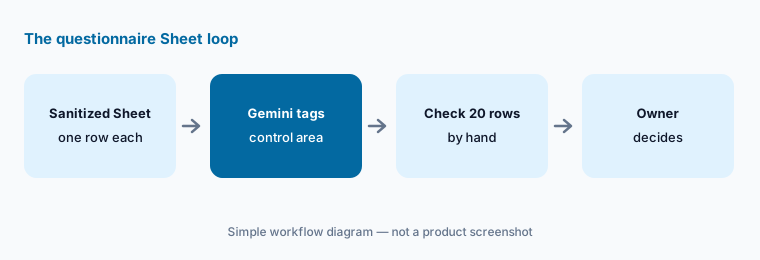
What it is: Make a sanitized copy of the incoming questionnaire as a native Google Sheet — Google’s help page says Gemini works best with native Sheets files, so save an .xlsx as a Google Sheet first. Keep one question per row and remove the customer’s name. Open Ask Gemini and give it your own fixed list of control areas — for example access control, encryption, logging and monitoring, incident response, vendor management, business continuity, HR security, privacy, and AI use — and ask it to add a column tagging each question with one area, or Unclear when none fits. Then check twenty rows by hand, picked from the top, middle, and bottom. The tags route questions to owners; they don’t answer anything.
Google’s help page also describes an =AI() function (also =Gemini()) that can categorize a cell or range. It lists limits worth knowing: it can’t see the whole spreadsheet unless you pass a range, it can’t be undone (you regenerate instead), and the edit is attributed to you in version history. Some accounts see “AI function not available” depending on plan, admin settings, or language — the side panel is the dependable route.
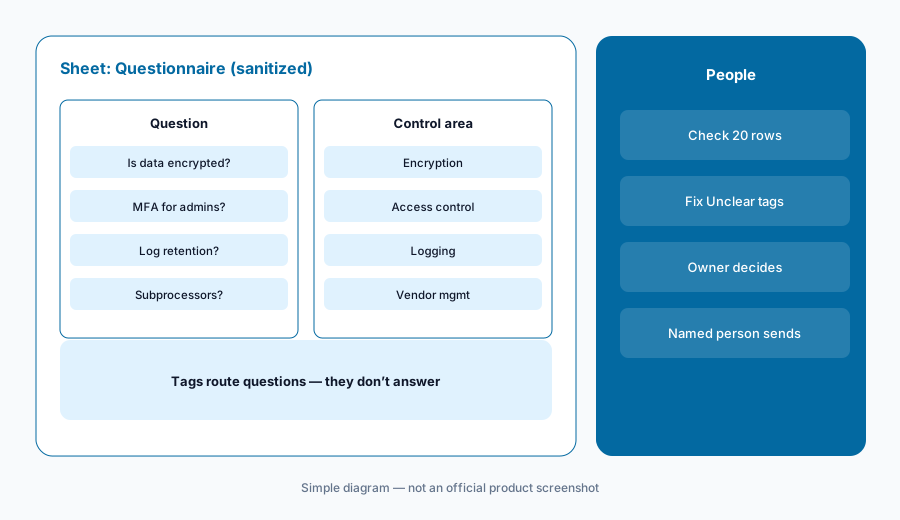
Primary workflow:
In a sanitized questionnaire Sheet, ask Gemini to tag each question by control area. Check twenty rows by hand.
2. Sheet actions: owners, due dates, and counts
What it is: Once the tags are checked, the same panel can do the bookkeeping. Ask for an Owner dropdown with your control owners’ names, a highlight on rows whose due date has passed, and a pivot table counting questions by control area and status. Each change appears as an action preview card; click Apply, check the result, and use Undo if it’s wrong — Google says Undo is available until you make further changes. Google also says the side panel’s history is lost if you reload, close the file, or go offline, so insert anything you want to keep.
Watch the sharing banner. Google’s help page says Sheets shows a warning that content added by Gemini may be visible to users outside your domain when the file has an outside viewer or editor, or was created by someone outside your domain. A questionnaire workbook that came from a customer may carry that flag — work in your own copy.
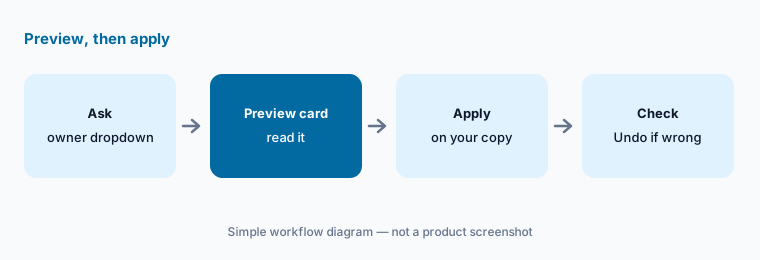
Preview, then apply:
On your copy of the questionnaire Sheet, ask Gemini for an Owner dropdown and a pivot of open questions by control area. Check each preview card before Apply and use Undo if a range is wrong.
3. Policy doc reviews in Docs
What it is: Draft answers often promise more than the policy says. In Docs, open a doc with your draft answers for one control area, add the matching approved policy as a Source (Sources → Add from Drive, or type @ and pick the file), and ask Gemini to list every answer that goes beyond the policy — a stronger time frame, a broader scope, or a control the policy doesn’t mention — quoting the policy section each time. Gemini shows its edits as suggestions you accept one by one or reject. The policy owner decides whether the answer or the policy changes.
Ask for a list, not a rewrite. A list of five mismatches with quotes is quick to check; a rewritten answer set hides which sentence changed and why.
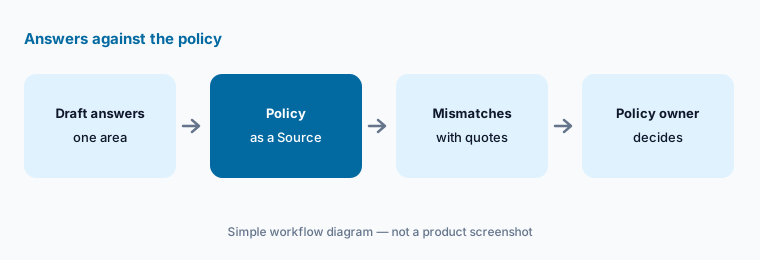
List mismatches, don’t rewrite:
In a Doc of draft answers for one control area, add the approved policy as a Source. Ask Gemini to list every answer that goes beyond the policy, quoting the section, and send the list to the policy owner.
4. Evidence-request emails in Gmail
What it is: Before an audit or a big questionnaire, a coordinator sends the same email twenty times: which control, what evidence, which period, and the due date. In Gmail, Help me write drafts from a short prompt, and Formalize, Friendly, and Shorten adjust the tone. Google’s help page says Help me write can proactively take details from your other emails and Drive files to personalize a draft, and a Sources button shows which ones it used. Check Sources every time so details from another customer’s thread or another audit don’t end up in the request. Ask for the evidence to be uploaded to your evidence folder or compliance platform, never attached to the reply.
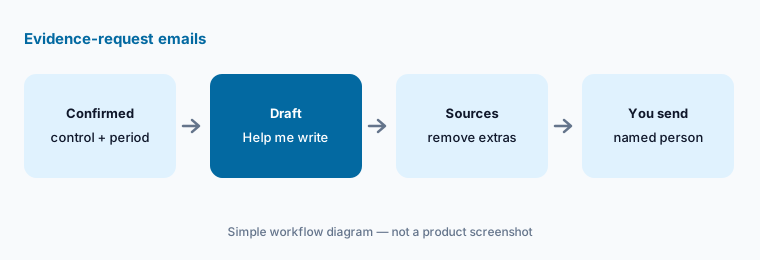
Check Sources before sending:
Draft one evidence-request email with Help me write: control, evidence, period, due date, and where to upload it. Open Sources, remove anything from unrelated threads, and send it yourself.
5. Accounts, plans, and what never goes in
What it is: Google’s generative AI privacy page (read 10 October 2026) says Workspace data is not reviewed by humans or used for generative AI model training outside your domain without permission, that Gemini can only retrieve data the user has permission to access, and that DLP rules, Information Rights Management, and client-side encryption can restrict Gemini’s access to sensitive content. It lists certifications including ISO 42001, BSI C5, and FedRAMP High. None of that makes a prompt the right place for secrets: keep out keys, tokens, passwords, internal hostnames, customer data, and audit or penetration test reports received under NDA. Help me write is also offered on personal Google Accounts (US only), and Workspace Experiments is a trusted tester program for personal accounts — security work stays in the company account.
Plan matters for this guide: on Google’s pricing page, Business Starter lists Gemini in Gmail but not Gemini in Docs or Sheets, so sections 1–3 need Business Standard or above.
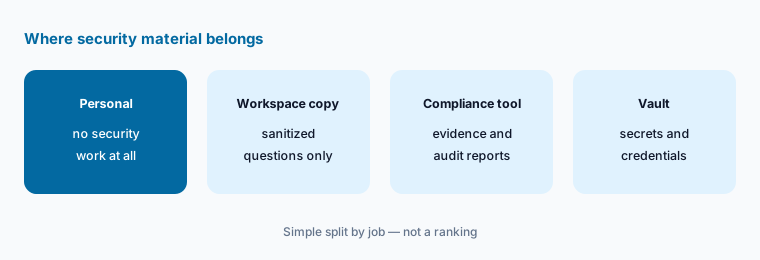
Check account and plan first:
List everyone who uses Gemini for security work, which account they use, and which Workspace plan it is on. Move security work out of personal accounts and confirm Sheets users are on Business Standard or above.
6. One home per job: Gemini, ChatGPT, Claude, or your security tools
What it is: Gemini fits when the questionnaire is a Sheet, the policies are Docs, and requests go out from Gmail — nothing gets copied into another tool. A shared drafting assistant that answers only from your approved library fits better as a project in ChatGPT or Claude. High-volume questionnaires belong in a questionnaire tool such as Conveyor; evidence and control status belong in your compliance platform; alert handling belongs in security automation such as Tines or Torq. Google’s pricing page also lists Gemini Notebook, a notebook grounded in the sources you add, with basic access on Starter and expanded access on Standard and above. Paying for three assistants to tag the same questionnaire is seat overlap.
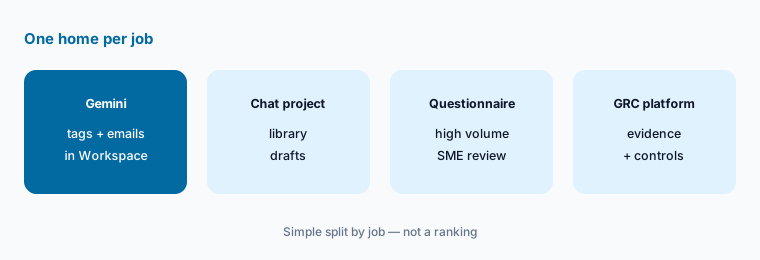
One home per job:
List your security ops drafting jobs — questionnaire tagging, answer drafts, policy checks, evidence emails — and which tool each person used last month. Pick one home per job for 30 days, then check which seats nobody missed.
Pricing context (October 2026)
On Google’s Workspace pricing page (as listed 10 October 2026, USD, per user per month, before tax and before introductory offers for new customers): Business Starter $7; Business Standard $14; Business Plus $22; Enterprise through sales. Google says a one-year commitment saves 16%, and Starter, Standard, and Plus can be bought for up to 300 users. The page also showed a limited-time discount on the first months for new customers.
What matters for this guide: the same page lists Gemini in Gmail on every plan (Starter shows Gemini in Workspace apps as “Limited”), and Gemini in Docs, Sheets, Drive, and Meet on Business Standard and above. A coordinator on Starter gets Help me write in Gmail but not the Sheets panel from section 1. Dated notes on Gemini plans are on the Gemini deep-dive.
Uncertainty: Google’s introductory and promotional prices change often, and prices vary by country and currency. The Sheets help page we read describes the Workspace Experiments version, and the AI function page says some of its capabilities are limited to Experiments and Beta participants, so what you see depends on your plan and admin settings. Gemini features roll out gradually. This is product education, not security or audit advice for your environment.
When it’s useful (honest take)
Useful when your security or compliance team already works in Google Workspace on Business Standard or above, questionnaires arrive as spreadsheets, and a person checks every tag and every draft before anything leaves.
Useful when policies live in Docs and evidence requests go out by email, and you want the same fields in every request.
Less useful when questionnaires are a daily, high-volume flow better served by a questionnaire tool, security work would end up in personal accounts, or anyone expects Gemini to decide whether a control exists.
Paying for Gemini and a few other AI tools? The $9 AI toolkit spreadsheet lists every AI subscription you have, what each one costs, and how fast it pays for itself, so you can see which ones are worth the money.
Want someone to do it for you? AI toolkit audit — $19
Related options (educational)
| Need | Better home | Why |
|---|---|---|
| Answers only from an approved library in ChatGPT | ChatGPT for security ops | A project with gaps marked |
| Control drafts from uploaded files in Claude | Claude for security ops | Projects, cite the file |
| High-volume questionnaires and trust centers | Conveyor AI or Loopio AI | Answer libraries with SME review |
| Evidence and control status | Vanta AI or Drata AI | Compliance platform |
| Inventory every compliance AI seat | Stack map for compliance ops | Jobs, tools, owners, overlaps |
FAQ
How should a security ops coordinator start with Gemini?
Start with the questionnaire Sheet. Make a sanitized native Google Sheets copy, ask Gemini to tag each question with one of your control areas or Unclear, and check twenty rows by hand. Then route rows to owners, check draft answers against policies in Docs, and draft evidence requests in Gmail that you send yourself.
Can Gemini answer security questionnaires for us?
Not in this guide. Gemini tags, compares, and drafts; the control owner decides every answer and a named person sends it. For a library-based drafting assistant see ChatGPT for security ops; for high volume, a questionnaire tool such as Conveyor AI.
Which Workspace plan do we need for Gemini in Sheets?
As listed on 10 October 2026, Google’s pricing page shows Gemini in Docs and Sheets on Business Standard ($14 per user per month), Business Plus ($22), and Enterprise, but not on Business Starter ($7). Check workspace.google.com/pricing before budgeting.
Is our questionnaire data used to train Gemini?
Google’s privacy page says Workspace data is not reviewed by humans or used for generative AI model training outside your domain without permission, and that Gemini only retrieves data the user can already access. That covers the company Workspace account; personal accounts and Workspace Experiments have different terms. See Google’s generative AI privacy page.
What if someone pastes a key or a customer’s data into Gemini?
Rotate the key and tell the data owner. Deleting the prompt doesn’t undo the exposure. Work from sanitized copies, replace secrets with <REDACTED>, and keep NDA reports and customer data out of prompts entirely.
Optional next step (if seats overlap)
If security ops pays for Gemini, a chat assistant, a questionnaire tool, and a compliance platform’s AI that all draft the same answers, fix that overlap before adding another seat. Map the overlap with the $19 AI toolkit audit or the $9 AI toolkit spreadsheet. Email Audit $19 or Toolkit spreadsheet $9.
Checkout is live via Stripe. After you pay, we email delivery (spreadsheet) or intake next steps (audit).