Role guide · Property ops · Gemini · Workspace · Oct 2026
Gemini for property ops (Oct 2026): Sheets rent rolls, Docs house rules, and Gmail owner updates
Property ops role guide for property managers, leasing and turnover coordinators, and short-term rental hosts whose company runs on Google Workspace — Gemini lists same-day move-outs and move-ins in a sanitized turnover Sheet, summarizes a sanitized rent roll, turns approved policies into house rules and SOP drafts in Docs, and drafts owner updates in Gmail. You check ten rows by hand before anyone changes a schedule, the property manager or host makes every change in the property-management system, and a named person sends every owner, resident, or guest message. Companion to ChatGPT for property ops and Stack map for property ops.
Who this guide is for
Property managers, assistant managers, turnover and make-ready coordinators, and short-term rental hosts — the person who exports next week’s move-outs and move-ins into a Sheet to plan cleaners and vendors, keeps house rules and the turnover checklist in a Doc, and emails owners a monthly update — at a company that already pays for Google Workspace. The goal is a faster first pass on the Sheet and cleaner drafts, not an AI that manages property. If your property-management system already flags turn conflicts and drafts owner and resident messages from live data, use that first: see AppFolio AI, Buildium AI, Entrata AI, or Yardi AI; for vacation rentals, Guesty AI, Hostaway AI, or Breezeway AI. If your team drafts in ChatGPT instead, see ChatGPT for property ops.
What Google documents (its Gemini in Sheets, Gemini in Docs, and Help me write help pages and its pricing page, read 13 October 2026): in Sheets, the Ask Gemini side panel can create tables and formulas, analyze the sheet, and take actions such as conditional formatting, pivot tables, dropdowns, sorting, and filters, and Undo reverses an action. In Docs, Gemini shows edits as suggestions you accept or reject, and you can add your own files as Sources. In Gmail, Help me write drafts or polishes a message and can pull details from your other emails and Drive files. Google’s pricing page lists Gemini in Gmail on every Business plan, and Gemini in Docs and Sheets on Business Standard and above.
Ground rules for every section below: Gemini never sends a notice, never changes rent or a nightly rate, never approves or denies an applicant, never posts a bill or owner statement, and never messages a resident, owner, or guest. It lists, drafts, and suggests; the property manager or host makes each change in the PMS, and a named person sends each email. Work from sanitized exports — unit ID, unit type, dates, and status — with no tenant, applicant, guest, or owner names, phone numbers, emails, ledgers, bank details, screening reports, or door code and lock details. Anything prospect-facing gets a fair-housing review by a person, and local notice, short-term rental, and occupancy rules are checked locally, not with a chat tool.
Major features (with how someone uses them)
Examples at a glance: each feature has a concrete example from a real job plus a short Try this you can run this week.
1. Turnover Sheet: same-day move-out and move-in (primary)
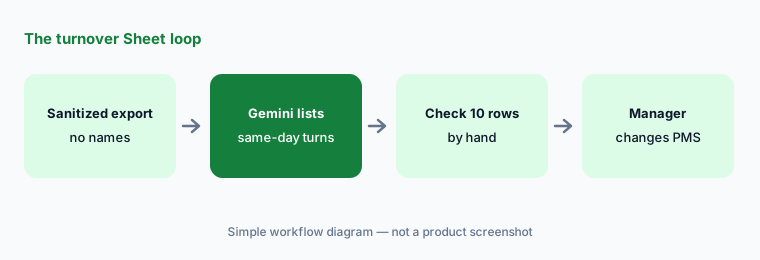
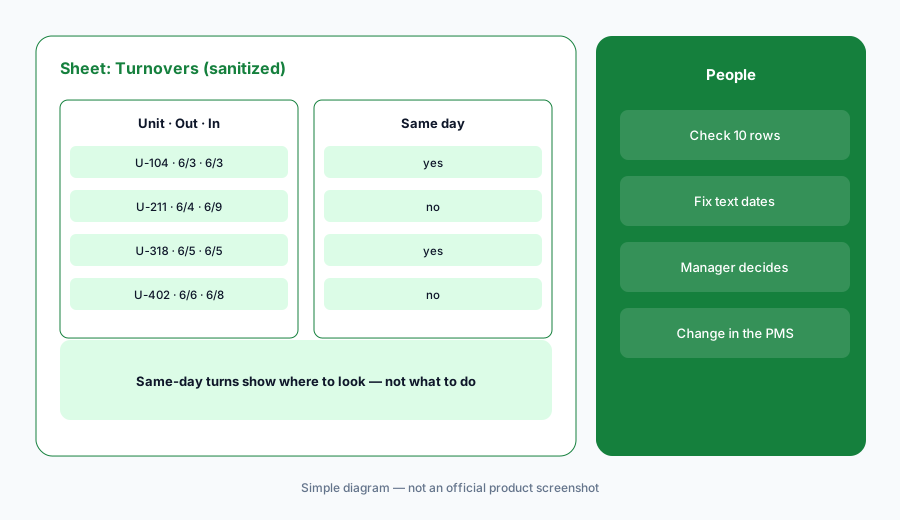
What it is: Export the next two weeks of move-outs and move-ins (or check-outs and check-ins) from the PMS, open them as a native Google Sheet (Google’s help page says Gemini works best with native Sheets files, so save an .xlsx as Google Sheets first), and strip it down to unit ID, unit type, move-out date, move-in date, and turn status — no resident or guest names, no notes. Then open Ask Gemini and ask it to list units with a move-out and a move-in on the same day, plus any unit where the gap is under 24 hours. Ask for the formula it used too, so the check can be repeated next week. Before anyone books a cleaner or tells a vendor, check ten rows by hand against the export: pick some it flagged and some it didn’t.
A same-day turn in the Sheet is a question, not a decision. The move-out may be a lease end that already slipped, the move-in may be a transfer within the building, or the export may have used the notice date instead of the move-out date. The property manager or host knows which, and makes any schedule change in the PMS — the Sheet is a copy, not the schedule.
Primary workflow:
In a sanitized turnover Sheet, ask Gemini to list units with move-out and move-in on the same day. Check ten rows by hand.
2. Rent roll Sheet: lease ends by month, sorted and highlighted
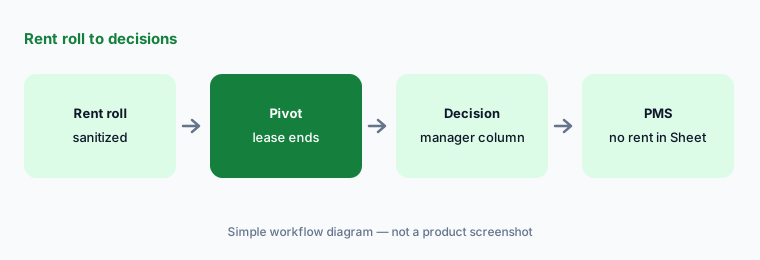
What it is: From a sanitized rent roll — unit ID, unit type, lease end month, occupancy status, and market-rent band, with no names, balances, or payment history — ask Gemini for a pivot table of lease ends by month and unit type, then ask it to highlight months where more than a tenth of units expire. On your own copy, have it sort by lease end and add a Manager decision column with values such as Renewal offer, Hold, and Review with owner. Use Undo if an action touched the wrong rows. Google’s help page says the side panel’s conversation history is lost when you reload the browser, close and reopen the file, or go offline — insert the pivot into the Sheet, not only the chat.
The pivot shows where renewals will cluster; it does not set rent. Renewal offers and rent changes are decided by the property manager and owner in the PMS, and some jurisdictions restrict algorithmic rent-setting — check local rules with counsel. Watch the sharing warning, too: Google says Sheets shows a message that content added by Gemini may be visible to users outside your domain when the file has an outside viewer or editor or was created outside your domain. Rent rolls shared with an owner or an outside bookkeeper often qualify — copy the data into a file your company owns before you prompt.
Pivot, then decide:
On a copy of a sanitized rent roll, ask Gemini for a pivot of lease ends by month and unit type and add a Manager decision column. Undo anything that touches rent amounts or balances.
3. House rules and SOP drafts in Docs from approved sources
What it is: House rules and turnover procedures drift: the quiet-hours rule lives in an old listing, the make-ready checklist is a photo of a clipboard. In Docs, add the approved sources — the current house rules, the community policy or HOA rules, the local short-term rental permit conditions you already confirmed, last season’s turnover checklist — as Sources, and ask Gemini for a draft: numbered rules or steps, the source under each one, and a list of anything the sources don’t cover. Google’s Docs help page says Gemini shows its edits as suggestions you accept or reject. The property manager or host approves the final text before it reaches a guest book, lease addendum, or listing.
Mark, don’t fill. Ask Gemini to label any rule it cannot tie to a source as “Not in sources — owner to confirm.” Occupancy limits, parking, pets, quiet hours, and fees come from your permit, lease, and local rules, never from a draft, and anything a prospect will read gets a fair-housing review by a person — describe the property and its rules, not the kind of guest or resident it suits.
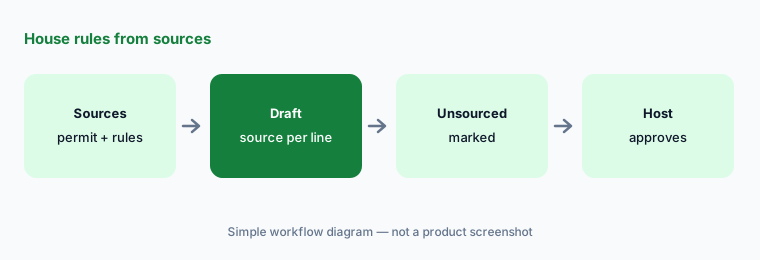
Source every rule:
Add your current house rules and one approved policy as Sources in Docs and ask Gemini for house rules that name the source under every line. Confirm every line marked not in sources before it reaches a guest or resident.
4. Owner updates in Gmail that a person sends
What it is: For monthly owner updates, open a draft and use Help me write with only facts you already checked in the PMS — occupancy for the month, turns completed, open maintenance by category, and the next step — and refine it with Formalize or Shorten. Keep the prompt itself free of resident or guest names, unit-and-name pairs, and dollar balances; the owner statement comes from the PMS and the bookkeeper, not from a draft. Google’s Gmail help page says Help me write can pull details from your other emails and Drive files to personalize a draft, and that Sources shows which ones it used. Click it before sending: in a shared office inbox, the wrong thread can carry another owner’s or resident’s details into this email.
Never promise what the PMS doesn’t show. If the draft says “all units are rent-ready” and the turnover board shows two open, the board wins. A named property manager reads every owner update and sends it; Gemini never sends.
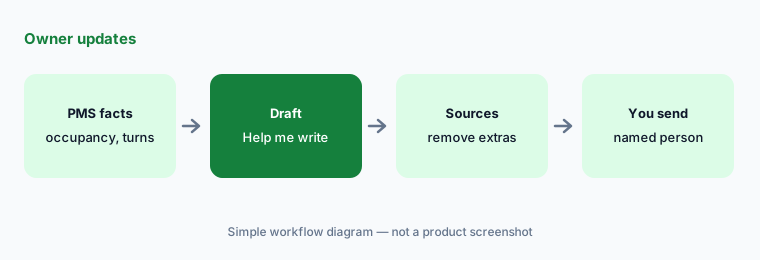
Draft, check Sources, send yourself:
Write one owner update with Help me write using only occupancy, turns completed, and open maintenance by category. Open Sources, delete anything pulled from another owner’s thread, confirm the numbers in the PMS, then send it yourself.
5. Weekly turn-issue review in Sheets
What it is: Turn issues — a missed clean, a damaged item found at inspection, a late vendor — are where procedures break. Export last month’s turn and inspection issues with unit ID, issue category, vendor or crew code, and days between move-out and ready, with no resident or guest columns. Ask Gemini for a pivot of issues by category and crew code, and a short list of the three largest groups. The property manager or host reads the list next to the SOPs from section 3 and decides what changes: a checklist step, a supply kept on site, or a conversation with a vendor that happens in person, not in a Sheet.
Crew and vendor codes are there to group work, not to rank people. If one crew’s issues stand out, that is a conversation with the full work-order history in the PMS or the operations tool such as Breezeway, not a column to share widely.
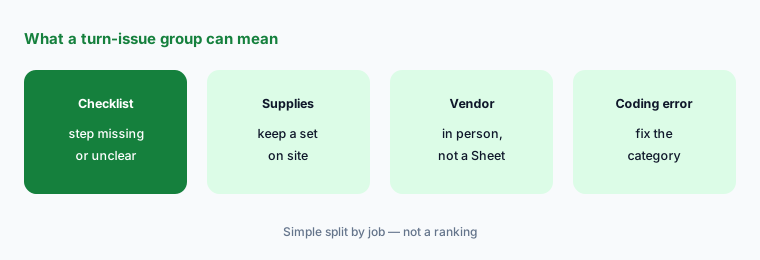
Group, check, decide:
Paste last month’s sanitized turn issues into a Sheet and ask Gemini for a pivot by category and crew code. Check ten rows against the PMS before anyone changes a checklist or a vendor.
6. Plan and data check before you start
What it is: Two checks first. The plan: Google’s pricing page lists Gemini in Gmail on every Business plan but Gemini in Docs and Sheets only on Business Standard and above, so a host on Business Starter gets Help me write but not the Sheet work in sections 1, 2, and 5. The account: property and owner work belongs in the company Workspace account, never a personal Gmail. Google’s generative AI privacy page says your data is not reviewed by humans or used for generative AI model training outside your domain without permission — a statement about the company account. The Sheets help page we read is labelled for Workspace Experiments, a program for personal accounts, so the panel you see at work depends on your plan and admin settings.
Then decide which system owns each job. Residents, leases, ledgers, and owner statements belong in the PMS; guest messages and calendars in the short-term rental PMS or channel manager such as Guesty or Hostaway; nightly rates in a pricing tool such as PriceLabs or Wheelhouse. A Sheet copy is a second home for the same job — that overlap is what the Stack map for property ops is for. September changes to two PMS platforms are in What’s new in AppFolio and What’s new in Entrata.
Plan and account check:
List each person who handles turnover Sheets or owner emails, their Workspace edition, and whether they have used a personal account for it. Move the work to Business Standard or above and delete personal copies before you start.
Pricing context (October 2026)
On Google’s Workspace pricing page (as listed 13 October 2026, USD, per user per month, not including tax): Business Starter $7; Business Standard $14; Business Plus $22; Enterprise through sales. The page showed a 16% saving with a one-year commitment, a 300-user maximum on the three Business plans, and a new-customer introductory offer that changed again since yesterday — on 13 October it read 20% off for three months on Starter and 50% off for three months on Standard and Plus, for the first 20 users.
What matters for this guide: the same page lists Gemini in Gmail and Vids on every plan (Starter shows Gemini in Workspace apps as “Limited”), and Gemini in Docs, Sheets, Drive, Meet, and Chat on Business Standard and above. Google lists no property-management or short-term-rental Gemini package, and we did not verify standalone Gemini Enterprise prices today, so none are quoted here. Dated notes on Gemini plans are on the Gemini deep-dive.
Uncertainty: Google’s introductory and promotional prices change often (this one changed between 12 and 13 October 2026) and vary by country and currency. The Sheets help page we read is labelled as the Workspace Experiments version and its wording changed between 12 and 13 October, so the exact panel and actions you see depend on your plan, admin settings, and rollout. We did not test Gemini against any specific PMS export format. A same-day list in a Sheet copy can disagree with the PMS; the PMS is the schedule. Nothing here is legal advice on notices, rent, fair housing, or short-term rental rules.
When it’s useful (honest take)
Useful when your office already works in Google Workspace on Business Standard or above, turnover and rent-roll exports can be sanitized, and someone checks every flagged row before anything moves.
Useful when house rules and SOPs live in Docs and owner updates go out by email, and you want the same checked facts in every update.
Less useful when your PMS already flags turn conflicts and drafts owner and resident messages from live data, exports can’t be stripped of tenant or guest details, or anyone expects Gemini to set rent, screen applicants, or send.
Paying for Gemini and a few other AI tools? The $9 AI toolkit spreadsheet lists every AI subscription you have, what each one costs, and how fast it pays for itself, so you can see which ones are worth the money.
Want someone to do it for you? AI toolkit audit — $19
Related options (educational)
| Need | Better home | Why |
|---|---|---|
| Notice and listing drafts in a chat project | ChatGPT for property ops | A Business workspace project |
| Turns and messages inside the PMS | AppFolio AI · Entrata AI | Live data, its own permissions |
| Guest messaging and STR operations | Guesty vs Hostaway · Breezeway AI | Channel manager, not a Sheet |
| September changes in your PMS | AppFolio · Entrata | Dated notes |
| Inventory every property-ops AI seat | Stack map for property ops | Jobs, tools, owners, overlaps |
FAQ
How should a property team start with Gemini?
Start with a sanitized turnover export in a native Google Sheet: unit ID, unit type, move-out date, move-in date, and status, with no resident or guest details. Ask Gemini to list units with a move-out and move-in on the same day and check ten rows by hand. The property manager or host makes any change in the PMS.
Can Gemini send owner updates or resident notices for us?
Not in this guide. Gemini drafts with Help me write; a named property manager checks the facts in the PMS, opens Sources, reads the email, and sends it. Notices, rent changes, and owner statements come from the PMS and the people who own them.
Which Workspace plan do we need for Gemini in Sheets?
As listed on 13 October 2026, Google’s pricing page shows Gemini in Docs and Sheets on Business Standard ($14 per user per month), Business Plus ($22), and Enterprise, but not on Business Starter ($7), which gets Gemini in Gmail. Check workspace.google.com/pricing before budgeting.
Is our property data used to train Gemini?
Google’s privacy page says Workspace data is not reviewed by humans or used for generative AI model training outside your domain without permission. That covers the company account; personal accounts and Workspace Experiments have different terms. See Google’s generative AI privacy page.
What if someone pastes tenant names, a screening report, or a door code into a prompt?
Delete the copy, tell whoever owns resident and guest data, and re-export a sanitized file. Deleting a prompt doesn’t undo the exposure. Resident, applicant, and guest records belong in the PMS and screening tools; the Sheet should hold unit IDs, dates, and status only.
Optional next step (if seats overlap)
If property ops pays for Gemini, a chat assistant, a PMS with its own AI, and a guest-messaging tool that all look at the same turns and draft the same owner and guest messages, fix that overlap before adding another seat. Map the overlap with the $19 AI toolkit audit or the $9 AI toolkit spreadsheet. Email Audit $19 or Toolkit spreadsheet $9.
Checkout is live via Stripe. After you pay, we email delivery (spreadsheet) or intake next steps (audit).