Tool · Property ops · Buildium · Oct 2026
Buildium AI review (Oct 2026): Lumina AI Workforce, AI Bill Scan, Write with Lumina, and AI Assistant for property managers
Buildium (a RealPage company) is property-management software for residential portfolios and community associations — accounting, leasing, maintenance requests, and a resident portal. Its AI suite is called Lumina AI: AI Bill Scan that turns emailed or uploaded invoices into draft bills, Write with Lumina for owner and resident messages, an AI Assistant for how-to help, AI summaries of maintenance tasks, and an AI Workforce of agents for maintenance, leasing, accounting, resident experience, and business operations. This page is about using those drafts while the bookkeeper and property manager still approve what posts and what gets sent. Each section has a Try this.
What this Buildium page covers
This page is for an owner-operator, property manager, or bookkeeper at a small or mid-size residential management company — often a few hundred to a few thousand doors — that runs Buildium or is weighing it against other property-management platforms. The question it answers: which bills, messages, summaries, and routine tasks Lumina AI drafts or handles, which plan you need for each, and what still needs a named owner.
Buildium’s AI page (read 13 October 2026) describes Lumina AI as an “intelligent automation suite” for billing, communications, leasing, maintenance, and reporting, and its FAQ says all available Lumina AI features are included with the Premium plan. The pricing page lists Buildium’s AI Assistant on Essential, “AI-enhanced Communications and Business Analytics” on Growth, and the “Full AI and Automations suite” on Premium. Lumina AI Workforce has account-specific pricing.
Ground rules: the bookkeeper (a named person) approves every AI-drafted bill before it posts; the property manager reads every AI-written owner update or resident notice before it is sent; screening and approval decisions stay with people; and no tenant bank details or screening reports go into prompts you test with. Buildium’s own FAQ says sensitive decisions require human review — this page treats that as the minimum. Facts come from Buildium’s website as read on 13 October 2026; Buildium’s time-saving estimates are not repeated here.
Major features (with how someone uses them)
Examples at a glance: each feature has a concrete example from a real job plus a short Try this you can run this week.
1. AI Bill Scan: invoices to draft bills, checked by the bookkeeper (primary)
What it is: AI Bill Scan lets you email invoices to your account’s inbox or upload a batch; Buildium says it captures vendors, dates, totals, and line items and builds the bill, removing most manual entry. It appears in the Lumina AI section of the pricing comparison, and Buildium’s FAQ says all Lumina features are on Premium. Extraction is fast; coding a bill to the right property, unit, and GL account is still a judgment call.
Run Bill Scan on a small batch first and compare each draft with the paper or PDF invoice. Watch for vendors whose invoices list several properties — those are where a wrong property match is most likely.
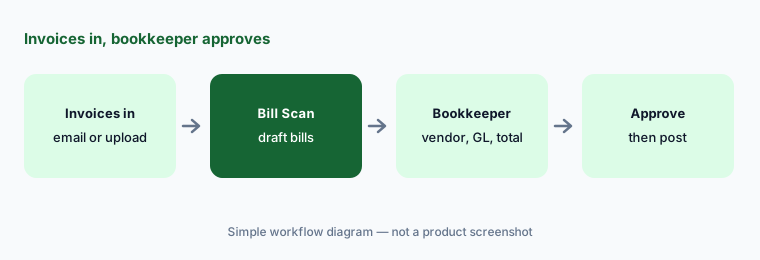
Primary workflow:
Run AI Bill Scan on five vendor invoices. Have the bookkeeper check vendor, date, total, and GL account on every draft bill before it is approved.
2. Write with Lumina: owner updates and resident reminders, read before sending
What it is: Write with Lumina (shown on Buildium’s AI page as “Write with AI”) drafts owner update emails, tenant SMS reminders, and announcements, adapting tone from friendly reminder to formal notice. A Buildium customer quoted on the page uses it to summarize items and shorten announcements to 140 characters. Fast first drafts; the facts in them are only as good as the numbers you give it.
Anything with a dollar amount, a date, or legal notice wording gets checked against the ledger or lease before it goes out. Keep your formal notice templates as templates — use AI for tone, not for legal language.
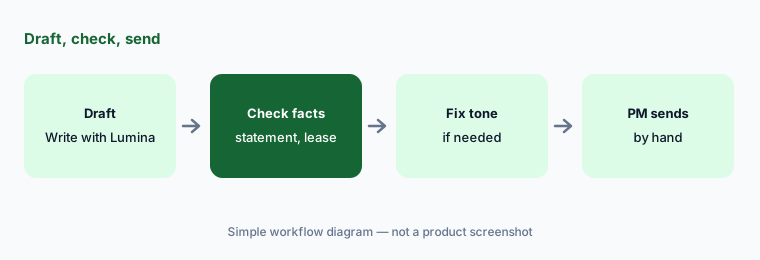
Check every number:
Draft one owner update with Write with Lumina. Check every number and date against the owner statement before it goes out.
3. Maintenance Agent and AI summaries: catch-up without losing the thread
What it is: The Maintenance Agent in Lumina AI Workforce is described as keeping projects and repairs moving “so nothing falls through the cracks,” and Buildium lists AI Summarization of maintenance tasks among Lumina’s workflows. Buildium also sells a Maintenance Contact Center, but that is a 24/7 call center staffed by professional agents — a human service, not AI.
A summary is a shortcut to the thread, not a replacement for it. Before replying to a resident, open the work order and check the unit, the vendor, and the promised date the summary mentions.
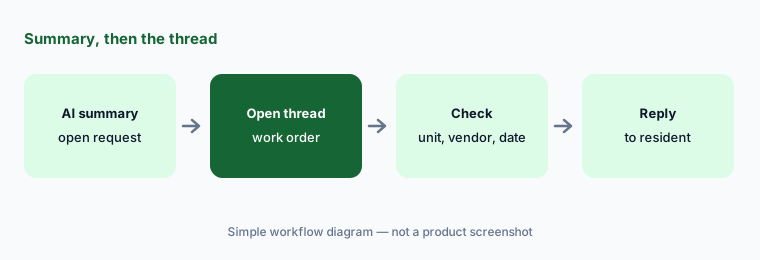
Summary, then the thread:
Ask for an AI summary of one open maintenance request. Check the unit, the vendor, and the promised date against the work order before you reply to the resident.
4. Leasing, Accounting, and Resident Experience agents: one agent at a time
What it is: Buildium describes AI Workforce as “a team of intelligent agents that work in sync”: a Leasing Agent for lead-to-lease from listing syndication to background checks, an Accounting Agent to keep books audit-ready, a Resident Experience Agent to keep residents updated in the Resident Center, and a Business Operations Agent for insights. Pricing for AI Workforce is account-specific, per Buildium’s pricing page.
Turn on one agent, on one property, with a written list of steps that stay human — screening decisions, lease terms, concessions, anything touching a security deposit. Add the next agent only after two clean weeks.
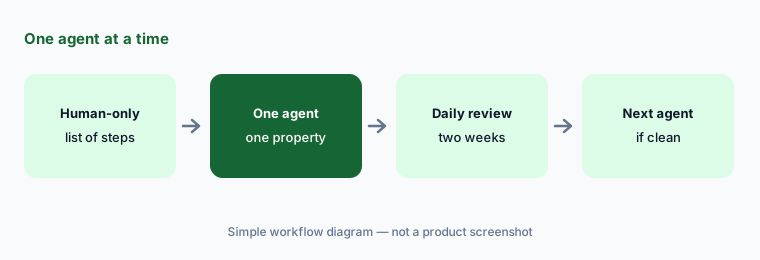
Human-only list first:
Before you enable the Leasing Agent, have the leasing lead list which steps stay with a person. Test the agent on one listing against that list for two weeks.
5. AI Assistant: how-to help for staff, checked in a test property
What it is: Buildium’s AI Assistant (listed on the pricing page as “Buildium Assistant (Help Only)” and included from Essential) gives just-in-time guidance on policies, processes, and troubleshooting — for example while onboarding a new hire. It helps you use Buildium; it does not act on your data.
Use it to shorten onboarding, then confirm the steps in a test property or against the help article before a new hire changes a live setting such as a returned-payment rule.
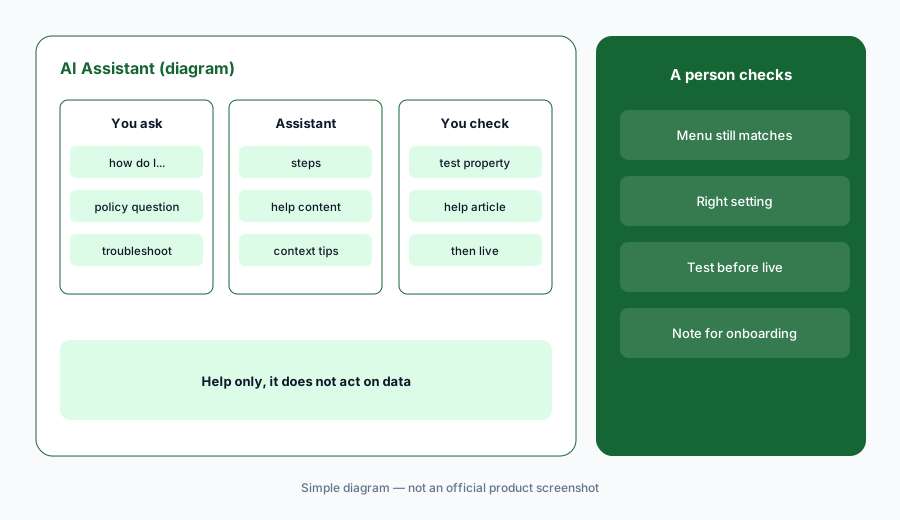
Test property first:
Ask AI Assistant how to set up one workflow you rarely use, such as a returned-payment rule. Follow its steps in a test property and note anything that differs from the help article.
6. AI Settings and plan fit: who owns each switch
What it is: Buildium’s FAQ says a centralized AI Settings Page lets you control which Lumina features are on and see the AI Workforce. Plan fit matters: Essential lists the AI Assistant, Growth lists AI-enhanced communications and business analytics, and Premium lists the full AI and automations suite plus Open API — and Buildium says all current Lumina features are on Premium.
Before upgrading for AI, list the two or three Lumina features you would actually use each week and who would own them. If nobody owns a switch, leave it off.
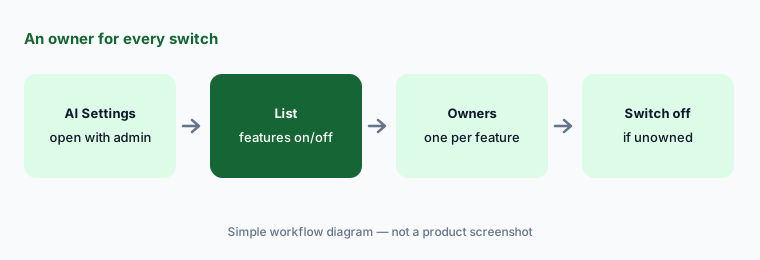
Owner per switch:
Open the AI Settings page with your admin. Write down which AI features are on, who owns each, and turn off anything nobody owns.
Pricing context (October 2026)
Buildium’s pricing page (read 28 Oct 2026) lists Essential starting at $65/month, Growth starting at $202/month, and Premium starting at $420/month; prices depend on unit count. A 14-day free trial is offered with no credit card required. Lumina AI rows on the comparison include Buildium Assistant (Help Only), Write with Lumina, AI Bill Scan, and Lumina AI Workforce, which points to account-specific pricing. Buildium’s AI page says all available Lumina AI features are included with Premium.
Separate services: the Maintenance Contact Center (a staffed call center, not AI) lists $1.10 per unit per month for all maintenance calls or $0.70 per unit per month for missed calls, a $140/month minimum, and a $300 one-time setup fee. Transaction fees (EFT, card payments, screening, eSignatures) vary by plan and are listed on the pricing page.
Uncertainty: Which Lumina features sit on Growth versus Premium is described in plan highlights and an FAQ rather than a full feature grid in the text we captured — confirm in a demo or trial before you upgrade for one feature. AI Workforce pricing is account-specific and not published. Agent names and scope can change; check the AI Settings page in your own account.
When it’s useful (honest take)
Useful when you run a small or mid-size residential portfolio, want published starting prices and a free trial, and have a bookkeeper who will check Bill Scan drafts and a property manager who reads AI-written messages.
Less useful when you need deep enterprise customization and agentic workflows across a large portfolio (compare AppFolio AI), you mainly run short-term rentals (see Guesty AI), or you expect the AI Workforce price to be included on a lower plan.
Paying for Buildium AI and a few other AI tools? The $9 AI toolkit spreadsheet lists every AI subscription you have, what each one costs, and how fast it pays for itself, so you can see which ones are worth the money.
Want someone to do it for you? AI toolkit audit — $19
Related options (educational)
| Need | Better home | Why |
|---|---|---|
| Small/mid residential PMS with published starting prices | Buildium AI (this page) | Lumina AI, Bill Scan, AI Workforce |
| Larger portfolios with agentic workflows | AppFolio AI | Realm-X, Flows, Performers; quote-based |
| Short-term and vacation rentals | Guesty AI | ReplyAI, AI agents, PriceOptimizer |
| AP approvals and payments | BILL AI | Bill approvals outside the PMS |
| General ledger for owner-landlords | QuickBooks AI · Xero AI | Books, not leasing or maintenance |
| Lease and notice signatures | DocuSign AI | Agreements, not property data |
FAQ
What is Lumina AI in Buildium?
Lumina AI is Buildium’s AI suite: AI Bill Scan, Write with Lumina, AI Assistant, AI summaries of maintenance tasks, and AI Workforce agents for maintenance, leasing, accounting, resident experience, and business operations.
Which Buildium plan includes Lumina AI?
Buildium’s FAQ (read 13 October 2026) says all available Lumina AI features are included with Premium. Essential lists the AI Assistant and Growth lists AI-enhanced communications and analytics. AI Workforce has account-specific pricing.
How much does Buildium cost?
Published starting prices are $65/month (Essential), $202/month (Growth), and $420/month (Premium) as of 28 October 2026, varying with unit count, plus transaction and service fees. There is a 14-day free trial.
Is Buildium’s Maintenance Contact Center an AI agent?
No. Buildium describes it as a 24/7 call center where professional agents answer maintenance calls, priced per unit per month with a monthly minimum and setup fee.
Can AI Bill Scan post bills without review?
It drafts bills from invoices. Keep the bookkeeper approving every draft until you trust the vendor and property matching — especially for invoices that cover more than one property.
Optional next step (if seats overlap)
If you pay for Buildium Premium, a separate AP tool, and general chat seats that all draft the same owner updates, that overlap is worth a look. Map the overlap with the $19 AI toolkit audit or the $9 AI toolkit spreadsheet. Email Audit $19 or Toolkit spreadsheet $9.
Checkout is live via Stripe. After you pay, we email delivery (spreadsheet) or intake next steps (audit).