How-to · Property management · Buildium · Oct 14, 2026
Scan vendor bills with Buildium's AI Bill Scan and have the bookkeeper approve every draft
Buildium's AI Bill Scan turns emailed or uploaded invoices into draft bills, capturing vendor, date, total, and line items. Extraction is fast; coding a bill to the right property, unit, and account is still a judgement call. This page shows how to run one week of bills through Bill Scan and have the bookkeeper approve each one.
Who this is for
Owner-operators, property managers, and bookkeepers at small residential management companies on Buildium who enter vendor bills by hand. The job here is bill entry with a bookkeeper's approval. For resident messaging, see the Buildium AI review.
How to do it
This is a how-to, not a ranking of property-management software. Per the Buildium AI review, AI Bill Scan lets you email invoices to your account's inbox or upload a batch, and captures vendors, dates, totals, and line items to build the bill. The review's ground rule: the bookkeeper approves every AI-drafted bill before it posts.

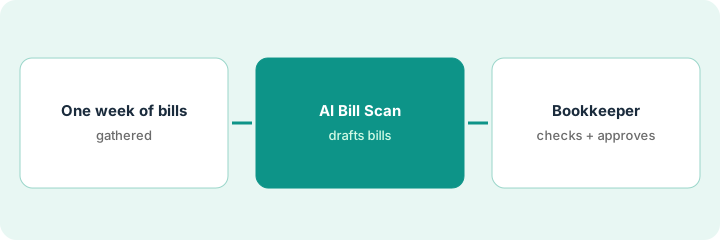
1. Step 1 — Gather one week of bills
What it is: Start with a small, normal batch so you can compare every draft with its invoice.
- Collect one week of vendor invoices.
- Include at least one vendor who works across several properties.
- Keep the originals (PDF or paper) next to you.
- Name the bookkeeper who approves.
The bookkeeper gathers last week's 22 invoices, including a landscaping vendor that bills four properties on one invoice.
Before scanning, write the number of invoices and their total. You'll compare with the drafts.
2. Step 2 — Run AI Bill Scan
What it is: Email or upload the batch and let Bill Scan draft the bills. Don't approve any yet.
- Upload the batch or forward the invoices.
- Check the number of drafts matches the number of invoices.
- Compare each draft total with the invoice total.
- Mark drafts where the property or unit looks uncertain.
Bill Scan drafts 22 bills. The landscaping invoice is drafted against one property instead of split across four, and one plumber's invoice has the date from the job, not the invoice.
Compare the total of all drafts with the total you wrote in Step 1. If they differ, find the difference before going further.
3. Step 3 — The bookkeeper checks and approves
What it is: The bookkeeper checks each draft for amount, vendor, property and unit, account, and date, then approves. Bills from vendors who work across properties get the closest look.
- Check vendor and amount against the invoice.
- Check the property, unit, and account coding.
- Split multi-property invoices correctly.
- Fix the date if needed.
- Approve; only approved bills go to payment.
The bookkeeper splits the landscaping bill across the four properties, fixes the plumber's date, and approves all 22. Next week she'll scan in the same way and track how many drafts she changed.
Track one number weekly: drafts changed before approval. When it's consistently low for a vendor, keep checking, but faster.
Pricing context (October 2026)
This how-to isn't a price sheet. Per the Buildium AI review, Buildium publishes starting prices for Essential, Growth, and Premium that depend on unit count, and its FAQ says all available Lumina AI features are included with Premium; Lumina AI Workforce has account-specific pricing. Dated October 2026.
Checked Oct 14, 2026 on the vendor’s own pricing page: Buildium’s pricing page lists Essential starting at $65/month, Growth starting at $202/month, and Premium starting at $420/month, with prices depending on unit count; AI Bill Scan appears in the Lumina AI section of the comparison.
Uncertainty: Which Lumina features sit on Growth versus Premium is described in plan highlights rather than a full grid; confirm in a demo or trial before upgrading for Bill Scan. The only prices this site sells here are the optional $9 AI toolkit spreadsheet and $19 AI toolkit audit.
When this helps (honest take)
Useful when you enter many vendor bills each week and the bookkeeper's time goes to typing rather than checking.
Not useful when most invoices are handwritten or split across many properties in non-standard ways. The checking time may match the typing time.
Related options (educational)
| Need | Where to look | Why |
|---|---|---|
| Buildium AI features | Buildium AI | Primary path on this page |
| A close alternative | AppFolio vs Buildium | Side-by-side |
| Resident messages approved by a manager | AppFolio Realm-X Resident Messenger | Same day's how-to |
| Cleaning tasks approved by ops | Breezeway task templates | Same day's how-to |
| A whole map of property tools | Stack map: property ops | Where Buildium fits |
FAQ
Can Bill Scan pay bills?
In this routine, no. It drafts bills; the bookkeeper approves before anything goes to payment.
Should resident bank details go through Bill Scan?
No. Bill Scan is for vendor invoices. Keep resident payment details out of anything you test with.
Where do current prices live?
On Buildium's pricing page. Our Oct 14, 2026 check of the vendor’s own pricing page is summarized in the pricing section above.
Which bills need the closest look?
Bills from vendors who work across several properties, because the property match is where drafts most often go wrong.
Optional next step
Free reviews stay free. If you pay for property software, a separate bill-capture tool, and a general AI chat tool, the $9 AI toolkit spreadsheet helps you lay them out, or the $19 AI toolkit audit gets you a written memo.