How-to · Short-term rentals · Breezeway · Oct 14, 2026
Let Breezeway draft cleaning and inspection task templates, and have the ops manager approve each one
Breezeway creates cleaning, inspection, and maintenance tasks from your reservation calendar, and Controller is an AI daily feed of work at risk. An auto-created clean timed against the wrong checkout sends a cleaner to an occupied home. This page shows how to test one template on one property and have the ops manager approve it before it runs everywhere.
Who this is for
Ops managers and cleaning leads at vacation-rental companies on Breezeway who coordinate turnovers across several homes. The job here is one task template, approved. For guest messaging, see the Breezeway AI review.
How to do it
This is a how-to, not a ranking of operations tools. Per the Breezeway AI review, Operations creates scheduling rules from reservations, occupancy, vacancy, and repeating tasks, then assigns work with checklists and photo proof; Controller ranks at-risk work such as unassigned tasks and cleans not started before check-in. The review's ground rule: the ops manager approves every AI-created task template.

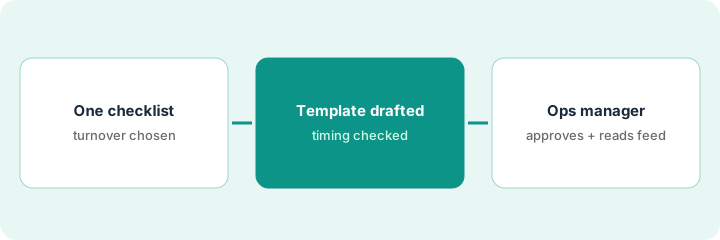
1. Step 1 — Pick one turnover checklist
What it is: Choose the turnover checklist you use most and one property to test it on. Write down the real turnover window for that property.
- Pick one property with frequent turnovers.
- Write its real check-out and check-in times.
- List the checklist items that must be photographed.
- Name the ops manager who approves.
The ops manager picks a beach house with back-to-back weekend stays. Check-out is 10 a.m., check-in 4 p.m. The checklist needs photos of the kitchen, bathrooms, and hot tub.
Write the property's real turnover window in hours. Any task scheduled outside it is wrong.
2. Step 2 — Let Breezeway create the tasks and check timing
What it is: Turn on auto-created cleaning tasks for the one property for a week and check each one against the reservation calendar.
- Check each task's start time against check-out.
- Check same-day back-to-back turnovers especially.
- Check that photo items are on the checklist.
- Note any task that would send a cleaner too early.
Two tasks land two hours before check-out because the template used a default turnover window. The ops manager notes both.
For the week, put each auto-created task next to its reservation and mark "timing OK" or "wrong." Fix the template until every one is OK.
3. Step 3 — The ops manager approves and reads the daily feed
What it is: The ops manager fixes the template, approves it, and then rolls it out property by property. Per the review, Controller's daily feed surfaces at-risk work and suggests assignees; the ops manager checks each suggestion against the person's load before assigning.
- Edit the template timing and checklist.
- Check the next five reservations by hand.
- Approve the template in writing.
- Roll it out to similar properties one at a time.
- Read Controller's feed each morning; confirm suggested assignees before assigning.
She edits the template to start at check-out, checks the next five stays, and approves it. Next morning, Controller shows three unassigned cleans on one street and suggests two cleaners; she checks their load and assigns both.
Keep a template log: "Template, properties, approved by, date." Add a property only after a week of correct timing.
Pricing context (October 2026)
This how-to isn't a price sheet. Per the Breezeway AI review, Breezeway offers a free first property, a self-serve Operations price per unit for small portfolios, and sales-led tiers for larger ones; Controller is included in any Operations plan. Dated October 2026.
Checked Oct 14, 2026 on the vendor’s own pricing page: Breezeway’s pricing page says Operations starts at $19.99 per unit per month; Guest Messaging, Guide, and Assist are priced as add-ons. Controller is included with Operations per our review.
Uncertainty: Add-on prices for Messaging, Guide, Assist, and Concierge were not shown as dollar amounts in our review. Larger portfolios need a sales conversation. The only prices this site sells here are the optional $9 AI toolkit spreadsheet and $19 AI toolkit audit.
When this helps (honest take)
Useful when you manage several homes with frequent turnovers and want tasks scheduled from the calendar without manual entry.
Not useful when check-out times vary booking by booking without being in the calendar. Fix the reservation data first.
Related options (educational)
| Need | Where to look | Why |
|---|---|---|
| Breezeway AI features | Breezeway AI | Primary path on this page |
| Another rental operations platform | Hostfully AI | Comparison point |
| Guest message templates | Hospitable templates | Same day's how-to |
| Vendor bills checked by a bookkeeper | Buildium Bill Scan | Same day's how-to |
| A whole map of property tools | Stack map: property ops | Where Breezeway fits |
FAQ
Does Controller assign work on its own?
In this routine, no. Controller suggests; the ops manager checks the person's load and assigns.
How many properties should we test on?
One, for a week that includes a back-to-back turnover. Then add similar properties one at a time.
Where do current prices live?
On Breezeway's pricing page for self-serve Operations, and with sales for larger portfolios. Our Oct 14, 2026 check of the vendor’s own pricing page is summarized in the pricing section above.
How long should a new template run on one home before rolling it out?
At least a week of reservations, including one back-to-back turnover, checked by hand against the calendar.
Optional next step
Free reviews stay free. If you pay for an operations tool, a rental platform with its own task features, and a messaging add-on, the $9 AI toolkit spreadsheet helps you lay them out, or the $19 AI toolkit audit gets you a written memo.