How-to · Short-term rentals · Hospitable · Oct 14, 2026
Write Hospitable's scheduled messages and Q&A auto replies once, and approve every template
Hospitable sends scheduled guest messages (check-in instructions, reminders, review requests) and Q&A auto replies for common questions. The Message AI Assistant helps you write them. A template runs on every booking, so one wrong trigger reaches every guest. This page shows how to write the core set once and have the host approve each one.
Who this is for
Hosts and co-hosts with a handful of listings on Hospitable who want automated messages that are right for every booking. The job here is the template set. For reply rules in a larger platform, see Guesty ReplyAI rules.
How to do it
This is a how-to, not a ranking of rental platforms. Per the Hospitable AI review, automated messaging covers scheduled guest messages and Q&A auto replies, the Message AI Assistant is listed from the Host plan, and Inbox AI with a Knowledge Hub is on the top Mogul plan.

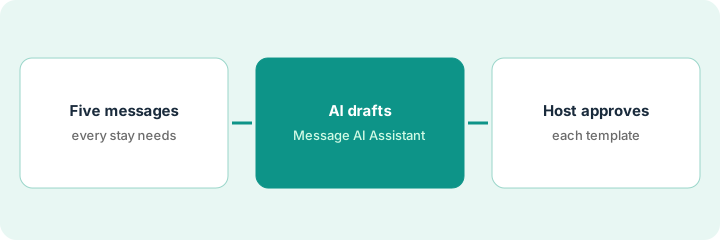
1. Step 1 — List the five messages every stay needs
What it is: Most stays need the same five messages. List them with when each should send and what it must include.
- Booking confirmation and what happens next.
- Check-in instructions (timing matters; see Step 3).
- Mid-stay check.
- Check-out reminder.
- Review request after departure.
The host lists the five messages and the facts each needs: check-in time, parking, Wi-Fi, check-out tasks, and a thank-you. She notes the door code belongs only in the check-in message.
Write a table: "Message / Sends when / Must include / Must not include." Fill it before writing any text.
2. Step 2 — Draft them with the Message AI Assistant
What it is: Use the Message AI Assistant to draft each template from your table and property details. Then read each one against the table.
- Draft each message from its row in the table.
- Check every fact against the listing.
- Remove anything the table says must not be included.
- Keep the tone consistent across all five.
The check-out reminder draft asks guests to strip beds, which the host doesn't require, and the mid-stay message offers early check-out "anytime," which conflicts with her cleaner's schedule. She removes both.
Read each draft once only for facts, and once only for promises. Delete any promise you don't already make.
3. Step 3 — The host approves each template
What it is: Before turning a template on, test what happens for a same-day booking and a cancelled stay. Then the host approves it. Per the review, a check-in message that sends door instructions 48 hours ahead can be too early for a same-day booking that hasn't been verified.
- For each template, check the same-day booking case.
- Check the cancelled-stay case.
- Fix triggers that send too early or after a cancellation.
- The host approves each template in writing.
- Do the same for each Q&A auto reply.
The check-in message sends 48 hours ahead. For a same-day booking it would send immediately, before verification. The host changes the trigger and adds a manual step for last-minute bookings, then approves all five.
Open every scheduled template and write what happens on a same-day booking and a cancelled stay. Approve only templates where both answers are fine.
Pricing context (October 2026)
This how-to isn't a price sheet. Per the Hospitable AI review, Essentials is free, Host and Professional are priced by property count through a calculator, and Mogul is sold through a demo. Dated October 2026.
Checked Oct 14, 2026 on the vendor’s own pricing page: Hospitable’s pricing page lists Essentials as free, Host and Professional priced by property count through a calculator, and Mogul through a demo; plan amounts did not show as fixed figures on our read. This page quotes no Hospitable dollar figure; confirm what your contract includes with Hospitable or your admin.
Uncertainty: Plan prices render through a calculator; check it for your property count. Which AI features sit on which plan may change; confirm Message AI Assistant availability before buying. The only prices this site sells here are the optional $9 AI toolkit spreadsheet and $19 AI toolkit audit.
When this helps (honest take)
Useful when you send the same messages for every stay and want them right once. Testing edge cases prevents the most common automated-message mistakes.
Not useful when each property needs different messages and you only host occasionally. Writing by hand may be simpler.
Related options (educational)
| Need | Where to look | Why |
|---|---|---|
| Hospitable AI features | Hospitable AI | Primary path on this page |
| Another host platform | Lodgify AI | Comparison point |
| Reply rules with a named approver | Guesty ReplyAI rules | Same day's how-to |
| Cleaning tasks from the calendar | Breezeway task templates | Same day's how-to |
| A whole map of property tools | Stack map: property ops | Where Hospitable fits |
FAQ
Do Q&A auto replies need the same approval?
Yes. They answer guests without review, so the host approves each one like a scheduled message.
Is Inbox AI needed for this?
No. Per our review, Inbox AI and the Knowledge Hub are on Mogul; this routine uses scheduled messages and the Message AI Assistant.
Where do current prices live?
On Hospitable's pricing page calculator. Our Oct 14, 2026 check of the vendor’s own pricing page is summarized in the pricing section above.
Should door codes go in a scheduled message?
Only if the trigger waits until the booking is verified and close to check-in. Check the same-day booking case before you approve it.
Optional next step
Free reviews stay free. If you pay for a rental platform, a messaging tool, and a general AI chat tool that all write guest messages, the $9 AI toolkit spreadsheet helps you lay them out, or the $19 AI toolkit audit gets you a written memo.