How-to · Short-term rentals · Guesty · Oct 14, 2026
Set Guesty ReplyAI rules for three guest questions and name who approves each rule
Guesty's ReplyAI drafts a reply to each guest message in the unified inbox, using reservation details and rules you specify. Drafts are only as accurate as your listing data. This page shows how to start with three repeat questions, find the gaps in your data, and have one named person approve each rule.
Who this is for
Short-term rental managers and guest-experience leads on Guesty who answer the same guest questions all day. The job here is three reply rules with a named approver. For filling a knowledge base before turning on automatic replies in another tool, see a different job: Fill Hostaway's Knowledge Base before Auto-reply.
How to do it
This is a how-to, not a ranking of rental platforms. Per the Guesty AI review, ReplyAI drafts a personalized reply for each guest message with reservation details beside the conversation, and Guesty's agent catalog describes replies in brand voice based on rules you specify. The review's ground rule: the guest-experience lead approves every ReplyAI rule before replies go out without review.

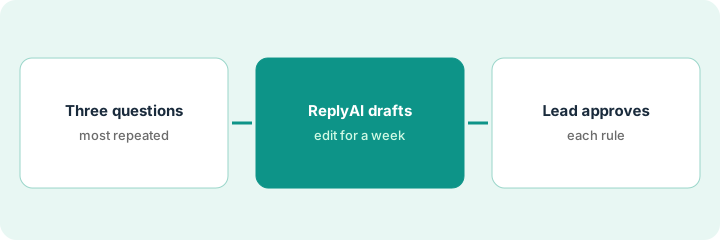
1. Step 1 — Pick three repeat questions
What it is: Look at last month's guest messages and find the three questions you answer most. Those are the first rules.
- Read or search last month's messages.
- Count the most common questions (check-in time, parking, Wi-Fi are typical).
- Pick three with one clear, stable answer.
- Name the guest-experience lead who approves rules.
The manager runs twelve cottages. Last month's top questions: check-out time, parking, and early check-in. Early check-in depends on cleaning, so she picks check-out, parking, and Wi-Fi instead.
Write the three questions and the correct answer for each, per property where it differs. That list is what ReplyAI will be checked against.
2. Step 2 — Let ReplyAI draft and edit for a week
What it is: Turn on ReplyAI drafts and edit every reply before sending for at least a week. Each edit shows a gap in your listing data or rules.
- Edit and send every draft yourself for a week.
- Note each wrong or missing fact.
- Fix the listing details and saved replies, not just the message.
- Keep door codes and guest IDs out of anything you test with.
Three drafts quote the old 10 a.m. check-out (it's 11 now) and one says parking is free when it's a paid lot. She fixes the listing details and saved replies, then runs another week of drafts.
Keep a list during the week: "Draft said / Should say / Fixed where." Don't move on until the list stops growing.
3. Step 3 — The lead approves each rule
What it is: The guest-experience lead approves each rule in writing before it's allowed to send without review. Rules outside the three stay as drafts.
- Write the rule for each question.
- The lead reads the rule and three recent drafts it produced.
- The lead approves or asks for changes.
- Record who approved each rule and when.
- Recheck the rules whenever a listing changes.
The lead approves the check-out and Wi-Fi rules. She holds parking for one more week because two cottages share a lot with new rules. Everything else stays edit-before-send.
Keep a one-page rule log: "Rule, approved by, date, listings covered." Review it every time a property's details change.
Pricing context (October 2026)
This how-to isn't a price sheet. Per the Guesty AI review, Guesty publishes a starting per-listing price for Guesty Lite, while Pro and Enterprise are quoted; ReplyAI is marked Freemium on every plan. Dated October 2026.
Checked Oct 14, 2026 on the vendor’s own pricing page: Guesty’s pricing page says Guesty starts at $9 per listing per month on Guesty Lite; Pro is priced by listing count behind a quote, and Enterprise is customized. ReplyAI is marked Freemium on each plan.
Uncertainty: "Freemium" isn't defined on Guesty's pricing page; ask what the free tier covers. Guesty's agent catalog is long and changing, so confirm which agents act on their own in your account. The only prices this site sells here are the optional $9 AI toolkit spreadsheet and $19 AI toolkit audit.
When this helps (honest take)
Useful when most guest messages are repeat questions with stable answers and you have someone to own the rules.
Not useful when your listing data is out of date or answers vary by booking. Fix the data first, or keep replying by hand.
Related options (educational)
| Need | Where to look | Why |
|---|---|---|
| Guesty AI features | Guesty AI | Primary path on this page |
| A close alternative | Guesty vs Hostaway | Side-by-side |
| Knowledge base before automatic replies | Hostaway Auto-reply | A different job |
| Scheduled message templates | Hospitable templates | Same day's how-to |
| A whole map of property tools | Stack map: property ops | Where Guesty fits |
FAQ
Should ReplyAI answer pricing or refund questions?
Not in this routine. Those depend on the booking and your policy; keep them edit-before-send.
What about local rules and permits?
Per our review, local short-term rental rules, permits, and taxes are checked by a person, not inferred by AI.
Where do current prices live?
On Guesty's pricing page for Lite, and through a quote for Pro and Enterprise. Our Oct 14, 2026 check of the vendor’s own pricing page is summarized in the pricing section above.
What does Freemium mean for ReplyAI?
Guesty’s pricing page doesn’t define it. Ask your account manager what the free tier covers and when billing would start.
Optional next step
Free reviews stay free. If you pay for a rental platform, a separate guest-messaging tool, and a general AI chat tool, the $9 AI toolkit spreadsheet helps you lay them out, or the $19 AI toolkit audit gets you a written memo.