How-to · Property management · AppFolio · Oct 14, 2026
Use AppFolio's Realm-X Resident Messenger, and have a named property manager approve what reaches residents
AppFolio's Realm-X Performers include a Resident Messenger that answers resident conversations day or night. Messages to residents carry legal and relationship weight: a wrong answer about a fee, a repair, or a renewal is hard to take back. This page shows how to start with one message type and have a named property manager approve what goes out.
Who this is for
Property managers and portfolio directors at residential management companies on AppFolio who are switching on Realm-X Performers. The job here is resident messaging with a named approver. For the commercial side, see the MRI Software AI review.
How to do it
This is a how-to, not a ranking of property-management software. Per the AppFolio AI review, the Resident Messenger Performer answers resident conversations day or night and works inside Flows; AppFolio's 29 September 2026 release says the new Realm-X is available with all plans. The review's ground rules: a named property manager approves every bulk resident message and every Performer before its hours or scope widen, and leasing answers get a fair-housing read by the leasing manager.

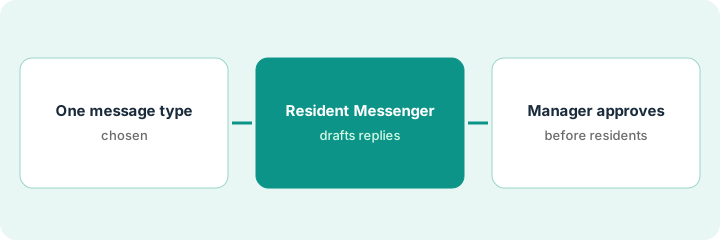
1. Step 1 — Pick one message type
What it is: Start with one common, low-risk message type with a clear written answer, such as maintenance request status or amenity hours. Leave fees, renewals, and anything leasing-related for later.
- List last month's most common resident questions.
- Pick one with a clear, written answer.
- Write the answer and where it comes from (work order system, community rules).
- Name the property manager who approves.
The property manager picks "When will my maintenance request be done?" for one community. The answer comes from the work order list. Renewal and fee questions stay with staff.
Write: "Message type: [ ]. Source of truth: [ ]. Approver: [name]. Out of scope: [fees, renewals, leasing]."
2. Step 2 — Let Resident Messenger draft
What it is: Configure Resident Messenger for the chosen message type at one property, with drafts reviewed before sending. Check each draft against the source of truth.
- Limit it to one property and one message type.
- Check each draft against the work order list.
- Note drafts that promise dates or outcomes.
- Keep door codes and screening data out of prompts.
A draft tells a resident their leak will be fixed "today," but the work order shows the vendor scheduled for tomorrow. Another quotes a work order that was completed but never closed. The manager fixes the work order list and notes both.
For a week, mark each draft "correct," "wrong date," or "wrong status." Fix the source data before changing the messenger.
3. Step 3 — The manager approves before residents see it
What it is: The named property manager approves drafts before they're sent, at least until the error rate is near zero. Anything touching leasing, renewals, or eligibility also goes to the leasing manager for a fair-housing read.
- Review drafts daily before they go out.
- Approve, edit, or reply yourself.
- Route leasing-related messages to the leasing manager.
- Widen hours or message types only with the manager's written approval.
- Record each widening and the date.
After two weeks with no wrong dates, the manager approves Resident Messenger sending maintenance-status replies after hours for this community only, and reads a sample each morning.
Keep a scope log: "Message type, property, hours, approved by, date." Nothing goes beyond what's on the log.
Pricing context (October 2026)
This how-to isn't a price sheet. Per the AppFolio AI review, AppFolio's pricing page lists Core, Plus, and Max with Get a Quote buttons and no dollar amounts; AppFolio lists no prices for the Resident Messenger or other Performers. Dated October 2026.
Checked Oct 14, 2026 on the vendor’s own pricing page: AppFolio shows no public list price. AppFolio’s pricing page lists Core, Plus, and Max with Get a Quote buttons and no dollar figures and no Performer prices. This page quotes no AppFolio dollar figure; confirm what your contract includes with AppFolio or your admin.
Uncertainty: New Realm-X capabilities were announced 29 September 2026; confirm what is switched on in your database before writing processes around it. Plan contents and minimums can change. The only prices this site sells here are the optional $9 AI toolkit spreadsheet and $19 AI toolkit audit.
When this helps (honest take)
Useful when residents send many routine questions after hours and your work order data is kept current.
Not useful when data is stale (the messenger will repeat it) or most questions involve fees, disputes, or leasing decisions. Those need a person, and fair-housing review where relevant.
Related options (educational)
| Need | Where to look | Why |
|---|---|---|
| AppFolio AI features | AppFolio AI | Primary path on this page |
| A close alternative | AppFolio vs Buildium | Side-by-side |
| Commercial property software | MRI Software AI | Comparison point |
| Vendor bills approved by a bookkeeper | Buildium Bill Scan | Same day's how-to |
| A whole map of property tools | Stack map: property ops | Where AppFolio fits |
FAQ
Can Resident Messenger discuss rent increases?
Not in this routine. Rent and renewal conversations stay with staff and get a fair-housing read.
Who approves bulk resident messages?
Per our review, the named property manager approves every bulk resident message.
Where do current prices live?
With AppFolio's sales team, as a quote. Our Oct 14, 2026 check of the vendor’s own pricing page is summarized in the pricing section above.
Does fair-housing review apply to resident messages?
Yes, for anything touching leasing, renewals, or eligibility. Route those messages through the leasing manager as well as the property manager.
Optional next step
Free reviews stay free. If you pay for property software, a separate resident-messaging tool, and a general AI chat tool, the $9 AI toolkit spreadsheet helps you lay them out, or the $19 AI toolkit audit gets you a written memo.