Role guide · Research ops · ChatGPT Business · Oct 2026
ChatGPT for research ops (Oct 2026): screeners, survey drafts, and feedback summaries
Research ops role guide — a shared survey drafter GPT in a ChatGPT Business workspace that turns one study goal into neutral questions, plus screener drafts and open-text feedback summaries with row numbers you can check. Instructions forbid inventing quotes or counts. ChatGPT drafts; researchers approve every survey, screener, and summary before it reaches a participant or a stakeholder. Companion to Claude for research ops and ChatGPT for product ops.
Who this guide is for
Research ops leads, UX researchers, and the PM who sends the quarterly survey, at companies that already have ChatGPT Business (formerly ChatGPT Team) or Enterprise. You want repeatable drafts for surveys, screeners, and the pile of open-text feedback. If your team works in Claude, see Claude for research ops; if surveys run inside your product, Sprig AI analyzes open text at the source. Product deep-dive: ChatGPT. Sibling role guides: ChatGPT for product ops, ChatGPT for support, ChatGPT for knowledge.
Custom GPTs are being retired — read this first. OpenAI’s help center (read 9 October 2026) says custom GPTs are scheduled to retire on December 11, 2026 (February 11, 2027 for Enterprise workspaces with an approved deferral), that the change affects all ChatGPT plans, and that it recommends moving GPTs to plugins. New GPT creation and publishing are already unavailable on personal accounts (Free, Go, Plus, Pro); in Business, Enterprise, and Edu workspaces, creating GPTs depends on workspace settings. For affected Enterprise workspaces, OpenAI lists October 26, 2026 (planned) as the end of new custom GPT creation. Existing GPTs keep working until retirement. This guide still starts with a GPT because the instructions are what you will carry into a plugin; section 6 covers the move.
Ground rules: ChatGPT never launches a survey, sends a screener, or contacts a participant — a researcher approves every question and sends it from your survey or panel tool. Instructions must forbid inventing quotes, counts, or percentages, and must mark gaps “Unknown.” Never paste participant names, emails, or account IDs from survey exports; use row numbers. Keep research work in the Business workspace, where OpenAI says it doesn’t train on your business data by default, not in personal accounts.

Major features (with how someone uses them)
Examples at a glance: each feature has a concrete example from a real job plus a short Try this you can run this week.
1. GPT survey drafter (primary)
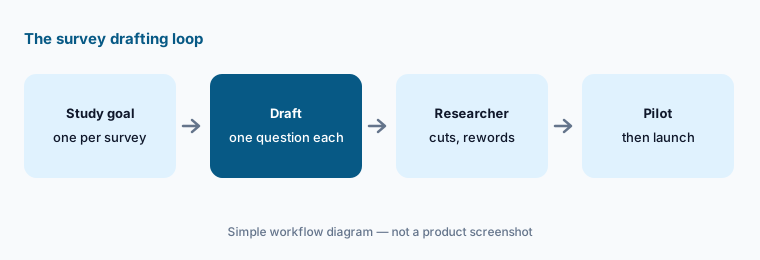
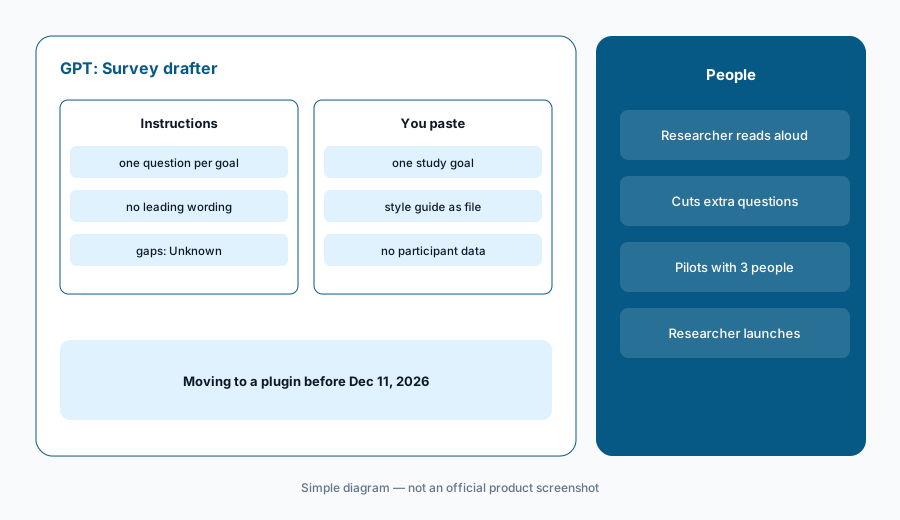
What it is: In a Business workspace where you are allowed to create GPTs, open the GPTs area, select Create, and use the configuration view. Name it Survey drafter. In Instructions, write the rules: one question per goal; no leading or loaded wording (“How much do you love…”); no double-barreled questions; neutral answer options that include “none of these” or “don’t know” where it fits; plain words; never invent a statistic or a quote; mark anything the goal doesn’t say “Unknown.” Attach your question style guide and two past surveys you liked as knowledge files, test in Preview, and share it with the research team only. OpenAI says GPT builders cannot see individual conversations people have with a GPT, and that GPTs do not use saved memory or custom instructions — each chat starts fresh.
The value is the discipline, not the wording. A drafter that refuses to write two questions for one goal keeps surveys short, and a short survey gets more honest answers. The researcher still reads every question aloud once — leading wording is easier to hear than to see.
Primary workflow:
GPT survey drafter. Instructions: one question per goal, no leading wording. Paste one study goal.
2. Screener questions that don’t give away the answer
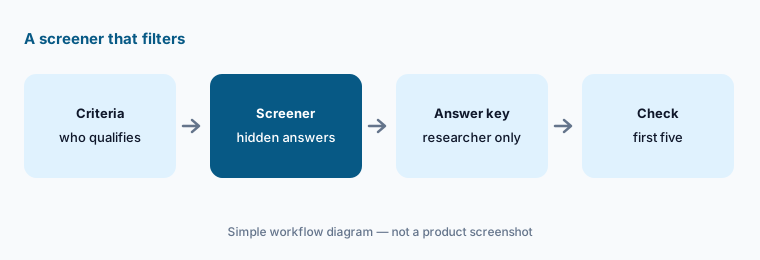
What it is: Paste the participant criteria for a study — role, product usage, company size, and who you must exclude — and ask for a screener. Tell ChatGPT to hide the qualifying answer among plausible options, to ask about behavior (“In the last month, how often did you…”) rather than identity, to include one disqualifying question for people who work in research or for a competitor, and to list which answer qualifies or disqualifies for each question in a separate key for the researcher only.
A screener that reads “Are you a product manager who uses analytics weekly?” recruits people who say yes. Hidden qualifiers and behavior questions filter better. The researcher checks the first five qualified participants against the criteria before the study fills up.
Hide the qualifier:
Paste the criteria for your next study. Ask for a screener with hidden qualifying answers, behavior questions, one disqualifier, and a separate answer key. Check the first five qualified participants against the criteria.
3. Open-text feedback summaries
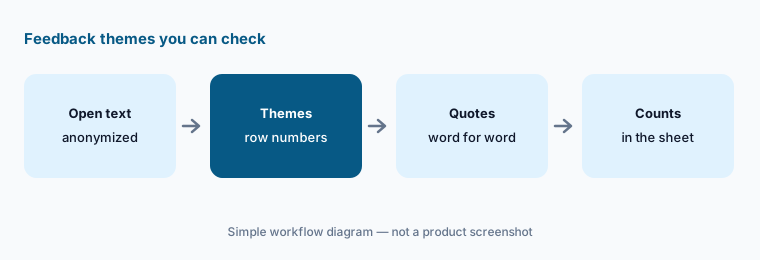
What it is: Export open-text answers with a row number and any segment fields, remove names and emails, and paste or upload them. Ask for themes with the row numbers under each and one verbatim quote per theme — copied, not paraphrased. Put the counting in the spreadsheet: ask ChatGPT to list row numbers, then count them yourself. Instructions should say “never state a percentage or count you did not compute from the rows” and “quote only text that appears in the file.”
Two checks keep the summary honest: open ten rows from the biggest theme to confirm they belong, and search the export for every quote. If feedback already flows into a repository, Dovetail offers a connector for ChatGPT (announced 25 March 2026) that searches your workspace and references individual customer quotes — still check the quotes against the source.
Quotes must match:
Upload one open-text export with row numbers and no names. Ask for themes with row numbers and one exact quote each. Search the file for every quote and count themes in the sheet before you share.
4. Projects for one study
What it is: A GPT is a reusable tool; a Project is a folder for one piece of work. OpenAI’s Business pricing page lists Projects, shared projects, and scheduled tasks on Business. Create one project per study, add the brief, the approved screener and survey, and the summary decisions as files, and keep study chats inside it so the context stays together. Share it with the researcher, the PM, and the designer on that study — not the whole company.
Projects are also a reasonable home for the survey drafter’s instructions if your workspace can no longer create GPTs: paste the same rules into the project’s instructions and attach the style guide.
One study, one project:
Create a project for your next study, add the brief and style guide, and keep every study chat inside it. At readout, check whether anyone needed a file that wasn’t there.
5. Where research data belongs
What it is: OpenAI says ChatGPT Business, Enterprise, and Edu data is not used for training by default, while consumer plans (Free, Plus, Go, Pro) may be, depending on your opt-out setting. Its Business pricing page lists SAML SSO, MFA, an admin console, and GPT analytics and management for Business; granular GPT controls and group permissions are listed for Enterprise only. Keep survey exports and notes in the Business workspace, anonymize rows, and review any GPT or plugin that connects to outside apps — OpenAI says relevant parts of your input may be sent to those services, and it does not audit how they use your data.
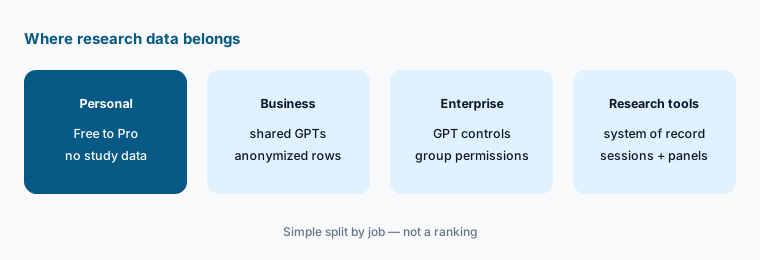
Write the three rules:
Write three data rules for your research team’s ChatGPT use — what may be pasted, where, and who reviews connected apps — and pin them in your survey drafter’s instructions.
6. Move the GPT to a plugin before December 11
What it is: When migration is available for your account, OpenAI says you go to My GPTs and select Migrate to plugin. Under the planned workflow, the GPT’s instructions become a skill in the new plugin, knowledge files become reference files, and connected apps carry over as apps. The selected model, custom actions, and sharing settings do not carry over; migration uses the latest published version (drafts don’t transfer), the original becomes read-only, and the new plugin starts private. OpenAI recommends saving a few familiar prompts and comparing the replacement’s results before switching. Its Business pricing page lists Plugins and Skills (beta) on Business.
For a survey drafter, the test is simple: run the same three study goals through the GPT and the plugin and compare. If the plugin writes two questions for one goal or slips in a leading phrase, the rules did not survive the move — fix the skill before you reshare it.
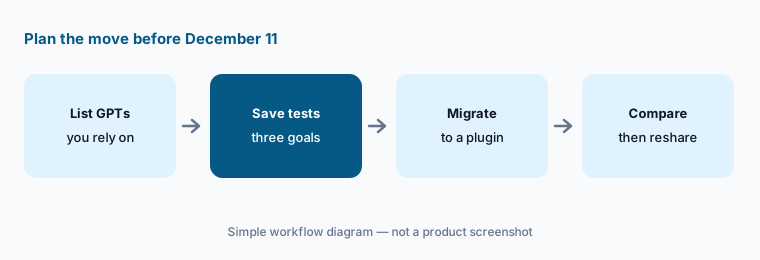
Test the replacement:
Before December 11, 2026, save three study goals you have already run through your survey drafter GPT. After migrating it to a plugin, run the same goals and compare the questions before anyone switches.
Pricing context (October 2026)
OpenAI’s Business pricing page (as listed 9 Oct 2026, USD): Standard seat $20 per user per month billed annually or $25 billed monthly; Premium seat $100 per user per month billed annually or $125 billed monthly, with 5x the usage of Standard and no 5-hour limit. Seat types can be mixed; Business is for teams of 2 to 200 and starts at two users. The page says Business and Enterprise can buy credits for more access. Enterprise is priced through sales.
Personal-plan prices are not quoted here because personal accounts can no longer create GPTs and are not where participant data should live. Full dated notes are on the ChatGPT deep-dive.
Uncertainty: Seat types, usage limits, and the GPT-to-plugin timeline can change. OpenAI says migration may reach accounts at different times, that its dates are subject to change, and that restrictions on creating GPTs are separate from retirement of existing GPTs; the October 26 creation cutoff is listed for affected Enterprise workspaces, with other plans expected to follow the same timeline. Skills is labelled beta on the pricing page. Consent and participant-data rules are your organization’s call.
When it’s useful (honest take)
Useful when your company already pays for ChatGPT Business or Enterprise, surveys and screeners follow a written style guide, and someone owns the shared GPT (and its plugin replacement) and keeps its instructions current.
Useful when researchers need quick neutral drafts and feedback themes with row numbers they can check, and counting stays in the spreadsheet.
Less useful when nobody will plan the December 2026 GPT retirement, exports can’t be anonymized first, your survey or repository tool already drafts and summarizes in place, or anyone expects ChatGPT to launch a survey or contact participants.
Paying for ChatGPT and a few other AI tools? The $9 AI toolkit spreadsheet lists every AI subscription you have, what each one costs, and how fast it pays for itself, so you can see which ones are worth the money.
Want someone to do it for you? AI toolkit audit — $19
Related options (educational)
| Need | Better home | Why |
|---|---|---|
| Interview guides, synthesis checks, readouts in Claude | Claude for research ops | Projects with participant codes |
| In-product surveys with AI themes | Sprig AI | Surveys and analysis at the source |
| Interview and feedback themes with source highlights | Dovetail AI | Repository with Chat and Agents |
| Unmoderated and AI-moderated tests | Maze AI or UserTesting AI | Where studies run |
| Product ops drafting in ChatGPT | ChatGPT for product ops | Launch checklists, copy, NPS |
| Inventory before adding a seat | Stack map for research ops | One row per job and tool |
FAQ
How should a research ops team set up ChatGPT?
In a Business or Enterprise workspace, create a Survey drafter GPT (or project instructions, if your workspace no longer allows new GPTs) with one question per goal, no leading wording, and no invented quotes or counts. Share it with the research team and have a researcher approve every survey and screener before it goes out.
Are custom GPTs going away?
Yes. OpenAI says custom GPTs are scheduled to retire on December 11, 2026 (February 11, 2027 for Enterprise workspaces with an approved deferral) and recommends migrating to plugins: instructions become a skill and knowledge files become reference files, while the model, custom actions, and sharing settings do not carry over. See OpenAI’s retirement FAQ.
Can ChatGPT write a screener?
It can draft one from your criteria with hidden qualifying answers and a separate key for the researcher. The researcher removes anything that tips people off, loads it into the panel tool, and checks the first five qualified participants against the criteria.
Is research data used to train OpenAI models?
OpenAI says ChatGPT Business, Enterprise, and Edu data is not used for training by default; consumer plans may be, depending on the opt-out setting. Keep exports anonymized, in the Business workspace, and review any GPT or plugin that sends data to outside apps.
What does ChatGPT Business cost in October 2026?
As listed on 9 October 2026: Standard seats $20 per user per month billed annually or $25 monthly, and Premium seats $100 annually or $125 monthly with 5x the usage, for teams of 2 to 200. See openai.com/business/pricing.
Optional next step (if seats overlap)
If research ops pays for ChatGPT, Claude, a survey tool’s AI analysis, and a repository’s summaries that all theme the same feedback, fix that overlap before adding another seat. Map the overlap with the $19 AI toolkit audit or the $9 AI toolkit spreadsheet. Email Audit $19 or Toolkit spreadsheet $9.
Checkout is live via Stripe. After you pay, we email delivery (spreadsheet) or intake next steps (audit).