Tool · Customer insight · Dovetail · Oct 2026
Dovetail AI review (Oct 2026): Chat, Agents, Channels, and MCP for customer insight teams
Dovetail is a customer insight platform: research projects (interviews, usability tests, calls, surveys), continuous feedback in Channels, and shareable Docs. Its AI layer now spans Chat (Fast and Deep research modes, plus voice mode in beta), Dovetail Agents that run on triggers, Channels 2.0 ideas from high-volume feedback, Digital Twins built from customer data, automatic redaction, and an MCP server with connectors for Claude and ChatGPT. This page is about using those features to find themes faster — with a researcher opening the source highlights behind every insight before it is shared. Each section has a Try this.
What this Dovetail page covers
This page is for a UX researcher, a research ops lead, or a product manager who owns customer feedback and wants to know what Dovetail’s AI actually does with interviews, calls, and tickets. The question it answers: which AI features turn a pile of recordings and feedback into themes you can act on, what each one reads, and where a person still has to open the source and approve before anything reaches a roadmap, a customer, or another tool.
Dovetail’s changelog (read 9 October 2026) shows a busy year: Chat’s Deep research mode (23 June), Dovetail Agents in general availability (15 July), Channels 2.0 in open beta (1 September), agents you can create by describing them in chat (21 September), project and workspace context in the MCP server (23 September), voice mode for Chat and Digital Twins (1 October), and, today, a beta called Sources that connects each feedback tool once for the whole workspace. Dates below are as shown on that page.
Ground rules for using any of this: AI never launches a study, merges or closes customer feedback, or publishes a roadmap change without a named person approving it; participant and customer personal data stays redacted; and an AI-written line is never presented as a participant’s words — only a quote you can play or read in the source highlight counts. Everything below comes from Dovetail’s pricing page and changelog as we read them on 9 October 2026; we did not use third-party price estimates.
Major features (with how someone uses them)
Examples at a glance: each feature has a concrete example from a real job plus a short Try this you can run this week.
1. Chat: top themes, then open the highlights (primary)
What it is: Chat answers questions across your Dovetail data. Since 23 June 2026 it has two modes: Fast, which Dovetail describes as instant, cited answers for everyday questions, and Deep research, which takes longer to reason across more evidence — sales calls, support tickets, and research sessions — for harder questions. You switch with the mode selector in the prompt toolbar. Earlier changelog entries add multiple contexts at once (April) and code and charts in chat (June).
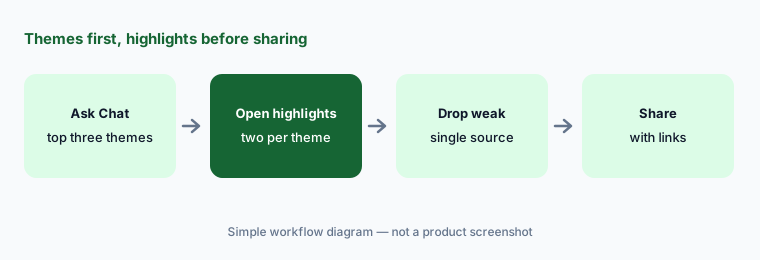
Citations are the point. A theme in a chat answer is a claim about your data; the highlight it cites is the evidence. Open at least two highlights per theme, play or read them in context, and drop any theme whose highlights don’t say what the summary says. Only then copy the theme into a Doc or a message.
Primary workflow:
Ask Dovetail Chat for the top three themes in last month’s interviews. Open two source highlights per theme before you share it.
2. Dovetail Agents: triggers, scoped tools, and an approver
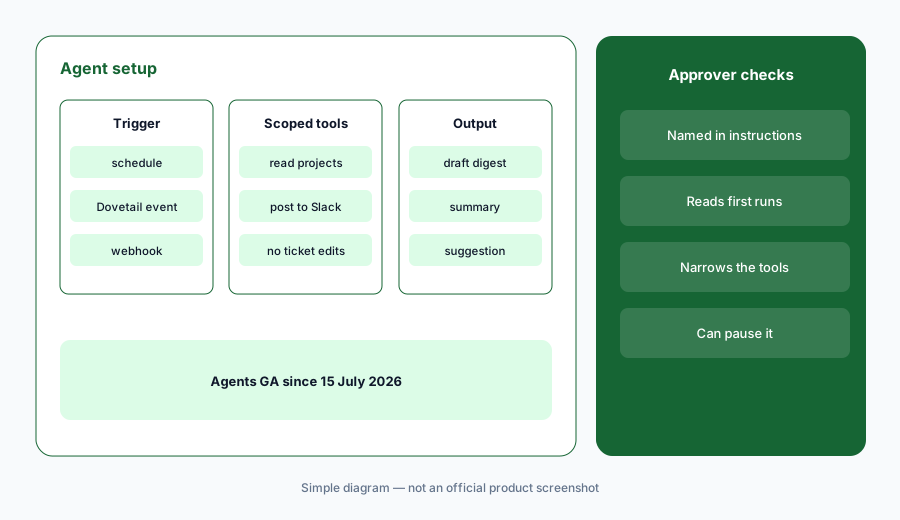
What it is: Dovetail announced Agents in general availability on 15 July 2026. An agent runs on demand, on a schedule, on Dovetail events (project created, Doc updated, data added), or from webhooks in Salesforce, Jira, and Slack. It can use skills (a Doc or insight attached for context), connectors (Linear, Notion, Hex, Salesforce, Canva, Gmail, or a custom MCP server), and scoped tools — you pick exactly which tools each agent may use. Since 21 September, agent setup offers Create with chat, which drafts the agent’s instructions from your description. Dovetail’s GA post says agents are available on all paid plans; agents can also be paused and resumed (March 2026).
Start every agent read-only or draft-only. An agent that posts a weekly summary to Slack is low risk; one that updates Jira tickets or messages customers needs a named approver and a narrow tool scope. Write the approver’s name into the agent’s instructions and check its first four runs by hand.
Draft-only first:
Create one scheduled agent with chat that drafts a weekly highlight digest. Scope it to read-only plus one channel, name an approver in its instructions, and review four runs before it posts on its own.
3. Channels 2.0 and Sources: ideas from high-volume feedback
What it is: Channels classifies continuous feedback — tickets, reviews, surveys, calls. Channels 2.0 (open beta since 1 September 2026; opt in under Settings → General → Beta) surfaces feature requests, bugs, and pain points as ideas rather than broad themes, with commercial context (ARR, plan tier, segment) from Salesforce or HubSpot, owners, status, priority, trend lines, saved views, and one-click hand-off to Jira, Linear, Claude, Claude Code, Figma, or ChatGPT. It can also draft a notification to every customer who raised an idea once it’s resolved. Sources (beta, 9 October 2026) lets an admin connect each feedback tool once for the whole workspace — Dovetail lists Gong, Intercom, Zendesk, Freshdesk, Salesforce Service Cloud, HubSpot Service Hub, ServiceNow, Slack, App Store, Google Play, G2, Pendo, Sprig, PostHog, Qualtrics, Snowflake, and others — with credentials and PII redaction managed in one place.
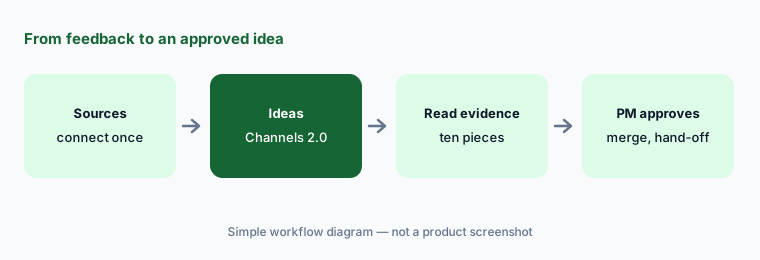
Ideas with ARR attached are persuasive, which is exactly why a PM should approve every merge and status change. Read ten pieces of evidence behind any idea before it moves to a roadmap tool, and treat the “close the loop” message as a draft a person edits and sends.
Ten pieces of evidence:
Pick the top idea in one Channels 2.0 channel. Read ten pieces of evidence behind it, split or merge by hand, and only then send it to your ticket tool with yourself as owner.
4. Digital Twins and voice mode: rehearsal, not evidence
What it is: A Digital Twin is a persona assembled from real customer data that you can question in chat; since 3 August 2026 it has its own option in the create menu, and chat can draft its instructions. Voice mode (1 October 2026) lets you talk to Chat or a twin out loud, share your screen so it can see a prototype or page, and hear answers spoken back. Dovetail says the twin answers in character from the data attached to it. Voice mode is in beta on the Enterprise plan, an admin must turn it on, and the workspace’s AI processing location must be set to “Best available.”
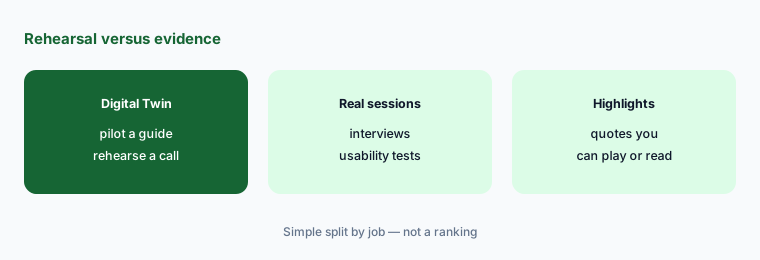
Use twins to rehearse — piloting an interview guide, practicing a renewal call, checking whether a page uses your customers’ words. Never quote a twin as a customer, never count a twin’s answer as a research finding, and check what data each twin is built from before you use it with stakeholders.
Pilot, then interview:
Pilot your next discussion guide with a Digital Twin and rewrite any question it misreads. In the readout, cite only real participants and label the twin session as a pilot.
5. Automatic redaction before analysis
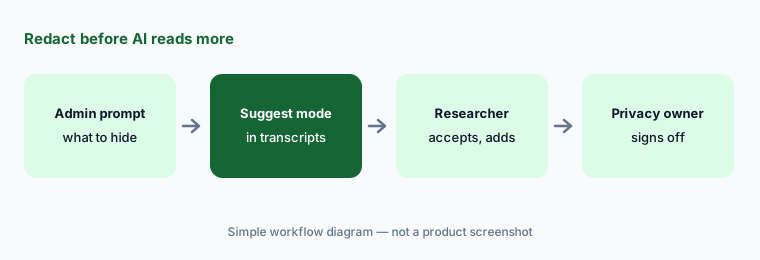
What it is: Since 23 March 2026, workspace admins can set a prompt that detects and redacts sensitive information across videos, audio, and transcripts in Projects and data points in Channels. There are three settings: Off, On (applied whenever eligible content is processed), and Suggest (in Projects, Dovetail suggests redactions in the transcript for review; in Channels, data points are redacted automatically because of volume). Redactions and blurring carry into highlights and Docs. Later entries added per-project and per-channel settings (April), custom redaction phrases (April), and bulk un-redact (May). Dovetail’s pricing page lists redaction under Enterprise security.
Turn redaction on before the first import, not after. Use Suggest in Projects so a researcher sees what will be hidden, and have your privacy owner review a sample of redacted transcripts and Channels data points before AI features read more of them.
Suggest mode first:
Set automatic redaction to Suggest for one project, import three transcripts, and review every suggestion. Add any missed phrases and get your privacy owner’s sign-off before analysis.
6. MCP server and Claude/ChatGPT connectors
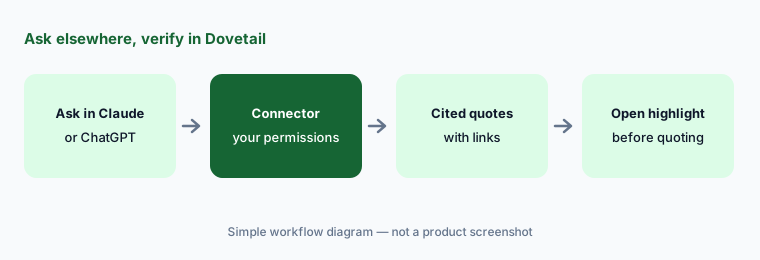
What it is: The Dovetail MCP server became read-write on 26 May 2026: AI tools can now create projects, Docs, data, highlights, and channel data, and retrieve contacts, folders, doc comments, highlights, channel themes, and project tags. September added project and workspace context and doc comments over the API and MCP, and 30 September added scoped permissions for personal API keys. Separate connectors let Claude (Claude.ai, Claude Desktop, Claude Code; April 2026) and ChatGPT (via Apps; March 2026) search your workspace and reference customer quotes, and Dovetail says the Claude connector follows the same permissions you have in Dovetail.
Read-write is a reason for care. Connect with the narrowest key you can, start with read-only questions whose answers you already know, and remember that whatever the connector pulls in also lives in that AI tool’s chat history. For product teams already using Claude or ChatGPT for product ops, the connector is the cleanest way to ground drafts in research — with the same rule: open the highlight before quoting it.
Known answer first:
Connect Dovetail to Claude or ChatGPT with the narrowest access you can. Ask about one finding your team already reported and compare the quotes with your readout before you trust it on a new question.
Pricing context (October 2026)
Dovetail’s pricing page (as listed 9 Oct 2026) shows two plans. Free: $0 per user per month, no card required — one channel, one project, Chat within a single project, and AI summaries. Enterprise: custom pricing through sales — unlimited Agents, channels, projects, and Docs, dashboards, Chat queries from Slack and Teams, advanced AI summaries and semantic search, redaction, SSO, access control, audit log, custom data retention, and a paid HIPAA add-on. Dovetail bills in USD, prices exclude tax, and Enterprise can be invoiced on net-30 terms.
No paid price is published, so ask for a quote that separates users by role (Manager, Contributor, Viewer), channels and data volume, and any AI or HIPAA add-ons.
Uncertainty: Dovetail’s Agents GA post says agents are on “all paid Dovetail plans,” while the pricing page we read lists only Free and Enterprise, so confirm which plan you would be on. Channels 2.0, Sources, Dashboards, and voice mode are labelled beta, and voice mode is Enterprise-only. Feature dates are as shown on Dovetail’s changelog on 9 October 2026 and may differ by a day from other time zones.
When it’s useful (honest take)
Useful when your team already runs interviews or collects high-volume feedback, has someone who owns research ops and redaction, and wants themes, ideas, and quotes that link back to the source — plus a way to bring that evidence into Claude or ChatGPT through connectors.
Less useful when you run a handful of interviews a year (a spreadsheet and a general assistant may be enough), nobody will open highlights before sharing themes, or you expect agents to change tickets or message customers without an approver. Teams that can’t redact personal data before import should sort that out first.
Paying for Dovetail AI and a few other AI tools? The $9 AI toolkit spreadsheet lists every AI subscription you have, what each one costs, and how fast it pays for itself, so you can see which ones are worth the money.
Want someone to do it for you? AI toolkit audit — $19
Related options (educational)
| Need | Better home | Why |
|---|---|---|
| Research repository plus feedback themes with AI | Dovetail AI (this page) | Chat, Agents, Channels 2.0, MCP |
| Feedback linked to roadmap features | Productboard AI | Insights tied to features |
| In-app feedback and analytics | Pendo AI or Userpilot AI | Collect where users are |
| Small batch of notes in a chat tool | Claude for product ops or ChatGPT for product ops | Projects or GPTs on sanitized rows |
| Feedback already in Google Sheets | Gemini for product ops | Theme column plus a hand check |
| Behavior behind the feedback | LogRocket AI or Fullstory AI | Session replay |
FAQ
What AI features does Dovetail have in October 2026?
Chat with Fast and Deep research modes and voice mode (beta, Enterprise), Dovetail Agents (generally available since 15 July 2026), Channels 2.0 ideas from high-volume feedback (open beta), Digital Twins, automatic redaction, AI summaries and clustering, and a read-write MCP server with connectors for Claude and ChatGPT.
How much does Dovetail cost?
As listed on 9 October 2026, Dovetail’s pricing page shows Free ($0, one channel and one project) and Enterprise (custom pricing). No paid price is published, so ask sales for a quote. See dovetail.com/pricing.
Can Dovetail Agents act on their own?
Yes — they run on demand, on schedules, on Dovetail events, or from Salesforce, Jira, and Slack webhooks, using only the tools you scope. Start draft-only, name an approver in the instructions, and review the first runs before letting an agent post or update tickets.
Can I quote a Digital Twin in a research readout?
No. A twin is a persona built from customer data for rehearsal, such as piloting an interview guide. Only quotes you can read or play in a real participant’s source highlight belong in a readout.
Does Dovetail work with Claude and ChatGPT?
Yes. Dovetail lists a connector for Claude (Claude.ai, Desktop, and Code) and one for ChatGPT, plus an MCP server that became read-write in May 2026. Use the narrowest access you can and open each cited highlight in Dovetail before quoting it.
Optional next step (if seats overlap)
If you pay for a research repository, a feedback tool, survey AI, and general chat seats that all summarize the same customer interviews, that overlap is worth a look. Map the overlap with the $19 AI toolkit audit or the $9 AI toolkit spreadsheet. Email Audit $19 or Toolkit spreadsheet $9.
Checkout is live via Stripe. After you pay, we email delivery (spreadsheet) or intake next steps (audit).