Tool · Session replay · LogRocket · Oct 2026
LogRocket AI review (Oct 2026): Galileo AI for session replay and issue triage
LogRocket records sessions in web and mobile apps and pairs session replay with product analytics, error monitoring, and frontend performance data. Its AI layer is called Galileo: it watches sessions, reads customer feedback, and tracks releases, then ranks the problems it finds, summarizes sessions, answers questions in chat (Ask Galileo), and can hand an issue to a coding agent. This page is about using Galileo to find and triage real user problems faster — with an engineer reproducing every bug before a ticket or a fix goes anywhere. Each section has a Try this.
What this LogRocket page covers
This page is for a product manager, a frontend or mobile engineering lead, or a support lead who already records sessions — or is about to — and wants to know what Galileo actually does with them. The question it answers: which Galileo features turn thousands of recordings into a short list of problems worth fixing, what each one reads, and where a person still has to watch the session and reproduce the bug before anyone opens a ticket.
LogRocket describes Galileo as an AI layer that “watches every session, reads user feedback, and tracks product changes.” On its pricing page (read 9 October 2026), Galileo comes with the Pro plan: AI session summaries, AI issue detection, AI funnel and heatmap insights, Ask Galileo, and AI feedback analysis. The newer Issues experience, which groups problems and hands them to coding agents, is labelled 2026 Beta in LogRocket’s docs.
Everything below comes from LogRocket’s pricing and Galileo pages, its documentation, and its March 2026 launch post for Ask Galileo, as we read them on 9 October 2026. LogRocket says Ask Galileo answers “roughly 90% of queries accurately,” based on its own customer feedback and human reviewers; that is a vendor figure, not a result you should assume for your app.
Major features (with how someone uses them)
Examples at a glance: each feature has a concrete example from a real job plus a short Try this you can run this week.
1. Galileo issue ranking: reproduce the top two before you open tickets (primary)
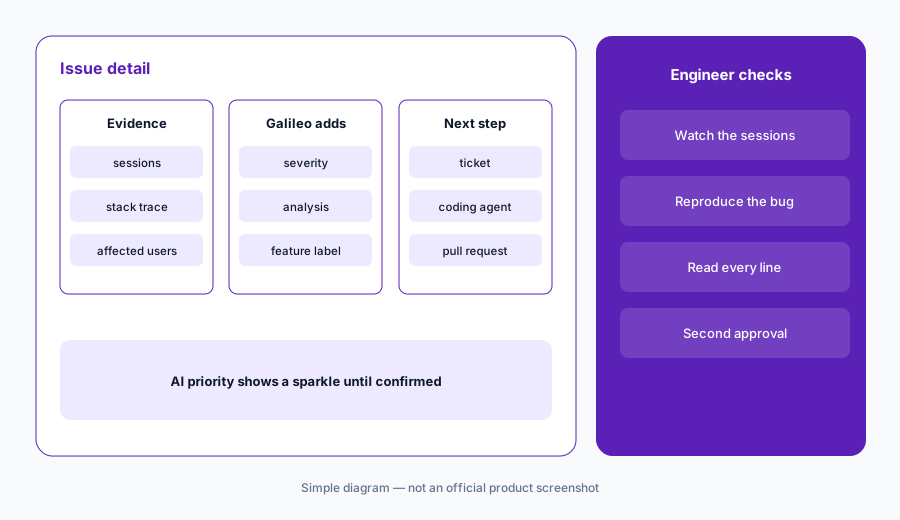
What it is: LogRocket collects Signals — JavaScript and network errors, rage clicks, dead clicks, error states, mobile crashes, and slow network requests — and Galileo scores each one for severity. In the 2026 Issues beta, a Signal that crosses Galileo’s threshold becomes an Issue at High priority, with an AI analysis, the number of affected sessions, and AI-generated feature labels such as “Checkout” or “Shopping Cart.” LogRocket’s docs say the severity score is owned by Galileo and can’t be set by hand; you can change an Issue’s priority, and AI-set priorities carry a sparkle icon until a person confirms them.
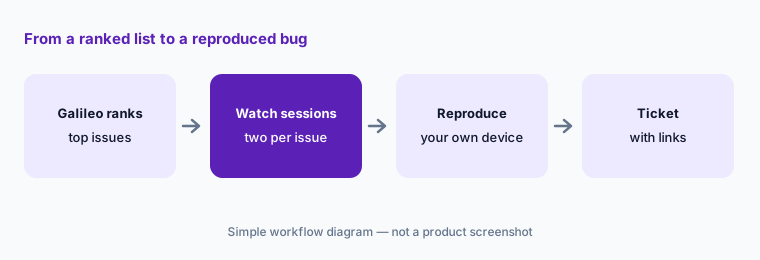
A ranked list tells you where to look first, not what is broken. For the top items, watch the sessions LogRocket attaches, then reproduce the bug yourself on the same browser or device. Only a reproduced bug becomes a ticket. Note that the non-JavaScript signal types (network errors, rage and dead clicks, error states, mobile crashes) are listed for Pro and Enterprise plans only.
Primary workflow:
Let Galileo rank this week’s top user issues. Reproduce the top two before you open tickets. For each, write the browser or device you used and link two sessions that show it.
2. Galileo Highlights: session summaries with jump links
What it is: Galileo Highlights summarizes sessions so you can find the moment you need. LogRocket’s docs say it “watches” up to 10 sessions at a time from a single user, gives an overall summary plus a summary of each session, and links each point to that moment in the replay. You start it from the session list with Summarize. It works on web and native mobile sessions, is available on Pro and Enterprise plans, and has an API for sending Highlights into a ticketing tool, CRM, or Slack.
Highlights is most useful for support: a customer writes in, you summarize their last sessions, and you jump to the moment they got stuck instead of watching twenty minutes of video. Read the summary, then click through to the moment before you reply — a summary can describe a click the user never meant to make.
One customer, one summary:
Pick one open support ticket from a logged-in user. Run Highlights on their recent sessions, jump to the moment it names, and reply to the customer only with what you saw yourself.
3. Ask Galileo: product questions in plain language
What it is: Ask Galileo is a chat inside LogRocket where you ask questions such as “Are there dead clicks on the checkout page?” or “What JavaScript errors are users experiencing most frequently on mobile?” LogRocket’s docs list its skills as answering with metrics (time series, tables, funnels, heatmaps, session playlists, path analyses), watching sessions, querying issues and errors, and reading customer feedback. It asks clarifying questions when unsure and, LogRocket says, may take a few minutes on harder questions. LogRocket launched it on 6 March 2026.
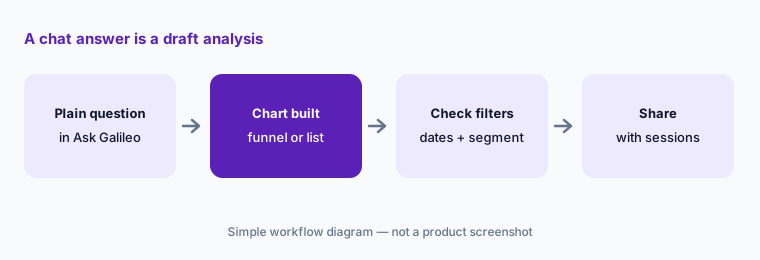
Treat an answer as a draft analysis. Open the chart or playlist it builds and check the filter, date range, and segment before you quote a number. If you will repeat a question every week, LogRocket’s Streams (in beta) run a saved question on a schedule and raise findings as Signals.
Check the filters:
Ask Galileo one question you already know the answer to from last month’s data. Compare its chart with yours, note any filter or date difference, and only then ask it a new question.
4. Issues beta: tickets, coding agents, and who signs off
What it is: Every Issue in the 2026 beta leads with one fix action: create or link a Linear, Jira, or Azure DevOps ticket, or dispatch a coding agent (Cursor or Claude) that receives a Galileo-generated debug package and opens a pull request; tracking that pull request needs the GitHub integration. An optional auto-dispatch setting launches an agent whenever Galileo opens an Issue from a new severe Signal, using a project-wide API key. Error Issues auto-resolve after seven days without events; Feedback, Release Recap, and Stream Issues stay open until you resolve them.
Leave auto-dispatch off until your team has watched the manual path for a few weeks. A pull request from an agent is a suggestion: the engineer who owns that code reproduces the bug, reads every changed line, and a second reviewer approves before it merges. Keep the coding agent’s API key scoped to the repositories it needs.
Manual first:
For two weeks, dispatch a coding agent by hand on one reproduced Issue a week. Log whether the pull request fixed the bug, what the reviewer changed, and how long review took — then decide on auto-dispatch.
5. LogRocket MCP and feedback signals
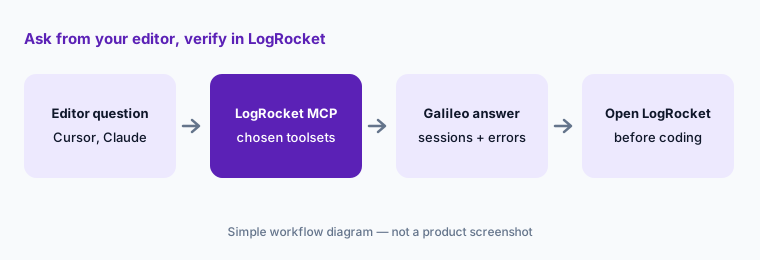
What it is: The hosted LogRocket MCP server (mcp.logrocket.com/mcp) lets Cursor, Claude Code, Claude Desktop, Codex, and other MCP clients query sessions, metrics, and issues, with OAuth sign-in that gives the same organizations and projects you can see in the browser. LogRocket’s docs list toolsets — sessions, metrics, issues, and ask-galileo — so you can expose only some tools. Separately, Feedback signals (beta) pull support conversations, surveys, and app-store reviews from tools such as Intercom and Zendesk, cluster them with Galileo, and link each cluster to sessions. The pricing page lists 500 free API/MCP credits a month on Pro and 2,000 on Enterprise.
MCP is handy for an engineer working in an editor — “watch this user’s sessions and suggest a root cause” — but the session data then also sits in that AI tool’s chat history. Start with the sessions and issues toolsets, try one question whose answer you already know, and check your AI tool’s data settings first.
Known answer first:
Connect the LogRocket MCP with only the sessions and issues toolsets. Ask about one bug your team already fixed and compare the answer with your ticket before you trust it on a new one.
6. Privacy: what LogRocket records and how to hide it
What it is: LogRocket’s privacy docs say password fields are never recorded, and that you hide anything else by adding a data-private attribute to inputs or page elements; hidden data “is never sent to LogRocket servers.” The SDK can also sanitize all text, inputs, and images, and exclude request and response bodies, headers, and URLs from network capture. LogRocket says Highlights “sees exactly what you would see,” so redacted fields are not used in summaries, that it does not train on customer-identifiable data, and that its AI providers are OpenAI and Google Cloud. A self-hosted option is offered on Enterprise.
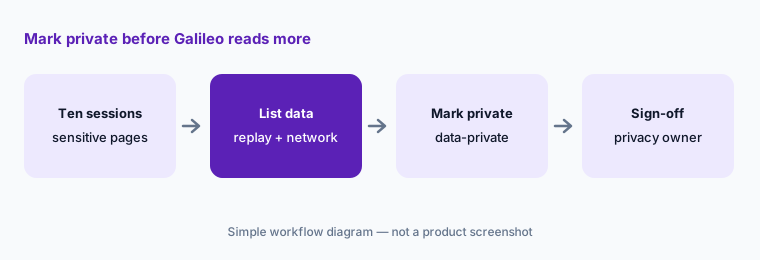
Unlike tools that mask everything by default, LogRocket expects your developers to mark what is private. Before you turn on Galileo, have an engineer and your privacy owner watch ten sessions from pages with personal data — account settings, billing, support chat — and confirm nothing sensitive shows in the replay or the network panel. Your own consent banner and privacy policy still apply.
Ten-session audit:
Watch ten recorded sessions on your three most sensitive pages, with the network panel open. List every piece of personal data you can see and mark each with data-private or a sanitizer before Galileo reads more sessions.
Pricing context (October 2026)
LogRocket publishes a starting price. Its pricing page on 9 October 2026 priced plans by monthly sessions (web plus mobile), with unlimited analytics events, error events, and logs on every plan. At the page’s default of 25,000 sessions a month, it showed “Starting at $176 / month based on annual plan savings,” and said the final price depends on seats, retention length, and add-ons such as Streaming Export. It lists three plans: Core (for fewer than 100K sessions a month), Pro (adds Galileo AI; “available below 100K sessions at a higher price than Core,” and the selected plan at 100K+), and Enterprise (unlimited seats, Streaming Data Export, self-hosted option).
There is a 14-day free trial with no card required. LogRocket also offers free AI feedback analysis that doesn’t need session replay, and lists discounts for startups, non-profits, open-source projects, multi-year contracts, and others. Ask for a quote that separates sessions, seats, retention, and any AI or export add-ons.
Uncertainty: We read the $176 figure from LogRocket’s pricing page on 9 October 2026 at its default 25,000-session setting; the page’s slider changes the amount, and a static read did not make clear whether that figure is the Core or the Pro price, so set the slider to your own volume and plan. Pro and Enterprise prices at other volumes are not published as fixed list prices. The Issues experience and Feedback, Release Recap, and Stream signals are labelled beta and may change.
When it’s useful (honest take)
Useful when you already record sessions, have more issues than people to watch them, and want one tool that connects replays, errors, network data, and customer feedback: Galileo to rank what hurts users most, Highlights to jump to the right moment, Ask Galileo for quick product questions, and an MCP server so engineers can pull the same context into their editor.
Less useful when your traffic is low (few sessions means weak patterns for Galileo), nobody on the team will reproduce bugs before filing them, or your main need is UX research across marketing pages rather than app debugging. Teams that cannot spend developer time marking private fields should sort that out before turning on replay at all.
Paying for LogRocket AI and a few other AI tools? The $9 AI toolkit spreadsheet lists every AI subscription you have, what each one costs, and how fast it pays for itself, so you can see which ones are worth the money.
Want someone to do it for you? AI toolkit audit — $19
Related options (educational)
| Need | Better home | Why |
|---|---|---|
| Replay plus engineering triage with AI | LogRocket AI (this page) | Galileo ranking, Highlights, Issues beta, MCP |
| Replay-first product and UX questions | Fullstory AI | StoryAI, Opportunities, privacy by default |
| Zones, journeys, and heatmaps for digital teams | Contentsquare AI | Sense Chat, Sense Analyst |
| Stack traces and backend errors | Sentry AI | Error monitoring first |
| Analytics, replay, and flags in one suite | PostHog AI | Developer-friendly suite |
| Guiding users past the problem in-app | Userpilot AI or Appcues AI | Flows and checklists |
FAQ
What is LogRocket Galileo?
Galileo is LogRocket’s AI layer. It watches sessions, reads customer feedback, and tracks releases, then scores problems for severity, summarizes sessions (Highlights), answers questions in chat (Ask Galileo), and can hand an Issue to a coding agent. LogRocket includes it in the Pro plan.
How much does LogRocket cost in October 2026?
At the pricing page’s default of 25,000 sessions a month it showed “Starting at $176 / month” based on annual billing, with the final price depending on seats, retention, and add-ons. Galileo AI is part of the Pro plan; Enterprise is quoted. See logrocket.com/pricing.
Can LogRocket fix bugs automatically?
In the 2026 Issues beta it can dispatch a Cursor or Claude coding agent that opens a pull request, by hand or automatically for new severe issues. The pull request is a suggestion: an engineer should reproduce the bug, review every changed line, and get a second approval before merging.
Does LogRocket record passwords and personal data?
LogRocket says password fields are never recorded. Other fields and elements are recorded unless your developers mark them with data-private or turn on sanitizing, and network bodies and headers need their own exclusions. Your consent banner and privacy policy still apply.
LogRocket or Fullstory?
Both pair session replay with AI. LogRocket leans toward engineering triage — errors, network data, and coding-agent hand-off — while Fullstory leans toward product and UX questions and masks by default. See Fullstory AI for that side.
Optional next step (if seats overlap)
If you pay for a replay tool, an error monitor, a product analytics seat, and a general AI assistant that all explain the same bug, that overlap is worth a look. Map the overlap with the $19 AI toolkit audit or the $9 AI toolkit spreadsheet. Email Audit $19 or Toolkit spreadsheet $9.
Checkout is live via Stripe. After you pay, we email delivery (spreadsheet) or intake next steps (audit).