Tool · Product + engineering · LaunchDarkly · Oct 2026
LaunchDarkly AI review (Oct 2026): Vega, AgentControl, and guarded rollouts for safer releases
LaunchDarkly is a feature-flag platform: your code asks it whether a feature is on for a given user, so a team can release to 1% of customers, watch what happens, and switch the feature off without shipping new code. In 2026 it added an AI agent called Vega that cleans up old flags and investigates errors, and AgentControl, which treats an AI feature’s prompt and model as a flag you can target, test, and roll back. This page walks through each piece with a real release job, a Try this, and where an engineer still has to review the change.
What this LaunchDarkly page covers
This page is for the people who decide how features reach customers at a software company — an engineering manager, a release or platform lead, or a product manager who runs experiments and owns the “is it safe to turn this on for everyone?” call. The question it answers: which of LaunchDarkly’s AI features save real release work, which ones can change your code or your production settings, and what permissions and reviews should be in place before you switch them on.
LaunchDarkly’s AI shows up in three places. Vega is an agent inside LaunchDarkly, powered by Anthropic’s Claude models, that removes stale flags from your code through GitHub pull requests and investigates logs, traces, errors, and session replays. AgentControl (called AI Configs until May 2026) manages the prompts, model settings, and tools for AI features in your own product, with evaluations and guarded rollouts. And the long-standing release tools — guarded rollouts, release pipelines, and experimentation — got AI-adjacent updates through September 2026. A hosted MCP server lets Cursor, Claude Code, or VS Code work with flags directly.
Everything below comes from LaunchDarkly’s public pricing page, product changelog, and documentation, as we read them on 8 October 2026. LaunchDarkly quotes speed and safety figures on several pages; we repeat only what the docs describe the product doing.
Major features (with how someone uses them)
Examples at a glance: each feature has a concrete example from a real job plus a short Try this you can run this week.
1. Vega for flag cleanup (primary)
What it is: Old flags pile up: a feature reached 100% months ago, but the if statement and the dead code path are still in the codebase. Vega for flag cleanup starts from a button on any flag. LaunchDarkly’s docs say Vega first checks your critical environments to confirm the flag serves only one variation everywhere that matters; if more than one variation is still being served, it stops and tells you (you can override). If the check passes, it opens a GitHub pull request that removes the flag from your code. It needs a connected GitHub account, works only with private repositories, and reads any CLAUDE.md or AGENTS.md file in the repo root for conventions you want it to follow.
AGENTS.md that says “never edit files under /billing without a second reviewer”, and runs Vega cleanup on ten low-risk flags. Eight pull requests are clean; one removes a flag that a mobile app still reads; one touches a test file it should not. Both get closed, and the mobile flag gets a note in its description.
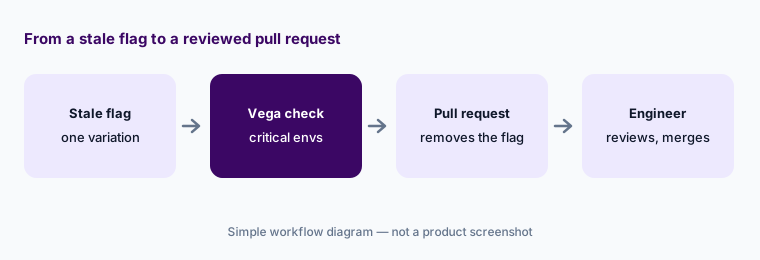
Primary workflow:
Pick one boolean flag that has served 100% of traffic for a month. Run Vega cleanup against a test repository first. Read every line of the pull request, run the tests, and merge only after a second engineer approves.
2. Vega for auto-remediation: errors, traces, and alerts
What it is: LaunchDarkly now includes observability — session replays, error monitoring, logs, and traces — and Vega works inside those views. In read-only mode (the default) it summarizes what happened and suggests likely causes, often tying an error spike to a recent flag change, and it never proposes code. In agent mode it can create dashboards and experiments, generate candidate code changes, and open a pull request. You can also attach Vega to an alert with Auto remediation turned on, and it can draft a Jira issue — the docs say it confirms the project and details with you before filing.
Two details matter for permissions. Vega respects your role: if you cannot view session replays or logs, neither can Vega, and an admin must add a specific Vega action to custom roles. When it runs from an alert, it uses the permissions of the person who last saved that alert’s settings, so update the alert if that person leaves. LaunchDarkly says Vega is on by default for self-serve customers on usage-based plans, available to select Enterprise customers, and not available in its EU or federal instances.
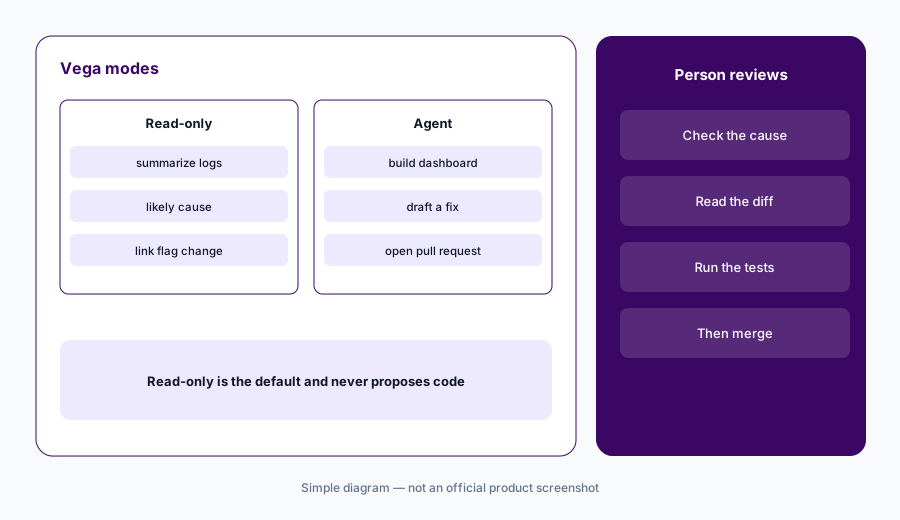
Read-only on alerts:
Turn on auto remediation for one noisy alert in read-only mode. For two weeks, compare Vega’s stated cause with what your team actually found. Move that alert to agent mode only if most summaries were right.
3. AgentControl: prompts and models as flags
What it is: If your own product has AI features, AgentControl (renamed from AI Configs on 19 May 2026; the API did not change) keeps each feature’s prompt, instructions, model choice, and settings in LaunchDarkly instead of in code. You target variations the same way you target flags — a stronger model for enterprise customers, a cheaper one for free users — and the change takes effect without a code release. LaunchDarkly says it does not call model providers for you: your app makes the call with its own credentials, and LaunchDarkly’s AI SDKs report back tokens, latency, errors, and evaluation results.
Around that sit offline evaluations (run variations against a test dataset, scored by an LLM judge), online evaluations on live traffic, guarded rollouts for new agent versions, A/B and multi-armed bandit tests, and agent graphs for multi-agent systems. Recent changelog items: Go and Java AI SDKs and a LiteLLM gateway integration (26 August 2026), and editable, versioned evaluation datasets (16 September 2026) — runs stay pinned to the dataset version they used.
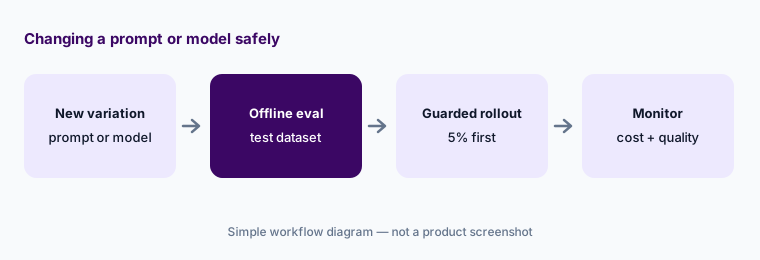
Test before you swap:
Before changing a model or prompt, build a dataset of 30–50 real inputs with answers a person marked good. Run an offline evaluation on both variations, read the ten worst-scoring outputs yourself, then roll out to 5% with a guarded rollout.
4. Guarded rollouts and release pipelines
What it is: A guarded rollout raises traffic to a new flag or AgentControl variation step by step while watching the metrics you attach — errors, latency, clicks, conversions. LaunchDarkly’s docs say it uses sequential testing to detect a statistically significant regression, and you choose whether it only notifies you or also rolls back automatically. If too few users see the change at any step, it rolls back too. Guarded rollouts need the Guardian add-on. Separately, release pipelines (shown as Release assistant in the app) move boolean flags through phases — environments, audiences, approvals — and are in beta for certain Enterprise customers, with up to 20 pipelines per project.
Pick guardrails first:
For your next risky release, write down two health metrics and one business metric before you start. Attach them to a guarded rollout with automatic rollback, and agree in advance who decides whether to restart after a rollback.
5. Experimentation: sample size and warehouse assignment
What it is: LaunchDarkly’s experiments run on the same flags, with Bayesian and frequentist analysis, A/B/n tests, and sample ratio mismatch detection. Two September 2026 updates are worth knowing. On 3 September it added a sample size and duration estimate inside the experiment builder for fixed-horizon frequentist tests, so a design carries its own target and reviewers can see when it is ready for a decision. On 23 September it added warehouse-native experiments with assignment from your own warehouse table — useful when randomization happens in your service or in a tool like an email platform — and the same data can be analyzed retroactively for a past test.
Size it first:
Before your next experiment starts, use the sample size estimate and write the end date in the experiment description. Do not read results before that date unless a guardrail metric breaks.
6. The MCP server and where LaunchDarkly fits
What it is: LaunchDarkly’s hosted MCP server connects AI coding tools such as Cursor, Claude Code, VS Code with Copilot, or Windsurf over OAuth, so an engineer can create or update flags, manage AgentControl configs, and query observability data from the editor. The docs say the hosted server is not available in the EU or federal instances (a local server is offered instead). Treat flag changes made from an editor like any production change: the same approvals and audit trail apply.
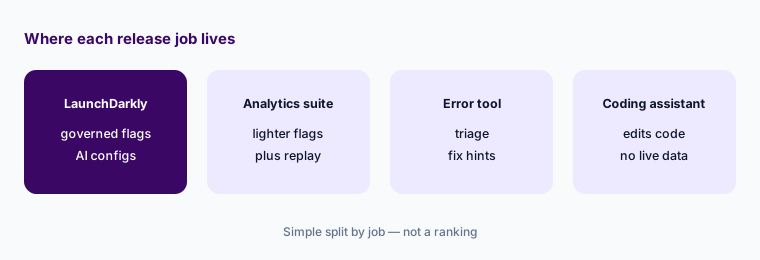
LaunchDarkly fits teams that release often, have more than one environment, and want flags, experiments, and now AI configuration in one governed place. Product teams that mostly want analytics with some flags may find PostHog covers more of their needs in one tool. For deep error triage, Sentry AI or Datadog Bits AI may already be in place; for user-experience questions, session analytics such as Fullstory goes deeper than LaunchDarkly’s bundled session replay. A coding assistant such as GitHub Copilot or Cursor can remove a flag too, but it will not check live evaluation data first.
Flags or not yet:
Count your flags, environments, and releases per week. If you have fewer than 20 flags and one environment, keep them in config for now. Revisit a flag platform when you need gradual rollouts or experiments on live traffic.
Pricing context (October 2026)
LaunchDarkly publishes usage-based prices. On its pricing page on 8 October 2026: Developer is $0 per month with unlimited seats and flags, 5 service connections, 1,000 client-side monthly active users (MAU), 100,000 experimentation MAU, 5,000 session replays, 5,000 errors, 10 million logs and 10 million traces, and 5,000 AI runs a month with 14 days of AgentControl data. Foundation is pay-as-you-go with no platform or seat fees: $10 per service connection per month (first 5 included) and $8.33 per 1,000 client-side MAU per month billed yearly, with 5,000 AI runs included and $5 per additional 1,000 AI runs, plus a 14-day trial. (A service connection is one server-side SDK connected to one environment for a month.)
Enterprise is custom-priced and adds advanced targeting, custom roles, approvals and scheduling, release automation, and SCIM. Guardian — release monitoring, guardrail metrics, automatic rollback — is a paid add-on priced separately. LaunchDarkly also offers custom rates for Kubernetes, serverless, Python, and Ruby setups that create many server-side connections.
Uncertainty: Prices are LaunchDarkly’s published numbers on 8 October 2026. The same page’s comparison table lists client-side MAU at $10 per 1,000 per month, which we read as the monthly-billing rate versus $8.33 billed yearly — confirm with LaunchDarkly. Vega eligibility differs by plan and region, release pipelines are in beta for certain Enterprise customers, and Guardian and Enterprise prices are not public.
When it’s useful (honest take)
Useful when you ship often across several environments, have dozens or hundreds of flags, and want releases you can stop in seconds. Then Vega’s cleanup pull requests and alert summaries remove real toil, AgentControl gives AI features the same rollout and rollback discipline as code, and guarded rollouts catch regressions before most users see them — as long as engineers still review every pull request and someone owns the guardrail metrics.
Less useful when you have a handful of flags and one environment, when nobody will maintain critical-environment settings (Vega’s safety check depends on them), or when your account is in LaunchDarkly’s EU or federal instance, where Vega and the hosted MCP server are not offered. Paying for Guardian without agreed guardrail metrics buys alerts nobody acts on.
Paying for LaunchDarkly AI and a few other AI tools? The $9 AI toolkit spreadsheet lists every AI subscription you have, what each one costs, and how fast it pays for itself, so you can see which ones are worth the money.
Want someone to do it for you? AI toolkit audit — $19
Related options (educational)
| Need | Better home | Why |
|---|---|---|
| Governed flags, experiments, and AI configs | LaunchDarkly AI (this page) | Vega, AgentControl, guarded rollouts in one place |
| Product analytics with lighter flags | PostHog AI | Analytics, replay, flags, and experiments together |
| Error triage and fix suggestions | Sentry AI or Datadog Bits AI | Deeper error and trace tooling |
| What users hit in the product | Fullstory AI | Session analytics and friction signals |
| Code edits without live flag data | GitHub Copilot Business or Cursor | Edits code; does not check evaluations |
| A few flags, one environment | Config file or environment variables | No new seat; revisit when rollouts matter |
FAQ
How much does LaunchDarkly cost in October 2026?
LaunchDarkly’s Developer plan is free. Foundation is pay-as-you-go at $10 per service connection per month (first five included) and $8.33 per 1,000 client-side MAU per month billed yearly, with 5,000 AI runs included and $5 per extra 1,000. Enterprise and the Guardian add-on are custom-priced. Confirm on launchdarkly.com/pricing.
What is LaunchDarkly Vega?
Vega is LaunchDarkly’s AI agent, powered by Anthropic’s Claude models. It removes stale flags from your code through GitHub pull requests and investigates logs, traces, errors, and session replays in read-only or agent mode.
Can Vega change my code without review?
No. Vega’s code changes arrive as GitHub pull requests that you review and merge yourself, and read-only mode never proposes code. It only works with private repositories you grant it access to.
What is the difference between AI Configs and AgentControl?
Only the name. LaunchDarkly renamed AI Configs to AgentControl in May 2026; API endpoints and existing integrations are unchanged.
Do guarded rollouts come with every plan?
No. LaunchDarkly’s docs say guarded rollouts are available to customers on a Guardian plan, which is a paid add-on on top of Enterprise.
Optional next step (if seats overlap)
If you pay for a flag platform, a separate experimentation tool, an error monitor, and a session replay tool that all watch the same releases, that overlap is worth a look. Map the overlap with the $19 AI toolkit audit or the $9 AI toolkit spreadsheet. Email Audit $19 or Toolkit spreadsheet $9.
Checkout is live via Stripe. After you pay, we email delivery (spreadsheet) or intake next steps (audit).