Tool · Customer success · Gainsight · Oct 2026
Gainsight AI review (Oct 2026): Copilot, Staircase AI agents, and MCP for customer success teams
Gainsight is a customer success platform: one place where CSMs see each account’s health, timeline, open tasks, success plans, and renewal dates. Over 2026 it added AI on almost every surface — a Copilot that answers questions and logs records, Staircase AI agents that read customer emails and calls for risk and expansion signals, and an MCP connection so Claude or ChatGPT can query Gainsight directly. This page walks through each piece with a real CS job, a Try this, and where a CSM or admin still has to sign off.
What this Gainsight page covers
This page is for the person who runs customer success at a B2B software company with a few hundred to a few thousand accounts — a VP of customer success, a CS ops lead, or the Gainsight admin who keeps being asked “can the AI just tell me which accounts are at risk?” The question it answers: which Gainsight AI features help a CSM prepare, decide, and follow up faster, which ones change data in your system, and what an admin has to switch on, restrict, and check.
Gainsight’s AI now spans several products. Inside Gainsight CS there is Copilot (an assistant on the left navigation and on each account page), an AI Cheat Sheet on the account view, Build with AI in Journey Orchestrator, and an Admin CLI built for AI agents. Staircase AI, a separate product Gainsight sells, reads emails, meeting transcripts, and support cases to produce risk, expansion, and handoff insights. The Gainsight MCP lets Claude, ChatGPT, Microsoft Copilot, and other tools query and update Gainsight, and since 15 September 2026 it also connects to Salesforce Agentforce and Slack. Agent Studio, announced in May 2026, is a Claude-powered workspace for building your own CS workflows.
Everything below comes from Gainsight’s public pricing page, its support documentation and quarterly release notes (April and July 2026), its product pages, and its May and September 2026 press releases, as we read them on 8 October 2026. Gainsight describes itself as a “retention” company, and many of its pages quote retention gains; we treat those as vendor claims, not results you should expect.
Major features (with how someone uses them)
Examples at a glance: each feature has a concrete example from a real job plus a short Try this you can run this week.
1. Copilot: answers and record updates for CSMs (primary)
What it is: Copilot is a chat assistant inside Gainsight CS. Gainsight’s documentation says it draws on several sources: the account Timeline (meeting notes, emails, calls), Company and Relationship records, open and overdue CTAs (calls to action) in Cockpit, Success Plans, health scores and their measures, any report you can access that was opened or run in the last 90 days, a CS best-practice expert, a Gainsight product expert, and — for Staircase AI customers — Ask Staircase. Every query honors your data permissions. Copilot can also create or update a Timeline activity, CTA, Success Plan, or Task from the conversation, and asks for any required fields first.
Two limits matter in practice. Gainsight says Copilot analyzes only the 50 most recent Timeline entries per account, so it recommends account-specific questions over broad ones. And for open-ended analysis of CTAs, tasks, and success plans it reads up to 30 records per type, mostly from the last 12 months. Copilot is off by default for new tenants; an admin turns it on under Gainsight AI settings, and Gainsight then preprocesses Timeline data for a few hours. Since the July 2026 release, chat history is kept for 90 days, and the same capabilities work in the Gainsight AI Agent in Slack.
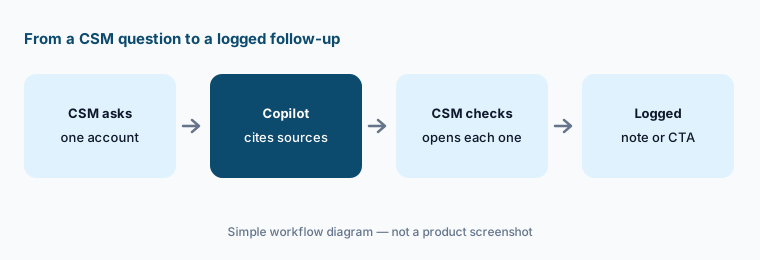
Primary workflow:
On one at-risk account’s C360 page, ask Copilot: “List the three biggest risks on this account and cite the source for each.” Open every Timeline entry and report it cites before you log a CTA. Note any risk you could not trace to a source.
2. Staircase AI agents and the AI Cheat Sheet
What it is: Staircase AI reads customer communication — email, recorded meeting transcripts, support cases, and product signals — and turns it into account insights. Gainsight lists Risk and Expansion Analysts as live, and launched a Handoff Analyst on 28 May 2026 that pulls deal history, stakeholders, and goals out of sales conversations for the sales-to-CS handoff. Since July 2026, admins can add Staircase agents — AI Summary, Risk, Expansion, Renewal, and Churn — to the AI Cheat Sheet on each account page, and Staircase insights such as Account Dark, No Reach Out, and Churn Risk sync into Gainsight CS for reports and Home widgets.
Staircase is a separate purchase. Gainsight’s release notes say the synced insights and Cheat Sheet agents are available only to customers who have bought Staircase AI, and the Cheat Sheet agents work on the company view (C360), not the relationship view.
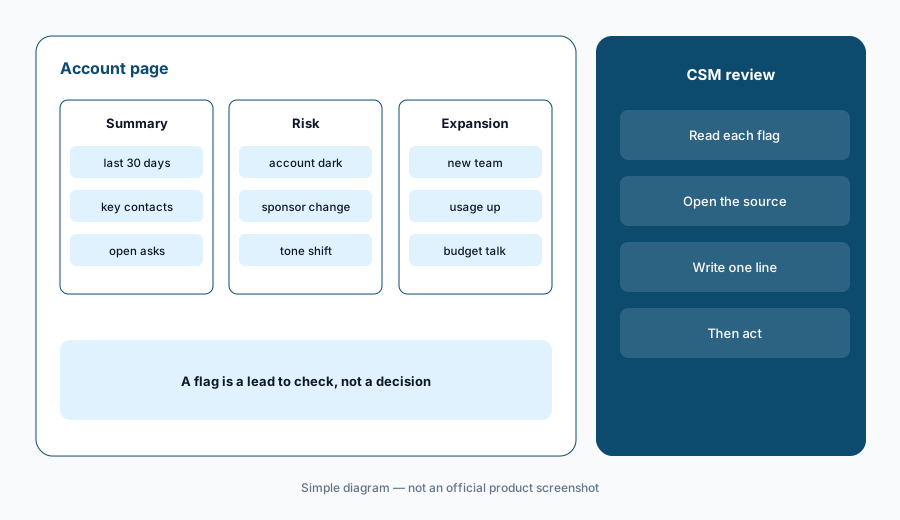
Compare with your team:
For two weeks, put the Risk Agent’s flagged accounts side by side with your CSMs’ own at-risk list. For every account on only one list, write why. Use that list to decide which signals you trust before anyone acts on them.
3. Gainsight MCP for Claude, ChatGPT, Agentforce, and Slack
What it is: The Gainsight MCP (Model Context Protocol) server lets an outside AI tool such as Claude, ChatGPT, or Microsoft Copilot ask questions of Gainsight data and, depending on settings, manage CTAs, update success plans, and create Timeline activities. Gainsight said in May 2026 that customers had run more than 175,000 tool calls through it — a vendor figure. The July 2026 release added report search (the MCP finds a report you already use and can add fields or filters to answer your question, but never removes locked filters), “my portfolio” queries based on your Gainsight Home filters, and a read-only contact search. Activities created through the MCP carry a CS MCP source tag you can filter on.
The most important admin setting arrived in the same release: AI Tool Management and Object Management. Gainsight says all tools and all objects are active by default; admins can switch off individual read or write tools and individual data objects, and those limits then apply to Copilot, the Slack agent, and outside clients alike. On 15 September 2026 Gainsight added MCP connectors for Salesforce Agentforce and Slackbot, covering Customer Success, Staircase AI, Skilljar, Customer Communities, and Product Experience, and said its Expansion Analyst can now look at Salesforce opportunities — and that Agentforce can open an opportunity automatically when Gainsight signals an account is ready to expand.
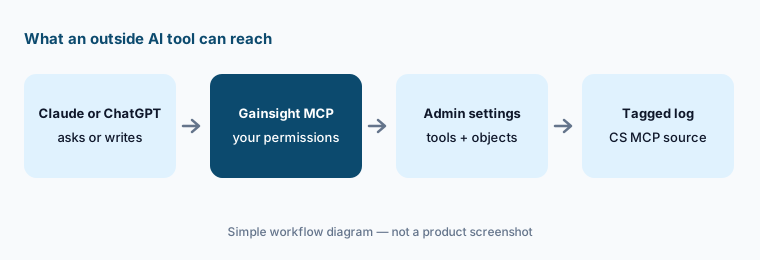
Read-only first:
Before anyone connects Claude or ChatGPT, open AI Tool Management and switch off every write tool. Run a two-week pilot with read-only tools. Turn on one write tool at a time, and review everything tagged “CS MCP” in Timeline each week.
4. The Admin CLI: letting an AI agent audit your setup
What it is: The Gainsight Admin CLI (July 2026) is a set of terminal commands designed for an AI agent like Claude to read and write Gainsight configuration. Gainsight’s release notes list read access to connectors, rules, health score structure and weightings, and reports, and read and write access to Data Designer templates, data management (custom objects and fields), and Journey Orchestrator programs. It needs Node.js and a Super Admin account. Gainsight’s own example: a CS ops director asks an agent to summarize how health scoring is set up and gets a structured summary in minutes instead of a one-to-two-week manual report.
Audit before you build:
Ask an agent connected through the Admin CLI for a read-only audit: every rule, its last run date, and the objects it writes to. Check ten rows in the Gainsight UI. Allow write commands only after a named owner approves a written plan, and try them in a sandbox first.
5. Build with AI in Journey Orchestrator and AI email help
What it is: Journey Orchestrator is Gainsight’s tool for automated customer programs: onboarding emails, NPS surveys, renewal reminders. Its Build with AI option (July 2026) creates a draft program from a plain-English prompt using your existing templates and segments. Gainsight’s notes are clear about the limits: the AI never publishes a program, it supports only audience, email, survey, outcomes, and delay steps, and it cannot create new data sources, templates, or surveys. The same release added AI-generated subject lines and preheaders (three tones), one-click template translation that keeps merge tokens, and reply tracking so programs can branch on whether a customer actually responded.
Draft, then review:
Ask Build with AI for one renewal-reminder program. Before publishing, check the audience count against your own report, read every email as the customer would, send a test to yourself, and name the person who approves it.
6. Agent Studio, Atlas, and where Gainsight fits
What it is: Agent Studio, powered by Claude, was announced on 28 May 2026 as “coming soon” with a waitlist. Gainsight’s product page describes repeatable flows (daily account briefs, post-call follow-ups), dashboards built by asking, admin-set skills, and read/write access to CTAs, success plans, Timeline, and health scores — with “nothing acts on your behalf until you approve it.” Ask your account team whether it is enabled for your tenant before planning around it. Separately, Atlas is a services offer in which Gainsight’s agents and renewal specialists run long-tail renewal outreach for you.
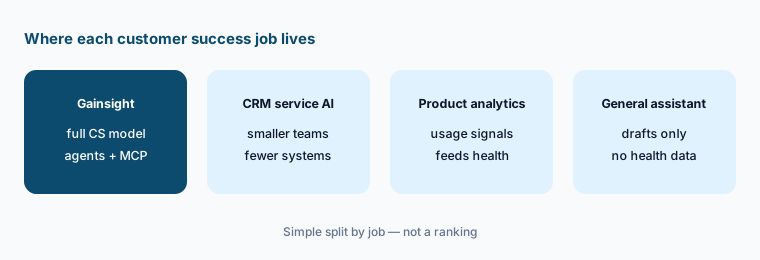
Gainsight fits best when CS is a real department with a data model to match. Smaller teams whose customers already live in HubSpot often get more from HubSpot Service Hub AI, and Salesforce-centric teams should compare what Salesforce Einstein already covers. For in-product usage signals, many teams pair a CS platform with product analytics such as Pendo or Amplitude, or session analytics such as Fullstory. A general assistant set up with good prompts (see Claude for customer success) can draft QBR notes, but it cannot see your health data unless you connect it.
Platform or not yet:
Count how many places a CSM opens to prepare one QBR today (CRM, usage data, support tool, notes). If it is one or two, a better shared view may be enough. Revisit a CS platform when prep routinely spans four or more systems.
Pricing context (October 2026)
Gainsight does not publish prices. Its pricing page on 8 October 2026 listed two Customer Success plans, Essentials and Enterprise, with no dollar amounts. Both list “AI Insights, Automations” as included, plus Customer 360, health scores, surveys, and digital journeys. Essentials lists 10 included full users and 100 customers per user; Enterprise lists 20 included full users and adds renewal and expansion forecasting and org mapping with sponsor tracking. Gainsight’s July 2026 notes say CS Essentials now allows 100,000 API calls a day (up from 50,000), which matters if you plan heavy MCP use.
Staircase AI, Customer Education (Skilljar), Customer Communities, and Product Experience are priced separately, and Atlas is a services contract. Gainsight said in September 2026 it is “adding new packages” for its Salesforce integrations. Expect your quote to depend on users, accounts, which products you add, and contract length, and ask directly whether Copilot, MCP, and Agent Studio are included in your plan.
Uncertainty: We could not find any public Gainsight price on 8 October 2026. Agent Studio was announced as coming soon with a waitlist, and its availability for your tenant may differ from the product page. Staircase features require a separate purchase. Release-note details describe Gainsight’s documentation at the time we read it and can change each quarter.
When it’s useful (honest take)
Useful when you run a CS team with hundreds of accounts, a defined health model, and someone in CS operations who can own settings. Then Copilot can cut QBR prep to minutes, Staircase can surface accounts nobody has talked to, and the MCP can bring customer context into Claude, ChatGPT, or Salesforce — as long as an admin restricts tools and objects first and someone reviews what gets written back.
Less useful when your team is small and customer data lives in a CRM already, when Timeline notes are thin (Copilot can only answer from what is logged), or when nobody can own MCP and CLI permissions. Because tools and objects are active by default, connecting outside AI without a review step is a new risk, not a time saver.
Paying for Gainsight AI and a few other AI tools? The $9 AI toolkit spreadsheet lists every AI subscription you have, what each one costs, and how fast it pays for itself, so you can see which ones are worth the money.
Want someone to do it for you? AI toolkit audit — $19
Related options (educational)
| Need | Better home | Why |
|---|---|---|
| Full CS platform with AI answers and agents | Gainsight AI (this page) | Copilot, Staircase agents, MCP on one CS data model |
| CS inside the CRM you already use | HubSpot Service Hub AI or Salesforce Einstein | Fewer systems; lighter health model |
| Product usage signals for health | Pendo AI or Amplitude AI | Usage data that feeds a health score |
| Session-level friction behind churn | Fullstory AI | See what users actually hit in the product |
| Call notes and deal history | Gong | Conversation data for sales-to-CS handoffs |
| QBR drafts without a platform | Claude for customer success | No new seat; paste sanitized notes only |
FAQ
How much does Gainsight cost in October 2026?
Gainsight does not publish prices. Its pricing page lists Essentials and Enterprise plans for Customer Success without dollar amounts; Staircase AI and other products are priced separately. Confirm on gainsight.com/pricing.
Can Gainsight Copilot change data, or only answer questions?
Both. Copilot can create or update Timeline activities, CTAs, Success Plans, and Tasks from the conversation, and prompts for required fields first. It respects your data permissions, and admins can restrict which objects and tools it uses.
Is Staircase AI included with Gainsight CS?
No. Gainsight’s release notes say Staircase insights and the Staircase agents in the AI Cheat Sheet are available only to customers who have purchased Staircase AI.
Can I connect Claude or ChatGPT to Gainsight?
Yes, through the Gainsight MCP for Customer Success and Staircase. All MCP tools and objects are active by default, so have an admin switch off write tools and sensitive objects in AI Tool Management before you connect.
Is Gainsight Agent Studio available?
Gainsight announced Agent Studio, powered by Claude, on 28 May 2026 as coming soon with a waitlist. Its product page now describes the features in detail; ask your account team whether it is enabled for your tenant.
Optional next step (if seats overlap)
If you pay for a CS platform, a separate conversation-intelligence tool, a product analytics seat, and a general assistant that all summarize the same customer calls, that overlap is worth a look. Map the overlap with the $19 AI toolkit audit or the $9 AI toolkit spreadsheet. Email Audit $19 or Toolkit spreadsheet $9.
Checkout is live via Stripe. After you pay, we email delivery (spreadsheet) or intake next steps (audit).