Tool · Product analytics · Fullstory · Oct 2026
Fullstory AI review (Oct 2026): StoryAI summaries, Opportunities, agents, and the Fullstory MCP
Fullstory records how people use your website or app — every click, scroll, error, and page change — so a team can replay a session, see where users struggle, and measure funnels without tagging every button first. Its AI layer, StoryAI, summarizes many sessions at once, answers questions about your data, surfaces friction worth fixing, and now runs agents that investigate a reported bug or watch each release. This page walks through each piece with a real product or support job, a Try this, and where a person still has to confirm the cause.
What this Fullstory page covers
This page is for the people who need to know what users actually experienced — a product manager chasing a conversion drop, a UX researcher, a support lead whose team keeps hearing “it just didn’t work”, or an engineer trying to reproduce a bug. The question it answers: which StoryAI features turn thousands of recorded sessions into a short list of problems you can act on, which ones are still in early access, and what to check before you trust an AI explanation of user behavior.
Fullstory’s AI pieces as of October 2026: Summaries across many sessions, Ask StoryAI for plain-English questions about your data, Opportunities that surface friction and rank it by estimated revenue impact, and StoryAI Agents (announced 16 June 2026, in early access) — on-demand Expert agents and always-on Monitoring agents. The Fullstory MCP connects the same behavioral data to Claude, ChatGPT, Gemini, Cursor, and other AI tools. Fullstory says StoryAI is powered by Google’s Gemini models.
Everything below comes from Fullstory’s public pricing page, StoryAI and MCP product pages, its June 2026 Summer Release announcement and blog, and its help center and developer docs, as we read them on 8 October 2026. Fullstory’s marketing makes several claims about speed and accuracy; we describe what the product does and flag what is early access.

Major features (with how someone uses them)
Examples at a glance: each feature has a concrete example from a real job plus a short Try this you can run this week.
1. StoryAI Agents: Issue Investigator and friends (primary)
What it is: Expert Agents run when you ask. Fullstory lists four: Issue Investigator takes a problem description — a bug report or a pasted support email — finds affected sessions, and returns a diagnosis with next steps; Conversion Optimizer looks at where and why users drop out of an important flow; Release Analyzer checks what changed for users after a specific code release; and Session Finder finds sessions that match a plain-English description. Monitoring Agents run all the time and send findings to Slack, email, or another tool: Release Health Monitor, a funnel-drop monitor, and VIP Frustration, which summarizes a high-value user’s frustrating session and sends it to support.
Agents live in a new StoryAI Home view. Fullstory says every output links back to session replays so findings can be checked, and that StoryAI Agents is in early access — you ask your account team to join.
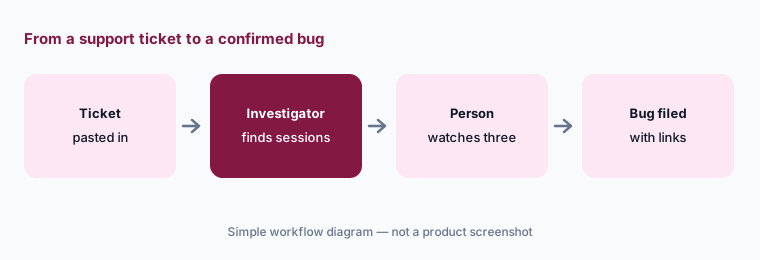
Primary workflow:
Paste one real support ticket into Issue Investigator (or ask Ask StoryAI the same question if you are not in early access). Open three of the sessions it cites and confirm the cause yourself before you file a bug. Note any session that does not match.
2. Summaries across many sessions
What it is: Watching replays one by one is slow. StoryAI Summaries read behavior across a set of sessions — for example everyone who abandoned checkout yesterday — and pull out what is relevant, so a team gets a short written takeaway instead of hours of video. Fullstory’s plan table lists StoryAI Summaries and Session Summary Notes among its session features.
Summary, then spot-check:
Build a segment for one flow users abandon. Ask for a summary, then watch ten sessions at random from the same segment. Write down which parts of the summary you saw for yourself and which you did not.
3. Ask StoryAI and Opportunities
What it is: Ask StoryAI lets anyone ask questions of the data in plain English — “what changed on the pricing page this week?” — without building a dashboard. Opportunities works the other way round: it surfaces friction on its own — signals such as dead clicks and errors on key pages — and ranks it by estimated revenue impact. Treat that ranking as a starting list; the revenue figure is Fullstory’s estimate from your traffic, not money you will recover.
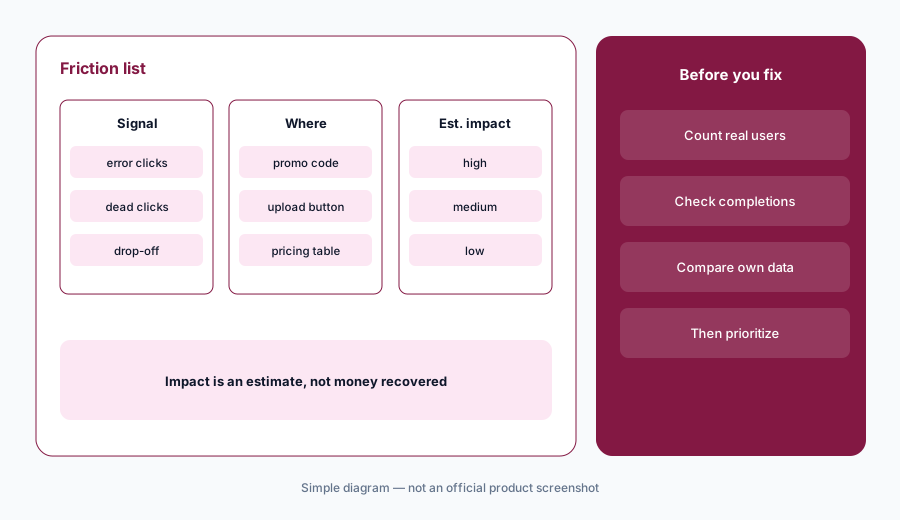
Check the estimate:
Take the top item in Opportunities this week. Ask StoryAI how many users hit it and how many still completed the flow. Compare that with your own order or signup data before you prioritize the fix.
4. The Fullstory MCP for Claude, Cursor, and other AI tools
What it is: The Fullstory MCP server connects Fullstory’s behavioral data to AI tools that support the Model Context Protocol — Claude (as a Verified connector in Claude’s directory), Claude Code, Cursor, VS Code, Gemini CLI, ChatGPT, and others — so you can ask about segments, metrics, funnels, and frustrations from where you already work. Fullstory’s help center says it is available to all paying customers; its developer docs still label it beta. An org admin must enable it under Settings → Account Management → StoryAI Features, and Fullstory warns that if StoryAI is turned off for your org, a client can appear connected but show no tools.
The Claude Code plugin adds two analysis skills (general-analysis and comparisons) and a session-context agent that reads individual session transcripts separately. Fullstory’s June demo showed Agentic Session Review, where an AI tool looks at frames from a session to explain an error. For support or sales agents that need one user’s session context, Fullstory points to a separate integration, Fullstory for Customer Agents.
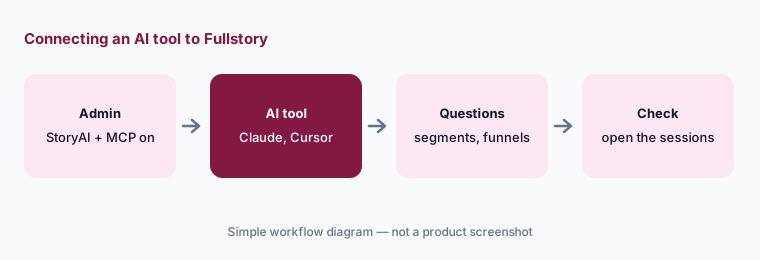
One question, two checks:
After an admin enables the MCP, ask your AI tool one question you already know the answer to (last week’s signup count, for example). If it matches your dashboard, ask a new question and open two of the sessions it cites.
5. Privacy defaults and what gets captured
What it is: Session tools capture a lot, so privacy settings matter more than any AI feature. Fullstory says its capture is private by default: sensitive data is excluded by default and personal data can be masked so it never leaves the user’s browser or device. It lists sensitive data detection, configurable form privacy, a consent API for recording only after consent, user deletion and data export for GDPR and CCPA requests, and IP, location, and user-agent restrictions. On security it cites SOC 2, ISO 27001, and ISO 42001 (an AI management standard) — all as Fullstory’s own statements.
Replay audit:
Before turning on StoryAI or the MCP, watch ten replays from your most sensitive pages. List every field or text block you can read. Exclude or mask each one, then watch ten more to confirm.
6. Where Fullstory fits against other options
What it is: Fullstory is strongest when the question is “what did users actually do and see?” across a busy web or mobile product, and when product, UX, support, and engineering all want the same evidence. If your main need is event analytics and funnels, Amplitude or Mixpanel may already cover it; PostHog bundles analytics, replay, and flags; Pendo pairs analytics with in-app guides. Engineering teams focused on errors often start with Sentry AI, and LaunchDarkly now includes basic session replay next to its flags. Fullstory also sells Workforce, which applies the same capture to the internal tools employees use.
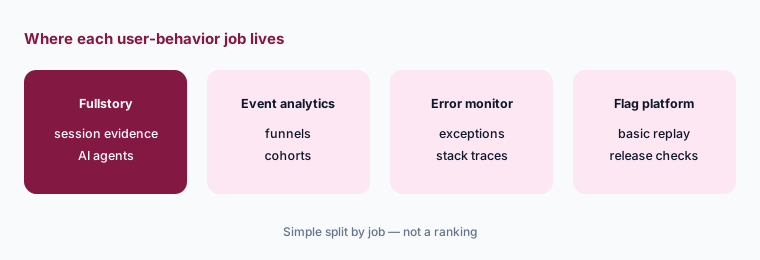
Replay or analytics:
Write the last five product questions your team asked. Mark each “needs to see sessions” or “needs a chart”. If most need a chart, start with the analytics tool you have; if most need sessions, trial replay on one flow.
Pricing context (October 2026)
Fullstory publishes its free plan but not paid prices. On its pricing page on 8 October 2026, FullstoryFree was a permanent free plan with no card: 30,000 sessions a month, 12 months of data retention, and up to 10 users, with session replay, basic analytics, and debugging tools. Fullstory says Dashboards, StoryAI, and higher session limits need a paid plan.
Paid Analytics plans — Business, Advanced, and Enterprise — showed no dollar amounts and route to a demo. Plan add-ons listed StoryAI (“a team of AI agents”), Guides and Surveys, Mobile, Multi-Org Management, and an Advantage support subscription. Workforce, Warehouse data sync, and Activation are sold separately. Expect your quote to depend on session volume, plan tier, and add-ons, and ask which StoryAI features your plan includes.
Uncertainty: We could not find a public price for any paid Fullstory plan on 8 October 2026. The pricing page lists StoryAI both as a plan add-on and as StoryAI Summaries inside the plan comparison, so confirm exactly which StoryAI features your tier includes. StoryAI Agents is early access, and the MCP is described as generally available to paying customers in the help center but beta in the developer docs.
When it’s useful (honest take)
Useful when you have enough traffic that nobody can watch the relevant sessions by hand, and several teams argue about what users actually experienced. Then Summaries, Opportunities, and Issue Investigator can turn a vague complaint into linked evidence in minutes, and the MCP brings that evidence into the tools engineers already use — as long as someone checks the cited sessions and privacy rules are set before the AI is switched on.
Less useful when traffic is low enough to review sessions directly, when your questions are mostly chart questions an analytics tool already answers, or when sensitive pages make full session capture hard to justify. Opportunities’ revenue estimates are a prioritization aid, not a business case on their own.
Paying for Fullstory AI and a few other AI tools? The $9 AI toolkit spreadsheet lists every AI subscription you have, what each one costs, and how fast it pays for itself, so you can see which ones are worth the money.
Want someone to do it for you? AI toolkit audit — $19
Related options (educational)
| Need | Better home | Why |
|---|---|---|
| Session-level evidence with AI summaries and agents | Fullstory AI (this page) | StoryAI, Opportunities, Issue Investigator, MCP |
| Event analytics and funnels | Amplitude AI or Mixpanel AI | Charts and cohorts without full replay |
| Analytics, replay, and flags in one tool | PostHog AI | One bill for several product jobs |
| Analytics plus in-app guides | Pendo AI | Guide users after you find friction |
| Errors and stack traces | Sentry AI | Engineering-first triage |
| Low traffic, few sessions | FullstoryFree or your current analytics | Watch sessions yourself first |
FAQ
How much does Fullstory cost in October 2026?
FullstoryFree is free with 30,000 sessions a month, 12 months of retention, and up to 10 users. Business, Advanced, and Enterprise plans are quote-only. Confirm on fullstory.com/pricing.
What AI model does StoryAI use?
Fullstory says StoryAI is powered by Google’s Gemini models and drives Summaries, Opportunities, and Ask StoryAI.
Are StoryAI Agents generally available?
Not yet. Fullstory announced StoryAI Agents on 16 June 2026 and says they are in early access; you join through your account team.
Can I connect Fullstory to Claude?
Yes. Fullstory MCP is a Verified connector in Claude’s directory, and there is a plugin for Claude Code. An org admin must first enable StoryAI features and the MCP toggle in Fullstory settings.
Does Fullstory record passwords and card numbers?
Fullstory says sensitive data is excluded by default and personal data can be masked in the browser before it is sent. You still need to review your own pages and set exclusions for any free-text fields that could hold personal information.
Optional next step (if seats overlap)
If you pay for session replay, an event analytics suite, an error monitor, and a flag platform with its own replay — all watching the same users — that overlap is worth a look. Map the overlap with the $19 AI toolkit audit or the $9 AI toolkit spreadsheet. Email Audit $19 or Toolkit spreadsheet $9.
Checkout is live via Stripe. After you pay, we email delivery (spreadsheet) or intake next steps (audit).