Role guide · Customer success · Claude
Claude for customer success (Oct 2026): QBR notes, risk flags, follow-ups
CS role guide — Projects with account notes; meeting → risks/actions; soft CTA if seat overlap on the same CS jobs. Companion to the Claude product deep-dive and other Claude role guides.
Who this guide is for
Customer success leads and CSMs who already have or are considering Claude and need a repeatable account loop for QBR notes, risk flags, expansion signals, and follow-ups — not another generic AI tips list. Product deep-dive and alternatives live on claude.html. Related role guides: Claude for ops, Claude for founders, Claude for finance.
The QBR → follow-ups loop (picture)
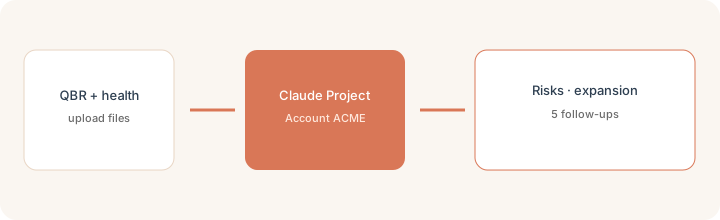
How a CS lead actually runs Claude
Examples at a glance: each feature has a concrete CS example plus a Try this mini-workflow.
1. Project Account ACME
What it is: A Claude Project groups chats, knowledge files, and custom instructions so you stop re-pasting QBR notes and health scores every renewal cycle. Pin a rule: only use Project files; blank any risk or expansion claim not present.

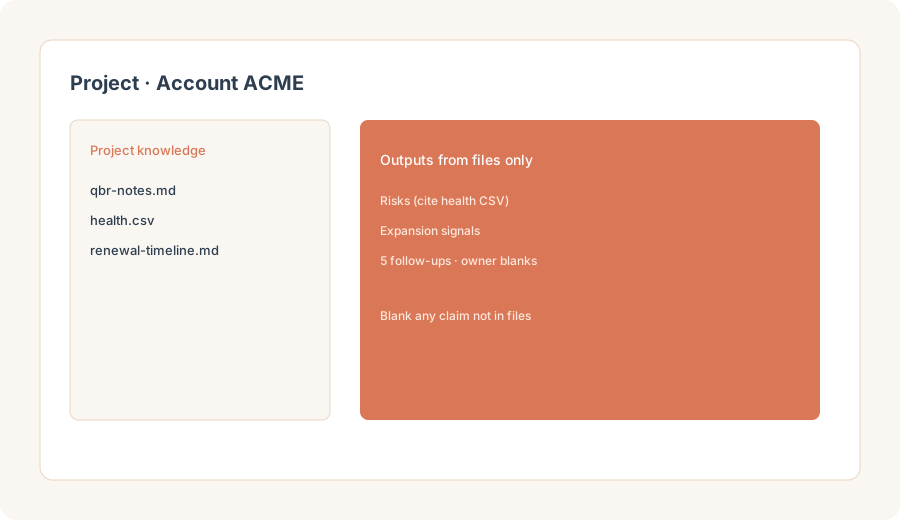
Primary SoT workflow:
Project Account ACME. Upload QBR notes + health CSV. Produce risks, expansion signals, and 5 follow-ups with owner blanks.
2. Risk flags from notes + health
What it is: Turn the Project files into a short risk list — usage dips, sponsor changes, open tickets — with blanks instead of invented churn predictions.
In the Account ACME Project:
Using only Project files, list account risks (max 7). For each: signal, source filename, confidence (High/Med/Low), and suggested owner blank. Use Unknown if a claim is not in the files. Do not invent churn dates, ARR, or NPS.
3. Expansion signals
What it is: Surface expansion clues that already appear in QBR notes or health data — new teams, feature asks, seat growth — without inventing pipeline.
After risks:
From only Project files, list expansion signals (max 5). Each must cite a note or CSV row. Flag anything that sounds like a sales forecast as Needs human. Do not invent deal size or close dates.
4. Five follow-ups with owner blanks
What it is: Convert risks and expansion into five concrete next actions with owner blanks — useful for the post-QBR Slack or CRM task list, dangerous if owners are guessed.
Before posting the post-QBR list:
Using only Project files, draft 5 follow-ups. Columns: Action | Why (cite file) | Owner (leave blank) | Due (blank if unknown). Do not invent owners, dates, or customer commitments.
When seats overlap (soft next step)
If Claude Projects already cover QBR notes → risks → follow-ups and you still pay ChatGPT, Gemini, and a notetaker to draft the same account memo, fix the overlap before adding more. Optional help: $19 AI toolkit audit or $9 AI toolkit spreadsheet — only if you are juggling multiple seats with the same CS jobs. Email hello@ with subject Audit $19 or Toolkit spreadsheet $9.
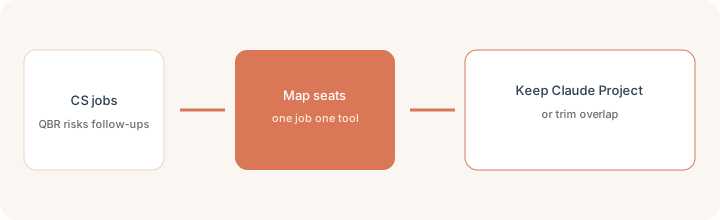
Checkout is live via Stripe. After you pay, we email delivery (spreadsheet) or intake next steps (audit). Soft offer — this role guide stands alone.
Pricing context (October 2026)
CS leads who lean on Projects + file uploads usually need Pro or Team. Public list we cross-checked on 30 Oct 2026: Pro about $20/month monthly (about $17/month on annual public cards); Team Standard about $25/member/month monthly (about $20 annual); Team Premium much higher for heavy usage. Confirm claude.com/pricing and anthropic.com/claude. Full dated notes on the Claude deep-dive. Limits and seat packaging change — do not budget from this page alone.
Alternatives (same CS jobs)
| Axis | Claude Projects | ChatGPT | Claude product page |
|---|---|---|---|
| Best when… | Recurring account files + strict “files only” rules. | You already live in ChatGPT for the same QBR loop. | You need features/pricing/alternatives deep-dive. |
| Less useful when… | You never reuse the same account files twice. | Projects-style file memory is the missing piece. | You only needed a CS workflow (this page). |
See Claude, Claude Projects, Claude for ops, Claude for founders, ChatGPT, and the ops & automation hub.
Paying for Claude and a few other AI tools? The $9 AI toolkit spreadsheet lists every AI subscription you have, what each one costs, and how fast it pays for itself, so you can see which ones are worth the money.
Want someone to do it for you? AI toolkit audit — $19
FAQ
How should a CS lead set up Claude for an account?
Create a Project for the account, upload real QBR notes and a health CSV, set instructions that forbid inventing risks or expansion claims, then reuse that Project instead of blank chats.
What is the QBR → follow-ups workflow?
Upload QBR notes and health CSV into a Project, ask for risks, expansion signals, and five follow-ups with owner blanks grounded only in those files, then blank any claim not present.
When should CS teams buy another AI seat?
Only when a clear CS job remains uncovered after Claude Projects/files. If multiple chat seats draft the same QBR memo, fix overlap first.
Where is the full Claude product review?
See /reviews/claude.html for features, pricing, and alternatives. Project setup: /reviews/claude-projects.html. This page is the customer success role guide.