Sales · RevOps · CRM AI
Salesforce Einstein review (Sep 2026): CRM AI for teams already on Salesforce
Educational features and usage for small ops/revops already paying Salesforce — not a reason to buy Salesforce just for AI. When opportunities are already the system of record, Einstein-style assists can draft next-step emails for stale deals and a hygiene checklist without inventing amounts that are not in the field dump.
Who this page helps
Ops and revops leads on small teams already paying Salesforce who want CRM-grounded AI for stale-deal follow-ups and field hygiene — not another chat seat that invents pipeline amounts. If Salesforce is not your CRM, this page is the wrong buy question; start with AI in your real CRM or a controlled export into a chat Project.
What Salesforce Einstein is
Salesforce Einstein is Salesforce’s long-running CRM AI brand: predictive scoring, activity capture, insights, and generative drafting inside Sales/Service experiences. In 2025–2026 public packaging, Salesforce also markets Agentforce as the agentic layer with consumption pricing. This review focuses on Einstein-style assists useful to small ops/revops already on Salesforce — and clearly separates Agentforce credit burn so budgets stay honest.

Major features (with how someone uses them)
Examples at a glance: each feature has a concrete ops/revops example plus a Try this mini-workflow.
1. Activity Capture & pipeline context
What it is: Einstein Activity Capture syncs emails/meetings into Salesforce so opportunity timelines are less empty. Public packaging includes a Standard tier with user caps on lower editions and fuller access via higher editions or Einstein/Inbox-related licenses. Treat sync scope and privacy settings as admin decisions — confirm on Salesforce help for your edition.
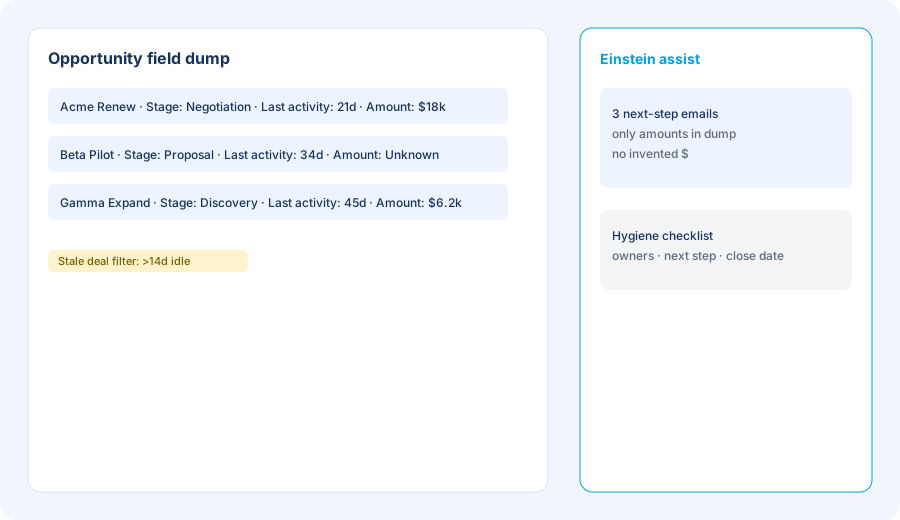
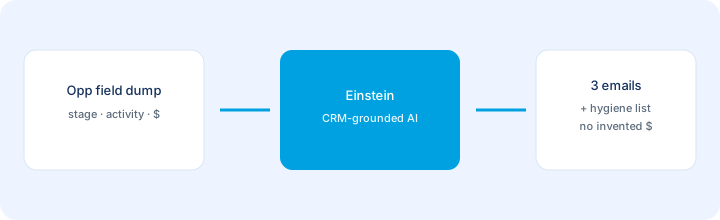
From one real opportunity list export:
From this opportunity field dump: Draft next-step emails for 3 stale deals and a hygiene checklist. Do not invent amounts not in the dump.
2. Opportunity & lead scoring
What it is: Predictive scores (often 1–99) on opportunities and leads to prioritize follow-up. Older Sales Cloud tables included Opportunity Scoring from Enterprise up (the October 2026 list renames the tiers Core, Advanced, and Max), with some lead/forecast features paid add-ons below Unlimited — confirm your edition matrix on Salesforce’s pricing page.
After exporting scored opportunities:
Rank these opportunities by score and days since last activity. For the top 5, write one sentence next step each. If Amount is blank, write Amount: Unknown — do not invent a number.
3. Generative next-step assists
What it is: Generative features (email drafts, summaries, prompt templates) that work on Salesforce context. Useful when the CRM fields are clean enough to trust. Ops should treat send actions as human-approved — drafts only until the field dump is honest.
Before enabling auto-send or mass updates:
List three Einstein jobs that must stay human-approved (send email, change stage, change amount). List two jobs that may draft only (bump email, hygiene checklist). Do not enable write-backs for the first list.
4. Agentforce vs Einstein (credits honesty)
What it is: Agentforce is Salesforce’s agentic layer with consumption models listed on Salesforce’s Agentforce pricing page (as of Oct 17, 2026) at $2 per conversation or Flex Credits at $500 per 100,000 credits (an action uses 20 credits, so about $0.10 per standard action), plus per-user Agentforce add-ons at $125 / user / month; the Max edition ($550 / user / month) includes the add-on. Einstein predictive/generative assists are now mostly edition-included; the older Sales Cloud Einstein add-on (historically ~$50 / user / month) is no longer listed for new buyers. Confirm on Salesforce’s live Sales Cloud / Agentforce pricing — packaging names move fast.
Before buying Agentforce or expanding Einstein add-ons:
List monthly Einstein jobs we already get in our edition. Estimate agent actions we might run. Convert with Salesforce’s published Flex Credit / conversation rates. If we cannot name a credit owner and ceiling, keep draft-only assists for 30 days.
Public pricing (as of Oct 17, 2026)
Einstein features are tied to Salesforce edition and add-ons — not a free reason to buy Salesforce from zero. From Salesforce’s official Sales Cloud and Agentforce pricing pages, re-checked as of Oct 17, 2026:
- Sales Cloud editions (as of Oct 17, 2026): Starter Suite $25 (billed monthly or annually), Pro Suite $100, Core $195, Advanced $395, and Max $550 per user / month, billed annually, on salesforce.com/sales/pricing. The older Enterprise and Unlimited editions are no longer sold from that list; only existing contracts may still use them. Region and promotions change, so confirm live.
- Edition-included Einstein: Activity Capture / Conversation Insights often appear earlier; Opportunity Scoring and related predictive features sat in Enterprise and up under the older tiers; on the October 2026 list, check the edition table for Core, Advanced, and Max; some generative and Agentforce capabilities are paid or Foundations-gated.
- Sales Cloud Einstein add-on: no longer listed on Salesforce’s pricing pages (as of Oct 17, 2026). It was a per-user add-on on older Enterprise contracts; if your contract still carries it, the price is quote-only — check your order form.
- Agentforce consumption: $2 / conversation or Flex Credits at $500 / 100k (salesforce.com/agentforce/pricing, as of Oct 17, 2026); Agentforce for Sales is listed from $125 / user / month, and the Max edition bundles it at $550. Salesforce says Flex Credits and Conversations can’t be used in the same org.
Uncertainty flags: Salesforce renamed and rebundled AI (Einstein → Einstein Copilot → Agentforce / Foundations). Included vs add-on matrices differ by cloud and year. Never budget from a blog table alone — open Salesforce’s live pricing and your entitlement list.
When Salesforce Einstein is useful (honest take)
Einstein tends to help when Salesforce is already the CRM of record, opportunity fields are clean enough to trust, and you want next-step drafts and hygiene without inventing amounts. It tends not to help when you hoped AI would fix a messy pipeline, when most selling lives in spreadsheets/email outside Salesforce, or when you are shopping for a CRM “because of AI” — buy the CRM you will actually run first. Agentforce consumption without a credit owner is how small teams overspend.
Paying for Salesforce Einstein and a few other AI tools? The $9 AI toolkit spreadsheet lists every AI subscription you have, what each one costs, and how fast it pays for itself, so you can see which ones are worth the money.
Want someone to do it for you? AI toolkit audit — $19
Alternatives compared: stay native vs parallel tools
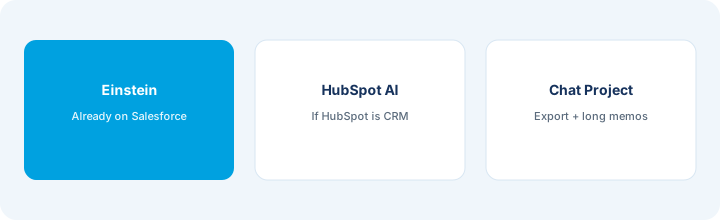
| Axis | Salesforce Einstein | HubSpot AI | Claude / ChatGPT Project | Sheets + LLM |
|---|---|---|---|---|
| Best when… | Salesforce is already CRM SoR. | HubSpot is already CRM SoR. | Long memos after controlled export. | One-off hygiene without more SaaS. |
| Cost shape (Sep 2026) | SF seats + edition AI + optional Agentforce credits. | HubSpot seats + HubSpot AI (see HubSpot AI). | Chat seat + paste/export time. | Near $0 tooling; human time is the cost. |
| Less useful when… | Salesforce is not where deals live. | You only need Salesforce-native assists. | You only need in-CRM next-step drafts. | You need multi-user CRM-grounded agents. |
Also see HubSpot AI, Clay, Claude for ops, and the sales & marketing hub.
Inventory seats by job on the stack map for sales ops.
FAQ
What is Salesforce Einstein?
Salesforce’s CRM AI brand for predictive and generative help inside Sales/Service — activity capture, scoring, insights, drafting. Agentforce is the newer consumption-priced agent layer.
How much does Salesforce Einstein cost in September 2026?
Mix of edition-included features and add-ons on top of Sales Cloud seats, which Salesforce lists at $25 to $550 per user/month as of Oct 17, 2026 (Starter Suite through Max). The older ~$50/user/mo Einstein add-on is no longer listed; Agentforce is $2 per conversation, $500 per 100k Flex Credits, or $125/user/mo add-ons. Confirm live Salesforce pricing.
Should we buy Salesforce just for Einstein?
Rarely for this page’s job. Prefer AI inside the CRM you already run. Einstein shines when Salesforce is already paid for and trusted.
Will Einstein fix a messy pipeline?
No. Clean amounts, owners, stages, and next steps first — or AI will confidently draft from bad fields.
Optional next step (if seats overlap)
If Salesforce Einstein is one of several AI seats and you want a written pass across the whole list, the optional $19 AI toolkit audit produces a short memo. Prefer an editable grid? The $9 AI toolkit spreadsheet is a one-time CSV. Soft offer only — this deep-dive stands alone.
Checkout is live via Stripe. After you pay, we email delivery (spreadsheet) or intake next steps (audit).