Sales & marketing · Ops cross-link · RevOps enrichment
Clay review (Sep 2026): enrichment and outbound research for ops/revops workflows
For ops and revops leads who burn hours on company research — when a Clay table + enrichment plan replaces VA copy/paste, and when a simpler list or CRM enrichment is enough. Features and usage, not generic sales hype.
Who this page helps
Ops leads, revops owners, and founders who maintain company lists and still pay people to Google each row. The buying question is whether structured enrichment + a QA gate beats another VA hour block — not whether Clay writes prettier cold emails.
What Clay is
Clay is a GTM data workspace: you work in tables, enrich rows from many providers (waterfalls), run AI research agents (Claygent), and push results toward CRM, email, or ads tools depending on plan. Free and paid Launch / Growth / Enterprise tiers meter Data Credits (marketplace data) and Actions (platform work). It is strongest when enrichment is repetitive and auditable. It is weaker when the research is one-off judgment a spreadsheet cannot encode.
Major features (with how someone uses them)
Examples at a glance: each feature has a concrete ops/revops example plus a short Try this.
1. Tables + waterfall enrichment (the buying decision)
What it is: Start with name + domain; add columns that pull firmographics, tech, contacts, and more from multiple providers in sequence. For ops, the win is a reusable column set — not a one-time CSV dump.
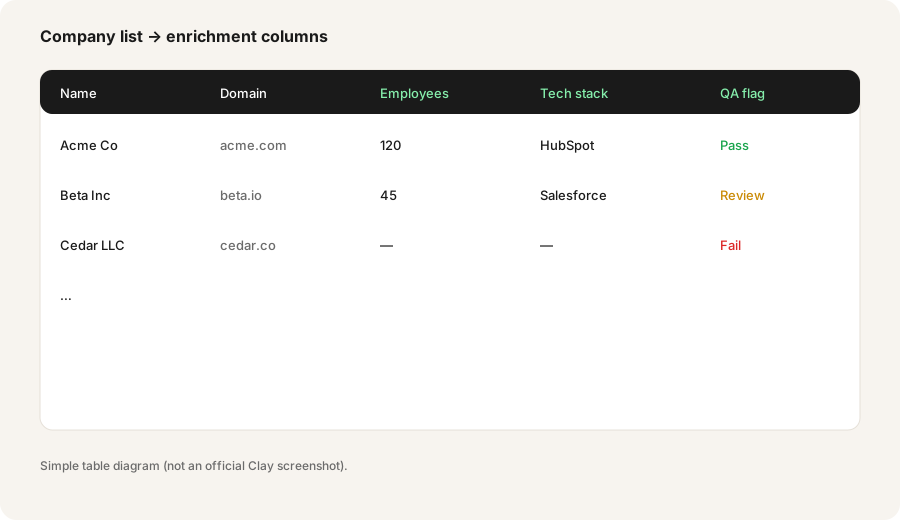
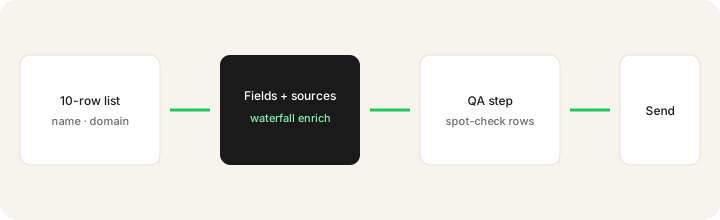
Given a 10-row company list (columns: name, domain), outline the plan before you spend credits:
Given this 10-row company list (columns: name, domain), outline a Clay-style enrichment plan: fields to add, sources, and a QA step before anyone sends outbound.
2. Claygent / AI research columns
What it is: AI agents that research custom fields from the public web (and related sources Clay documents). Useful for “summarize recent funding” or “list likely tech stack signals” — still not a license to invent facts. Credit and Action meters apply; confirm live docs.
Design one AI research column with a hard stop:
For each row, draft: ICP fit (1 sentence) + public source URL. If you cannot find a source, output UNKNOWN and set QA=Fail. Never invent a URL.
3. QA before anyone sends outbound
What it is: Enrichment without a QA column is how bad emails ship. The ops pattern: Pass / Review / Fail based on required fields, then only Pass rows enter Sequencer, CRM sync, or a human send list. Growth/Enterprise features (CRM sync, webhooks, ads audiences) only help if QA exists first.
Write the QA rule before you enrich:
Define Pass/Review/Fail: Pass = domain resolves + at least one verified contact path + ICP note with source. Review = missing one field. Fail = UNKNOWN source or inventable-looking data. No Fail rows leave the table.
4. When Clay replaces VA research hours — and when it doesn’t
What it is: Clay wins on repetitive, column-shaped research you will re-run. A VA (or ops generalist) still wins on judgment-heavy one-offs: “Is this partner trustworthy?” “Should we even sell to them?” Spreadsheet + chat can win for under ~20 rows once a quarter.
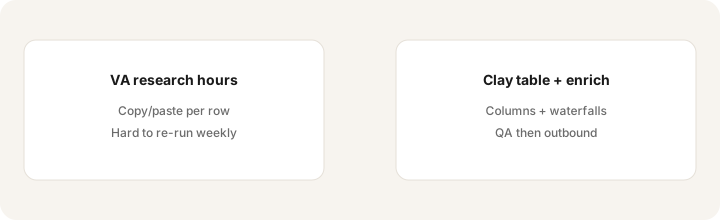
Audit last month’s research work:
List every research task. Mark R = repetitive column work, J = judgment one-off. If R hours > J hours and lists exceed ~30 rows/month, Clay (or similar) owns R; keep humans for J.
Public pricing (September 2026)
Figures from Clay’s public pricing page as of September 2026. Plans use separate Data Credits and Actions meters; sliders change the monthly floor.
- Free: $0 — public FAQ lists about 100 Data Credits and 500 Actions per month; limited rows per table; no phone enrichment on Free.
- Launch: FAQ lists starting around $185/month (about $167/month on annual). Includes larger Action/credit bundles (public default often cited as ~2,500 Data Credits and ~15,000 Actions/mo). UI also shows lower “starts at” slider floors — confirm live.
- Growth: FAQ lists starting around $495/month (about $446/month annual) with CRM sync, HTTP API, web intent, ads audiences, priority support. Default credit bundles larger (public pages often cite ~6,000 Data Credits and ~40,000 Actions/mo).
- Enterprise: custom — SSO, RBAC, higher volumes, dedicated strategist, etc.
Uncertainty: Clay’s pricing UI is slider-based (“starts at” floors differ from the FAQ headline defaults). Credit costs per enrichment vary by provider; BYO API keys change Data Credit usage. Always confirm on clay.com/pricing and Clay’s Actions & Data Credits docs before you buy.
When Clay is useful (honest take)
Clay tends to help when enrichment is repetitive, column-shaped, and QA’d before outbound — the job a VA used to copy/paste. It tends not to help when you only need a one-off 10-row list, or when the hard part is judgment rather than data. Stacking Clay + a full B2B database + a VA for the same columns is sprawl; pick who owns the enrichment loop.
Paying for Clay and a few other AI tools? The $9 AI toolkit spreadsheet lists every AI subscription you have, what each one costs, and how fast it pays for itself, so you can see which ones are worth the money.
Want someone to do it for you? AI toolkit audit — $19
Alternatives compared: Clearbit/ZoomInfo-class, Sheets + chat, CRM native enrich
| Axis | Clay | Point B2B database | Sheets + Claude/ChatGPT | CRM native enrich |
|---|---|---|---|---|
| Typical paid cost (Sep 2026) | Launch ~$185/mo headline; Growth ~$495/mo. Confirm clay.com/pricing. | Often higher seat/contract. Confirm vendor. | Chat seat ~$20/mo + Sheets you own. See Claude / ChatGPT. | Bundled in HubSpot/Salesforce add-ons. Confirm CRM. |
| Native strength | Table + multi-provider orchestration | Directory coverage | Ad-hoc research notes | Enrich where CRM already lives |
| Best fit when… | Revops owns reusable enrichment plays + QA. | You mainly search a fixed database. | Tiny one-off lists. | Enrichment only needs CRM fields. |
| Less useful when… | Volume is tiny or judgment-only. | You need multi-provider waterfalls + custom AI columns. | You re-run 50+ rows weekly. | Research must leave CRM into ads/email plays. |
Same job, two products: HubSpot AI vs Clay.
Inventory seats by job on the stack map for sales ops.
FAQ
What is Clay?
A GTM table workspace for multi-provider enrichment and AI research columns. Built for ops/revops workflows with a QA gate — not a generic sales chatbot.
How much is Clay in September 2026?
Public pages list Free, Launch (~$185/mo headline / ~$167 annual), Growth (~$495/mo / ~$446 annual), and custom Enterprise. Confirm on clay.com/pricing — sliders change floors.
When does Clay replace VA research hours?
When enrichment is repetitive and you can define Pass/Review/Fail before outbound. Keep humans for judgment-heavy one-offs.
Clay vs Clearbit/ZoomInfo-class tools — how should we compare?
Compare workflow ownership: Clay orchestrates providers in tables; point databases win as directories. Many teams use both for different jobs.
Optional next step (if seats overlap)
If Clay is one of several research/enrichment seats doing the same loop, optional help: $19 AI toolkit audit or $9 AI toolkit spreadsheet — only if you are juggling overlapping seats.
Checkout is live via Stripe. After you pay, we email delivery (spreadsheet) or intake next steps (audit).