How-to · Release safety · LaunchDarkly · Oct 18, 2026
Ship one feature with a LaunchDarkly guarded rollout, and have a named release owner own the rollback call
A LaunchDarkly guarded rollout raises traffic to a new flag step by step while it watches the metrics you attach, and can roll back on its own when it detects a regression. The rollout can stop itself; deciding what happens next is a person's job. This page shows how to ship one feature with a named release owner who owns the rollback and restart call.
Who this is for
Engineering managers, release and platform leads, and product managers who own the “is it safe to turn this on for everyone?” call. The job here is owning a guarded rollout. For planning a marketing web test with Optimizely's agents and having the experiment owner approve launch — a different job — see Optimizely test plan launch approval.
How to do it
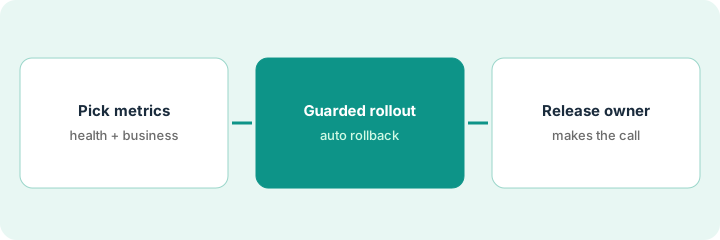
This is a how-to, not a ranking of flag tools. Per the LaunchDarkly AI review, guarded rollouts use sequential testing to detect a regression and can notify or roll back automatically, but they need the Guardian add-on. Vega is LaunchDarkly's agent for flag cleanup and incident triage, and AgentControl (formerly AI Configs) manages prompts and models for AI features. The ground rule: one named release owner decides whether to restart after any rollback.
1. Pick metrics for the guarded rollout
What it is: Before the release, write down two health metrics and one business metric and attach them to the guarded rollout.
- Pick two health metrics, such as p95 latency and error rate.
- Pick one business metric, such as clicked a search result.
- Plan the steps, for example 10%, 25%, 50%, then 100% over two days.
- Confirm your plan includes Guardian; without it there is no guarded rollout.
- Write the metrics in the flag description.
A release lead attaches p95 latency, search error rate, and clicked a result to the new ranking flag, with four steps over two days.
Write two health metrics and one business metric in the flag description before the first step.
2. Release owner sets thresholds and owns the call
What it is: Name one release owner who chooses notify-only or automatic rollback, and who alone decides whether to proceed or restart after a pause.
- Choose automatic rollback for risky changes; notify-only for low-risk ones.
- Agree in advance who decides to restart after a rollback — one name, not a channel.
- Note that the rollout also rolls back if too few users see the change at a step.
- Keep flag changes made from an editor through the hosted MCP server under the same approvals.
- Log every pause, rollback, and restart with the owner's name.
At 25% the latency metric regresses and the rollout reverts on its own. The release owner holds the restart until the team finds an unindexed query, then restarts the next day.
Put the release owner's name and the restart rule in the flag description.
3. Use Vega for flag cleanup after
What it is: Once the flag has served one variation everywhere for a while, run Vega cleanup to open a GitHub pull request that removes the flag, and have engineers review it.
- Mark staging and production as critical environments so Vega's check means something.
- Add conventions to an AGENTS.md or CLAUDE.md file in the repo root.
- Run cleanup; Vega stops if more than one variation is still served in a critical environment.
- Read every line of the pull request and run the tests.
- Merge only after a second engineer approves.
The ranking flag has served true in production for two weeks. Vega opens a pull request; the reviewer spots a test file it should not touch, fixes it, and a second engineer approves the merge.
Run Vega cleanup on one flag that has served 100% for a while, and require a second reviewer before merge.
Pricing context (October 2026)
This how-to isn't a price sheet. Per the LaunchDarkly AI review and LaunchDarkly's pricing page (checked Oct 18, 2026), Developer is $0 a month, and Foundation is pay-as-you-go at $10 per service connection per month and $8.33 per 1,000 client-side monthly active users billed yearly, with $5 per additional 1,000 AI runs. Enterprise and the Guardian add-on, which guarded rollouts need, are custom-priced. Dated October 2026.
Checked Oct 18, 2026 on the vendor’s own pricing page: LaunchDarkly’s pricing page lists a $0 Developer plan; pay-as-you-go usage at $10 per service connection per month and $8.33 per 1,000 client-side monthly active users billed yearly; and $5 per additional 1,000 AI runs. Guarded rollouts need the Guardian add-on.
Uncertainty: The only prices this site sells here are the optional $9 AI toolkit spreadsheet and $19 AI toolkit audit.
When this helps (honest take)
Useful when you ship often across several environments, have agreed guardrail metrics, and want releases you can stop in seconds with one person owning the call.
Not useful when you have a handful of flags and one environment, or nobody will own the guardrail metrics — Guardian without agreed metrics buys alerts nobody acts on.
Related options (educational)
| Need | Where to look | Why |
|---|---|---|
| LaunchDarkly AI features | LaunchDarkly AI | Primary path |
| Marketing web test approval | Optimizely test plan launch approval | A different job |
| LaunchDarkly and Statsig side by side | LaunchDarkly vs Statsig | Compare the two |
| What users hit in the product | Fullstory AI | Session analytics |
FAQ
Do guarded rollouts come with every plan?
No. Per our review, guarded rollouts need the Guardian add-on, which is priced separately.
Can Vega change my code without review?
No. Per our review, Vega's code changes arrive as GitHub pull requests you review and merge yourself, and it works only with private repositories.
How much does LaunchDarkly cost?
Developer at $0 and Foundation pay-as-you-go on the page we checked; Guardian and Enterprise are custom. See the pricing section.
Optional next step
If you want a one-page toolkit map for the tools you already pay for, use the optional $9 AI toolkit spreadsheet. If you want a short review of seat waste and unused tools, use the optional $19 AI toolkit audit. Neither is required to follow this how-to.