How-to · Experimentation · Optimizely · Oct 18, 2026
Plan one experiment with Optimizely's Test Ideation and Experiment Planning agents, and have the experiment owner approve the launch
Optimizely's Test Ideation agent proposes ideas from a page and your test history, and the Experiment Planning agent turns one idea into a hypothesis, metrics, and sizing guidance. That is a fast route from a page to a test plan. This page shows how to keep only ideas with evidence behind them and have the experiment owner approve every launch.
Who this is for
Experimentation and conversion leads, web product managers, and content marketers whose team already runs tests in Optimizely Web or Feature Experimentation. The job here is approving one planned test. For turning a VWO heatmap insight into a test with Wingz and having the conversion lead approve the hypothesis — a different job — see VWO Wingz hypothesis approval.
How to do it
This is a how-to, not a ranking of testing suites. Per the Optimizely AI review, Optimizely renamed Opal to Optimizely Agent Platform on 1 September 2026, with the chat assistant personified as Mark, but the docs, Opal Chat, agents, and Opal credits still use the Opal name. The variation development agent saves changes only when you click Save All, and the CRO Manager saves experiments as drafts for review. The ground rule: the experiment owner approves every launch and ship decision.

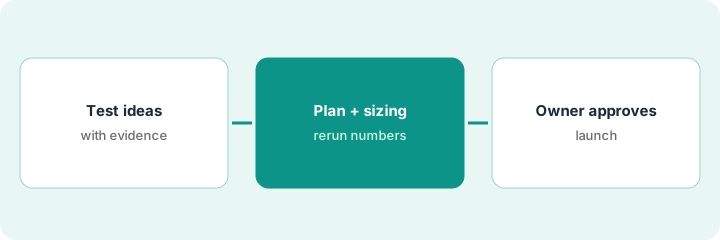
1. Ideate one test with Test Ideation
What it is: Call the Test Ideation agent in Opal Chat with one page URL, a goal, a primary metric, and the past tests on that page, and keep only ideas you can tie to a real user problem.
- Give it the page URL and one goal, such as more plan upgrades.
- Name past tests on the page so it doesn't suggest what already lost.
- Add evidence to the context field: a support ticket theme, a survey answer, a funnel drop.
- Ask for five ideas.
- Keep only the ideas with evidence; write the evidence next to each.
On the pricing page, two of five ideas match problems the team has seen: chat questions about what seats means, and a high drop at the annual-plan toggle. Three are generic. She keeps the two.
Write the evidence next to each idea you keep, and drop any idea without it.
2. Read the experiment plan and rerun the numbers
What it is: Turn one kept idea into an Experiment Planning draft — hypothesis, variants, targeting, metrics table, sizing guidance, risks — and check it by hand.
- Make the primary metric one your team already trusts and reports.
- Rerun the sample size with your own last 30 days of traffic.
- Check that the risks section names your guardrail metrics.
- If it can't finish in about four weeks, change the idea, not the threshold.
- Have a developer review any custom code the variation agent writes before publishing.
The draft proposes upgrade clicks as the primary metric. She swaps it for completed upgrades, which the team already reports, reruns the sizing, finds five weeks, and drops the second variant to fit four.
Rerun the plan's sample size yourself before you send it for approval.
3. Experiment owner approves launch, then reads the summary
What it is: The experiment owner approves the plan and launch, a person launches the test, and at the end the owner reads Opal's plain-language results summary next to the full results page.
- Approve the hypothesis, primary metric, sizing, and end date in writing.
- Launch it yourself; keep any CRO Manager experiments as drafts until reviewed.
- When the test ends, generate the results summary.
- Check every subgroup claim against the full results — treat unconfirmed ones as new hypotheses.
- The owner approves the ship decision and the wording that goes to leadership.
Opal's summary says completed upgrades rose and the effect was strongest for visitors from paid search. The full results show the overall lift is significant but the paid-search split is not. The owner ships, cuts the paid-search line, and logs it as a follow-up idea.
Name the experiment owner in the plan, and check every subgroup claim against the full results before sharing.
Pricing context (October 2026)
This how-to isn't a price sheet. Per the Optimizely AI review and Optimizely's plans page (checked Oct 18, 2026), Optimizely publishes no prices; every plan is individually packaged. Opal is metered in Opal credits with no published per-credit price. Dated October 2026.
Checked Oct 18, 2026 on the vendor’s own pricing page: Optimizely shows no public list price. Optimizely’s plans page says every plan is individually packaged; Opal credits have no published per-credit price. This page quotes no Optimizely dollar figure; confirm what your contract includes with Optimizely or your admin.
Uncertainty: The only prices this site sells here are the optional $9 AI toolkit spreadsheet and $19 AI toolkit audit.
When this helps (honest take)
Useful when your team already runs experiments in Optimizely, has test history for the agents to read, and has an owner who approves every launch.
Not useful when you don't run Optimizely Experimentation, your bottleneck is traffic rather than ideas, or you need published prices.
Related options (educational)
| Need | Where to look | Why |
|---|---|---|
| Optimizely AI features | Optimizely AI | Primary path |
| Heatmap insight to a test in VWO | VWO Wingz hypothesis approval | A different job |
| Website testing with Wingz | VWO AI | Another testing suite |
| Release safety for engineering | LaunchDarkly guarded rollout | Flags, not web tests |
| Product ops stack map | Stack map: product ops | Where Optimizely fits |
FAQ
Is Optimizely Opal still called Opal?
Per our review, Optimizely renamed Opal to Optimizely Agent Platform on 1 September 2026, with the chat personified as Mark. Docs, Opal Chat, agents, and credits still use the Opal name.
Can Opal launch experiments on its own?
Per our review, the CRO Manager saves each experiment as a draft for review and the variation agent saves only when you click Save All. A person launches the test.
How much does Optimizely cost?
Optimizely publishes no prices; plans are individually packaged. See the pricing section.
Optional next step
If you want a one-page toolkit map for the tools you already pay for, use the optional $9 AI toolkit spreadsheet. If you want a short review of seat waste and unused tools, use the optional $19 AI toolkit audit. Neither is required to follow this how-to.