Tool · Experimentation · Optimizely · Oct 2026
Optimizely Opal review (Oct 2026): AI agents for experimentation and content teams
Opal is Optimizely’s AI layer across its marketing suite — content management, content marketing, experimentation, personalization, commerce, and analytics. On 1 September 2026 Optimizely renamed Opal to Optimizely Agent Platform, with the chat assistant personified as Mark; its support center now titles the section “Agent Platform (previously Opal)”, while most docs, the Opal Chat app, and the credits are still called Opal. We use “Opal” on this page because that is what you will see in the product. For experimentation teams the useful parts are the Test Ideation and Experiment Planning agents, the variation development agent in the Visual Editor, results summaries, and the CRO Manager. Each section has a Try this and names who approves before anything goes live.
What this Optimizely Opal page covers
This page is for an experimentation or CRO lead, a web product manager, or a content marketer whose team already runs tests in Optimizely Web Experimentation or Feature Experimentation. The question it answers: which Opal agents help you get from a page to a sound test and from results to a decision, what each one reads, and where the program owner still has to approve before a test or a change reaches visitors.
On naming: Optimizely’s support center says that as of 1 September 2026 Opal is renamed Optimizely Agent Platform and that Mark (for marketing) personifies it; the optimizely.com AI page now leads with “Optimizely Agent Platform”, and an Optimizely press release describes Mark-IQ as the platform’s data layer, built on each organization’s experimentation history and web analytics. In the documentation we read on 8 October 2026, agents are still “Optimizely Opal agents”, you still call them from Opal Chat, and usage is still measured in Opal credits.
Everything below comes from Optimizely’s AI, plans, and experimentation pages, its press release on its marketing AI models, and its support and developer docs, as we read them on 8 October 2026. Optimizely’s pages quote customer results such as hours saved per marketer and conversion gains; we treat those as vendor claims, not results you should expect.
Major features (with how someone uses them)
Examples at a glance: each feature has a concrete example from a real job plus a short Try this you can run this week.
1. Test Ideation: five ideas, tied to a real user problem (primary)
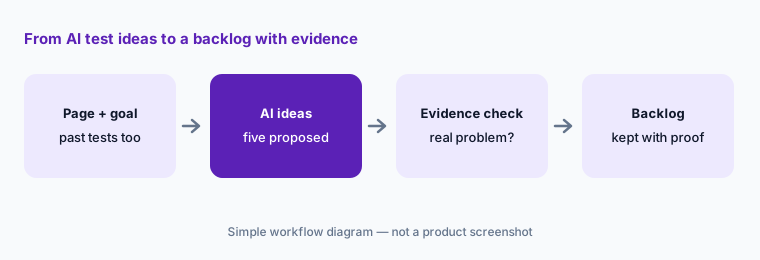
What it is: The Test Ideation agent (called with @test_ideation in Opal Chat) takes a page URL and, optionally, a goal, a primary metric, past experiments to build on, keywords to search your experiment history, and extra context such as known pain points or heatmap findings. Optimizely says it visits the page, takes a screenshot, pulls results for the past tests you name, and returns a prioritized package of experiment ideas in a canvas, organized by how hard each one is to build.
An idea list is cheap; a test calendar week is not. The best filter is evidence: keep an idea only if you can point to a real user problem behind it — a support ticket, a survey answer, a funnel drop, a session you watched. Feed that evidence into the agent’s context field, and give it the names of past tests on the page so it does not suggest what already lost.
Primary workflow:
Ask Opal for five test ideas on one landing page. Keep only the ones you can tie to a real user problem. Write the evidence — a ticket, a survey answer, a funnel step — next to each idea you keep.
2. Experiment Planning: hypothesis, metrics, and sample size
What it is: The Experiment Planning agent (@experiment_planning) takes a page URL and a test idea and returns a structured plan: a hypothesis, variant descriptions, targeting settings, a metrics table, statistical sizing guidance, risks, and assumptions. Optimizely runs it at its “complex” inference level by default.
The plan is a draft for the program owner, not a launch ticket. Check three things by hand: that the primary metric is one your team already trusts, that the sizing guidance matches your own traffic (rerun it in your sample-size calculator), and that the risks section names your guardrail metrics. If the plan cannot reach the sample size in four weeks, change the idea rather than the threshold.
Rerun the numbers:
Turn one kept idea into an Experiment Planning draft. Rerun its sample size with your own last 30 days of traffic, and change the plan if it cannot finish in four weeks.
3. Variation development agent: preview, then Save All
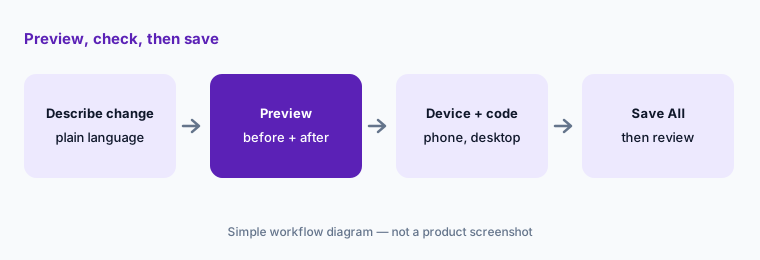
What it is: In the Visual Editor, the AI variation development agent changes page elements from plain-language instructions — restyling a call to action, adding a promotion bar with a countdown, reworking a section — and writes custom code where needed, keeping brand styles by reading the page. It can also generate a new variation: it looks at changes already made in your other variations and suggests distinct ideas, focusing on areas such as the hero section and primary calls to action. Optimizely says changes apply as a preview with a before-and-after comparison and the reasoning for each change, and are saved only when you click Save All (or discarded with Undo All).
Saving a variation is not launching a test, but it is the moment the code becomes real. The person who builds the variation checks it on mobile and desktop, in the browsers your visitors use, and reads any custom code the agent wrote; a developer reviews custom code before the experiment is published. Accessibility checks — contrast, focus order, screen-reader labels — are on the builder, not the agent.
Check two devices:
Use the variation development agent for one small change. Before Save All, view the preview on a phone and a desktop, read every line of any custom code it wrote, and note one thing you changed by hand.
4. Results summaries: plain language, full results alongside
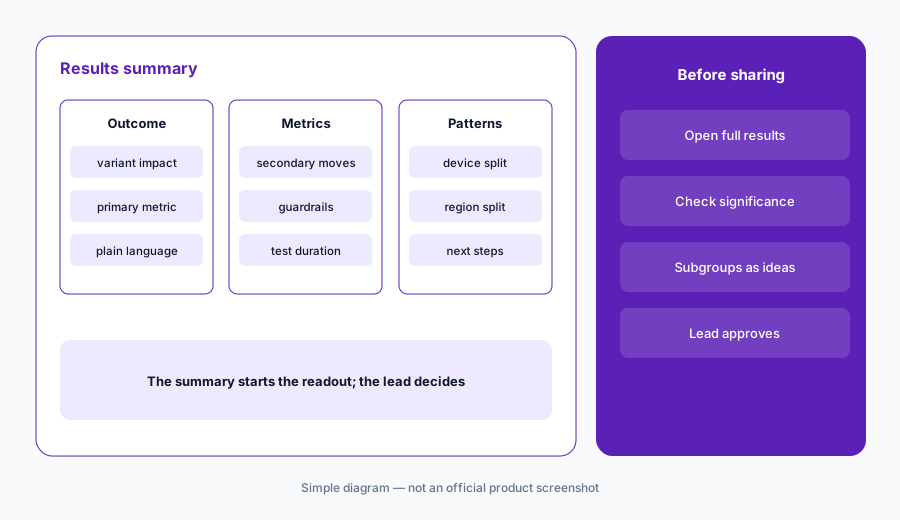
What it is: For A/B tests in Web Experimentation and Feature Experimentation, Opal’s results summary describes in plain language what each variation did, interprets primary and secondary metrics, notes patterns such as device or region, and recommends next steps. You can ask follow-up questions to shorten it or tailor it for a product manager or a CFO. Optimizely’s own guidance is to use the summary as a starting point and to keep using the full results page and statistical analysis for critical decisions.
Subgroup findings (“this worked especially well on mobile”) are where summaries mislead most: with many subgroups, some will look significant by chance. Treat any subgroup claim as a new hypothesis to test, not a result to ship. The experimentation program lead approves the ship decision and the wording that goes to leadership.
Subgroups are hypotheses:
Generate a results summary for your last finished A/B test. Find every subgroup claim in it, check each against the full results page, and move any that are not significant into your idea backlog.
5. CRO Manager: drafts for review, never auto-launch
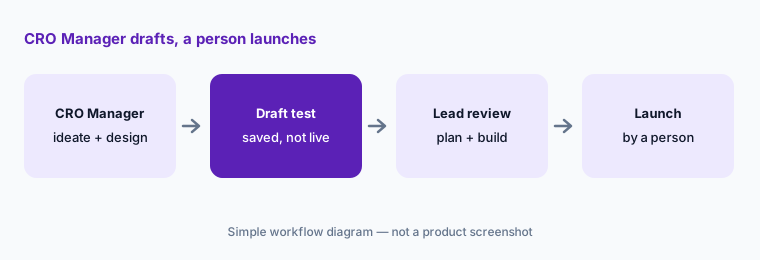
What it is: The CRO Manager runs a Web Experimentation program end to end as a set of scheduled or triggered jobs: it ideates (scanning conversion trends, crawling target pages, scoring hypotheses with the potential–importance–ease framework), designs (traffic baselines, sample size, runtime, wireframes), builds (audiences, metrics, traffic split, Visual Editor edits), monitors health daily (sample ratio mismatch, zero-conversion tracking breaks, runtime overruns), and reports a won, lost, or inconclusive verdict with a drafted stakeholder email. It reads GA4 and Web Experimentation data.
Optimizely’s docs say the CRO Manager saves each experiment as a draft in Web Experimentation for your review before launch, drafts stakeholder emails for you to send, and shows only the jobs an administrator turns on. Keep it that way: the experimentation program lead approves every launch and sends every email. Optimizely’s AI page also says every workflow has room for your team’s approval before output goes anywhere — make sure that step exists in each workflow you build.
Monitor first:
Turn on only the CRO Manager’s health-monitoring job for a month. Log every alert it raises and whether it was real before you enable the jobs that build experiments.
6. Opal credits, data handling, and where Optimizely fits
What it is: Optimizely says Opal credits are required to use Opal, are used whenever an Opal feature calls an AI model, and are pooled across eligible Optimizely products; each agent has a complexity band that sets its average credit use. From 1 October 2025 to 31 December 2026, each Opal instance can use up to 200 credits a month at no charge, and Optimizely may contact heavier users about a tailored plan. Optimizely says Opal currently runs on Google Gemini models, with Anthropic Claude models through Google Vertex AI added from March 2026, that prompts and outputs are not used to train general models, and that data is stored in the US or the EU region you choose. Administrators can turn generative AI off across Optimizely applications in the Opti ID Admin Center.
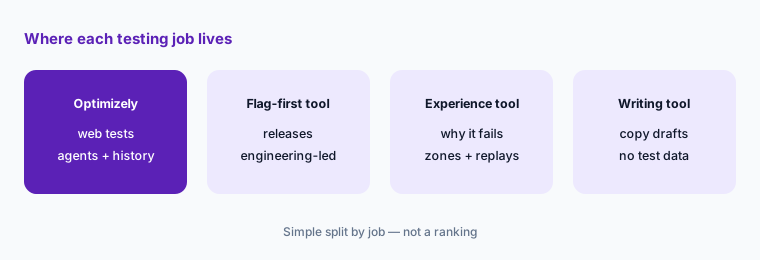
Optimizely fits marketing-led teams that run web experiments, personalization, and content in one suite and want agents that know their test history. Product and engineering teams that release behind flags often compare LaunchDarkly AI or Statsig; teams that need to see why visitors struggle before they test pair with Contentsquare or Fullstory; and content-heavy teams compare AI writing tools such as Jasper or Canva Magic Studio.
Credit forecast:
Check your Opal credit usage for last month. Estimate what it would be with the agents you plan to add, and ask your Optimizely account team in writing what that will cost after 31 December 2026.
Pricing context (October 2026)
Optimizely does not publish prices. Its plans page on 8 October 2026 said “Every Optimizely plan is individually packaged” and listed Experimentation, the Agent Platform, content, analytics, personalization, commerce, data, and feature management products with a demo request, but no dollar amounts.
Opal is metered in Opal credits, pooled across products. Optimizely’s credits FAQ says each Opal instance can use up to 200 credits a month on a complimentary basis from 1 October 2025 through 31 December 2026, and that Optimizely reserves the right to change or end that. No price per credit is published; credits are allocated by your account team. Ask for a quote that separates the experimentation licence, the credit allotment, and the cost of credits after the complimentary period.
Uncertainty: We could not find any public Optimizely price on 8 October 2026, including for Opal credits. The Opal-to-Agent-Platform rename took effect on 1 September 2026 but most documentation still says Opal, so menu names may change. Optimizely says its own marketing AI models are “coming soon”, which may change how agents run and how many credits they use. Vendor benchmark and customer figures are vendor claims.
When it’s useful (honest take)
Useful when your team already runs web or feature experiments in Optimizely and wants agents that read your own test history: ideas tied to past results, structured plans with sizing, variations built as previews you save, plain-language summaries for stakeholders, and a CRO Manager that drafts tests and watches experiment health while the program lead approves every launch.
Less useful when you do not run Optimizely Experimentation (the experimentation agents need it connected), your bottleneck is traffic rather than ideas, or you need published prices. Teams with little experiment history get generic ideas, because the agents have nothing of yours to build on.
Paying for Optimizely Opal and a few other AI tools? The $9 AI toolkit spreadsheet lists every AI subscription you have, what each one costs, and how fast it pays for itself, so you can see which ones are worth the money.
Want someone to do it for you? AI toolkit audit — $19
Related options (educational)
| Need | Better home | Why |
|---|---|---|
| Marketing-led web tests with agents that know your history | Optimizely Opal (this page) | Test Ideation, Experiment Planning, CRO Manager |
| Product experiments and flags priced by events | Statsig | AI summaries, gate cleanup PRs |
| Engineering-led releases with guarded rollouts | LaunchDarkly AI | Vega, AgentControl, experiments |
| Finding why visitors struggle before you test | Contentsquare AI | Sense Analyst, zones, journeys |
| Session evidence for a test idea | Fullstory AI | StoryAI summaries and Opportunities |
| Copy drafts without a testing suite | Jasper | Brand voice drafts; humans approve |
FAQ
Is Optimizely Opal still called Opal?
Optimizely renamed Opal to Optimizely Agent Platform on 1 September 2026, with the chat assistant personified as Mark. In October 2026 the docs, Opal Chat, agents, and credits still use the Opal name, so you will see both.
How much does Optimizely Opal cost in October 2026?
Optimizely does not publish prices; every plan is individually packaged. Opal uses credits, and each instance gets up to 200 complimentary credits a month through 31 December 2026. See optimizely.com/plans.
Can Opal launch experiments on its own?
Optimizely’s docs say the CRO Manager saves each experiment as a draft for your review before launch and drafts stakeholder emails for you to send; the variation agent saves changes only when you click Save All. A person launches the test.
Does Optimizely use my data to train AI models?
Optimizely says prompts, inputs, and outputs are not used to train general models, that the LLM does not retain your data, and that data is stored in the US or EU region you choose. Admins can turn generative AI off in the Opti ID Admin Center.
Who should approve tests built with Opal?
The experimentation program lead approves every launch and ship decision, the person who builds a variation checks it on real devices, and a developer reviews any custom code the agent wrote before the experiment is published.
Optional next step (if seats overlap)
If you pay for a testing suite with AI credits, a separate experience analytics tool, a copy tool, and a general assistant that all generate test ideas for the same pages, that overlap is worth a look. Map the overlap with the $19 AI toolkit audit or the $9 AI toolkit spreadsheet. Email Audit $19 or Toolkit spreadsheet $9.
Checkout is live via Stripe. After you pay, we email delivery (spreadsheet) or intake next steps (audit).