Tool · Experimentation · Statsig · Oct 2026
Statsig review (Oct 2026): experiments, feature gates, and AI help for product teams
Statsig is an experimentation and feature-flag platform that also does product analytics, web analytics, and session replay. Its ownership changed twice in a year: OpenAI announced it was acquiring Statsig on 2 September 2025, and since 5 May 2026 Statsig has been part of Amplitude — Statsig’s own blog now says the product, brand, and customers moved to Amplitude while the original team stayed at OpenAI. It is still sold on its own at statsig.com with published prices. Its AI is deliberately narrow: AI experiment summaries, a Hypothesis Advisor, AI stale gate cleanup pull requests, Knowledge Bank search, and a Statsig MCP whose v3 beta arrived on 7 October 2026. This page covers each with a Try this and who signs off.
What this Statsig page covers
This page is for a product manager, a data scientist, or an engineer who runs experiments and feature gates — often at a software company that ships many changes a week and wants one tool for flags, tests, and the metrics behind them. The question it answers: which Statsig AI features save time without weakening the statistics, what each one reads, and where the experiment owner or data scientist still has to check before a result is shared or a gate is removed.
First, the ownership facts, because readers ask. OpenAI announced on 2 September 2025 that it was acquiring Statsig. Statsig’s blog now carries a note that Statsig was acquired by Amplitude on 5 May 2026, with the original team staying at OpenAI; Amplitude’s own post that day calls it a strategic partnership in which Amplitude takes on Statsig’s brand and customers and keeps developing the platform in the cloud and the data warehouse. In June 2026 Statsig’s new product lead wrote that Amplitude events and cohorts would start working inside Statsig, and Statsig results inside Amplitude, by the end of the third quarter. Statsig remains a separate product with its own pricing page, console, and docs.
Everything below comes from Statsig’s pricing page, product-update entries, blog posts, and docs, plus the OpenAI and Amplitude announcements, as we read them on 8 October 2026. Statsig’s pages quote customers on shipping speed and impact; we treat those as vendor claims, not results you should expect.
Major features (with how someone uses them)
Examples at a glance: each feature has a concrete example from a real job plus a short Try this you can run this week.
1. AI experiment summaries: check guardrails before you share (primary)
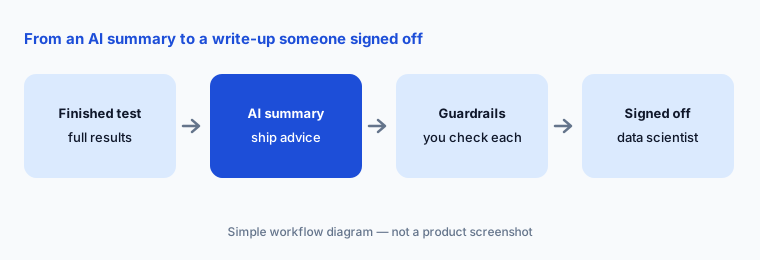
What it is: Statsig’s AI-Powered Experiment Summary (released December 2025, available to all customers) turns an experiment’s results into a readable summary: Statsig says it works out the purpose of the experiment, makes a ship recommendation, and highlights the most relevant metric observations. An admin turns it on under Settings → Statsig AI → AI Summary. It sits beside Statsig’s existing experiment templates and formatted report exports.
A summary that leads with the primary metric can skip the guardrail metrics that decide whether you should ship — latency, errors, refunds, unsubscribes. Statsig’s own September 2026 post on AI says its AI output will stay transparent so people can verify it, and that suggestions are optional. The experiment owner reads the full results page, and a data scientist or analytics lead signs off on the ship call; the AI summary is the first draft of the write-up, never the decision.
Primary workflow:
Pick one past experiment. Ask Statsig’s AI for the summary, then check the guardrail metrics yourself before sharing. Write one line per guardrail — moved, flat, or not measured — and add it to the top of the summary.
2. Hypothesis Advisor and Knowledge Bank search
What it is: The Hypothesis Advisor (July 2025) is a small, user-controlled AI step: you write a hypothesis, click a button, and it tells you what, if anything, you should change. AI Knowledge Bank Search (beta since December 2025, for warehouse-native customers who ask to join) lets you search past experiments in plain language — “find me experiments that impacted retention the most” — and returns the three best-matching experiments. Statsig also added contextual AI descriptions in December 2025.
Both help before a test starts: one sharpens the hypothesis, the other stops you repeating an old test. Neither one checks that your metric can move in the time you have — use the power analysis and sample-size tools for that. Knowledge Bank returns three matches, not all of them, so a quick manual search by tag is still worth doing.
Search before you test:
Before your next experiment, ask Knowledge Bank (or search by tag) for past tests on the same page or metric. Write one sentence on what the new test will learn that the old ones did not.
3. AI stale gate cleanup: read every pull request
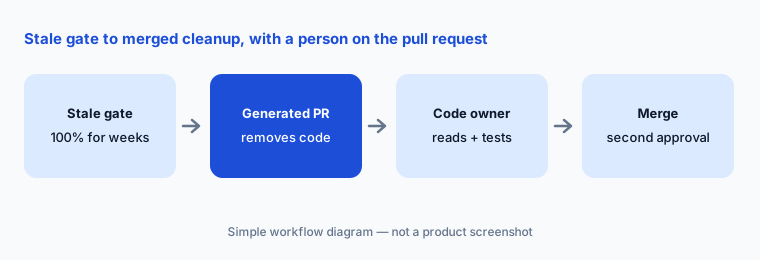
What it is: Statsig has long marked feature gates that are no longer active as stale. Since December 2025, with the GitHub AI integration, you can click “remove from code” in the Statsig console and get a generated pull request that deletes the dead flag code. Statsig describes the flow as: click, review the generated pull request, approve and merge. The flag dashboard also shows code references, health checks, and exposure counts.
The pull request is where a person takes over. An engineer who owns the code reads every changed line, checks that the branch kept is the one serving 100% in production, and runs the tests; a second reviewer approves as usual. Start with gates whose “on” branch has been fully rolled out for weeks, not ones that were turned off.
Three gates, one reviewer:
Pick three stale gates that have passed 100% for at least a month. Generate the cleanup pull requests, have the code owner read every line, and merge only after tests pass and a second engineer approves.
4. Statsig MCP (v3 beta): role-scoped writes
What it is: The Statsig MCP lets coding agents and AI clients read and change gates, experiments, dynamic configs, metrics, and audit logs. Through 2026 Statsig added OAuth sign-in, read-only access for read-only roles (June), experiment configuration and Autotune reviews over MCP, and self-serve role-based access for MCP (September). On 7 October 2026 it launched MCP v3 as a beta server (“Statsig V3 Beta” at https://api.statsig.com/v3/mcp), which Statsig says covers all 226 managed Console API endpoints and loads a small default tool set, with the rest reached on demand.
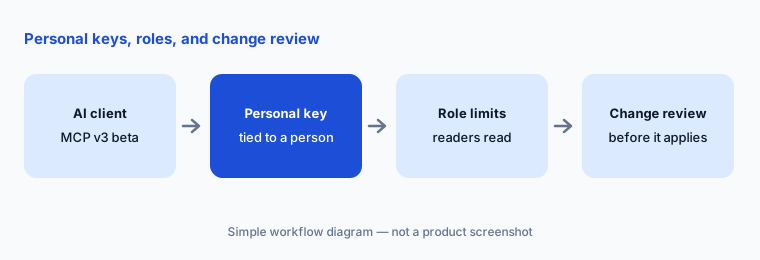
The v3 access model is the part to read. With personal keys, access is the overlap of the key owner’s role, the project maximum an admin sets, and the token scope, so a platform team can hold write access while everyone else reads. Statsig says permissions are applied twice — when the agent discovers tools and again when an operation runs — and tools you cannot use do not appear. Shared Omni and legacy Console API keys are not tied to a person, so role settings do not apply to them; keep those out of agents. Statsig also reports that v3 cut input tokens by about 43% in its internal testing — a vendor figure. If you used v2, you must sign in again and update any hard-coded tool names.
Readers read, owners write:
Connect MCP v3 with personal keys only. Give product and analytics people read-only roles, keep write for the platform team, and confirm that a gate change made through MCP still lands in change review.
5. Session replay: the default masks only passwords
What it is: Statsig includes web and mobile session replay (50,000 replays a month on the free Developer plan, 100,000 on Pro, 30-day retention on both) and lets you filter replays to users in a specific experiment group or gate. Its privacy docs list three baseline settings: Passwords (the default — only password inputs are replaced with asterisks; all other text and inputs appear as-is), Inputs (all input text masked), and Maximum (all text and inputs masked). CSS selector rules can mask, unmask, or block elements, and a global targeting gate limits who is recorded.
Because the default shows everything except passwords, change it before you record real users: start at Maximum or Inputs, block any element that shows account details, and use the targeting gate to record only the users you need. Masking settings do not replace your own consent banner, privacy policy, or data-processing terms — those still apply, and your privacy or legal owner should approve the replay setup before it goes live.
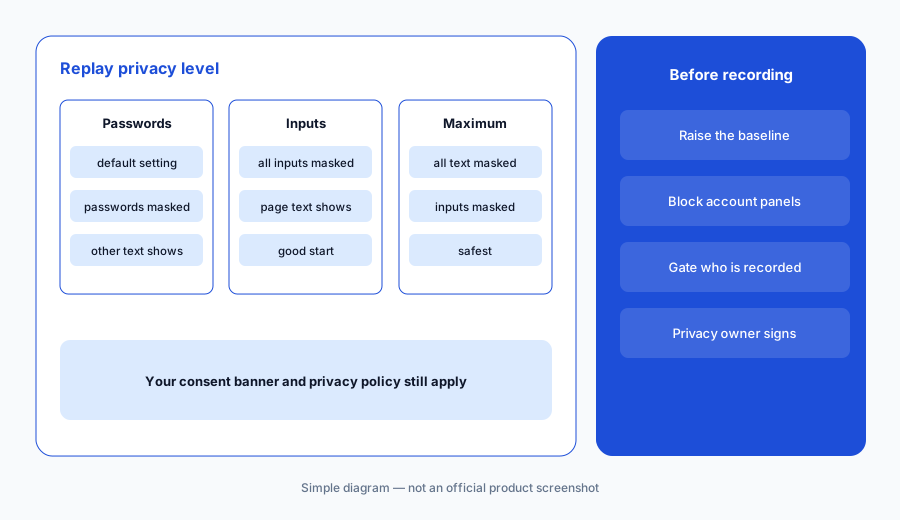
Change the default first:
Before recording any real sessions, set the replay baseline to Inputs or Maximum, block one element that shows account data, and record a test session to confirm what is visible. Have your privacy owner sign off in writing.
6. Pricing model, the Amplitude roadmap, and where Statsig fits
What it is: Statsig prices by events, not seats: flag and config checks are unlimited on every plan, and seats are unlimited from the free tier up. That makes it cheap to give everyone access and easy to underestimate event volume. Its stats engine is the core of the product — CUPED, sequential testing, Bonferroni and Benjamini-Hochberg corrections, holdouts, switchback and non-inferiority tests — and the AI features sit on top of it rather than replacing it.
Statsig fits product and data teams that want flags, experiments, analytics, and replay in one tool, priced by events, with the option to run warehouse-native on Enterprise. Engineering-led release teams often compare LaunchDarkly AI; marketing-led web testing teams compare Optimizely Opal; teams already on Amplitude should watch the data-layer link Amplitude promised for late 2026; and teams that mainly need analytics plus replay compare PostHog, Fullstory, or Contentsquare.
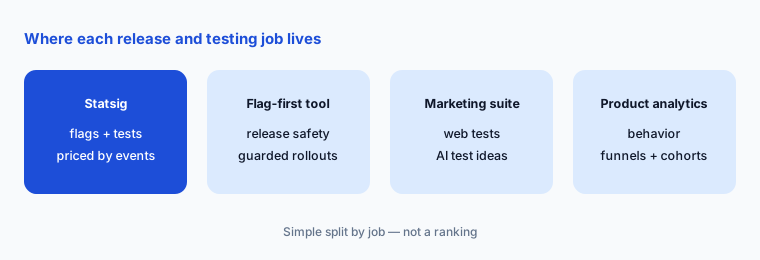
Price your events:
Export last month’s event count. Price it against Statsig’s Pro plan (5M events included, then $0.05 per 1,000) and write down how many events your next quarter’s experiments will add.
Pricing context (October 2026)
Statsig publishes prices. Its pricing page on 8 October 2026 listed: Developer — free (no card; 2M events a month, unlimited flag and config checks, 50,000 session replays a month, one-year analytics retention, unlimited seats); Pro — $150 a month (5M events included, then $0.05 per 1,000 events; 100,000 session replays a month; advanced experimentation and analytics, unlimited retention, change reviews and approvals, API controls); and Enterprise — custom (event- or experiment-based contracts, volume discounts, warehouse-native option, SSO and role-based access, data warehouse imports and exports, priority support, HIPAA eligibility with a BAA).
Statsig’s pricing page does not list a separate charge for its AI features; the AI experiment summary is described as available to all customers. AI tokens used through the MCP are billed by your own AI client. Ask in writing whether pricing or contracts will change as Statsig and Amplitude connect their products.
Uncertainty: Prices are as listed on statsig.com on 8 October 2026 and may change as Amplitude integrates Statsig; Amplitude called the May 2026 deal a strategic partnership while Statsig’s blog calls it an acquisition. MCP v3 is labelled beta. Statsig’s September 2026 post says more AI features are launching soon, so the AI section of this page may date quickly.
When it’s useful (honest take)
Useful when your product and data team wants flags, experiments, analytics, and replay in one tool with strong statistics, unlimited seats, and published event-based prices — and wants AI that drafts summaries, sharpens hypotheses, and opens cleanup pull requests while people keep the ship decision and the merge.
Less useful when your team expects the AI to run the experimentation program for you (Statsig keeps its AI narrow by design), your event volume is large and unpredictable, or you need contract certainty while the Amplitude integration is still taking shape. Session replay needs its privacy default changed before it suits most products.
Paying for Statsig and a few other AI tools? The $9 AI toolkit spreadsheet lists every AI subscription you have, what each one costs, and how fast it pays for itself, so you can see which ones are worth the money.
Want someone to do it for you? AI toolkit audit — $19
Related options (educational)
| Need | Better home | Why |
|---|---|---|
| Flags, experiments, analytics, and replay priced by events | Statsig (this page) | AI summaries, gate cleanup PRs, MCP v3 beta |
| Engineering-led releases with guarded rollouts | LaunchDarkly AI | Vega, AgentControl, Guardian |
| Marketing-led web testing with AI agents | Optimizely Opal | Test Ideation, CRO Manager, results summaries |
| Behavioral analytics with experiments alongside | Amplitude AI | Statsig’s owner since May 2026 |
| Open-source-friendly analytics, flags, and replay | PostHog AI | Self-serve product suite |
| Experience analytics and replay for UX teams | Contentsquare AI | Sense AI, zones, journeys |
FAQ
Who owns Statsig in October 2026?
OpenAI announced it was acquiring Statsig in September 2025. Since 5 May 2026, Statsig has been part of Amplitude: Statsig’s blog says the product, brand, and customers moved to Amplitude while the original team stayed at OpenAI. Statsig is still sold on its own at statsig.com.
How much does Statsig cost in October 2026?
Developer is free (2M events a month, 50,000 session replays). Pro is $150 a month with 5M events included, then $0.05 per 1,000 events. Enterprise is custom. Seats and flag checks are unlimited. See statsig.com/pricing.
What does Statsig’s AI do?
It writes experiment summaries with a ship recommendation, reviews hypotheses, searches past experiments in plain language (beta, warehouse-native), drafts contextual descriptions, and generates pull requests that remove stale feature gates. The Statsig MCP lets AI clients read and, with the right role, change Statsig objects.
Does Statsig session replay mask personal data by default?
Only passwords. The default baseline replaces password inputs with asterisks and shows other text and inputs as-is. Switch to Inputs or Maximum, use selector rules to block sensitive elements, and follow your own consent and privacy policy.
Who should approve experiment decisions made with Statsig AI?
The experiment owner reads the full results, a data scientist or analytics lead signs off on the ship call, and the code owner plus a second reviewer approve any AI-generated gate cleanup pull request before merge.
Optional next step (if seats overlap)
If you pay for a flag tool, an experimentation tool, product analytics, and session replay separately, and two of them now come from the same company, that overlap is worth a look. Map the overlap with the $19 AI toolkit audit or the $9 AI toolkit spreadsheet. Email Audit $19 or Toolkit spreadsheet $9.
Checkout is live via Stripe. After you pay, we email delivery (spreadsheet) or intake next steps (audit).