Tool · Customer success · Planhat · Oct 2026
Planhat AI review (Oct 2026): AI for customer data, health, and CSM workflows
Planhat is a customer platform for commercial teams — its pricing page lists CRM, customer success (CSP), and professional services (PSA) products on one data model. Its AI comes in layers: the AI platform (AIP) with AI steps inside Automations, conversation sentiment and categories that roll up into customer health, Conversation Summary, and a Planhat MCP server for Claude and ChatGPT. In September 2026 Planhat introduced Pi, a customer agent that is rolling out to a limited set of users first. This page walks through each layer with a real CS job, a Try this, and who signs off before anything reaches a customer.
What this Planhat page covers
This page is for a CSM, an account manager, or the CS operations lead who administers Planhat at a B2B software company — usually a team that already pipes product usage, conversations, and revenue data into Planhat. The question it answers: which Planhat AI features help you find at-risk or growing accounts in that data, what each one reads, and where a named person still has to check the output before it changes a record or reaches a customer.
Planhat’s help center describes the AI platform (AIP) as AI steps in template-based and custom Automations (using Planhat-managed models or your own AI connection), conversational AI that tags emails, chats, and calls with sentiment and a category, Conversation Summary for long threads, and the MCP server that connects Claude, ChatGPT, or your own apps to live Planhat data. Planhat says these features run on its own Google Vertex AI and OpenAI instances in the EU or US, that your data is not used for model training, and that usage (other than your own AI connections) consumes Planhat AI credits.
Everything below comes from Planhat’s Pi and AI platform pages, its September 2026 editorial on Pi, its help-center and developer articles, and its pricing page, as we read them on 8 October 2026. Planhat’s pages include customer logos and usage figures (for example, that 90% of customers automated at least one process with AI within five months, and that AI usage grew 15x over 2026); we treat those as vendor claims, not results you should expect.
Major features (with how someone uses them)
Examples at a glance: each feature has a concrete example from a real job plus a short Try this you can run this week.
1. Asking AI about usage drops — and checking the raw data (primary)
What it is: The most common first question for Planhat AI is a data question: which accounts are slipping? Today you can ask it two ways. Inside Planhat, Pi works in Sessions where you ask questions and hand it work (for users who have it). Outside Planhat, the MCP server lets Claude or ChatGPT query companies, end users, metrics, and conversations with your own permissions. Both read the same usage data your team already syncs — the active-user counts and calculated metrics behind your health scores.
Planhat also ships non-generative machine-learning helpers that answer part of this question without an LLM: the “Deviations from Normal” calculated-metric templates and the “Relevance” end-user field. If those are set up, compare the AI’s list with them. An AI answer is only as good as the usage sync; if a product’s events stopped arriving last week, every account using it will look like it lost users.
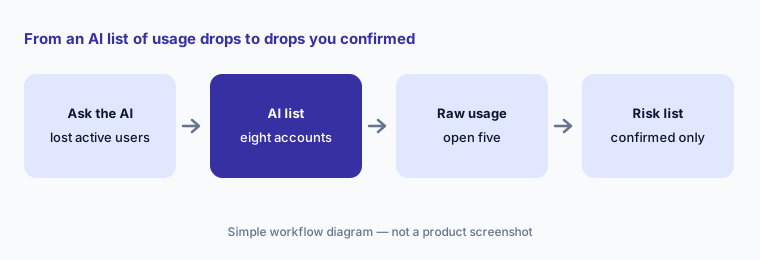
Primary workflow:
Ask Planhat’s AI which accounts lost the most active users this month. Check five in the raw usage data. For each one, write “real drop”, “data problem”, or “expected” before anyone contacts the customer.
2. Pi: the customer agent (rolling out since September 2026)
What it is: Pi is what Planhat calls a “multiplayer customer agent”. Planhat says Pi watches the business continuously — customer emails, calls, tickets, product usage, funding events — surfaces risk and opportunity, saves memories, and keeps data clean; helps people in Sessions or through MCP and the API (meeting prep, inbox triage, reply drafts, notes, data updates, churn analysis); and can own whole processes, such as renewals for long-tail accounts. Planhat lists Pi for customer success, professional services, renewals, sales, account management, and support (beta).
On availability, the Pi page we read on 8 October 2026 says Pi is rolling out to a limited set of users first and offers a waitlist; Planhat’s editorial introducing Pi is dated 22 September 2026. On control, Planhat says Pi “knows what it can see, what it can do, and when a person should be involved”, and can route decisions and request approval with permissions and traceability. Our rule for this page: a named CSM or account owner approves every customer-facing message and every renewal step Pi proposes, until your team has reviewed enough of its work to decide otherwise in writing.
One job, one owner:
If you have Pi, give it only meeting briefs for one month. Name the account owner who reads each brief, and log every claim that was wrong or out of date before you let Pi draft any customer email.
3. AI steps in Automations: who approves before it runs
What it is: Planhat’s Automations support AI two ways: one-click AI Automation Templates from the App Center, and a “Use AI” step inside custom Automations that sends a prompt to Planhat’s managed models or your own AI connection. Planhat says the response of an AI step is shown for 30 days and saved to its database only if you decide to save it. Planhat’s August 2026 AI platform page adds an AI Model Hub for choosing models and describes no-code AI workflows with role-based access for people and agents.
An Automation runs on every record that matches it, so a weak prompt repeats its mistake at scale. Have the CS ops admin who builds the Automation and the CS lead who owns the process both approve it, start it on a small segment, and keep its output internal (a note, a task, or a field) until you have read a sample. An AI step that writes customer-facing text should end in a task for the account owner, not in a sent email.
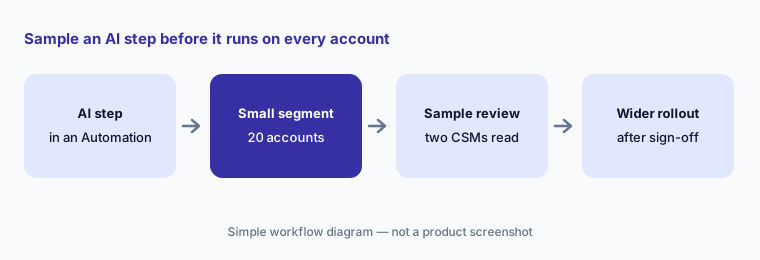
Sample before scale:
Pick one AI Automation Template. Run it on 20 accounts, have two CSMs mark each output right or wrong, and write down the prompt change you made before turning it on for the whole book.
4. Conversation sentiment and categories in customer health
What it is: Planhat’s conversational AI tags customer and prospect emails, chats, and calls with a sentiment (Positive, Neutral, or Negative) and a category such as Support or Billing. Sentiment rolls up to company, end-user, and user scores that you can use in health scores, Automations, and dashboards. Conversation Summary writes quick overviews, action items, and translations for long threads, and Planhat saves each summary so it can show it again later.
Adding AI sentiment to a health score is a decision, not a default. Sentiment tags misread sarcasm, short replies, and messages from your own team in the same thread. Before you give sentiment a weight in health, have a CSM label 30 recent conversations by hand and compare. If they disagree often, show sentiment on the account page but keep it out of the health score until the tags improve.
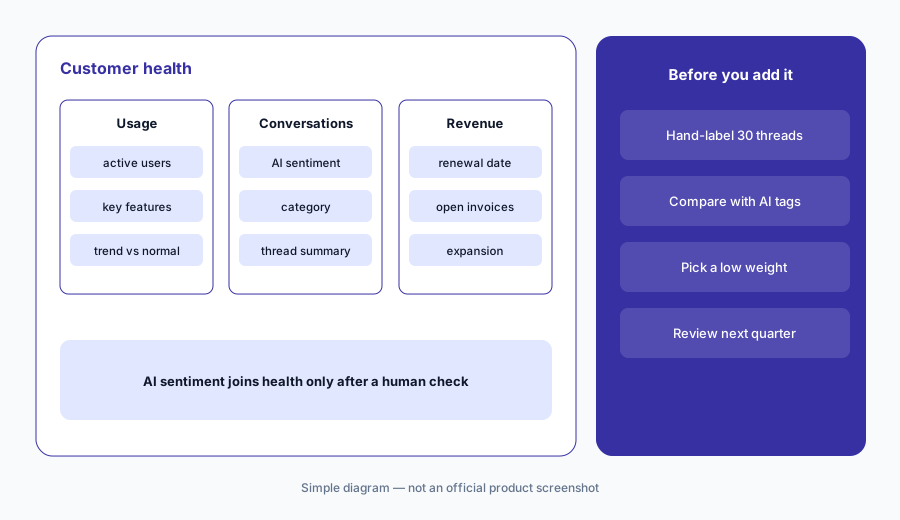
Hand-label first:
Label 30 recent customer conversations Positive, Neutral, or Negative yourself, then compare with Planhat’s tags. Only add sentiment to the health score if the two agree on most of them, and note the weight you chose.
5. Planhat MCP server: scope write and delete permissions
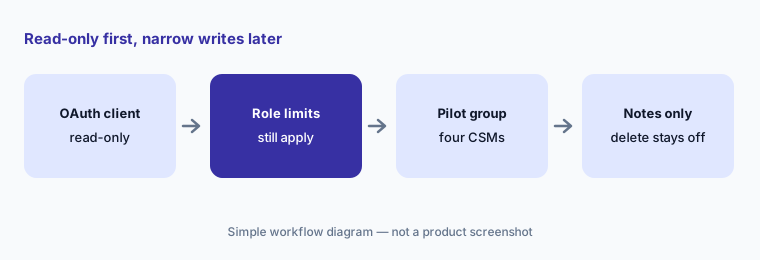
What it is: The Planhat MCP server connects Claude (Pro, Team, or Enterprise), ChatGPT (Business, Edu, or Enterprise with developer mode), or your own apps to live Planhat data. A system admin creates an OAuth Client in the App Center (“MCP for Claude” or “MCP for ChatGPT”), and each user signs in with their own Planhat account. Planhat says access is the overlap of the OAuth Client’s permissions and the user’s Planhat role, so nobody can grant themselves more than their role allows.
The developer docs are direct about writes: the MCP server supports creating, updating, and deleting records, and Planhat recommends being deliberate with write permissions, avoiding delete permissions “unless there is a clear and controlled use case”, and double-checking important results before writing them back. Start with an OAuth Client that can read only the objects a pilot needs, add create and update later for named users, and leave delete off.
Read-only client first:
Create a Planhat OAuth Client that can only read companies and end users. Ask your AI client three account questions and open the records behind each answer before you allow any write.
6. AI credits, data handling, and where Planhat fits
What it is: Planhat says AI steps that use its managed models, conversation sentiment and classification, and Conversation Summary consume AI credits, while your own AI connections are billed by that provider. Planhat processes AI requests on its own Vertex AI and OpenAI instances in the region of your Planhat instance (EU or US), says neither provider stores the requests or responses, and says your data is not used for model training.
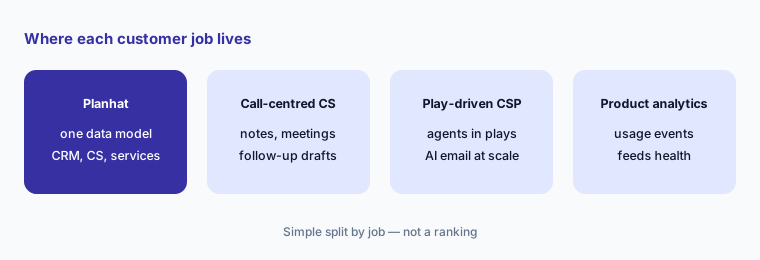
Planhat fits teams that want CRM, customer success, and services work on one customer data model, with AI that reads all of it. Large CS organizations with a deep admin model often compare Gainsight AI; teams centred on calls and notes compare Vitally AI; teams that want agents inside automated plays compare ChurnZero AI; and teams that want a knowledge layer for their own agents read Totango AI (now Odie). For the product-usage signals themselves, pair with Pendo, Amplitude, or Contentsquare.
Credit check:
List every Planhat Automation and feature that would use AI credits in a normal month. Ask your Planhat contact to estimate that usage in writing before you turn on sentiment for all conversations.
Pricing context (October 2026)
Planhat does not publish prices. Its pricing page on 8 October 2026 showed CRM, CSP, and PSA packages with an “Enquire” form and no dollar amounts. The package feature lists include “Planhat AIP”, Automations, dashboards, Open API, and advanced permissions, but the page does not say how many AI credits come with each package.
AI usage through Planhat-managed models — AI steps in Automations, conversation sentiment and classification, and Conversation Summary — consumes Planhat AI credits; your own AI connections and MCP clients bill through those providers. Pi is rolling out to a limited set of users with a waitlist, and Planhat had not published how Pi is packaged or priced. Ask for a quote that separates the platform, any AI credit allotment, the cost of extra credits, and Pi.
Uncertainty: We could not find any public Planhat price on 8 October 2026, including for AI credits or Pi. Pi had just started rolling out and Planhat said it would reach all customers over the following month, so its features and controls may change quickly. Planhat’s customer and usage figures are vendor claims we could not check.
When it’s useful (honest take)
Useful when your customer data — usage, conversations, revenue, projects — already lives in Planhat and your team wants AI that reads all of it: data questions in Pi Sessions or Claude, AI steps that draft notes and summaries inside Automations, sentiment that a CS lead has tested before adding to health, and an MCP server whose access follows each user’s role.
Less useful when your usage sync is patchy (every AI answer about usage inherits the gaps), your team cannot spare an admin to own Automation prompts and OAuth permissions, or you need fixed published pricing before you can compare. If you only need help drafting follow-ups from sanitized notes, a general assistant may be enough.
Paying for Planhat AI and a few other AI tools? The $9 AI toolkit spreadsheet lists every AI subscription you have, what each one costs, and how fast it pays for itself, so you can see which ones are worth the money.
Want someone to do it for you? AI toolkit audit — $19
Related options (educational)
| Need | Better home | Why |
|---|---|---|
| AI across CRM, CS, and services data on one model | Planhat AI (this page) | AIP, Pi (rolling out), MCP with role-scoped access |
| Deep CS admin model for a large team | Gainsight AI | Copilot, Staircase agents, MCP |
| Call notes, docs, and follow-up drafts | Vitally AI | AI Copilot, AI+ recorder, read-only MCP option |
| Agents and AI email inside automated plays | ChurnZero AI | AI Marketplace, Review Required for AI email |
| Product usage signals behind health | Pendo or Amplitude | Usage events and analytics your CS tool reads |
| Drafts from sanitized notes without a new seat | Claude for customer success | No live data; humans send |
FAQ
How much does Planhat cost in October 2026?
Planhat does not publish prices. Its pricing page lists CRM, CSP, and PSA packages with an Enquire form. AI features use Planhat AI credits, and Pi’s pricing was not published. Ask via planhat.com/pricing.
What is Planhat Pi?
Pi is Planhat’s customer agent, introduced in September 2026. Planhat says it watches customer signals, surfaces risk and opportunity, helps in Sessions or through MCP and the API, and can own processes such as long-tail renewals. On 8 October 2026 it was rolling out to a limited set of users with a waitlist.
Can I connect Claude or ChatGPT to Planhat?
Yes, through the Planhat MCP server and an OAuth Client created in the App Center. Access is the overlap of the client’s permissions and each user’s Planhat role. The server supports create, update, and delete, so start read-only and leave delete off.
Does Planhat use my customer data to train AI models?
Planhat says its AI features run on its own Vertex AI and OpenAI instances in the EU or US, that the providers do not store requests or responses, and that your data is not used for model training.
Who should approve Planhat AI outreach and automations?
A named account owner or CSM approves every customer-facing message, and the CS ops admin plus the CS lead who owns the process approve any Automation with an AI step before it runs beyond a small test segment.
Optional next step (if seats overlap)
If you pay for a CS platform with AI credits, a separate CRM assistant, a call recorder, and a general assistant that all summarize the same accounts, that overlap is worth a look. Map the overlap with the $19 AI toolkit audit or the $9 AI toolkit spreadsheet. Email Audit $19 or Toolkit spreadsheet $9.
Checkout is live via Stripe. After you pay, we email delivery (spreadsheet) or intake next steps (audit).