Tool · Customer success · Totango (now Odie) · Oct 2026
Totango AI review (Oct 2026): Unison and AI agents for customer success
Totango has run a customer success platform for more than fifteen years, merged with Catalyst in 2024, and launched Unison, an AI engine for churn and renewal risk, later that year. On 10 September 2026 the company renamed itself Odie and launched a Customer Knowledge Engine plus an optional agent workspace called the Customer Operating System. The Totango and Catalyst platforms are still sold and supported. This page explains which AI lives where, walks through each piece with a real CS job and a Try this, and says who still approves outreach.
What this Totango page covers
This page is for a CS leader or CS operations lead who uses Totango or Catalyst today, or who is weighing Totango’s AI against Gainsight, ChurnZero, or Vitally. The question it answers: after the rename, what AI can a Totango customer actually use, what does each piece read, and where does a person still have to check the result before a customer hears about it.
Start with the names, because they changed while we were writing. Totango is the original enterprise customer success platform. Catalyst is the customer growth platform Totango merged with in 2024. Unison, launched in late 2024 after Totango bought the team and technology of Parative, is an AI engine that predicts churn and renewal risk from calls, emails, meetings, and support tickets, and works with Totango, another CS platform, or none. Odie is the company’s new name since 10 September 2026, and also the name of its new product: a Customer Knowledge Engine with an MCP server, and an optional Customer Operating System with prebuilt agents. Odie’s CEO letter says legacy Totango and Catalyst customers keep the same contract, pricing, product, and people for now. Unison’s help center now carries the Customer Operating System name.
Everything below comes from totango.com and heyodie.ai, Odie’s CEO letter and pricing page, Totango’s support article on AI account summaries, and Unison help-center articles, as we read them on 8 October 2026. Odie’s home page quotes percentage gains in token efficiency and output quality from its own benchmark; we treat those as vendor claims, not results you should expect.
Major features (with how someone uses them)
Examples at a glance: each feature has a concrete example from a real job plus a short Try this you can run this week.
1. Unison: churn and renewal-risk predictions (primary)
What it is: Unison unifies customer data and uses AI models to predict churn, flag risk, and spot accounts ready to expand. Totango offers a standard model that reads engagement data — calls, emails, meetings, and support tickets — and says it can be running in days, and custom models for enterprises, trained on your own renewal history with professional services. Unison’s help center describes standard and custom health scoring, a customer health overview whose renewal-risk view uses a configurable renewal window (90 days by default), and a global context setting where you add the churn and renewal keywords your customers actually use.
A risk prediction is a ranking of where to look, not a verdict. The useful test is whether it finds accounts your CSMs missed — and whether it misses accounts they would have caught. That is what the primary Try this measures, over a window short enough to check by hand.
Primary workflow:
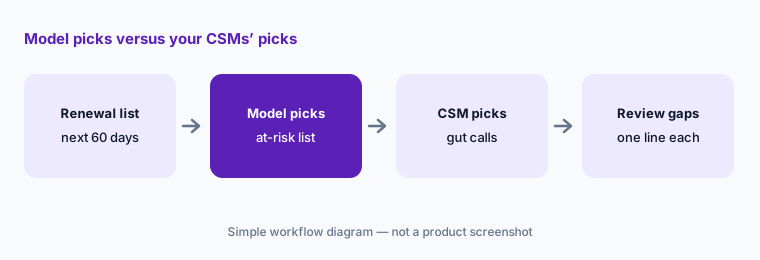
Run Totango’s AI on your renewal list for the next 60 days. Compare its at-risk picks to your CSMs’ gut calls. For every account on only one list, write one line on why, and decide which signals you trust before anyone changes a forecast.
2. AI account summaries in the Totango platform
What it is: Inside the Totango platform, Account Summary is a gated feature an admin switches on. From any account profile it produces a natural-language overview followed by usage and engagement, interactions, sentiment, risks, renewal, and recommended next actions. Totango’s support article says it sends anonymized account attributes to an AI engine (OpenAI, processed in the US), refreshes every 12 hours with a manual refresh option, and caches the same summary for everyone on the team until the next refresh. Admins choose up to four header KPIs, up to ten attributes for deeper analysis, and attributes to ignore.
The article’s own limits are worth reading twice. The summary uses a defined subset of attributes, not the full profile, and does not yet include touchpoints or emails. Attributes you add for deeper analysis are not masked, so Totango warns against including identifying details such as company names or domains. To keep a summary, Totango suggests copying it into an internal touchpoint, because the cached version is replaced after 12 hours.
Know what it can’t see:
Generate an Account Summary for one account you know well. List three recent things that happened by email or in a touchpoint. If the summary misses them, write that gap at the top before you share it, and save your edited version as an internal touchpoint.
3. Unison MCP: read-only customer context in Claude Code and Codex
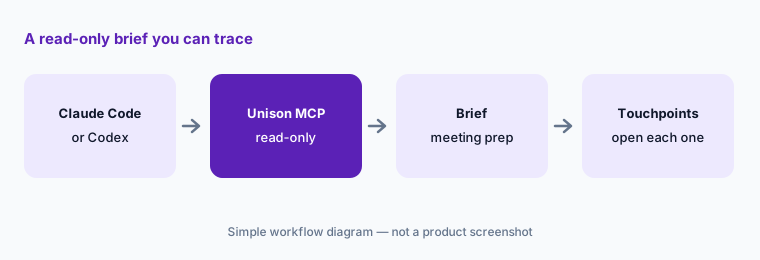
What it is: The Unison MCP server connects Unison’s customer data to AI clients that support remote MCP servers with browser sign-in. Unison’s setup article lists Claude Code, Codex, generic remote MCP clients, and hosted MCP clients. Its tools are Find Account (resolves aliases and abbreviations), Get Account context (health, contacts, recent activity, risks, opportunities, renewal timing), Get Touchpoints (calls, meetings, emails, tickets), Search Accounts, Get Segment, and Get brief (finds or generates an account brief, meeting-prep brief, or custom brief). The article states that the Unison MCP is read-only and can only reach what the signed-in user is already allowed to see.
Read-only is a good default for a first pilot: nothing is written back to your records. It does not make the output safe to forward. A meeting-prep brief in a general assistant is still a draft built from whatever touchpoints exist, and it now sits in a second tool, so agree which users may connect and what they may paste into other documents.
Ask for the sources:
Connect the Unison MCP for one pilot user. Ask for a meeting-prep brief, then ask “which touchpoints is each point based on?” Open them all before the meeting. Log any point you could not trace.
4. Odie’s Customer Knowledge Engine: capturing what your best CSMs know
What it is: Odie’s main new product is a Customer Knowledge Engine. Odie describes four steps: Capture (Odie interview agents run short sessions with your team to record what they know about customers and your company), Comprehend (daily AI analysis of CRM, usage, email, call, meeting, and voice-of-customer data), Curate (a self-updating “living narrative” for each business unit, customer, and employee), and Connect (an Odie MCP server so the agents and enterprise AI you already use can draw on it). Odie’s pricing page says implementation takes about eight weeks and starts by agreeing one to three outcomes you will measure.
The idea is that the hard-won context — who the real decision-maker is, what was promised two years ago — lives in people, not fields. That makes the interviews sensitive: they capture opinions about named customers and colleagues. Decide up front who can read each narrative, and have the CSM who gave the interview review what Odie wrote about their accounts before anyone relies on it.
Owner reviews the narrative:
Pick five accounts. After the interviews, have each account’s CSM read Odie’s narrative and mark every sentence “right”, “wrong”, or “out of date”. Connect the engine to other tools only once the wrong and out-of-date marks are fixed.
5. Customer Operating System: daily guidance, briefs, and prebuilt agents
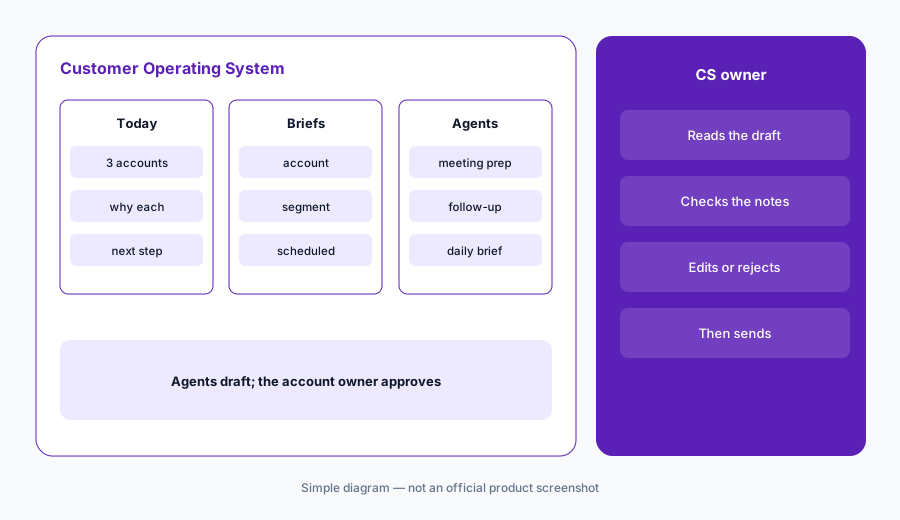
What it is: The Customer Operating System is Odie’s optional workspace on top of the Knowledge Engine — Odie calls it a modern alternative to a traditional CS platform. It re-analyzes every customer daily to pick up new signals and predict outcomes, gives each person a short list of what to focus on today, offers an on-demand chat copilot, sends intelligence briefs on an account or segment to your inbox on a schedule, and includes prebuilt agents for meeting prep, follow-ups, and daily briefings. Teams can also build their own agent skills without a developer. Predictive models trained on your own history estimate renewal and expansion.
Odie’s pricing FAQ explains how AI work is paid for: scheduled daily analyses are covered by the account fee, while on-demand work — manually triggered analyses, briefs, emails, meeting prep, and the chat copilot — draws on an AI Success pool that can also buy hours with Odie’s applied-AI team. Odie says it never charges overages automatically and tracks every token by user and use case. For outreach, our rule for this page holds: a follow-up agent drafts, and the account’s CS owner approves before anything reaches a customer.
Drafts go to the owner:
Set the follow-up agent so every message lands as a draft for the account’s CS owner. For two weeks, compare ten sent follow-ups with the call notes. Remove any promise, date, or price that nobody actually said.
6. Legacy Totango, Catalyst, and where Odie fits
What it is: If you are a Totango or Catalyst customer today, Odie’s CEO letter says nothing about your account changes now — same contract, same pricing, same product — and that Odie will show you what is new when you are ready. In practice that means three paths: stay on the Totango or Catalyst platform and use features such as Account Summary; add Unison for risk prediction; or move toward the Knowledge Engine and Customer Operating System. Ask your account team which of these your renewal assumes.
Odie fits teams that want an AI knowledge layer feeding agents they already run, or a light workspace instead of a heavy CS platform. Teams that want a full CS data model with agents built in often compare Gainsight AI or ChurnZero AI; teams that live in notes, docs, and meeting summaries look at Vitally AI. If your customers live in a CRM, check HubSpot Service Hub AI or Salesforce Einstein; for call data, Gong is a common source; and for in-product signals, Pendo or Fullstory.
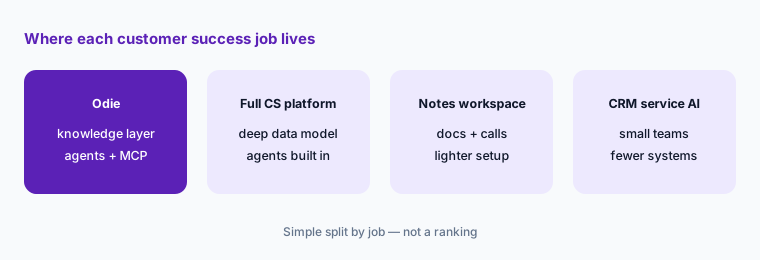
Which path is your renewal on?
Before your next Totango or Catalyst renewal, write down which you are buying: the current platform, Unison, the Knowledge Engine, or the Customer Operating System. Ask your account team to confirm each in writing, with what changes for your users.
Pricing context (October 2026)
Odie publishes starting prices. Its pricing page on 8 October 2026 listed the Customer Knowledge Engine at “starts at $500 / month”, priced on knowledge maintenance (how many business-unit, customer, and employee knowledge graphs Odie keeps current, and how often) and knowledge usage (an access fee for the MCP connection). It listed the Customer Operating System at “starts at $1,500 / month”, priced on customer portfolio size, depth and frequency of analysis, and an AI Success pool. Odie says there is no seat-based pricing and no extra charge for integrations; tokens your own AI tools use through the MCP stay on that vendor’s bill.
Terms start at one year with no month-to-month option, and Odie says most customers sign for two years. Activation includes a separate free testing pool for the first 60 days. Totango and Catalyst platform prices and Unison prices are not published; Odie says legacy customers keep their current pricing for now.
Uncertainty: Starting prices are Odie’s list figures as of 8 October 2026; your quote will depend on scope. The rename happened on 10 September 2026, so product names, URLs, and help-center branding are still shifting — totango.com/pricing and the Unison product page now land on a Totango-is-now-Odie notice. We read Unison help-center details through search extracts because the help center would not load from our test machine. Confirm which product your contract covers before planning around any feature here.
When it’s useful (honest take)
Useful when your calls, emails, meetings, and tickets are captured somewhere Unison or Odie can read, you want risk predictions or a knowledge layer that feeds agents you already use, and someone can own interview reviews and outreach approval. Then Unison can point CSMs at quiet accounts, the Unison MCP can give read-only context in Claude Code or Codex, and the Customer Operating System can cut meeting prep and follow-up drafting.
Less useful when your customer conversations are not recorded or logged, when you need certainty about the roadmap for a legacy Totango or Catalyst contract this quarter, or when nobody can review what interview agents and follow-up agents produce. A one-year minimum term also means a pilot is a real commitment, so set the one to three outcomes you will measure before you sign.
Paying for Totango AI and a few other AI tools? The $9 AI toolkit spreadsheet lists every AI subscription you have, what each one costs, and how fast it pays for itself, so you can see which ones are worth the money.
Want someone to do it for you? AI toolkit audit — $19
Related options (educational)
| Need | Better home | Why |
|---|---|---|
| AI knowledge layer and agents over your tools | Totango AI / Odie (this page) | Unison risk, Knowledge Engine, MCP, optional workspace |
| Full CS data model with agents built in | Gainsight AI or ChurnZero AI | Copilot or agents inside one CS platform |
| Notes, docs, and call summaries in one workspace | Vitally AI | Copilot summaries, AI Meeting Recorder, MCP |
| CS inside the CRM you already use | HubSpot Service Hub AI or Salesforce Einstein | Fewer systems; lighter health model |
| Call recordings that feed risk models | Gong | Conversation data many CS tools read |
| Renewal prep without a platform | Claude for customer success | No new seat; sanitized notes only |
FAQ
Is Totango now called Odie?
Yes. On 10 September 2026 the company announced that Totango is now Odie. The Totango Customer Success Platform and Catalyst are still listed as products, and Odie’s CEO letter says legacy customers keep the same contract, pricing, product, and people for now.
How much does Totango or Odie cost in October 2026?
Odie lists the Customer Knowledge Engine from $500 a month and the Customer Operating System from $1,500 a month, with terms of at least one year. Totango, Catalyst, and Unison prices are not published. See heyodie.ai/pricing.
What is Totango Unison?
Unison is Totango’s AI engine for predicting churn and renewal risk and spotting expansion, using calls, emails, meetings, and support tickets. It has standard models and custom enterprise models, and works with Totango, another CS platform, or none.
Can I connect Claude to Totango data?
Unison offers a read-only MCP server for clients such as Claude Code and Codex, and Odie’s Knowledge Engine includes an Odie MCP server. Both reach only what the signed-in user can access.
Do Odie’s agents email customers by themselves?
Odie lists prebuilt agents for meeting prep, follow-ups, and daily briefings. Set them so drafts go to the account’s CS owner, who edits and approves every message before it reaches a customer.
Optional next step (if seats overlap)
If you pay for a CS platform, a risk model, a call recorder, and an enterprise assistant that all hold a version of the same customer story, that overlap is worth a look. Map the overlap with the $19 AI toolkit audit or the $9 AI toolkit spreadsheet. Email Audit $19 or Toolkit spreadsheet $9.
Checkout is live via Stripe. After you pay, we email delivery (spreadsheet) or intake next steps (audit).