Tool · Customer success · ChurnZero · Oct 2026
ChurnZero AI review (Oct 2026): AI assists for customer success managers
ChurnZero is a customer success platform built for subscription software teams: account health, usage, plays (automated workflows), journeys, surveys, and renewals in one place. In 2026 it packaged its AI into one subscription called Agentic Essentials — about twenty named agents in an AI Marketplace, a Customer Intelligence Profile that tells them how your business works, and ChurnZero Connect, an MCP connection for Claude and ChatGPT. This page walks through the AI a CSM will actually touch, with a real CS job, a Try this for each, and the point where a person still has to approve.
What this ChurnZero page covers
This page is for a customer success manager or CS leader at a B2B subscription company — often a team of five to fifty CSMs — who already uses ChurnZero or is comparing it with Gainsight, Totango, or Vitally. The question it answers: which ChurnZero AI features save a CSM time before a QBR or renewal, which ones write to customers or to your records, and which settings an admin should check first.
ChurnZero now calls its AI simply ChurnZero AI. It comes in two layers. Built into the platform are Snapshot AI (account briefs), Engagement AI (sentiment and topics across emails, meetings, notes, and surveys), Meeting AI (call summaries and action items), and CS AI (a writing and analysis assistant). On top sits Agentic Essentials, launched on 15 June 2026: an annual subscription that bundles the AI Marketplace of named agents, a pool of AI credits, Knowledge Sources (Confluence, Zendesk Guide, SharePoint, Intercom, Notion), the Customer Intelligence Profile, and ChurnZero Connect (MCP).
Everything below comes from ChurnZero’s AI product page, its May, June, and August 2026 announcements, its monthly release notes, and its support article on Snapshot AI, as we read them on 8 October 2026. ChurnZero’s pages include customer quotes about time saved and earlier risk detection; we treat those as vendor claims, not results you should expect.
Major features (with how someone uses them)
Examples at a glance: each feature has a concrete example from a real job plus a short Try this you can run this week.
1. Snapshot AI: a one-click account brief before a QBR (primary)
What it is: Snapshot AI builds a written summary of one account’s current state from ChurnZero data. ChurnZero’s support article lists four sections: Background (from account attributes), Health (the account’s primary ChurnScore and usage metrics), Relationships (key contacts, their engagement, and how often they come up in notes), and Engagements (recent notes, emails, and logged activities, with themes by date range). Since late 2025, admins can also choose which meeting types’ notes feed the snapshot. You open the Snapshot AI tab on an account, click Generate, and refresh it when you need the latest; ChurnZero says automatic refreshes slow down when nobody opens an account and pause after about 45 days of inactivity.
A snapshot is only as good as what your team logs. If emails are not synced or meeting notes live in another tool, the brief will look confident about a thin slice of the relationship. That is why the primary Try this below asks you to sort every claim into “seen in data” or “needs a check” before the snapshot goes anywhere near a customer deck.
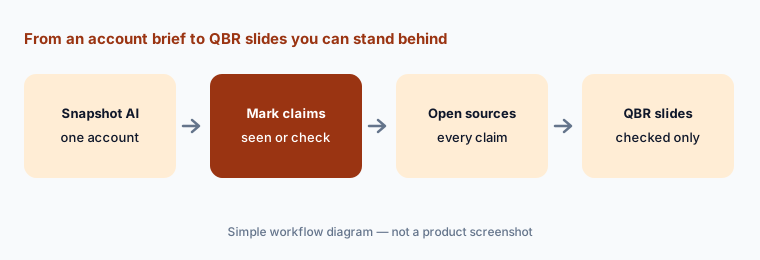
Primary workflow:
Ask ChurnZero’s AI to summarize one account before a QBR. Mark each claim “seen in data” or “needs a check”. Open the record behind every “seen in data” claim, and leave anything still marked “needs a check” out of the customer deck.
2. Agentic Essentials and the AI Marketplace agents
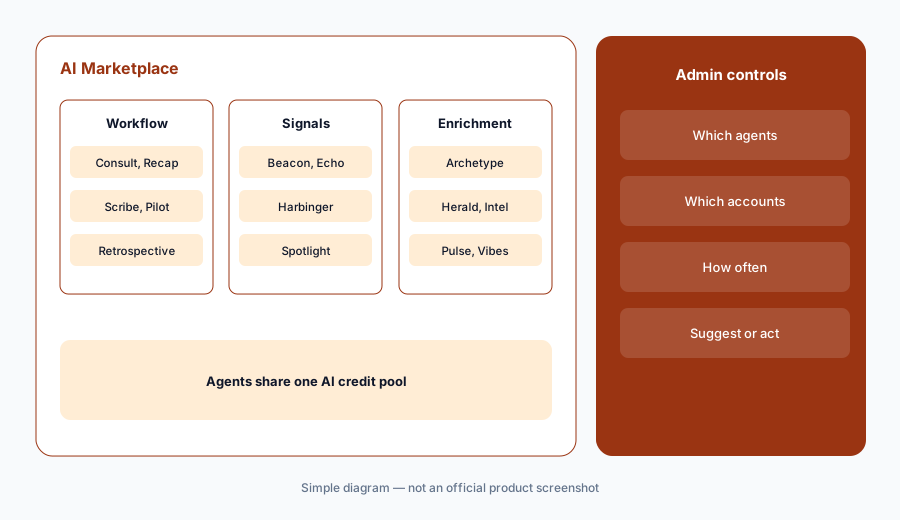
What it is: The AI Marketplace is where admins switch on named agents. ChurnZero groups them in three families. Workflow agents draft work: Consult (success plans), Compass (success plan summary emails), Crux (summary emails for Dynamic Slides), Recap (email thread summaries), Scribe (reply drafts), Verse (slides into narratives), Pilot (AI actions inside automation), Retrospective (churn analysis), and three handoff agents — Baton (sales to CX), Liftoff (implementation to CS), and Transfer (CSM to CSM). Signal detection agents flag things: Beacon (buying intent), Echo (product feedback), Harbinger (relationship risk), Spotlight (moments of measurable value). Data enrichment agents keep records current: Archetype, Herald, Intel, Pulse, and Vibes.
ChurnZero says you control which agents run, which accounts and contacts they apply to, and how often each one executes, and that your team decides when agents only suggest and when they act. Since June 2026 an admin can also put an eligible agent inside a play with the Run Agent step, and the July release added a Source column and play-report charts so you can trace every note, success plan, or signal back to the play and step that created it. Agents read the Customer Intelligence Profile — your products, segments, success definitions, and commercial lines — so filling it in carefully matters more than any single agent setting.
Start small:
Switch on two agents for one month, both in suggest mode, on a named set of accounts. At the end, filter records by the Run Agent source and read 20 with a team lead. Keep an agent only if your team would have wanted most of what it produced.
3. Pilot and Send AI Email: keep Review Required on
What it is: Pilot is the agent behind the Send AI Email play step, launched in May 2026. Instead of a fixed template, you write an email objective — what the email should achieve and what customer context to use — and when a play reaches that step Pilot drafts a personal email from the live customer record and the sender’s writing profile. ChurnZero lets you preview drafts, set a backup email, and tag a person with Review Required. Its announcement says review is on by default and the sending CSM must approve each AI email before it goes out; admins can switch review off for lower-stakes, high-volume plays, though ChurnZero itself recommends keeping it on for sensitive outreach such as at-risk customers.
Two details are easy to miss. If AI is unavailable or credits run out, the backup email sends automatically — so write the backup as carefully as the objective. And July 2026 added a starter library of objectives (an onboarding welcome, an unanswered outreach) that pre-fills settings; treat those as drafts of your playbook, not finished copy. Our rule for this page: no AI email reaches a customer unless a named CSM has read and approved it.
Human approver first:
Build one Send AI Email step with Review Required on and the account owner as reviewer. Send the first ten drafts to an internal test inbox instead of customers. Read the backup email out loud too — it goes out without review if AI is unavailable.
4. Retrospective: a drafted churn analysis for the CSM to correct
What it is: Retrospective, announced on 12 August 2026, runs when an account is marked as churned. It reads the account’s history — notes, meetings, surveys, and signals — drafts a narrative churn analysis, classifies the loss against your existing list of churn reasons, and attaches a confidence score. If none of your reasons fits, it proposes a new one for the CS leader to review. ChurnZero’s own FAQ is clear that it does not replace the CSM’s judgment: the CSM reviews, corrects, and saves the final record.
Correct before you count:
For the next five churned accounts, save the agent’s first classification and confidence score in a sheet before the CSM edits it. After the CSM corrects each one, compare the two. Report churn reasons only from the corrected records.
5. ChurnZero Connect (MCP) for Claude and ChatGPT
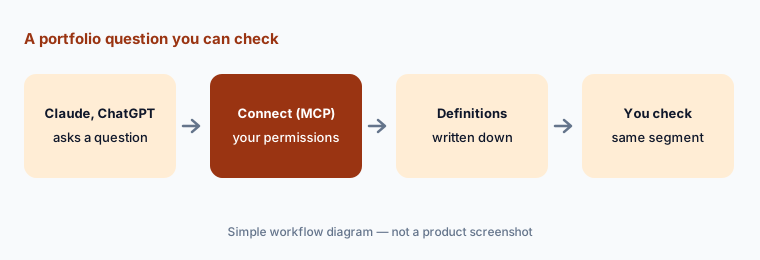
What it is: ChurnZero Connect uses the Model Context Protocol to give Claude and ChatGPT governed access to live ChurnZero data. ChurnZero says it does more than pass rows through: it maps plain-language questions to the right fields using your business definitions, knows who is asking (so “my accounts” returns that person’s book), runs calculations inside ChurnZero, and applies permission-based guardrails. Its example question is “how many enterprise customers renewing in the next 90 days are at risk?” Connect is part of Agentic Essentials, not a separate product.
Two practical points. Answers are only as sound as the definitions behind them — what counts as “enterprise”, “at risk”, and “renewing” — so write those down in the Customer Intelligence Profile before anyone relies on portfolio questions. And a general assistant that can see live customer data is a new place for that data to be copied, so agree with security which users can connect and what they may paste back out.
Known answer first:
Before anyone uses Connect for decisions, ask it one question you can already answer from a ChurnZero segment, such as renewals in the next 90 days. If the counts differ, fix the definition in the Customer Intelligence Profile and ask again.
6. Engagement AI, CS AI, and where ChurnZero fits
What it is: Engagement AI (January 2025) analyzes emails, meetings, notes, surveys, support tickets, and calls for sentiment and topics, turns them into a Relationship Score that can feed your health score, and draws a Relationship Map of how each contact sees you. Admins can weight it and choose topics and keywords. Meeting AI turns calls into summaries with action items, and CS AI is a CS-tuned assistant for writing and analysis. Together they cover much of what a CSM used to do by reading threads by hand.
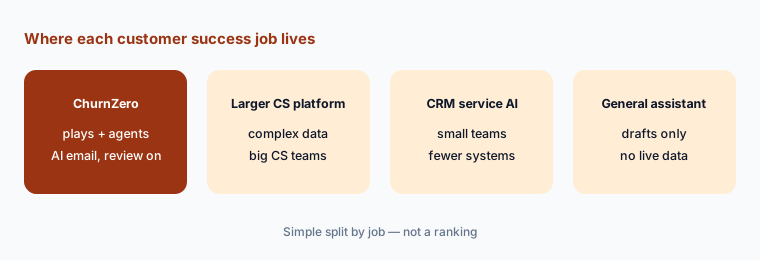
ChurnZero fits teams that run many automated plays across a mid-sized book and want agents inside those plays. Larger CS organizations with complex data models often compare it with Gainsight AI; teams that want a lighter, doc-and-notes-centred workspace look at Vitally AI; and teams interested in an AI knowledge layer over their existing tools should read Totango AI (now Odie). If your customers live in your CRM, check what HubSpot Service Hub AI or Salesforce Einstein already covers. For usage signals, many teams pair a CS platform with Pendo or session analytics such as Fullstory.
Do agents have enough to read?
Pick ten accounts and count what ChurnZero holds for each in the last 90 days: synced emails, meeting notes, survey answers, usage events. If most accounts have fewer than five items, fix data capture before you pay for more agents.
Pricing context (October 2026)
ChurnZero does not publish prices. On 8 October 2026 churnzero.com/pricing returned “page not found”, and the site offers demos rather than plans with dollar amounts. ChurnZero’s June 2026 announcement says Agentic Essentials is available for its Professional and Enterprise editions as a single annual subscription with a flat fee and a set allotment of AI credits; its AI page describes “transparent flat-rate tiers and pre-purchased AI credits”, and the August announcement says every agent draws from one shared credit pool.
Expect your quote to depend on edition, the number of users and accounts, and whether you add Agentic Essentials. Ask directly how many AI credits are included, what one snapshot, agent run, or AI email uses in credits, what happens when credits run out (the Send AI Email backup message sends automatically), and whether ChurnZero Connect is included in your tier.
Uncertainty: We could not find any public ChurnZero price on 8 October 2026, and we do not repeat third-party price estimates. Agent names and counts changed during 2026 (“more than 15” in June, 20 in August), and ChurnZero’s August 2026 release notes and Retrospective product page were behind a browser check when we tried them, so details here come from the press releases and earlier notes. Confirm which agents are in your edition before planning around one.
When it’s useful (honest take)
Useful when your CSMs already run plays in ChurnZero, emails and meetings are synced, and someone in CS operations can own agent settings and the Customer Intelligence Profile. Then Snapshot AI shortens QBR prep, Harbinger and Engagement AI surface quiet accounts, Retrospective gives churn reviews a consistent first draft, and Send AI Email can personalize outreach at scale — with Review Required kept on.
Less useful when your data is thin (few synced emails, no meeting notes), when nobody can own agent settings and credits, or when your team mostly needs a shared notes-and-docs workspace rather than automation. Agents that can act inside plays save time only if someone reads what they produced; without that review step they add risk, not capacity.
Paying for ChurnZero AI and a few other AI tools? The $9 AI toolkit spreadsheet lists every AI subscription you have, what each one costs, and how fast it pays for itself, so you can see which ones are worth the money.
Want someone to do it for you? AI toolkit audit — $19
Related options (educational)
| Need | Better home | Why |
|---|---|---|
| Plays with AI agents and AI email inside them | ChurnZero AI (this page) | Agent Marketplace, Pilot, Snapshot AI, Connect |
| Complex CS data model for a large team | Gainsight AI | Copilot, Staircase agents, deeper admin model |
| Notes, docs, and meeting summaries in one workspace | Vitally AI | Copilot summaries, AI Meeting Recorder, MCP |
| AI knowledge layer over the tools you already use | Totango AI (now Odie) | Knowledge Engine and MCP; optional workspace |
| CS inside the CRM you already use | HubSpot Service Hub AI or Salesforce Einstein | Fewer systems; lighter health model |
| Call recordings and deal history | Gong | Conversation data for handoffs and renewals |
FAQ
How much does ChurnZero cost in October 2026?
ChurnZero does not publish prices. Its site offers demos; its Agentic Essentials announcement describes an annual subscription with a flat fee and a set allotment of AI credits for the Professional and Enterprise editions. Ask ChurnZero for a quote.
Does ChurnZero’s AI send emails to customers on its own?
It can, if an admin turns review off. The Send AI Email play step, powered by Pilot, has Review Required on by default so the sending CSM approves each draft. Keep it on, and remember the backup email sends automatically if AI is unavailable or credits run out.
What is in ChurnZero Agentic Essentials?
The AI Marketplace and its agents, a pool of AI credits, Knowledge Sources, the Customer Intelligence Profile, and ChurnZero Connect (MCP) for Claude and ChatGPT, sold as one annual subscription.
Can I use ChurnZero data inside Claude or ChatGPT?
Yes, through ChurnZero Connect (MCP), which applies your business definitions and permission-based guardrails. Test it with a question you can already answer from a ChurnZero segment before relying on it.
Does the Retrospective agent decide why a customer churned?
No. It drafts an analysis, suggests a churn reason from your own list, and gives a confidence score. The CSM reviews, corrects, and saves the final record.
Optional next step (if seats overlap)
If you pay for a CS platform with AI credits, a meeting recorder, a conversation-intelligence tool, and a general assistant that all summarize the same customer calls, that overlap is worth a look. Map the overlap with the $19 AI toolkit audit or the $9 AI toolkit spreadsheet. Email Audit $19 or Toolkit spreadsheet $9.
Checkout is live via Stripe. After you pay, we email delivery (spreadsheet) or intake next steps (audit).