Tool · Customer success · Vitally · Oct 2026
Vitally AI review (Oct 2026): AI meeting notes and account summaries for CS teams
Vitally is a customer success platform for B2B software teams that leans on notes, docs, meetings, and projects as much as on health data. Its AI comes in two tiers: AI Copilot, included for every user (account summaries, Ask AI, and AI Actions that draft follow-ups and tasks), and the paid AI+ add-on (the AI Meeting Recorder, custom summaries, and all-time history). Since July 2026 a Vitally MCP server also brings the same data into Claude, ChatGPT, and Cursor. This page walks through each piece with a real CS job, a Try this, and where the CSM still has to check and send.
What this Vitally page covers
This page is for a CSM, a CS team lead, or the person who administers Vitally at a B2B software company — often a team that runs many customer calls a week and keeps account plans in docs. The question it answers: which Vitally AI features cut the time between a customer call and a useful follow-up, what each one reads, and where a person still has to check the output before a customer sees it.
Vitally’s help center splits the AI into two layers. AI Copilot (included) works on Accounts, Organizations, Conversations, Meetings, Notes, and Custom Objects and covers AI Summaries, Ask AI, and AI Actions, with a 90-day history window. Vitally AI+ (a paid add-on) adds the AI Meeting Recorder with five recorder seats, Custom AI Summaries, a summary dashboard widget, and all-time history. The Vitally MCP server went into beta on 28 July 2026. Vitally says its AI runs on Amazon Bedrock with models from providers such as Anthropic, Meta, and Cohere, and that customer data is not used to train models.
Everything below comes from Vitally’s pricing and AI product pages and its help-center articles and release notes for July and September 2026, as we read them on 8 October 2026. Vitally’s pages quote customer results such as hours saved and faster go-live times; we treat those as vendor claims, not results you should expect.
Major features (with how someone uses them)
Examples at a glance: each feature has a concrete example from a real job plus a short Try this you can run this week.
1. AI Meeting Recorder: call briefs, key points, and suggested tasks (primary)
What it is: The AI Meeting Recorder (part of AI+) sends a bot to Zoom, Google Meet, or Microsoft Teams calls with external attendees, records them, and writes a transcript. After the call, the Meeting’s Overview tab shows key points, suggested tasks, and a churn analysis; the Recording tab holds the video and transcript; and the AI Copilot tab offers AI Actions. Since September 2026, briefs and task names are written in the language the meeting was held in, and teams that record with other tools such as Granola or Fireflies can upload those transcripts to the right Vitally meeting through the REST API. Gong transcripts also feed the AI.
Two setup facts decide whether it works. A meeting syncs — and the bot joins — only when the organizer’s email and at least one participant’s email exist as user records in Vitally and match the calendar invite exactly. And transcripts need captions enabled on the meeting platform; if the customer hosts, they have to enable them. On consent, Vitally relies on each platform’s own recording notice, recommends that hosts announce the recording where the law requires, and lets the host remove the bot to stop. Vitally also notes there is no dedicated audit log of who viewed a recording.
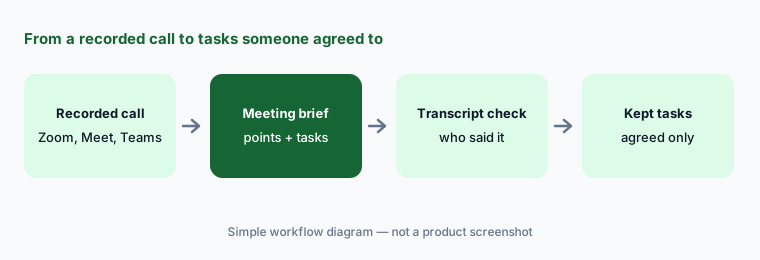
Primary workflow:
Let Vitally’s AI summarize your last three calls with one account. Delete anything nobody actually said. For each point you keep, find the line in the transcript; for each suggested task, confirm someone on the call agreed to it.
2. AI account summaries with citations
What it is: From any Account or Organization page, the Copilot’s AI Summary action builds an overview with sentiment, churn risk, key concerns, growth opportunities, and account properties. Vitally says it reads Conversations, Notes, Tasks, Projects, Docs, Custom Objects, NPS and custom survey responses, and meeting transcripts (from the AI Meeting Recorder or Gong), reviewing up to 500 conversations per summary. The default window is the last three months; AI+ unlocks six months, a year, all time, or a custom range. You can click the citations inside a summary to open the interactions behind it, and save the result as a Note or a Doc.
With AI+, Custom AI Summaries let you write your own template — for example, a renewal summary with sections for open requests, executive sponsor, and competitor mentions — and share it with the team or place it on a 360 dashboard widget. A summary saved as a Doc can be shared with the customer for a QBR, which is exactly why someone should read every line against its citation first.
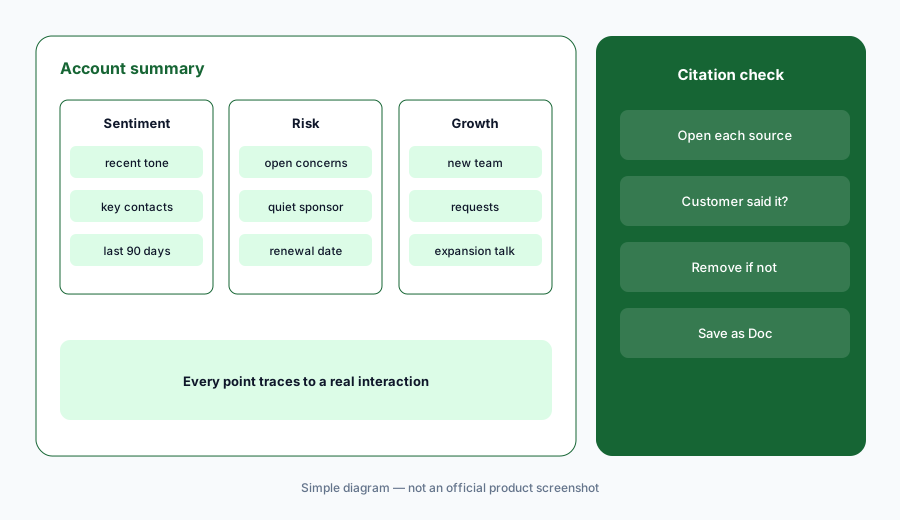
Click every citation:
Generate one account summary and click the citation behind every risk and opportunity it lists. Remove any point whose source is an internal note rather than something the customer said or did. Save only the checked version as a Doc.
3. AI Actions: follow-up drafts the CSM sends, tasks the CSM accepts
What it is: AI Actions are quick actions in the Copilot panel. Draft a Follow Up writes an email from a meeting (from scratch or from a Conversation Template written like a prompt) and opens it as a Conversation draft; when you start from an account, Vitally fills the To, CC, and BCC fields from the account’s contacts. Suggest Follow-up Tasks lists tasks from an email thread or transcript, each with a + to accept or an x to reject. Extract Custom Objects pulls items such as product requests or bug reports out of a conversation as suggestions you click to create. Copilot can also draft a Goal from your Goal Templates and propose a Key Role assignment on a review card you accept.
Vitally’s own help article tells you to review the recipient fields before sending. Our rule for this page is stricter: no AI-drafted email goes to a customer until the CSM who owns the account has read it, checked the recipients, and pressed send themselves. Suggested tasks and objects are only created when someone accepts them, which is the right default.
Check recipients first:
Use Draft a Follow Up on your next three meetings. Before sending each one, compare the To, CC, and BCC lines with the actual attendee list, and remove any sentence that is not in the transcript. You send it; the AI never does.
4. Ask AI, Copilot Calculations, and memories
What it is: Ask AI lets you ask plain-language questions about one customer, meeting, or conversation — sentiment, risks, product requests, goals — or use the global Copilot across records. Since September 2026, Copilot Calculations compute totals and averages with the same engine as Vitally’s dashboard widgets, so a number Copilot gives should match the widget. Earlier 2026 releases added saved prompts, AI memories that leaders can edit for the whole team, a stop button, and live status for each chat. Each chat has a context limit; when it fills, you start a new chat.
Vitally’s help center is candid about limits: Copilot answers best about engagement tracked in Vitally, and it is not built for multi-part questions with dependencies or for things tracked outside Vitally, such as support ticket counts or product login frequency unless that data is synced. When you need a number for a decision, compare it with a dashboard widget once before you trust the Copilot version.
Match the widget once:
Ask Copilot one number you already show on a dashboard, such as ARR renewing next quarter. Compare the two. If they match, save the prompt; if not, note the difference in filters before anyone uses the Copilot figure.
5. Vitally MCP server: use the read-only endpoint first
What it is: The Vitally MCP server (beta since July 2026) lets Claude, ChatGPT, Cursor, and other MCP clients search Vitally accounts, users, meetings, conversations, notes, docs, tasks, projects, goals, risk and opportunity indicators, NPS and surveys, and custom objects, and pull the actual text of a note or transcript excerpt with a link back to the record. Claude users connect through Claude’s connector directory; other clients add the server URL and sign in with OAuth. It respects your Vitally permissions and Access Groups, has a default limit of 100 requests per minute per user, and any AI tokens are billed by your own AI client, not Vitally.
Read the write-tool section carefully. The full endpoint can create notes, tasks, and custom object records, and Vitally’s documentation says these write actions run without a separate confirmation step and are attributed to you with no marker showing they came from MCP. Vitally offers a separate read-only endpoint whose tokens cannot be used for writes. Start there, and if you later allow writes, ask the AI to label each record “created via MCP” as Vitally suggests.
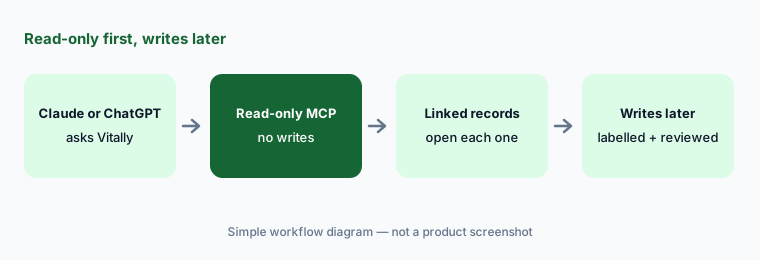
Read-only pilot:
Connect your AI client to Vitally’s read-only MCP endpoint for two weeks. For every answer you act on, open the linked record. Only then consider the full endpoint, and label every record it creates “created via MCP”.
6. AI+, Claude CS Skills, and where Vitally fits
What it is: Deciding on AI+ mostly comes down to two questions: do you need Vitally to record calls itself (or will Gong or another recorder feed transcripts in), and do your summaries need more than 90 days of history? Without AI+, Gong customers also get a 90-day window. Vitally also publishes a free set of Claude CS Skills — account briefs, follow-up emails, QBR narratives, churn-risk assessments, and proactive outreach — that teams can load into Claude, which pairs naturally with the MCP server.
Vitally fits CS teams whose work runs through notes, docs, projects, and calls, and who want AI that summarizes and drafts inside that workspace. Teams that want agents running inside automated plays often compare ChurnZero AI; large CS organizations with complex data models compare Gainsight AI; and teams that want an AI knowledge layer feeding their own agents should read Totango AI (now Odie). If calls already live in Gong or a note-taker such as Granola or Fireflies, you may not need the recorder. For product usage signals, pair with Pendo or Fullstory.
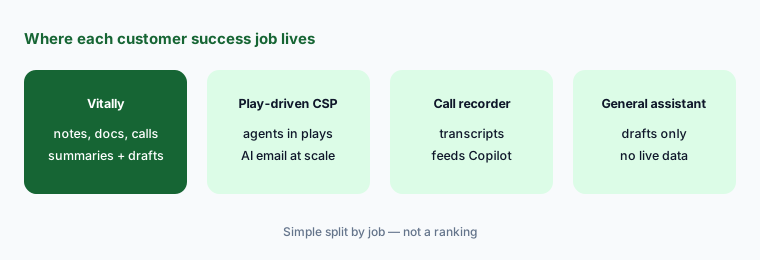
Recorder or not:
List where your last 20 customer calls were recorded. If most already live in Gong or another recorder that can send transcripts to Vitally, test Copilot on those first before buying AI+ seats for the Vitally recorder.
Pricing context (October 2026)
Vitally does not publish prices. Its pricing page on 8 October 2026 listed three plans — Tech-Touch, Hybrid-Touch, and High-Touch — with no dollar amounts, all with the same core features plus unlimited automations, unlimited observer seats, single sign-on, the full integration library, and unlimited docs. Vitally’s help center says AI Copilot (AI Summaries, Ask AI, AI Actions, 90-day history) is included for all users.
Vitally AI+ is a paid add-on with no published price. It adds the AI Meeting Recorder with five recorder seats included (more seats through your account manager), Custom AI Summaries, the summary dashboard widget, and all-time history. Vitally MCP usage is billed through your own AI client’s plan. Ask for a quote that separates the plan, the AI+ add-on, and any extra recorder seats.
Uncertainty: We could not find any public Vitally price on 8 October 2026, including for AI+. The MCP server is labelled beta and Vitally says its tools and behavior may change. AI features and help-center wording changed in every 2026 release; check the current release notes before relying on a limit such as the 90-day window or 500-conversation summary cap.
When it’s useful (honest take)
Useful when your CSMs run many calls, keep notes and account plans in Vitally, and want summaries and follow-up drafts in the same place. Then the recorder turns calls into briefs and tasks, account summaries with citations speed up QBR prep, AI Actions draft follow-ups the CSM sends, and the read-only MCP brings the same context into Claude or ChatGPT.
Less useful when your calls are not recorded anywhere, your team needs agents that act inside automated plays at scale, or the questions you ask depend on data Vitally does not hold, such as support ticket counts. Recording customers also brings consent duties that the platform notice alone may not cover in every jurisdiction.
Paying for Vitally AI and a few other AI tools? The $9 AI toolkit spreadsheet lists every AI subscription you have, what each one costs, and how fast it pays for itself, so you can see which ones are worth the money.
Want someone to do it for you? AI toolkit audit — $19
Related options (educational)
| Need | Better home | Why |
|---|---|---|
| Call briefs, summaries, and follow-up drafts in one workspace | Vitally AI (this page) | Copilot, AI Meeting Recorder, MCP with read-only option |
| Agents and AI email inside automated plays | ChurnZero AI | AI Marketplace, Pilot with Review Required |
| Complex CS data model for a large team | Gainsight AI | Copilot, Staircase agents, deeper admin model |
| AI knowledge layer feeding your own agents | Totango AI (now Odie) | Knowledge Engine and MCP |
| Call recording and conversation intelligence | Gong | Transcripts that Vitally Copilot can read |
| Follow-up drafts without a CS platform | Claude for customer success | No new seat; sanitized notes only |
FAQ
How much does Vitally cost in October 2026?
Vitally does not publish prices. Its pricing page lists Tech-Touch, Hybrid-Touch, and High-Touch plans without dollar amounts, and AI+ is a paid add-on with no published price. Ask Vitally for a quote via vitally.io/pricing.
Is Vitally AI included or an add-on?
AI Copilot — AI Summaries, Ask AI, and AI Actions with a 90-day window — is included for all users. The AI Meeting Recorder, Custom AI Summaries, and all-time history come with the paid AI+ add-on.
Does Vitally’s AI send follow-up emails to customers?
No. Draft a Follow Up opens a Conversation draft with recipients filled from the account’s contacts. The CSM reviews the text and recipients and sends it.
Can I connect Claude or ChatGPT to Vitally?
Yes, through the Vitally MCP server (beta since July 2026). Use the read-only endpoint first: on the full endpoint, notes, tasks, and custom objects are created without a separate confirmation step.
Which calls can the Vitally AI Meeting Recorder join?
Zoom, Google Meet, and Microsoft Teams calls with external attendees, when the organizer and at least one participant exist as Vitally users with matching emails and captions are enabled. The host can remove the bot to stop recording.
Optional next step (if seats overlap)
If you pay for a CS platform recorder, a separate call-intelligence tool, a note-taker, and a general assistant that all summarize the same customer calls, that overlap is worth a look. Map the overlap with the $19 AI toolkit audit or the $9 AI toolkit spreadsheet. Email Audit $19 or Toolkit spreadsheet $9.
Checkout is live via Stripe. After you pay, we email delivery (spreadsheet) or intake next steps (audit).