Tool · Experience analytics · Contentsquare · Oct 2026
Contentsquare AI review (Oct 2026): Sense AI for experience analytics (with Heap and Hotjar)
Contentsquare is an experience analytics platform — heatmaps and zone analysis, journeys, funnels, session replay, surveys, errors, and product analytics — that now also contains two well-known tools: Heap (acquired in 2023, now Contentsquare Product Analytics) and Hotjar (acquired in 2021, folded into Contentsquare in 2024; new sign-ups go to Contentsquare, including its free plan). Its AI is called Sense: Sense Chat answers questions about your data, summaries condense replays, heatmaps, errors, and journeys, Sense Analyst runs multi-step analyses on a schedule, and an MCP server brings the data into Claude, ChatGPT, Copilot, and Cursor. Each section has a Try this, the privacy defaults, and who approves a fix.
What this Contentsquare page covers
This page is for a UX researcher, a digital or e-commerce manager, or a product manager who needs to know why visitors struggle on a page — and for former Heap or Hotjar users wondering where their tools went. The question it answers: which Sense features shorten the path from “conversion dropped” to a fix you can defend, what each one reads, and where a named owner still has to open the evidence before anyone changes the site.
Naming as of 8 October 2026: Sense is the AI layer across Contentsquare, and Contentsquare’s Sense guide says it is built into the platform rather than a separate add-on — though Sense Analyst itself is a paid add-on on Pro and Enterprise plans. Contentsquare says “what was formerly known as Heap is now Contentsquare Product Analytics”, and that you can no longer sign up for Hotjar because its heatmaps, recordings, surveys, and feedback tools now live inside Contentsquare; hotjar.com’s pricing link now opens the Contentsquare pricing page.
Everything below comes from Contentsquare’s Sense guide and AI page, its help-center articles, its March 2026 press release, its Heap and Hotjar comparison pages, and its pricing page, as we read them on 8 October 2026. Contentsquare quotes customer results such as conversion gains after redesigns; we treat those as vendor claims, not results you should expect.

Major features (with how someone uses them)
Examples at a glance: each feature has a concrete example from a real job plus a short Try this you can run this week.
1. Sense Chat on a conversion drop: open the zones and sessions (primary)
What it is: Sense Chat is Contentsquare’s conversational assistant. You ask a question in plain English — why did paid conversions dip this week, what is causing rage clicks on the product page, which pages have the highest drop-off — and Contentsquare says it answers with visual evidence and a recommended next step, and takes follow-up questions. Contentsquare’s pricing page lists “Sense Chat & AI summaries” among plan features.
A chat answer gives you reasons; the evidence is in the zones and sessions. For each reason Sense gives, open the zone it refers to (click rate, hesitation, scroll reach) and three or four sessions that show the behavior. A reason survives only if you can see it happen. Then check the boring causes Sense may not know about: a campaign that ended, a tracking change, a price change, a slow release.
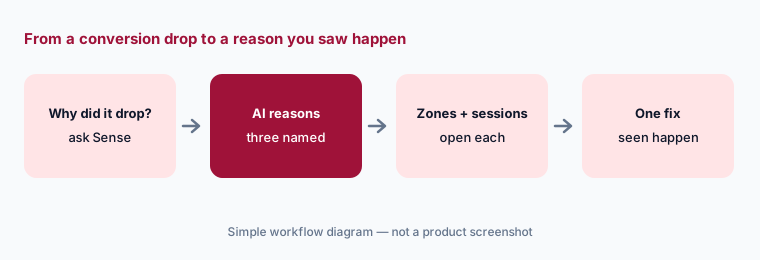
Primary workflow:
Ask Contentsquare’s AI why one page’s conversion dropped last week. Open the zones and sessions behind each reason. Mark each reason “seen”, “partly seen”, or “not seen”, and take only the “seen” ones to the page owner.
2. Sense Analyst: multi-step analyses, curated insights, schedules
What it is: Sense Analyst is Contentsquare’s analytics agent. Given a goal such as “help me reduce checkout abandonment”, Contentsquare says it builds an analysis plan, runs it across Journey Analysis, Funnels, Zoning, Page Comparator, Session Replay, Error Analysis, speed metrics, and more, and returns prioritized recommendations. It also produces curated insights on a set cadence, ranked Critical, Opportunity, Win, Risk, or Info, emails top insights every Tuesday, keeps conversation history, and lets you schedule saved prompts daily, weekly, or monthly. In March 2026 Contentsquare made it configurable to each team’s goals, KPIs, and industry.
Recommendations such as “add trust badges near the payment button” or “cut form fields from 8 to 4” (Contentsquare’s own examples) are test ideas, not fixes to ship. Send each one through your normal test or design review, with the evidence Sense Analyst cited attached. A named page or product owner decides what changes; Sense Analyst does not edit your site.
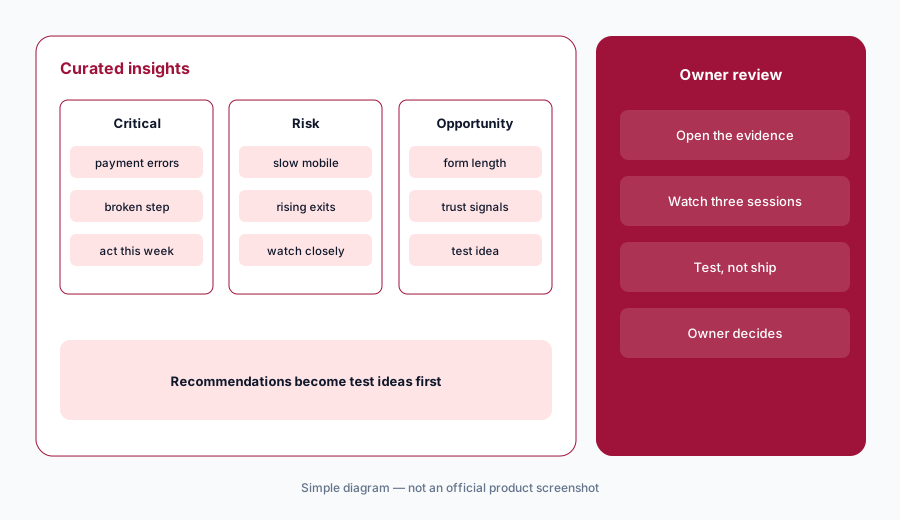
Schedule one prompt:
Schedule one Sense Analyst prompt weekly for your highest-traffic funnel. For four weeks, log each Critical or Risk insight, whether the evidence held up, and who acted on it.
3. Session replay and heatmap summaries
What it is: Sense summaries condense session replays, heatmaps, errors, and journeys. Contentsquare says Session Replay summaries can cover one session or a group of up to 100 at once, surfacing friction points, errors, and standout moments — for example, a batch of post-launch sessions after a redesign. Sense also writes page mappings automatically and can generate surveys and analyse feedback.
A summary of 100 sessions tells you where to look, not what is true. Watch at least five of the sessions behind any friction it reports, and check that the batch you chose is representative — 100 sessions from the first hour after a launch may all be your own team. The UX or product owner who acts on a summary should be able to name the sessions they watched.
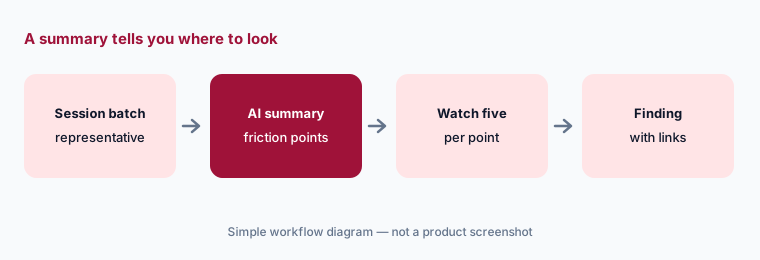
Watch five:
Summarize 50 sessions from one page. For the top friction point, watch five of the sessions yourself and attach their links to any ticket you open.
4. Privacy defaults: full masking and automatic redaction
What it is: Contentsquare’s help center says web projects start with full masking — all text, numbers, and media masked — with partial masking (text and numbers masked, media visible) and no masking as options, plus page-level exceptions and element-level masking. Separately, Automatic Personal Data Redaction is always on and cannot be turned off: the tag redacts form field values, email addresses, card-like numbers, phone-like strings, numbers of nine or more digits, and JWT tokens. On mobile apps, the SDK masks all UI content by default. Masking changes are not applied retroactively.
Full masking makes replays harder to read, so teams are tempted to unmask. Unmask by element, page by page, after checking what each page shows — never by switching the whole site to no masking. Masking settings do not replace your own consent banner, privacy policy, or data-processing agreement; those still apply. Name a privacy or legal owner who approves any masking change, and do not paste session recordings or raw replay data into general chat tools.
Unmask by element:
List three page elements your team most wants to see in replays. Unmask only those, on pages without personal data, after your privacy owner approves in writing — and confirm in a test session that form fields still show redacted.
5. Contentsquare MCP: experience data in Claude, ChatGPT, and Copilot
What it is: Contentsquare’s MCP server lets Claude, ChatGPT, Microsoft Copilot, Cursor, and other AI assistants query Contentsquare data in natural language — “which parts of our checkout journey are causing drop-off this week?” — without logging in to Contentsquare separately. Its pricing page lists “Connect with LLMs (MCP)” among the features on the free plan. The March 2026 release also added analytics for ChatGPT apps and for LLM- and agent-driven traffic, and conversation intelligence built on Contentsquare’s Loris acquisition.
An answer in a general assistant loses the visual evidence Sense Chat shows inside Contentsquare. Use MCP for quick questions and weekly digests, but open Contentsquare before you act on a number. Keep the AI client’s own data settings in mind: the experience data you pull into a chat is then governed by that tool’s retention and sharing rules as well.
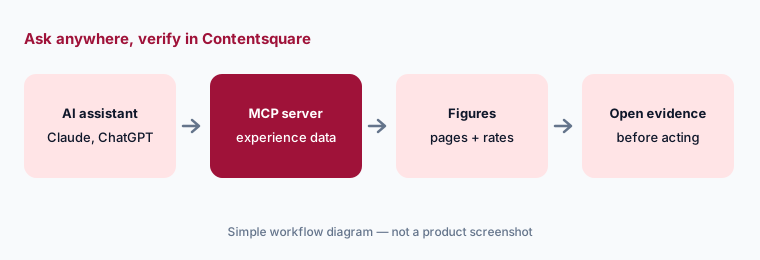
Open before acting:
Ask your AI assistant, through the Contentsquare MCP, for this week’s three biggest conversion drops. Open each in Contentsquare and note whether traffic mix, not behavior, explains it.
6. Plans, the Heap and Hotjar move, and where Contentsquare fits
What it is: Contentsquare sells Free, Growth, Pro, and Enterprise plans, priced by monthly sessions, with separate allowances for Product Analytics (the former Heap) and Voice of Customer (surveys and feedback, much of it from Hotjar). Sense Chat and AI summaries appear in plan features; Sense Analyst is a paid add-on on Pro and Enterprise with a 30-day trial, in open beta for Growth customers who signed up from 7 July 2026, and a lighter “Sense Analyst lite” is listed in beta.
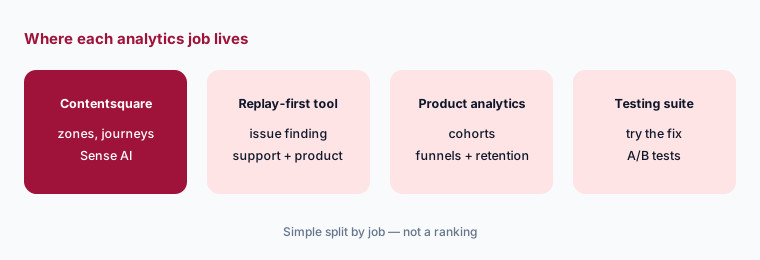
Contentsquare fits UX, digital, and e-commerce teams that want heatmaps, zones, journeys, replays, and product analytics in one place with AI that reads all of it. Product and support teams focused on replay-based issue finding compare Fullstory AI; teams that want analytics with flags and tests compare Statsig or PostHog; behavioral analytics teams compare Amplitude or Mixpanel; and teams that turn findings into web tests pair with Optimizely Opal. For in-app guidance on the same product, see Pendo.
Map your allowances:
Write last month’s sessions, replays watched, and survey responses next to Contentsquare’s plan allowances. Pick the smallest plan that covers them before you price Sense Analyst on top.
Pricing context (October 2026)
Contentsquare publishes some prices. Its pricing page on 8 October 2026 listed a Free plan ($0; Product Analytics up to 10k monthly sessions; MCP connection listed), Growth “starting from” $49 for Experience Analytics (the figure rises with monthly sessions; Voice of Customer and Product Analytics are priced separately), and Pro and Enterprise with no listed price. It says Growth plans do not require an annual contract, that paying annually in-app by card or PayPal takes 20% off before VAT, and that European customers are billed in euros.
Sense Analyst is a paid add-on for Pro and Enterprise with no published price (admins can start a 30-day free trial); it is in open beta for Growth customers who signed up from 7 July 2026, and Free-plan sign-ups can try it during the 14-day Growth trial. Ask for a quote that separates sessions, replays, Product Analytics, Voice of Customer, and Sense Analyst.
Uncertainty: We read Contentsquare’s prices from its pricing page on 8 October 2026; the displayed amount depends on product, session volume, billing period, and region, so check the page with your own volume. Sense Analyst’s price is not public, and its open beta for Growth may end or change. The masking details come from Contentsquare help-center articles, which we read through search extracts.
When it’s useful (honest take)
Useful when your team needs to know why visitors struggle on specific pages and wants zones, journeys, replays, and product analytics in one place: Sense Chat to get candidate reasons fast, summaries to triage many sessions, Sense Analyst to watch key funnels on a schedule, and an MCP server for quick questions from Claude or ChatGPT — with full masking on by default.
Less useful when your traffic is small (few sessions means weak patterns for Sense to find), your team will not watch the sessions behind each reason, or your main need is server-side experiments and flags. Former Hotjar users who only want heatmaps may find the free plan enough without any Sense add-on.
Paying for Contentsquare AI and a few other AI tools? The $9 AI toolkit spreadsheet lists every AI subscription you have, what each one costs, and how fast it pays for itself, so you can see which ones are worth the money.
Want someone to do it for you? AI toolkit audit — $19
Related options (educational)
| Need | Better home | Why |
|---|---|---|
| Zones, journeys, replays, and product analytics with AI | Contentsquare AI (this page) | Sense Chat, summaries, Sense Analyst, MCP |
| Replay-first issue finding for product and support | Fullstory AI | StoryAI, Opportunities, privacy by default |
| Analytics with flags and experiments | Statsig | Event-based pricing, AI summaries |
| Behavioral cohorts and funnels | Amplitude AI or Mixpanel AI | Product analytics first |
| Turning a finding into a web test | Optimizely Opal | Test Ideation, Experiment Planning |
| Self-serve analytics, replay, and flags | PostHog AI | Developer-friendly suite |
FAQ
Is Contentsquare the same as Heap and Hotjar now?
Contentsquare acquired Hotjar in 2021 and Heap in 2023. It says Heap is now Contentsquare Product Analytics and that you can no longer sign up for Hotjar; Hotjar’s heatmaps, recordings, surveys, and feedback tools live inside Contentsquare, including its free plan.
How much does Contentsquare cost in October 2026?
The pricing page lists a Free plan, Growth starting from $49 for Experience Analytics (rising with sessions), and Pro and Enterprise without listed prices. Sense Analyst is a paid add-on on Pro and Enterprise with no published price. See contentsquare.com/pricing.
What is Contentsquare Sense?
Sense is the AI built into Contentsquare: Sense Chat answers questions about your data, summaries condense replays, heatmaps, errors, and journeys, Sense Analyst runs multi-step and scheduled analyses, and an MCP server connects the data to Claude, ChatGPT, Copilot, and Cursor.
Does Contentsquare mask personal data in session replay?
Yes by default. Web projects start with full masking of text, numbers, and media, and automatic redaction of form values, emails, card-like and phone-like numbers, long numbers, and JWTs is always on. Your own consent banner and privacy policy still apply.
Who should approve changes based on Contentsquare AI?
A named page or product owner approves any site change after opening the zones and sessions behind each AI reason, and a privacy or legal owner approves any change to masking settings.
Optional next step (if seats overlap)
If you still pay for Hotjar-era heatmaps, a separate product analytics seat, a replay tool, and a general assistant that all explain the same conversion drop, that overlap is worth a look. Map the overlap with the $19 AI toolkit audit or the $9 AI toolkit spreadsheet. Email Audit $19 or Toolkit spreadsheet $9.
Checkout is live via Stripe. After you pay, we email delivery (spreadsheet) or intake next steps (audit).