How-to · Experimentation · VWO / Wingify · Oct 18, 2026
Turn VWO heatmap insights into a test with Wingz, and have the CRO lead approve the hypothesis and variation
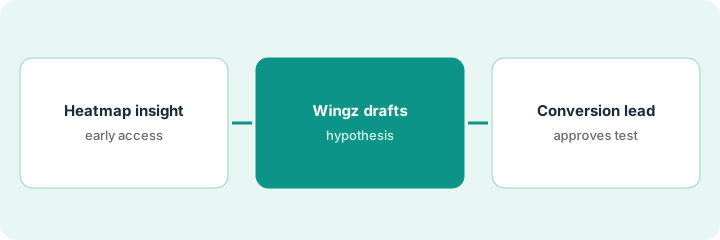
VWO's copilot, now called Wingz, turns a heatmap into a report of insights you can save as hypotheses, and can build a page variation from a prompt. That gets you from a hunch to a test fast. This page shows how to keep the conversion rate optimization (CRO) lead in charge of the hypothesis, the metric, and the variation before a single visitor sees it.
Who this is for
Marketers and conversion specialists who run website tests in VWO, now Wingify. The job here is approving a heatmap-based hypothesis and its variation. For using Contentsquare Sense to summarize session replays and having the UX lead watch them — a different job — see Contentsquare replay summary check.
How to do it
This is a how-to, not a ranking of testing tools. Per the VWO AI review, VWO relaunched as part of Wingify on 16 September 2026, Wingz Core with 2,500 AI credits a month is included on paid plans, heatmap insights are in early access, and Wingify says nothing goes live without your explicit approval. Synthetic tests (Wingz Advanced) are a filter, never a result. The ground rule: the CRO lead approves the hypothesis and the variation, and a named person launches.
1. Read one heatmap insight
What it is: Run Wingz on one busy page's heatmap and read the Heatmap Analysis Report — insights by impact, each with an observation and a suggested action.
- Pick a page with at least 100 clicks (the feature's minimum) and real traffic.
- Type your own business goal instead of the one Wingz guesses.
- Read the High-impact insights first and open the page area each one points to.
- Budget credits: Wingify's guide puts one heatmap analysis at about 200 credits.
- Save at most three insights as hypotheses.
Wingz's top insight says visitors click the plan comparison table but rarely scroll to the sign-up button below it. She saves three hypotheses.
Write the goal yourself before running Wingz, and save no more than three hypotheses.
2. Let Wingz draft the hypothesis and variation
What it is: For the strongest hypothesis, write the deciding metric and sample size, then let Wingz build one variation from a prompt.
- Write the metric that decides the winner, such as trial starts, not engagement.
- Work out the visitors each version needs from the current rate and the smallest lift worth acting on.
- Drop any hypothesis whose page can't reach that sample in about four weeks.
- Ask Wingz for one variation from a short prompt and preview it on mobile.
- Ask Wingz Chat to audit the draft campaign's traffic split and metrics.
Metric trial starts, current rate 3.1%, smallest lift worth it 15%: about 23,000 visitors per version. The page gets about 60,000 a month, so one test fits in roughly three weeks. Wingz builds a variation that moves the sign-up button above the table.
Write the metric and sample size next to the hypothesis before you build anything.
3. CRO lead approves before traffic
What it is: The CRO lead checks the hypothesis, the variation's claims, the mobile view, and the metrics, then approves; the team's autonomy stays at Propose and approve.
- Check every claim in the variation is something the product can back up.
- Confirm the main metric and any secondary metrics are right.
- Keep the autonomy dial at Propose and approve, where a person launches each test.
- Name the one person who presses launch.
- Keep start and pause actions inside Wingify, not in a connected AI tool.
Wingz Chat flags that the secondary metric is page views instead of completed orders. The CRO lead fixes it, removes a variation line that promised a feature the product doesn't have, approves, and launches the test herself.
Write the approver and the launcher in the campaign notes and keep autonomy at Propose and approve.
Pricing context (October 2026)
This how-to isn't a price sheet. Per the VWO AI review and Wingify's pricing page (checked Oct 18, 2026), Wingify (formerly VWO) publishes no prices; plans are Growth, Pro, and Enterprise by demo, and paid plans include Wingz Core. Dated October 2026.
Checked Oct 18, 2026 on the vendor’s own pricing page: VWO shows no public list price. Its pricing address now leads to Wingify’s pricing page, where each plan says Schedule a Demo; Growth includes the Wingz AI Core Plan. This page quotes no VWO dollar figure; confirm what your contract includes with VWO or your admin.
Uncertainty: The only prices this site sells here are the optional $9 AI toolkit spreadsheet and $19 AI toolkit audit.
When this helps (honest take)
Useful when a marketing or conversion team runs website tests monthly, has enough traffic to reach a sample size in a few weeks, and has a named lead who approves and launches each test.
Not useful when pages get too little traffic for tests to finish, experiments live in product code owned by engineers, or nobody tracks credit use.
Related options (educational)
| Need | Where to look | Why |
|---|---|---|
| VWO AI features | VWO AI | Primary path |
| Replay summaries checked by the UX lead | Contentsquare replay summary check | A different job |
| Enterprise experiment planning | Optimizely test plan launch approval | Another testing suite |
| Behavior before testing | Contentsquare AI | Journeys and replay |
| Product ops stack map | Stack map: product ops | Where VWO fits |
FAQ
Is VWO now called Wingify?
In effect, yes. Per our review, VWO and AB Tasty launched the shared Wingify brand on 16 September 2026, and vwo.com forwards to wingify.com. The copilot is called Wingz.
Can synthetic tests pick the winner?
No. Per our review, Wingify calls synthetic A/B tests directional validation that does not replace live traffic testing. Use them only to discard weak ideas.
How much does VWO cost?
Wingify publishes no prices; it offers custom proposals. See the pricing section.
Is VWO part of Wingify?
Per our review, VWO is part of Wingify and its AI copilot is called Wingz.
Optional next step
If you want a one-page toolkit map for the tools you already pay for, use the optional $9 AI toolkit spreadsheet. If you want a short review of seat waste and unused tools, use the optional $19 AI toolkit audit. Neither is required to follow this how-to.