Tool · Experimentation · VWO / Wingify · Oct 2026
VWO AI review (Oct 2026): AI copilot for A/B testing and website experiments
VWO is a website testing tool: it runs A/B tests (show half your visitors one version of a page and half another, then measure which gets more sign-ups or sales), plus heatmaps, session recordings, surveys, personalization, and feature rollouts. Two things changed in 2026. VWO merged with AB Tasty, another testing company, and on 16 September 2026 the combined company relaunched as Wingify — vwo.com now forwards to wingify.com. And VWO’s AI copilot became Wingz, which reads heatmaps and recordings, suggests test ideas, builds page variations from a prompt, and runs agents. Wingify says nothing goes live without your explicit approval. This page keeps the VWO name people search for and shows each Wingz feature with a Try this.
What this VWO page covers
This page is for a marketer, a conversion rate optimization specialist (someone whose job is getting more visitors to sign up or buy), or a product manager who runs website tests in VWO — or is weighing it up after the rename. The question it answers: which Wingz features save time between “something looks wrong on this page” and a properly measured test, what each one costs in AI credits, and where a person still decides what gets tested and when.
On naming: VWO and AB Tasty announced they were joining forces on 20 January 2026, and launched the shared Wingify brand and platform on 16 September 2026. Wingify’s product pages now say “Wingify Experimentation” instead of VWO; its help center still mentions “Copilot” in places, and its page scanner still identifies itself as “VWO.” Existing VWO contracts and pricing were said to be unchanged by the merger. Wingz itself comes in two tiers: Wingz Core, included with every paid Wingify product, and Wingz Advanced, a paid upgrade.
Everything below comes from Wingify’s Wingz and pricing pages, its January and September 2026 announcements, and its help-center articles (most updated 17–25 September 2026), as we read them on 9 October 2026. Wingify does not publish prices. Figures such as “70–90 billion events a day” and “4,000+ customers” are Wingify’s own claims.
Major features (with how someone uses them)
Examples at a glance: each feature has a concrete example from a real job plus a short Try this you can run this week.
1. Three hypotheses from one heatmap, each with a metric and sample size (primary)
What it is: A heatmap colors a page by where visitors click, move, and scroll. While viewing one, you click Wingz, allow a screen capture, and in about a minute it returns a Heatmap Analysis Report: insights sorted by High, Medium, and Low impact, each with an observation and a suggested action, plus links to the part of the page it means. Wingz guesses a business goal from the page; you can type your own. Any insight can be saved as a hypothesis — a testable statement such as “moving the price above the fold will raise trial sign-ups.” The page needs at least 100 clicks, and Wingify says the feature is in early access and rolling out in phases.
Before building any test, write two things for each hypothesis. The metric: the one number that decides the winner (trial sign-ups, not “engagement”). The sample size: how many visitors each version needs before the result means anything — work it out with a free sample size calculator from your page’s current conversion rate and the smallest improvement worth acting on. If the page can’t reach that number in a few weeks, pick a busier page or a bigger change. Wingify’s credit guide puts a single-page heatmap analysis at about 200 credits.
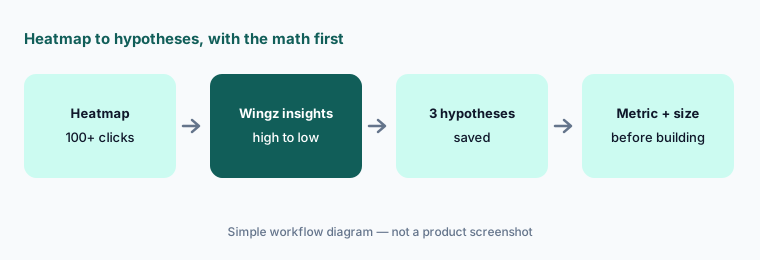
Primary workflow:
Ask VWO’s copilot for three hypotheses from one heatmap. Write the metric and sample size for each before you build it. Drop any hypothesis whose page can’t reach that sample size within four weeks.
2. AI test ideas from a page scan
What it is: Under Plan → Ideas, you give Wingify a page address, choose desktop or mobile, and optionally a goal (“more clicks on Request demo”). It takes a snapshot of the page and lists A/B test ideas tailored to it, which you can add to your hypothesis backlog or turn into a campaign with one-click setup. For pages that change as you use them, you can script clicks, hovers, and waits so the snapshot shows the right state — for example, after closing a pop-up. Wingify says this is on all Web Experimentation plans and needs admin access; a page scan with ideas costs about 100 credits.
One practical catch from Wingify’s help article: its scanner sends “VWO” in its user-agent (the label a browser or bot sends with each request), so if your site sits behind a firewall you may need to allow it, or the scan fails. Ideas are a starting list, not a plan — keep only the ones that tie to one goal you already track.
One goal only:
Scan one page on mobile with a single goal. Keep only the ideas that could move that goal, and add those to your backlog with the metric written next to each.
3. AI-built variations from a prompt, a design file, or a click
What it is: Wingz can build a test variation from a sentence (“add a sticky countdown banner”), from a Figma design file or screenshot, or by clicking an element on the page and saying what to change. In the Visual Editor, once you have edited one variation, Remix (the help article still calls it “Remix Your Variation with Wingify Copilot”) can generate more versions — either automatically from your first edits or guided by your own prompt — which you preview and add if you like them. Credit estimates in Wingify’s guide: about 50 for a headline change, 100 for adding a pop-up, 150 for a large section from a Figma file.
Wingify’s own advice is to test one hypothesis at a time and start with small changes so you can tell what made the difference. Three AI headlines in one test split your traffic three ways and need more visitors; two good versions are usually better than five quick ones. Preview every variation on mobile, where AI layout changes break most often.
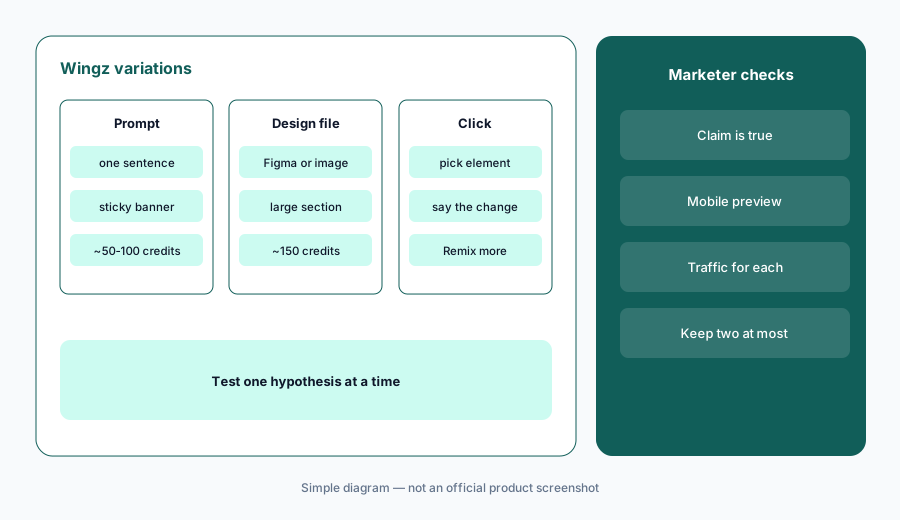
One by hand, two by AI:
Make one variation by hand, then ask Remix for two more with a specific prompt. Preview all three on mobile and keep at most two that make claims your product can back up.
4. Wingz Chat, agents, and how much autonomy to give
What it is: Wingz Chat (included with paid plans) answers questions about your tests in plain language — “compare desktop vs mobile in this campaign” — reads attached screenshots or briefs, and can audit a draft campaign: its traffic split, hypothesis, and main and secondary metrics. Agents are saved specialists (Wingify lists Insight, Hypothesis, Experiment, Guardrail, and more, or build your own), and Workflows chain agents on a schedule or trigger. Wingify describes autonomy as a dial: Propose and approve, Act inside guardrails, or Autopilot, with an approval gate, guardrail metrics, traffic caps, a kill switch, and a permanent holdout group always on.
A holdout is a slice of visitors who never see changes, so you can measure the total effect. Start every team at “Propose and approve,” where a person launches each test, and write down who that person is. Recurring workflows charge credits every time they run — Wingify’s example is about 70–100 credits for a weekly heatmap summary — and AI Workflow and AI Autopilot are Wingz Advanced features on the pricing page.
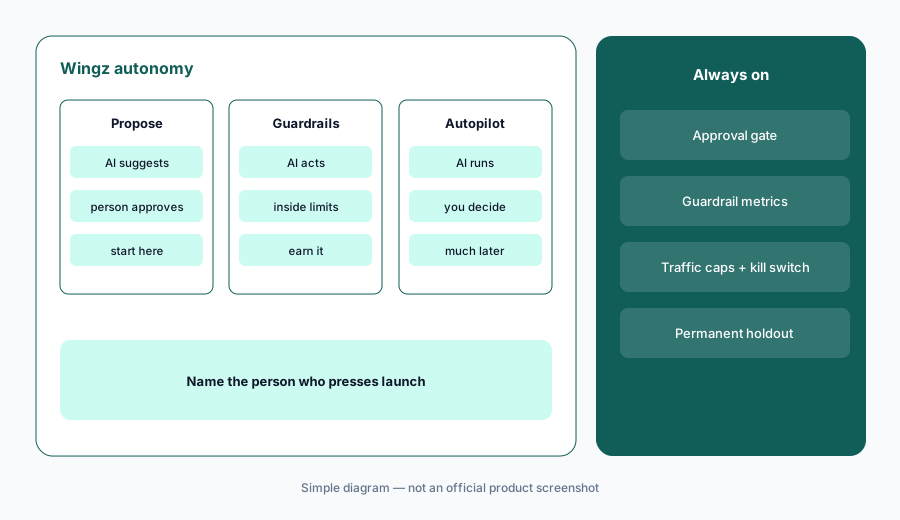
Audit before launch:
Ask Wingz Chat to audit one draft campaign before launch — goal, traffic split, and metrics. Fix what it flags, and name the one person who presses launch.
5. Synthetic A/B tests and the Wingify MCP
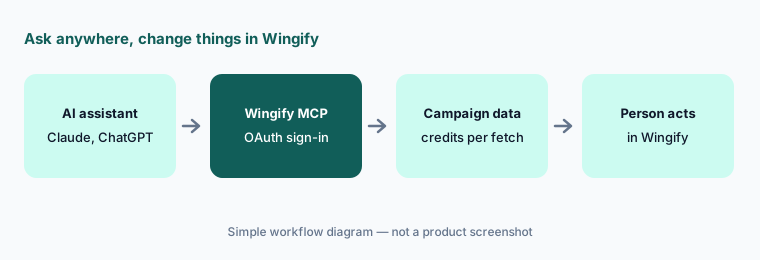
What it is: Synthetic A/B testing (Wingz Advanced only) lets you upload screenshots of two page versions and have AI-generated personas — “Price-Sensitive Shopper,” “Growth Marketer,” or your own — answer evaluation questions about them. Wingify calls it “directional validation” that “does not replace live user traffic testing.” The Wingify MCP server (Model Context Protocol, a standard way to connect AI assistants to other software) lets Claude, ChatGPT, Cursor, or automation tools such as n8n and Zapier read your campaigns, heatmaps, and recordings, signing in with your Wingify account (OAuth) rather than copying API keys. Behavior-analytics data through MCP needs Wingz Advanced.
Use synthetic tests to discard weak ideas, never to declare a winner. Blur anything confidential in screenshots first; Wingify says it doesn’t detect sensitive content in uploads. Through MCP, Wingify charges credits only for fetching data (for example, about 45 credits to analyze a running campaign), but an MCP client can also create, start, or pause a test, so decide who may connect and for what.
Read-only first:
Connect the Wingify MCP in Claude or ChatGPT and ask which campaigns had no winner in the last three months. Check each in Wingify, and agree as a team that tests are started and stopped only inside Wingify.
6. Plans, credits, and where VWO fits
What it is: Wingify’s pricing page lists Web Experimentation in Growth, Pro, and Enterprise plans with “Schedule a demo” and no prices, and says pricing is custom, based on monthly active users (behavior analytics uses tracked users, a subset). Every paid plan includes Wingz Core with 2,500 AI credits a month that don’t roll over; Wingz Advanced is a paid upgrade with 8,000 or 15,000 credits a month, optional 5,000-credit packs, and an Enterprise Data Control add-on (run Wingz on your own model, or keep AI processing in the US or EU). Advanced and add-ons are switched on through your account manager, not self-serve.
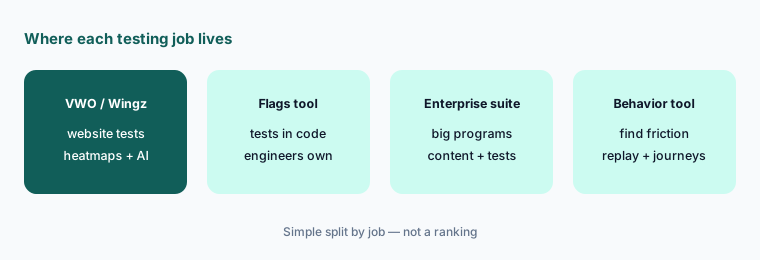
VWO fits marketing and conversion teams who test website pages and want heatmaps, recordings, and testing in one place with AI help. Teams whose tests are owned by engineering and run inside the product often compare Statsig or LaunchDarkly; enterprise marketing teams compare Optimizely; teams that mainly need behavior insight look at Contentsquare or Fullstory.
Credit budget:
Estimate a month of Wingz use with Wingify’s credit guide — about 200 per heatmap analysis and 550 per AI-built campaign — and compare it with Core’s 2,500 credits before you ask about Advanced.
Pricing context (October 2026)
Wingify (formerly VWO) does not publish prices. Its pricing page on 9 October 2026 said “No fixed plans. Just a custom proposal,” based on monthly active users, products, plans, and setup scope. Web Experimentation & Rollout shows Growth, Pro, and Enterprise with feature lists (Growth includes the visual and code editors, unlimited experiments, and Wingz Core; Pro adds guardrail metrics and multivariate tests, which test several changes at once; Enterprise adds approval workflow and single sign-on). There is a 30-day free trial with no card.
AI: Wingz Core is included with every paid product (Wingz Chat analysis and MCP without behavior-analytics data; 2,500 credits a month per Wingify’s help center). Wingz Advanced is paid (MCP with behavior data, AI Workflow, AI Autopilot, Synthetic A/B tests; 8,000 or 15,000 credits a month), with credit packs and Enterprise Data Control as add-ons. Ask for a quote that shows your monthly active users, the products you need, and whether you need Advanced.
Uncertainty: Wingify lists no prices, so any figure you see elsewhere is not from Wingify or VWO. The rebrand is recent (16 September 2026) and product names, help articles, and packaging may keep changing; heatmap insights are in early access. Credit costs are Wingify’s own estimates and vary with each request. We read everything on 9 October 2026.
When it’s useful (honest take)
Useful when a marketing or conversion team runs website tests every month, has enough traffic to reach a sample size in a few weeks, and wants AI to speed up the slow parts — reading heatmaps, drafting ideas and variations, checking draft campaigns — with a named person approving and launching every test.
Less useful when your pages get too little traffic for tests to finish, your experiments live in product code owned by engineers, or nobody tracks credit use. Synthetic tests are a filter, not evidence; teams that treat them as results will ship wrong winners.
Paying for VWO AI and a few other AI tools? The $9 AI toolkit spreadsheet lists every AI subscription you have, what each one costs, and how fast it pays for itself, so you can see which ones are worth the money.
Want someone to do it for you? AI toolkit audit — $19
Related options (educational)
| Need | Better home | Why |
|---|---|---|
| Marketing-led website A/B tests with heatmaps and AI | VWO AI / Wingz (this page) | Heatmap insights, AI ideas, variations |
| Enterprise marketing experimentation suite | Optimizely Opal | Large content and testing programs |
| Engineering-owned experiments and feature flags | Statsig or LaunchDarkly AI | Tests in product code |
| Understanding behavior before testing | Contentsquare AI or Fullstory AI | Journeys, replay, friction |
| Product analytics and tests in one open tool | PostHog AI | Developer-friendly suite |
| Writing hypotheses and readouts | Claude or ChatGPT | General assistants; paste no customer data |
FAQ
Is VWO now called Wingify?
Yes, in effect. VWO and AB Tasty announced their merger on 20 January 2026 and launched the shared Wingify brand and platform on 16 September 2026. vwo.com now forwards to wingify.com, and products are named Wingify Experimentation and so on. Wingify said existing VWO contracts and pricing were unchanged by the merger.
What is VWO’s AI copilot called now?
Wingz. It analyzes heatmaps, recordings, and campaigns, suggests test ideas, builds variations from prompts or design files, audits draft campaigns in Wingz Chat, and runs agents and workflows. Some Wingify help articles still use the older Copilot name.
How much does VWO cost in October 2026?
Wingify does not publish prices; it offers custom proposals based on monthly active users and products, with a 30-day free trial. Wingz Core (2,500 AI credits a month) is included with paid plans; Wingz Advanced is a paid upgrade. See wingify.com/pricing.
Will Wingz change my website by itself?
Wingify says no: Wingz handles analysis and suggestions, your team decides what gets tested and when, and nothing goes live without explicit approval. Higher autonomy levels exist (Act inside guardrails, Autopilot), so decide your team’s setting and name who launches tests.
VWO or Optimizely?
Both run website experiments with AI help. VWO (Wingify) bundles heatmaps, recordings, and testing with Wingz credits included on paid plans; Optimizely focuses on large marketing and content programs with its own AI agents. See Optimizely Opal.
Optional next step (if seats overlap)
If you pay for a testing tool, a separate heatmap and recording tool, a survey tool, and a general AI assistant that writes the same test ideas, that overlap is worth a look. Map the overlap with the $19 AI toolkit audit or the $9 AI toolkit spreadsheet. Email Audit $19 or Toolkit spreadsheet $9.
Checkout is live via Stripe. After you pay, we email delivery (spreadsheet) or intake next steps (audit).