Compare · Product + engineering · Flags and experiments · Oct 2026
LaunchDarkly vs Statsig (Oct 2026): feature flags, experiments, and AI release help
LaunchDarkly and Statsig both let a team ship code behind feature flags, turn a feature on for a slice of users, and measure what happened. They differ in who they are built around, how they charge, and what their AI does. This page compares them by who owns releases (engineering or product), the pricing model (service connections and monthly active users versus events), and how AI helps (LaunchDarkly’s Vega and AgentControl versus Statsig’s AI features) — not as a ranking — with a Try this for each.
What this comparison covers
This page is for an engineering manager, a platform or release lead, a product manager, or a data scientist choosing a flag and experiment tool — or wondering whether the one they have is the right shape — who wants to know which tool fits the way their team actually ships, what it will cost at their usage, and where the AI saves real work.
The short version: LaunchDarkly leans toward engineering-owned releases. It charges for server-side SDK connections and client-side users, adds guarded rollouts that can roll a change back automatically, bundles observability, and puts an AI agent called Vega (built on Anthropic’s Claude models) on flag cleanup and error triage. AgentControl manages prompts and models for AI features in your own product. Statsig leans toward product and data teams that run many experiments. It charges by events with unlimited flag checks, centres on its statistics engine, and keeps its AI narrow: experiment summaries, a hypothesis check, cleanup pull requests, and an MCP server. Statsig has been part of Amplitude since 5 May 2026 but is still sold on its own.
Prices were re-checked on both vendors’ pricing pages on 9 October 2026. Feature facts match our LaunchDarkly AI and Statsig reviews, which read each vendor’s docs, changelogs, and blog posts on 8 October 2026. Speed and impact figures on either site are vendor claims.
| Question | LaunchDarkly | Statsig |
|---|---|---|
| What you pay for | Service connections (one server-side SDK in one environment for a month), client-side MAU, AI runs, observability usage | Metered events; flag and config checks unlimited |
| Free tier | Developer $0: 5 service connections, 1K client-side MAU, 5K AI runs a month | Developer free: 2M events, 50,000 session replays a month |
| First paid tier | Foundation, pay as you go: $10 per extra service connection, $8.33 per 1K client-side MAU (billed yearly) | Pro $150 a month: 5M events, then $0.05 per 1K events |
| Seats | Unlimited on every plan | Unlimited on every plan |
| AI help | Vega agent (flag cleanup pull requests, error and alert triage); AgentControl for your own AI features | AI experiment summaries, Hypothesis Advisor, stale gate cleanup pull requests, Knowledge Bank search (beta) |
| Safety net | Guarded rollouts with automatic rollback (Guardian add-on) | Change reviews and approvals (Pro); sequential testing and guardrail metrics |
| Ownership | Independent | Part of Amplitude since 5 May 2026; still sold on its own |
Major features (with how someone uses them)
Examples at a glance: each feature has a concrete example from a real job plus a short Try this you can run this week.
1. Start from your last five releases (primary)
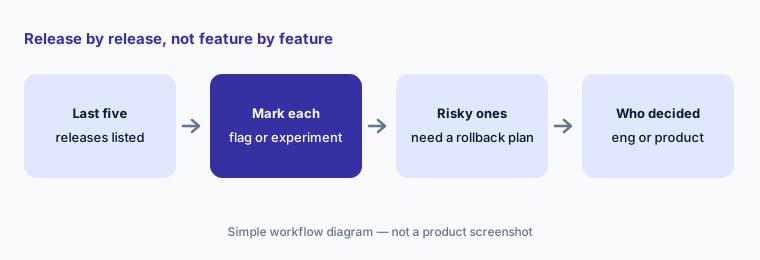
What it is: The quickest way to see which tool fits is to look at what your releases actually needed. Some changes only need a flag: ship dark, turn on for staff, then everyone. Some need an experiment: a product question with a metric and a sample size. Some need a rollback plan: a risky change to payments, search, or infrastructure where you want the change to switch itself off if errors climb. A team whose releases are mostly rollback-plan changes is asking for LaunchDarkly’s guarded rollouts; a team whose releases are mostly experiments is asking for Statsig’s statistics engine.
Most teams have a mix, and both tools do all three. The point of the list is to see where your weight is — and who on your team made the call each time, which tells you whose tool this really is.
Primary workflow:
Write your last five releases. Mark which needed a flag only, an experiment, or a rollback plan. Next to each, write who made the release call — an engineer or a product manager.
2. Who owns releases: guarded rollouts vs experiments and approvals
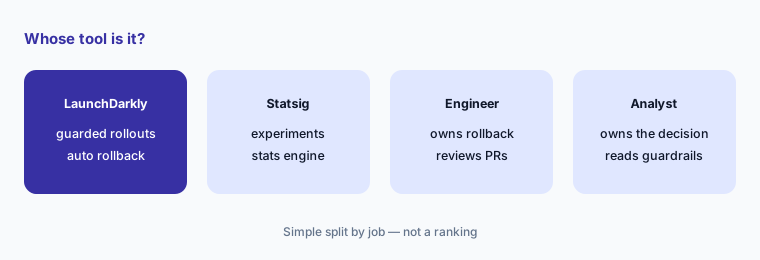
What it is: LaunchDarkly is built around the release itself. A guarded rollout raises traffic step by step while watching attached metrics (errors, latency, conversions) and, using sequential testing, can notify you or roll back automatically on a significant regression; it needs the Guardian add-on, which LaunchDarkly’s pricing page says is priced separately on top of Enterprise. Release pipelines (beta for certain Enterprise customers) move flags through environments, audiences, and approvals. Enterprise adds custom roles, approvals, and scheduling. Statsig is built around the experiment. Its Pro plan lists change reviews and approvals, and its engine offers CUPED variance reduction, sequential testing, multiple-comparison corrections, holdouts, and switchback tests — the tools a data scientist uses to decide whether a result is real.
LaunchDarkly’s experiments are real (Bayesian and frequentist, sample size estimates since 3 September 2026, warehouse-native assignment since 23 September 2026), and Statsig can gate releases. The difference is emphasis: who opens the tool every day, and which safety net they reach for first.
Name the owner:
For each of your last five releases, write who would set it up and who would decide to stop it. Count how many sit with engineering and how many with product or data.
3. Pricing model: service connections and MAU vs events
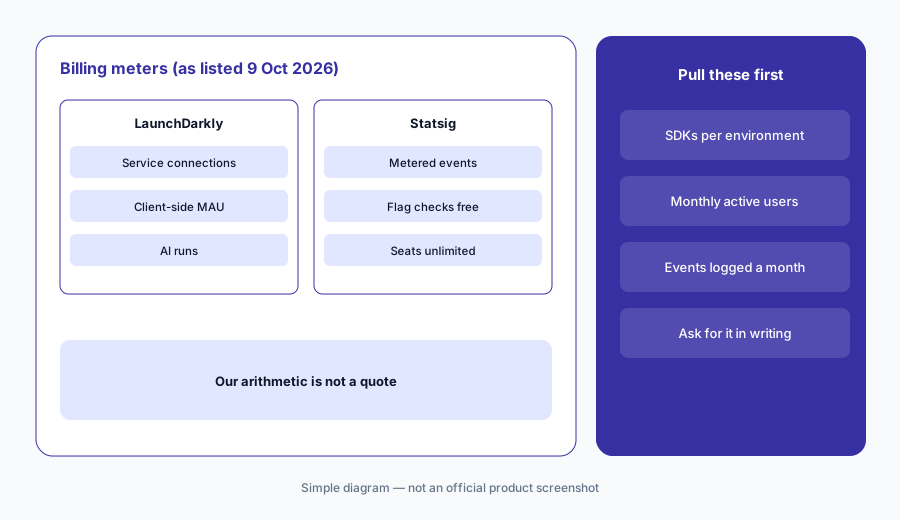
What it is: Both publish usage prices (as listed 9 Oct 2026) and both give unlimited seats. LaunchDarkly counts service connections — one server-side SDK connected to one environment for a month — and client-side monthly active users (MAU). Foundation is pay as you go: the first 5 service connections are included, then $10 each a month, and $8.33 per 1,000 client-side MAU a month billed yearly; the comparison table lists $10 per 1,000 MAU, which we read as the monthly-billing rate. AI runs (each tracked LLM request or online evaluation) include 5,000 a month, then $5 per 1,000. Statsig counts metered events — the exposures and logged events that power analytics — and does not charge for flag or config checks. Pro is $150 a month with 5 million events included, then $0.05 per 1,000.
A rough check with made-up numbers: three backend services in three environments are 9 service connections, so 4 beyond the included 5 cost $40 a month on LaunchDarkly Foundation, and 20,000 client-side MAU cost up to $166.60 a month billed yearly (LaunchDarkly’s page does not say whether Foundation keeps the free tier’s 1,000 MAU). On Statsig Pro, 10 million metered events a month cost $150 plus 5,000 × $0.05 = $400 a month. That is our arithmetic from the published rates, not a quote — and LaunchDarkly offers custom rates for Kubernetes, serverless, Python, and Ruby setups that create many connections.
Price your own usage:
Pull your server-side SDK instances per environment, monthly active users, and monthly logged events. Price both tools from their published pages, then ask each vendor to confirm the number in writing.
4. AI flag cleanup: Vega pull requests vs stale gate pull requests
What it is: Both products now use AI for the most common flag chore: deleting old flag code. LaunchDarkly’s Vega starts from a button on a flag, first checks your critical environments to confirm the flag serves only one variation everywhere that matters (it stops and tells you if not), then opens a GitHub pull request that removes the flag. It needs a connected GitHub account, works only with private repositories, and reads CLAUDE.md or AGENTS.md conventions in the repo root. Statsig marks inactive gates as stale and, with its GitHub AI integration (since December 2025), offers “remove from code”, which generates a pull request; Statsig describes the flow as click, review the generated pull request, approve and merge.
Neither merges anything on its own. The engineer who owns the code reads every changed line, checks that the branch kept is the one serving 100% in production, runs the tests, and a second reviewer approves. Start with flags that have been fully on for weeks, not ones that were switched off.
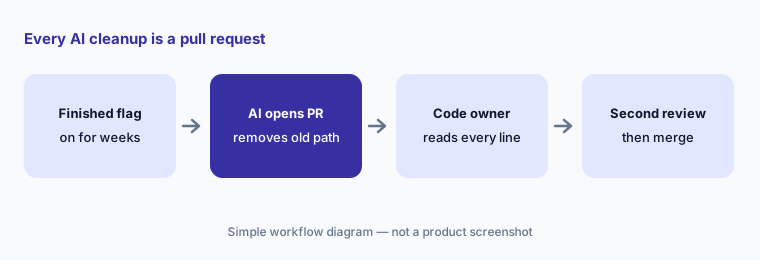
One cleanup, reviewed:
Pick one flag that has been fully on for at least a month. Let the tool’s AI open the cleanup pull request, and have the code owner plus a second reviewer approve it before merge.
5. AI beyond cleanup: Vega triage and AgentControl vs summaries, Hypothesis Advisor, and MCP
What it is: LaunchDarkly goes broader. Vega also works inside LaunchDarkly’s bundled observability — session replays, errors, logs, traces — in a read-only mode (the default) that summarizes and suggests likely causes, or an agent mode that can create dashboards and open pull requests; it can be attached to an alert and draft a Jira issue after confirming details with you. LaunchDarkly says Vega is on by default for self-serve usage-based plans, offered to select Enterprise customers, and not available in its EU or federal instances. AgentControl (renamed from AI Configs on 19 May 2026) treats prompts and models in your own AI features as flags you can target, evaluate, and roll out. Statsig stays narrow on purpose: an AI experiment summary with a ship recommendation (available to all customers), a Hypothesis Advisor, Knowledge Bank search over past experiments (beta, warehouse-native customers), and the Statsig MCP, whose v3 beta (7 October 2026) applies the key owner’s role, the project maximum, and the token scope to every tool.
Breadth and narrowness both have a cost. Vega in agent mode and alert-triggered runs need careful permissions — an alert runs with the permissions of whoever last saved it. Statsig’s summary can lead with the primary metric and underplay guardrails, so the experiment owner still reads the full results and a data scientist signs off on any ship call.
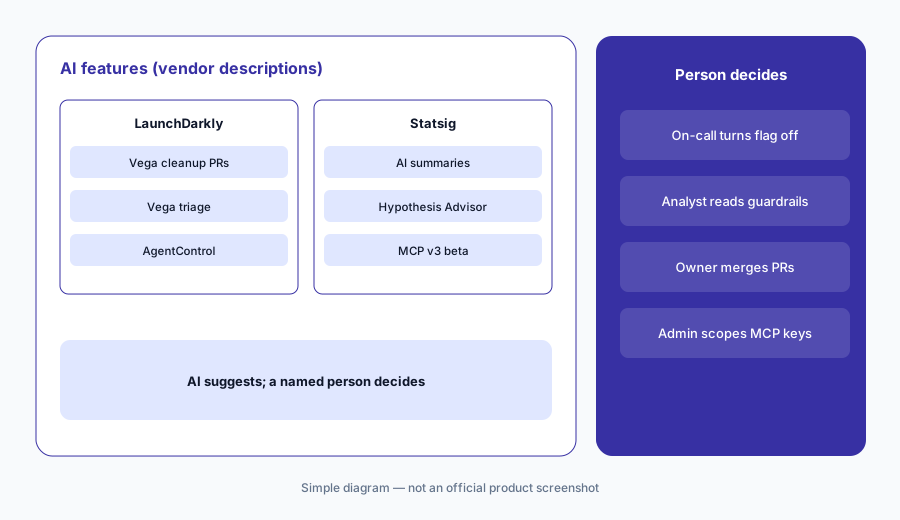
Check the AI against the page:
Take one finished experiment or incident. Compare the tool’s AI summary with the full results or traces and write down anything the summary left out before it goes to your team.
6. Where each fits, and when neither is the answer
What it is: LaunchDarkly fits engineering-led teams that release often across several environments, want automatic rollback on risky changes, and may want governed configuration for their own AI features. Statsig fits product and data teams that run many experiments, want strong statistics with analytics and session replay in the same tool, and prefer event-based prices with unlimited flag checks. On ownership: OpenAI announced it was acquiring Statsig in September 2025, and since 5 May 2026 Statsig has been part of Amplitude — Amplitude calls it a strategic partnership, Statsig’s blog calls it an acquisition — with Amplitude data promised inside Statsig by late 2026. If you mostly want product analytics with some flags, PostHog bundles both; marketing-led web testing teams look at Optimizely or VWO (now Wingify).
A handful of flags in one environment do not need either tool: a config file or environment variables will do until rollouts or experiments start to matter.
Pick by your weight:
Count how many of your last five releases needed an experiment versus a rollback plan. Shortlist the tool built around the larger number, and ask the other vendor to show the smaller job.
Pricing context (October 2026)
LaunchDarkly publishes usage prices (as listed 9 Oct 2026). Developer is $0 a month with unlimited seats and flags, 5 service connections, 1,000 client-side MAU, 100,000 experimentation MAU, 5,000 session replays and errors, 10 million logs and traces, and 5,000 AI runs a month. Foundation is pay as you go after a 14-day trial, with no platform or seat fees: $10 per service connection a month beyond the first 5, $8.33 per 1,000 client-side MAU a month billed yearly, and $5 per 1,000 AI runs beyond 5,000. Enterprise is custom; the Guardian add-on (release monitoring, guardrail metrics, automatic rollback) is priced separately on top of Enterprise. See launchdarkly.com/pricing.
Statsig publishes prices too (as listed 9 Oct 2026). Developer is free with no card: 2 million events a month, unlimited flag and config checks, 50,000 session replays a month, one-year analytics retention, and unlimited seats. Pro is $150 a month with 5 million events included, then $0.05 per 1,000 events, 100,000 session replays, change reviews and approvals, and unlimited retention. Enterprise is custom, with volume discounts and a warehouse-native option. Statsig’s pricing page lists no separate charge for its AI features. See statsig.com/pricing.
Uncertainty: Prices are each vendor’s published numbers on 9 October 2026. LaunchDarkly’s comparison table shows client-side MAU at $10 per 1,000 a month, which we read as monthly billing versus $8.33 billed yearly, and the page does not say whether Foundation keeps the free tier’s 1,000 MAU — confirm both. Guardian and Enterprise prices are not public. Statsig’s pricing may change as Amplitude integrates it, and its MCP v3 is labelled beta.
When it’s useful (honest take)
LaunchDarkly is useful when engineering owns most release calls, you ship across several environments, and you want risky changes to roll back on their own — and when engineers will review every Vega pull request and someone owns the guardrail metrics.
Statsig is useful when product and data teams run many experiments, want the statistics, analytics, and replay in one tool, and prefer event-based prices with unlimited flag checks — with a data scientist signing off on ship calls and replay privacy changed from its passwords-only default.
Less useful when (either one) you have a few flags and one environment, nobody will maintain critical-environment settings or guardrail metrics, or you expect the AI to run releases or experiments for you. Both keep the decision with a person by design.
Still choosing between LaunchDarkly and Statsig? The $19 AI toolkit audit gives you a written plan for which tools to keep using and which to drop across your whole AI stack, including this pair.
Prefer to do it yourself? Spreadsheet — $9
Related options (educational)
| Need | Better home | Why |
|---|---|---|
| Engineering-led releases with automatic rollback | LaunchDarkly AI | Guarded rollouts, Vega, AgentControl |
| Experiments with strong statistics, priced by events | Statsig | AI summaries, gate cleanup, MCP v3 beta |
| Product analytics with flags and replay in one suite | PostHog AI | One bill for several product jobs |
| Marketing-led web testing | Optimizely or VWO (Wingify) | Visual editors and AI test ideas |
| Behavioral analytics next to experiments | Amplitude AI | Statsig’s owner since May 2026 |
| Error triage after a bad release | Sentry AI | Stack traces and fix suggestions |
FAQ
Is LaunchDarkly or Statsig better?
Neither in general, and this page is not a ranking. LaunchDarkly leans toward engineering-owned releases with guarded rollouts, Vega, and AgentControl, priced by service connections and client-side users. Statsig leans toward product and data teams running experiments, priced by events with unlimited flag checks. List your last five releases and see which kind of job dominates.
How do LaunchDarkly and Statsig charge in October 2026?
LaunchDarkly Foundation is pay as you go: $10 per service connection a month beyond five, $8.33 per 1,000 client-side MAU a month billed yearly, and $5 per 1,000 AI runs beyond 5,000; Developer is free and Enterprise is custom. Statsig Pro is $150 a month with 5 million events included, then $0.05 per 1,000 events; Developer is free with 2 million events. As listed on 9 October 2026.
Can either AI remove flags or change production without review?
No. Both generate GitHub pull requests for flag cleanup that a person reviews and merges. LaunchDarkly’s Vega checks critical environments first and works only with private repositories. Vega’s read-only mode never proposes code; agent mode and alert-triggered runs follow role and alert-owner permissions, so set those first.
Who owns Statsig now?
Statsig has been part of Amplitude since 5 May 2026, after OpenAI announced in September 2025 that it was acquiring Statsig; the original team stayed at OpenAI. Statsig is still sold on its own at statsig.com with its own pricing and console.
Do I need Guardian for safe LaunchDarkly releases?
For guarded rollouts with automatic rollback, yes: LaunchDarkly’s pricing page lists Guardian as an add-on priced separately on top of Enterprise. Without it you can still release gradually by hand and use experiments, but nothing rolls back on its own.
Optional next step (if seats overlap)
If engineering pays for a flag tool, product pays for an experiment tool, and both teams also pay for analytics and session replay that overlap, that is worth mapping before renewal. Map the overlap with the $19 AI toolkit audit or the $9 AI toolkit spreadsheet. Email Audit $19 or Toolkit spreadsheet $9.
Checkout is live via Stripe. After you pay, we email delivery (spreadsheet) or intake next steps (audit).