Compare · Digital adoption · Internal apps · Oct 2026
Whatfix vs WalkMe (Oct 2026): AI digital adoption platforms for internal apps
Whatfix and WalkMe are both digital adoption platforms: they sit on top of the business apps employees already use — a CRM, an HR system, an ordering tool — and add walkthroughs, tips, help search, and usage analytics without changing the app. Both added AI in 2025–2026 to build guidance faster, answer questions inside the app, and explain usage data. This page compares them for internal apps by app coverage, authoring effort, and AI guidance — not as a ranking — with a Try this for each.
What this comparison covers
This page is for an application owner, a digital adoption manager, an IT product manager, or a change and training lead who has to get employees using internal software correctly — and is choosing between Whatfix and WalkMe, or renewing one — who wants to know which apps each can cover, how much work it takes to build and maintain guidance, and what the AI does inside the app.
The short version: both cover web apps and desktop apps and both now use AI for authoring, in-app answers, and analytics, with a person approving before anything goes live. Whatfix leans on ScreenSense (its engine for recognizing the screen and what the person is trying to do), click-once Quick Capture Flows with AI step text, virtual-desktop support, and its Mirror training product. WalkMe, an SAP company since 12 September 2024, leans on conversational AI Authoring and AI Insights (both released 31 August 2026), three forms of in-app Contextual AI, and WalkMe for SAP GUI.
Facts come from both vendors’ pricing and AI pages, re-checked on 9 October 2026, and match our Whatfix AI and WalkMe AI reviews, which read each vendor’s help-center articles the same day. Return-on-investment and ticket-reduction figures on either site are vendor claims.
| Question | Whatfix | WalkMe |
|---|---|---|
| Published prices | None — Standard, Premium, Enterprise with “Get a Demo”; free trial offered | None — two packages with “Request a quote” |
| How the quote is built | Flat fee plus user licenses (all users with access for employee apps; monthly active users for customer-facing apps) | Not stated on the pricing page |
| App coverage named on the pricing page | Web and desktop apps, virtual desktops (Citrix, Azure Virtual Desktop), offline mode, cloud or self-hosted | Employee apps and customer-facing apps; WalkMe Menu for web, mobile, desktop; WalkMe for SAP GUI |
| AI for authoring | Quick Capture Flows with AI step text (DAP AI add-on); Visibility Rules AI (Beta) | AI Authoring: describe a problem, approve a plan (gradual release since 31 Aug 2026; cannot publish) |
| AI guidance inside apps | QuickRead one-line answers in the Self Help panel | Contextual AI: Pinned, Proactive, and On-Demand AI |
| AI for usage questions | Ask Whatfix AI, Deep think, survey summaries | AI Insights (GA 31 Aug 2026); MCP server on request |
| Ownership | Independent | SAP company since 12 Sep 2024 |
Major features (with how someone uses them)
Examples at a glance: each feature has a concrete example from a real job plus a short Try this you can run this week.
1. Start from the three internal apps with the most tickets (primary)
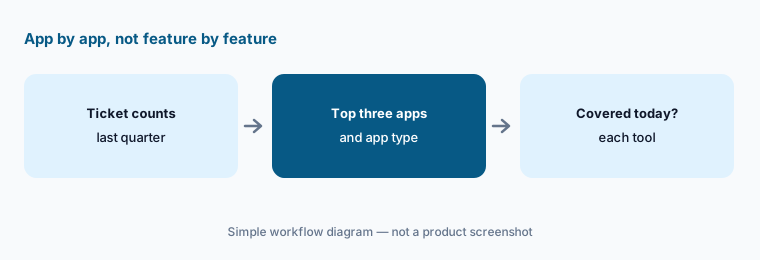
What it is: Digital adoption platforms are bought for apps, not features. Start with the three internal apps that generate the most support tickets, and for each note what kind of app it is — a browser app, a desktop app, an app running in a virtual desktop, SAP GUI — and whether each tool already covers it today, without custom work. An app neither covers well is a training or app-fix problem, not a guidance one.
Write the result as a short table: app, ticket count last quarter, app type, Whatfix coverage, WalkMe coverage. Then ask both vendors to demo guidance on your top app, using a test account, not their demo CRM.
Primary workflow:
List the three internal apps with the most support tickets. Note which tool covers each today. Add the app type — browser, desktop, virtual desktop, or SAP GUI — next to each.
2. App coverage: web, desktop, virtual desktops, and SAP GUI
What it is: Whatfix’s pricing page (as listed 9 Oct 2026) sells Standard, Premium, and Enterprise plans for web and desktop apps, with cloud or self-hosted setups, offline mode, and virtual desktop support for desktop apps running in Citrix and Azure Virtual Desktop. Its Product Analytics Standard plan is included free with any digital adoption plan for web and desktop, and Mirror adds practice copies of apps for hands-on training. WalkMe’s pricing page sells one package for employee apps and one for customer-facing apps and websites, a WalkMe Menu for web, mobile, or desktop, Discovery for company-wide web app usage, and WalkMe for SAP GUI (SAP GUI for Windows 7.70 and higher, and SAP Business Client), aimed at moves from SAP ECC to S/4HANA. WalkMe lists US and EU data centers, and its help center adds an SAP data center where new features sometimes arrive later.
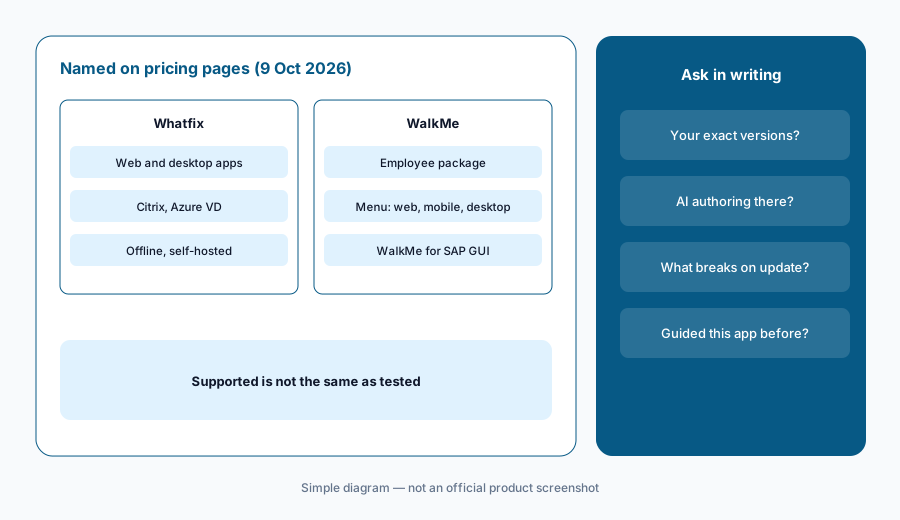
“Supports desktop apps” can mean very different things in practice. Ask each vendor which of your specific apps and versions it has guided before, whether AI authoring works on that app type (Whatfix’s AI capture is web-only today), and what breaks when the app updates.
Same list to both:
Send both vendors your top three apps with exact versions. Ask in writing whether each is covered today, whether AI authoring works on it, and what happens to guidance when the app updates.
3. Authoring effort: Quick Capture Flows vs AI Authoring
What it is: Whatfix starts from clicks. With Quick Capture Flows you click through a task once and each click becomes a step; AI writes each step’s title and description from the labels you clicked, and Enhance with AI can rewrite the whole Flow (Polish, Formalize, Elaborate, Shorten, or a custom prompt). Whatfix says the AI reads only captured labels, not app data. Limits: English and web apps only, Undo reverts the whole rewrite, and the enhanced AI step text is part of a DAP AI add-on package enabled through your customer success manager. Visibility Rules AI (Beta) turns plain-language targeting into rules you review. WalkMe starts from a conversation. With AI Authoring you describe a business problem, answer clarifying questions, edit a live preview, and approve a plan; WalkMe then creates the item in the Editor. Its help article says this version cannot publish or archive content, does not build Smart Walk-Thrus or SmartTips yet, cannot pick screen elements, and is not on unlimited, lite, or trial systems.
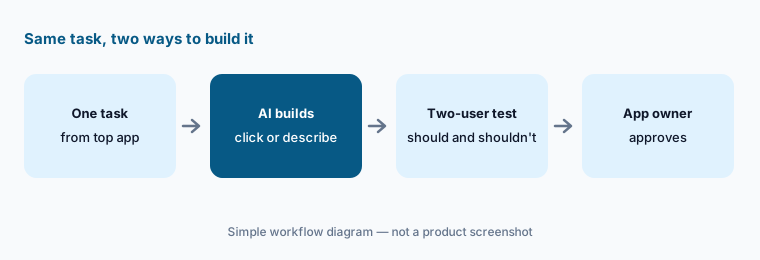
So the effort lands in different places. Whatfix’s path is fast for step-by-step walkthroughs of a task you can click through; WalkMe’s path is fast for announcements, segments, and display rules you can describe, but step-by-step guides are still built by hand. Either way, a builder tests with two users and the app owner approves before publishing.
Time one build:
Pick one task from your top app. Build its guidance with each tool’s AI, time the build plus fixes, and have the app owner approve every step before anything is published.
4. AI guidance inside the app: QuickRead vs Contextual AI
What it is: Whatfix’s Guidance Agent powers QuickRead in the Self Help panel: someone types a question and gets a one-line summary with a link to the source article. Whatfix says its AI runs on private Azure OpenAI instances in your region and stores AI queries and responses so you can see what people asked. WalkMe’s Contextual AI Assistance comes in three forms: Pinned AI attached to a specific field or step, Proactive AI in the Action Bar that reads the screen and suggests a next step unasked, and On-Demand AI in the WalkMe Menu. All three retrieve passages from the policies and documents you connect (retrieval-augmented generation), on a rescan schedule you set. WalkMe’s pricing page lists the Action Bar “with Default Settings (No AI)” separately from the Contextual AI section, so confirm which forms your package includes.
Both are only as current as the documents behind them. Before switching either on, retire stale articles and set someone to own the source library; the AI will repeat an out-of-date policy with full confidence.
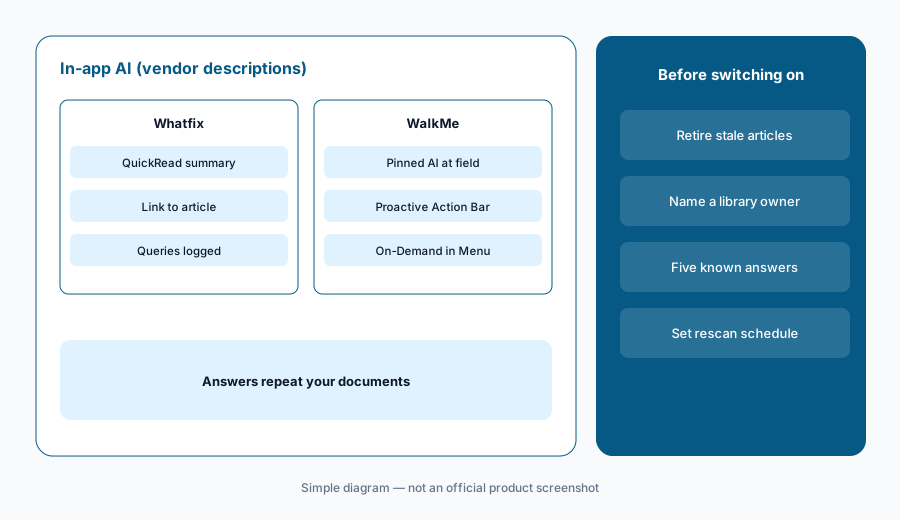
Five known answers:
Ask each tool’s in-app AI five questions you already know the answers to. Remove or fix every source document behind a wrong answer before employees see it.
5. Usage questions: Ask Whatfix AI vs AI Insights
What it is: Whatfix’s Insights Agent answers usage questions in plain language: Ask Whatfix AI returns trend, funnel, or user-journey charts; Deep think tries to interpret the data and suggest what to do; a survey summary sorts open-text answers into themes. Whatfix’s privacy article says its AI always needs human supervision to validate outputs. WalkMe’s AI Insights (generally available since 31 August 2026) answers questions such as “break license use down by department” with a chart or table, a suggested next step, and — WalkMe says — where the data came from and how it was calculated. Its help article says it cannot create or change content, cannot see tracked events or saved filters, and tells you when the data can’t support an answer. It is also available as an MCP server on request, using a WalkMe API token.
Usage data about named employees is sensitive. Agree with HR and your privacy owner what is collected and who sees user-level views before anyone asks an AI about individual people, and give any API token a named owner.
One question you can check:
Ask each tool’s AI one usage question your existing dashboard already answers. Compare the numbers and ask the vendor to explain any difference before you trust the next answer.
6. Where each fits, and when neither is the answer
What it is: Whatfix fits companies rolling out several business apps — including desktop apps in virtual desktops — that want click-once walkthroughs with AI step text, a training product (Mirror), and a quote built from a flat fee plus user licenses. WalkMe fits large companies running many employee apps, especially SAP shops moving to S/4HANA, that want conversational AI for announcements and segments, three forms of in-app AI, and AI Insights with an MCP option. Both publish no prices. If you are guiding customers through your own product rather than employees through internal apps, look at Pendo, Userpilot, or Appcues instead.
If the apps with the most tickets are broken rather than confusing, guidance won’t help — fix the app or the process. And if the real goal is getting people to use an AI assistant the company already pays for, start by knowing what that tool does (see Microsoft 365 Copilot).
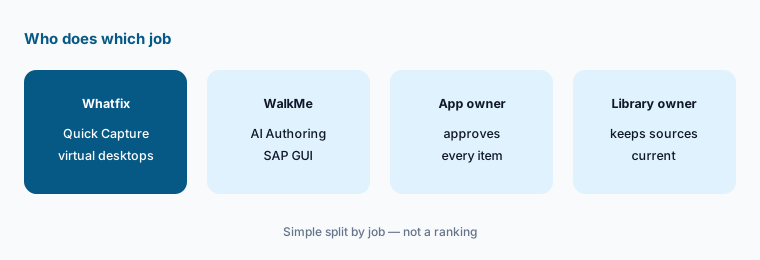
Shortlist by coverage:
Score your top three apps “covered today” or “needs work” for each tool. Shortlist the tool that covers your highest-ticket app today, and ask the other to prove coverage on that app.
Pricing context (October 2026)
Whatfix does not publish prices (as listed 9 Oct 2026). Its pricing page shows Standard, Premium, and Enterprise plans for web and desktop apps, each with “Get a Demo”, and offers a free trial. Its FAQ says each price is a flat fee for the product and plan plus user license fees: for employee-facing apps, a license per user with access; for customer-facing apps, per monthly active user. The AI step text in Quick Capture Flows is part of a DAP AI add-on package, and Visibility Rules AI is a Beta you request from support.
WalkMe does not publish prices either (as listed 9 Oct 2026). Its pricing page shows two packages — employee apps, and customer-facing apps and websites — with “Request a quote” or “Get a quote”, listing AI Insights, AI Authoring, Contextual AI Assistance, Discovery, UI Intelligence, ActionBot, and WalkMe for SAP GUI. WalkMe’s Q3 2026 release notes say the new AI experiences need WalkMe’s AI terms and conditions in place.
Uncertainty: Neither vendor showed a price on 9 October 2026, so we quote none; any figure elsewhere is not from Whatfix or WalkMe. Some AI features are Beta, add-ons, or in gradual release (WalkMe’s AI Authoring since 31 August 2026), and new WalkMe features can reach SAP data centers later. We could not confirm from public pages which plans or packages include which AI features.
When it’s useful (honest take)
Whatfix is useful when your highest-ticket apps include browser apps you can click through and desktop apps in virtual desktops, and named app owners will check every AI-drafted step and targeting rule before it goes live.
WalkMe is useful when you run many employee apps, especially SAP GUI and S/4HANA, want AI for announcements, segments, in-app answers, and usage questions, and have a digital adoption manager who publishes every item after testing.
Less useful when (either one) you have one simple app and a small team, your help articles and policies are out of date (the in-app AI will repeat them), or the top-ticket app is broken rather than confusing. Budgeting also waits for a demo and a quote.
Still choosing between Whatfix and WalkMe? The $19 AI toolkit audit gives you a written plan for which tools to keep using and which to drop across your whole AI stack, including this pair.
Prefer to do it yourself? Spreadsheet — $9
Related options (educational)
| Need | Better home | Why |
|---|---|---|
| Click-once walkthroughs across web, desktop, and virtual desktops | Whatfix AI | ScreenSense, Quick Capture, Mirror training |
| Many employee apps, SAP GUI, conversational authoring | WalkMe AI | AI Authoring, AI Insights, Contextual AI |
| Guides plus analytics for your own software | Pendo AI | Product-led adoption suite |
| Onboarding inside a product-led app | Userpilot AI or Appcues AI | Lighter in-app flows for customers |
| Knowing the AI assistant you want people to adopt | Microsoft 365 Copilot | What the licenses actually do |
| Drafting training scripts and policy summaries | Claude or ChatGPT | General assistants; paste no personal data |
FAQ
Is Whatfix or WalkMe better for internal apps?
Neither in general, and this page is not a ranking. Whatfix leans on ScreenSense, click-once Quick Capture Flows with AI step text, virtual-desktop support, and Mirror training. WalkMe, an SAP company, leans on conversational AI Authoring, AI Insights, three forms of in-app Contextual AI, and WalkMe for SAP GUI. Start from the three internal apps with the most tickets and check which tool covers each today.
How are Whatfix and WalkMe priced in October 2026?
Neither publishes prices. Whatfix lists Standard, Premium, and Enterprise plans with a demo request and a free trial; its FAQ says prices are a flat fee plus user licenses. WalkMe lists two packages, employee apps and customer-facing apps, with a request-a-quote button.
Can either AI publish guidance by itself?
No. Whatfix says its AI assists people and AI-written steps and rules are drafts you review before publishing. WalkMe’s help article says AI Authoring cannot publish or archive content, and AI Insights cannot create or change content. Have the app owner approve every item before it reaches employees.
Does WalkMe only work with SAP?
No. SAP completed its acquisition of WalkMe on 12 September 2024, and WalkMe still sells its platform for many business apps, with packages for employee apps and customer-facing apps. It also offers WalkMe for SAP GUI for SAP desktop screens.
Does Whatfix’s AI work in desktop apps?
Whatfix sells plans for web and desktop apps and supports desktop apps in virtual desktops such as Citrix and Azure Virtual Desktop, but its help center says the AI part of Quick Capture Flows works on web apps only and in English only. Ask which AI features work on each of your apps.
Optional next step (if seats overlap)
If IT pays for a digital adoption platform, a separate training tool, and AI assistants that answer the same how-do-I questions, that overlap is worth mapping before renewal. Map the overlap with the $19 AI toolkit audit or the $9 AI toolkit spreadsheet. Email Audit $19 or Toolkit spreadsheet $9.
Checkout is live via Stripe. After you pay, we email delivery (spreadsheet) or intake next steps (audit).