Tool · In-app guidance · Appcues · Oct 2026
Appcues AI review (Oct 2026): AI help for in-app flows, checklists, and emails
Appcues builds in-app experiences — flows, tooltips, checklists, banners, pins, and a launchpad — plus mobile flows, emails and push through Workflows, NPS and surveys, and goals and analytics, all without code. Appcues AI sits on top: you describe an experience in plain language (or upload a mockup) and it drafts content and targeting; a Recommendations page lists issues and opportunities its Insights agent finds; and an MCP server connects Claude, ChatGPT, and Cursor. Nothing it drafts goes live until a person approves. This page shows each feature with a Try this.
What this Appcues page covers
This page is for a product manager, product marketer, or customer education lead at a product-led company who builds onboarding and feature-adoption experiences. The question it answers: which Appcues AI features save real build and analysis time, what each one reads and changes, and where a person still has to check the copy, the targeting, and the result before users see it.
Appcues’ AI features as we found them on 9 October 2026: Appcues AI in the Appcues App builds or edits experiences from prompts, mockups, screenshots, public URLs, or existing flows; admins set context rules and three Enhanced AI toggles; the Recommendations page (help article updated 17 August 2026) surfaces AI findings, some with one-click AI actions; and the Appcues MCP server (updated 6 October 2026) includes an Experience Builder in beta. Appcues’ MCP article also mentions Captain AI, which uses the same tools with extra agent rules inside Appcues Studio. Appcues says what its AI can build end to end “is expanding over time,” so check the current list in your account.
Everything below comes from Appcues’ pricing page and help-center articles as we read them on 9 October 2026. Appcues’ pricing page does not publish prices.
Major features (with how someone uses them)
Examples at a glance: each feature has a concrete example from a real job plus a short Try this you can run this week.
1. Rewrite one checklist in plain language, then test both versions (primary)
What it is: Once an experience exists, Appcues says you can ask Appcues AI to edit it — rename it, change its targeting, or adjust its content — in conversation or directly in the builder. You can @-mention specific experiences, segments, or campaigns in the prompt and attach files such as a tone-and-style guide so the copy sounds like your brand. For testing, Appcues’ help center describes A/B testing experience variations: separate “show once” experiences with the same goal, an Audience Randomizer to split an identical audience, and at least 500 users per group as a guide.
Plain language means short items that each name one action — “Connect your calendar,” not “Leverage seamless scheduling.” Keep the original as version A, save the AI rewrite as version B, and give both the same goal (for example, “checklist completed” or your activation event). Decide the test length and success measure before you start, and don’t judge it early. If your segment is too small for 500 users a group, run it longer or read the result as a hint, not proof.
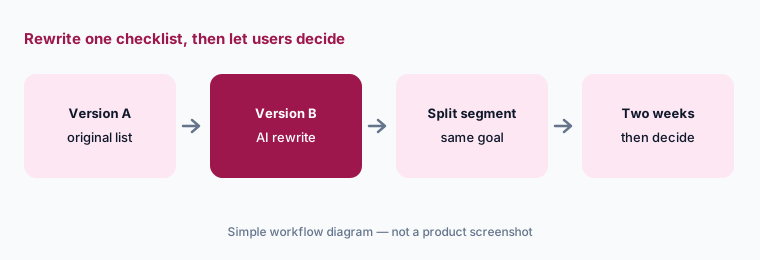
Primary workflow:
Ask Appcues’ AI to rewrite one checklist in plain language. Test both versions on one segment for two weeks. Give both the same goal, split the segment with the Audience Randomizer, and write the success measure down before you start.
2. Build a draft from a prompt, mockup, or URL
What it is: In the Appcues App you describe an experience in plain language and Appcues AI builds a draft — or opens the builder for you to finish it. You can also upload a mockup or screenshot (it reads layout, copy, and styling; it can’t open a Figma link), point it at a public URL, or ask it to convert a legacy flow to the newer Flows 2.0 builder (in beta), which Appcues says gives “a starting point rather than a faithful copy.” Before publishing, Appcues AI shows the domain, page, audience, and frequency and asks you to confirm; nothing goes live until you explicitly approve, and publishing needs a publisher or admin role. Flows 2.0 also offers AI translation into your configured languages.
Appcues’ own prompt guide says to describe the problem, not the experience: “New users aren’t completing setup — I want to guide them through the three required steps on their first login.” Name the segment by behavior (“signed up in the last 7 days and haven’t completed the setup wizard”) and the moment it should appear. Then open the draft and check every tooltip points at the right element.
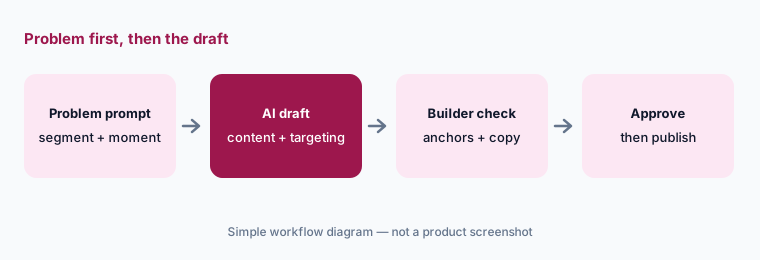
Problem first:
Write one prompt that names the problem, the behavioral segment, and the moment — not the experience type. Compare the draft Appcues AI picks with what you would have built.
3. Recommendations page, AI actions, and spike alerts
What it is: Appcues periodically analyzes your campaigns and adds Recommendations — Issues (something to fix) and Opportunities (something to gain) — each attributed to the Insights agent that produced it, with “What we noticed,” a suggested action, and expected impact. Some include AI Actions you can Apply; completed actions may offer a Smart revert, which Appcues says “attempts to undo the change” with results that “may vary.” Appcues also raises a recommendation when the issue rate on a live experience spikes or stays high — often because a site change broke the selector an experience depends on.
Spike alerts are the safest win: a broken tooltip is a real problem and easy to check. For other recommendations, read what was noticed and open the experience’s analytics yourself before you click Apply. Appcues’ own panel notes that AI can make mistakes. Have one owner review the list weekly, and send spike alerts to Slack or email so nobody has to remember to look.
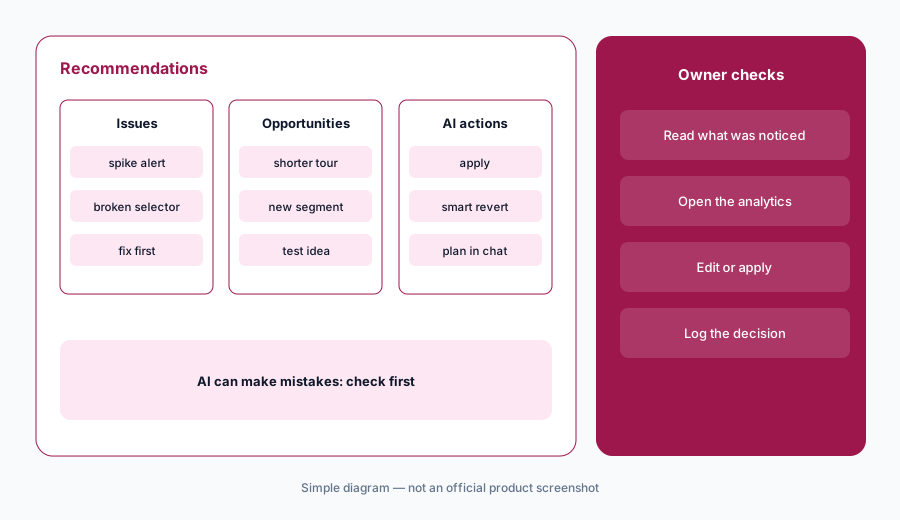
Weekly review:
Turn on spike-alert notifications to Slack or email. For four weeks, log each recommendation, whether you checked its analytics first, and whether you applied, edited, or dismissed it.
4. Admin AI settings: context rules, memory, and data toggles
What it is: The Appcues AI settings page is admin-only. Context rules are persistent instructions applied to every team member’s conversations — facts about your product, audience, and house style. Memory is per user and not shared. Three Enhanced AI features toggles control whether Appcues AI can answer questions that require sending user data (user properties, events, account data) to Appcues’ LLM provider, whether team members can connect MCP clients, and whether automatic AI insights and actions appear on the Recommendations page.
Decide the first toggle with your privacy owner. Appcues’ MCP article says that if you only send anonymous IDs, no personal data can surface; if you send names or emails and turn the toggle off, user-level questions stop working but aggregate analytics still do. Write your context rules like a short style guide: product names, banned phrases, reading level, and “never promise a feature we haven’t shipped.”
Five rules:
Write five context rules for Appcues AI: your product’s feature names, reading level, tone, one banned phrase, and one claim it must never make. Ask it to rewrite one live tooltip and check it follows all five.
5. Appcues MCP server: experience data in Claude, ChatGPT, and Cursor
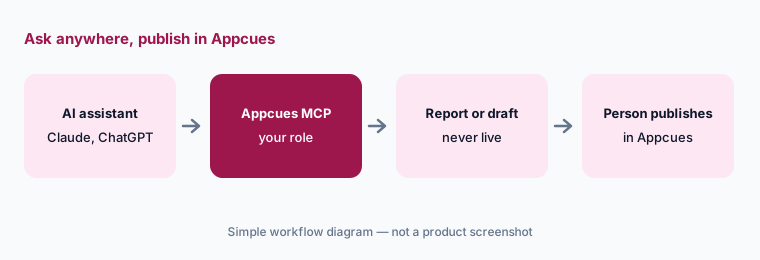
What it is: An admin turns on the Appcues MCP server in Studio settings, and team members connect Claude, ChatGPT, or Cursor (mcp.appcues.com/mcp, or an EU address for EU-hosted accounts). Appcues lists uses such as flow completion summaries, NPS scores and recent responses, an audit of published experiences, segment sizes, goal completion, survey responses, content issues, and rendered screenshots of a step. The connection uses your own login and role. Its Experience Builder (beta) can build experiences, but Appcues says changes always land on a draft and are not published until you do so manually or explicitly ask your agent to publish.
“Explicitly ask your agent to publish” is the line to watch: agree as a team that agents never publish, and that a person publishes from Appcues after checking the draft. The audit use case is a good first job — “list all published experiences and when they were last updated” finds stale tours nobody owns.
Audit first:
Connect the Appcues MCP and ask for every published experience with its last update date. Open the five oldest in Appcues and decide with each owner whether to update or unpublish them.
6. Plans, emails, and where Appcues fits
What it is: Appcues says every plan includes every experience type, feature, and integration, with “Use AI where it helps most” listed among the capabilities. Plans differ by monthly active users, published experiences, and reporting history; Workflows send emails and push notifications alongside in-app content, and audience targeting can use whether a Workflow email was delivered, opened, or clicked.
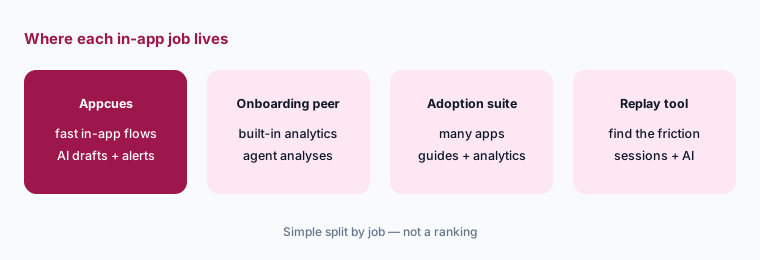
Appcues fits product-led teams that want to ship and test in-app experiences quickly, with AI help for drafts and a list of things to fix. Teams that want the same jobs with deeper built-in product analytics and an agent that runs analyses compare Userpilot AI; larger estates compare Pendo; teams finding where users get stuck before they guide them pair with LogRocket AI or Fullstory AI.
Count first:
Count your monthly active users and the experiences you would publish in the first quarter. Bring both numbers to the pricing call and ask which plan covers them with room for one test variation each.
Pricing context (October 2026)
Appcues does not publish prices. Its pricing page on 9 October 2026 listed three plans by package: Start (up to 3,000 monthly active users, 10 published experiences, 12 months of reporting history), Grow (starting at 3,000 monthly active users, 25 published experiences, 24 months), and Enterprise (custom volumes, 100 published experiences, 36 months, priority support). It says pricing is based on monthly active users, number of installations, and published experiences, that every plan includes every capability, and that a Spark program serves teams under 25 people.
Appcues offers a free trial with no credit card after an intro call, and says that if you exceed plan limits it keeps experiences running and contacts you about upgrading at the next billing cycle. Ask for a quote that shows the price at your monthly active users and experience count, and whether any AI feature has its own limits.
Uncertainty: Appcues lists no prices, so any figure you see elsewhere is not from Appcues. We read the plan packaging and help articles on 9 October 2026; Flows 2.0 and the MCP Experience Builder are in beta, and Appcues says what its AI can build end to end is expanding, so the feature list may change. We did not find a separate public price for AI features.
When it’s useful (honest take)
Useful when a product-led team ships in-app flows, checklists, and lifecycle emails often and wants AI to cut build time — prompt- or mockup-built drafts, copy rewrites that follow your context rules, spike alerts for broken selectors, and an MCP server for audits and quick reporting — with a person confirming targeting before anything publishes.
Less useful when you need deep product analytics in the same tool, your audience is too small to test variations, or nobody owns the Recommendations list. Teams that send personal data to Appcues need a privacy decision on the user-data toggle before the AI can answer user-level questions.
Paying for Appcues AI and a few other AI tools? The $9 AI toolkit spreadsheet lists every AI subscription you have, what each one costs, and how fast it pays for itself, so you can see which ones are worth the money.
Want someone to do it for you? AI toolkit audit — $19
Related options (educational)
| Need | Better home | Why |
|---|---|---|
| Fast in-app flows, checklists, and emails with AI drafts | Appcues AI (this page) | Prompt builds, Recommendations, MCP |
| Onboarding plus built-in product analytics and an agent | Userpilot AI | Lia skills, AI drafts |
| Guides plus analytics across a larger app estate | Pendo AI | Broad adoption suite |
| Finding where users get stuck before guiding them | LogRocket AI or Fullstory AI | Session replay with AI |
| Behavioral analytics to pick the moment | Amplitude AI or Mixpanel AI | Cohorts and funnels |
| Drafting copy variants before you build | Claude or ChatGPT | General assistants; paste no user data |
FAQ
What can Appcues AI do in October 2026?
It builds or edits experiences from plain-language prompts, mockups, screenshots, public URLs, or existing flows; follows admin context rules; lists AI recommendations with optional one-click actions and spike alerts; and connects to Claude, ChatGPT, and Cursor through an MCP server. Nothing goes live until a person approves.
How much does Appcues cost?
Appcues does not publish prices. Its pricing page lists Start (up to 3,000 monthly active users), Grow, and Enterprise, priced by monthly active users, installations, and published experiences, plus a Spark program for teams under 25 people. See appcues.com/pricing.
Can Appcues AI publish experiences by itself?
Appcues says Appcues AI shows the targeting and asks you to confirm, and nothing goes live until you explicitly approve; publishing needs a publisher or admin role. Through the MCP Experience Builder (beta), changes land on drafts unless you publish manually or explicitly ask your agent to publish.
Does Appcues AI send user data to an AI provider?
Only if an admin turns on the enhanced AI setting that lets Appcues AI answer user-level questions; that sends user properties, events, and account data to Appcues’ LLM provider. With it off, aggregate analytics still work. If you send only anonymous IDs, no personal data can surface.
Appcues or Userpilot?
Both build in-app flows, checklists, and surveys with AI help. Appcues leans toward fast building with AI drafts and a Recommendations page; Userpilot leans toward built-in product analytics with an agent that runs analyses. See Userpilot AI.
Optional next step (if seats overlap)
If you pay for an in-app guidance tool, a separate email tool for the same users, a survey tool, and a general AI assistant that writes the same copy, that overlap is worth a look. Map the overlap with the $19 AI toolkit audit or the $9 AI toolkit spreadsheet. Email Audit $19 or Toolkit spreadsheet $9.
Checkout is live via Stripe. After you pay, we email delivery (spreadsheet) or intake next steps (audit).