Tool · In-app onboarding · Userpilot · Oct 2026
Userpilot AI review (Oct 2026): AI for in-app onboarding flows and product analytics
Userpilot is a no-code platform for in-app onboarding and product analytics: flows, tooltips, checklists, banners, a resource center, surveys and NPS, email, and analytics (trends, funnels, retention, paths), with session replay on higher plans. Its AI comes in two parts: Lia, an agent that analyzes your product data, runs ready-made skills such as “analyze activation,” and drafts content; and an AI writing assistant inside every text box. A hosted MCP server brings the same data into Claude, ChatGPT, Cursor, and Copilot. This page shows where each helps — and why a product manager reviews every flow before it goes live. Each section has a Try this.
What this Userpilot page covers
This page is for a product manager, growth lead, or customer success lead at a SaaS company who owns onboarding and activation and wants to know what Userpilot’s AI really saves. The question it answers: which AI features shorten the path from “new users stall at step two” to a flow you can test, what each one reads, and where a person still has to check the steps, the targeting, and the result.
Userpilot calls Lia its “AI product agent.” Its help center says Lia reads the data already in your account — events, features, users, companies, segments, flows, surveys, and NPS — answers questions, runs skills, and can create segments, reports, dashboards, checklists, and draft surveys. Userpilot’s product pages go further and say Lia “drafts the experience, writes the copy, picks the format … You approve. She launches.” Its pricing page (read 9 October 2026) lists “MCP and AI Agent Lia” on every plan, and marks AI session summaries and suggested replays as coming soon.
Everything below comes from Userpilot’s pricing, AI, and product pages, its blog, and its help-center articles as we read them on 9 October 2026. Userpilot says more than 1,200 companies use it; treat that and any outcome figures as vendor claims.
Major features (with how someone uses them)
Examples at a glance: each feature has a concrete example from a real job plus a short Try this you can run this week.
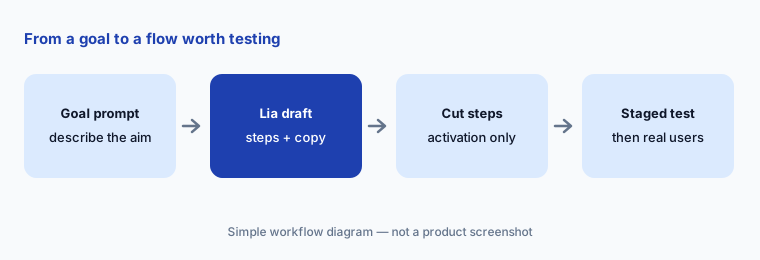
1. Lia drafts an onboarding flow: cut every step that doesn’t lead to activation (primary)
What it is: You describe the goal — “new trial users should connect a data source in their first session” — and Lia drafts the experience: the steps, the copy, and the format (tooltip, modal, slideout, checklist, or banner). Userpilot’s blog advises generating from evidence, such as an observed drop-off, rather than inventing flows from nothing. Userpilot flows are built in a Chrome extension on top of your product, and its help center says Lia won’t change live content on its own.
An AI draft tends to be long and friendly. Before you test it, write down your activation event — the one action that predicts a user sticks — and check each step against it. A step that explains the product but doesn’t move the user toward that action goes. Then check every tooltip is anchored to the right element and the targeting matches the users you meant. A named PM approves the flow before it goes live.
Primary workflow:
Have Userpilot’s AI draft a three-step onboarding flow. Cut any step that doesn’t lead to your activation event. Write the event name above the flow so reviewers can check each step against it.
2. AI writing assistant in tooltips, modals, and banners
What it is: Inside any text box in a modal, tooltip, banner, or similar element, pressing space opens Userpilot’s AI writing assistant. Its help center says it can write new copy from a prompt, continue, shorten or summarize existing text, fix spelling and grammar, and help simplify flows by cutting redundant copy. You accept, edit, or discard each suggestion, and discarding returns your original text.
Use it for the second draft, not the first decision. Write what the step must get the user to do in one plain sentence, then ask the assistant to shorten it. Read the result in the product, at the size users see it — a tooltip that reads well in the editor can cover the button it points at.
Twenty words:
Take the longest tooltip in your live onboarding. Ask the writing assistant to shorten it to under 20 words while keeping the button’s exact label, then preview it in the product before you save.
3. Lia skills: activation, retention, and adoption analyses
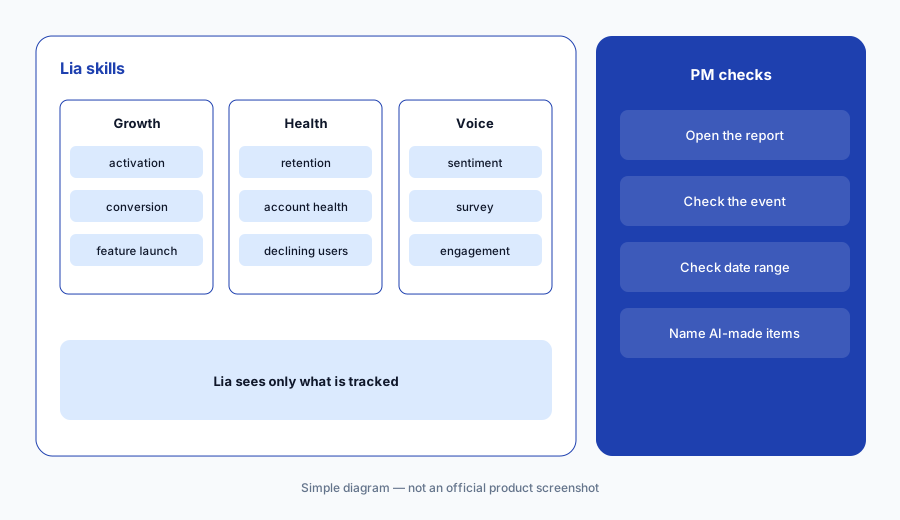
What it is: Lia’s skills are ready-made analyses you run by asking naturally (“Why are users churning?” triggers Analyze retention) or by typing a slash command such as /analyze-activation. The help center lists skills for activation, feature adoption, feature launch, trending and declining users and companies, segments and segment comparison, account health, retention, sentiment, surveys, conversion, dashboards, and the engagement of a flow or checklist. Its notes say Lia only sees what is tracked in Userpilot, and that segments, reports, and dashboards it creates are saved to your account right away.
Lia is only as good as your event tagging: if a feature isn’t tagged, Lia can’t analyze it. Before acting on a skill’s finding, open the report it built and check the date range and the definition of the event. Because Lia saves segments and reports immediately, agree on a naming prefix so AI-made ones are easy to find and tidy up.
/analyze-feature-launch on a scheduling feature shipped three weeks ago. Lia reports that most users who open it never save a schedule, and that a launch banner has a low click rate. She opens the funnel Lia built, sees the “saved” event fires only on the second save, fixes the event definition with engineering, and reruns the skill before the review.
Check the event:
Run /analyze-activation. Before sharing the result, open the report Lia built and write down the exact event it treats as activation. If that isn’t your team’s definition, fix the event and run it again.
4. AI surveys, feedback summaries, and sentiment
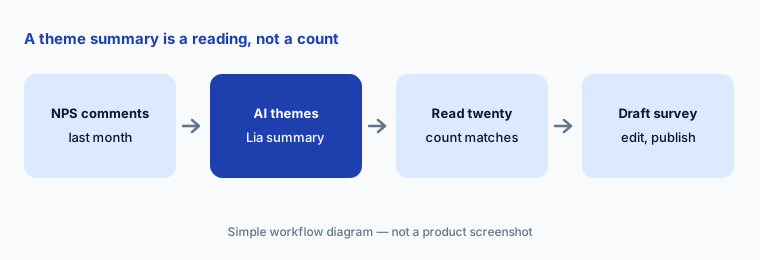
What it is: Userpilot’s pricing page lists an AI Survey Builder, AI Feedback Summaries, and AI Sentiment & Thematic Analysis in its AI suite, and Lia has Summarize user sentiment and Analyze a survey skills that read NPS scores and open-text answers. The help center says surveys Lia creates are saved as drafts — you review and publish them yourself.
A theme summary is a reading of free text, so check it against the raw answers. Read twenty responses yourself and see whether the top theme appears as often as the summary says. Keep survey questions short and avoid asking for personal details you don’t need.
Read twenty:
Ask Lia to summarize last month’s NPS comments. Read twenty of them yourself and write how many match the top theme before you share the summary with anyone.
5. Userpilot MCP server: product data in Claude, ChatGPT, and Cursor
What it is: The hosted Userpilot MCP server (mcp.userpilot.io/mcp) connects Claude, Claude Code, ChatGPT, Cursor, and Microsoft 365 Copilot to your Userpilot account with your normal login (OAuth). Its help center says you can ask questions such as “How did my signup funnel perform last month?” and ask it to create segments, reports, dashboards, and survey drafts; it is available on all plans, and your plan’s feature limits apply. Userpilot also sells Agent Analytics and MCP Analytics as add-ons on Growth and Enterprise, for teams that want to see how users use their own AI agents and MCP servers.
An MCP connection acts with your login, so it can create things in your account. Start with read-only questions whose answers you already know, and check what your AI tool keeps in its chat history before you pull user-level data into it.
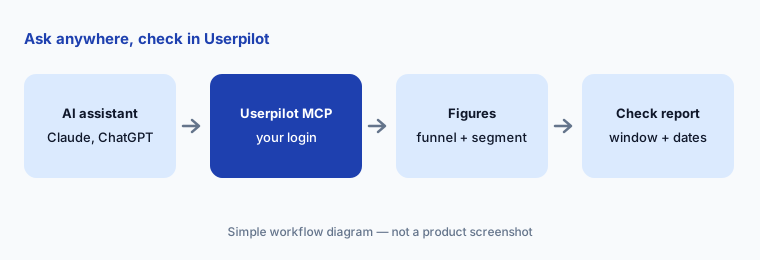
Known answer first:
Connect the Userpilot MCP to your AI assistant. Ask for one funnel you already track and compare the answer with the Userpilot report, including the date range and conversion window.
6. Preview, test mode, and staging before a flow goes live
What it is: Userpilot’s help center describes Preview Mode in the builder, Test Mode to experience a live flow as an end user, and controlled publishing: restricting a flow to staging or testing domains, or triggering it only by permalink or script. Its plan table lists A/B testing and experimentation, localization, and content throttling as features above the Starter plan.
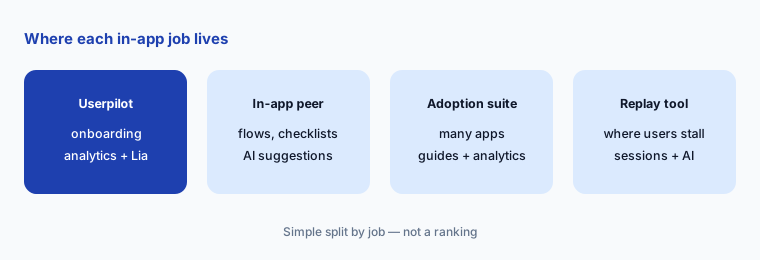
An AI-drafted flow goes through the same path as a hand-built one: preview, then staging or a permalink for a small test group, then targeting real users. Agree on the success measure first — the activation event from the first section — and compare users who saw the flow with users who didn’t. For in-app guidance across a larger enterprise app estate, compare Pendo; for a close peer with an AI recommendations page, see Appcues AI.
Stage it first:
Publish your next AI-drafted flow to staging or by permalink only. Walk through it in Test Mode on two screen sizes, fix what breaks, and only then target real users.
Pricing context (October 2026)
Userpilot publishes two prices. Its pricing page on 9 October 2026 listed Starter at $299/mo (up to 2,000 monthly active users, 3 seats, up to 10 segments, 1-year data retention), Growth “from $849/mo” (15 seats, advanced product analytics, autocapture, resource center, advanced surveys, 100k emails and 5k session replays a month, 3-year retention), and Enterprise with no listed price. All three list “MCP and AI Agent Lia.” Agent Analytics and MCP Analytics are add-ons on Growth and Enterprise, with 5,000 free AI session analyses.
There is a 14-day free trial with no credit card required. Pricing is based on monthly active users, so ask how the price moves as you grow past each plan’s included users, and whether AI features carry any usage limits.
Uncertainty: We read Userpilot’s prices from its pricing page on 9 October 2026; it did not say on our read whether $299 and $849 are monthly or annual-billing rates, and Growth is a “from” price that rises with monthly active users. The plan table lists AI Guides Builder in the AI suite but shows it missing from Starter in another row, so confirm which AI features your plan includes. AI session summaries and suggested replays are marked coming soon.
When it’s useful (honest take)
Useful when a SaaS product or growth team owns onboarding and activation, has its key events tagged, and wants in-app flows, surveys, and analytics in one tool: Lia to find where users stall and draft a first version, the writing assistant to tighten copy, skills for repeatable analyses, and an MCP server for quick questions from Claude or ChatGPT.
Less useful when your events aren’t tagged (Lia can only see what Userpilot tracks), nobody has defined an activation event to judge flows against, or you need guidance across many internal enterprise apps rather than one SaaS product. Very small teams with one simple onboarding path may get most of the value from a hand-built checklist.
Paying for Userpilot AI and a few other AI tools? The $9 AI toolkit spreadsheet lists every AI subscription you have, what each one costs, and how fast it pays for itself, so you can see which ones are worth the money.
Want someone to do it for you? AI toolkit audit — $19
Related options (educational)
| Need | Better home | Why |
|---|---|---|
| In-app onboarding plus product analytics with an agent | Userpilot AI (this page) | Lia skills, AI drafts, MCP |
| In-app flows and checklists with AI recommendations | Appcues AI | Prompt-built drafts, Recommendations page |
| Guides plus analytics across a larger app estate | Pendo AI | Broad adoption suite |
| Finding where users get stuck in sessions | LogRocket AI or Fullstory AI | Session replay with AI |
| Behavioral cohorts and funnels | Amplitude AI or Mixpanel AI | Analytics first |
| Testing the flow as an experiment | Statsig | Experiments and feature gates |
FAQ
What is Userpilot Lia?
Lia is Userpilot’s AI agent. It reads the product data in your Userpilot account, answers questions, runs ready-made analyses called skills (activation, retention, adoption, sentiment, and more), and can create segments, reports, dashboards, checklists, and draft surveys. Userpilot says it won’t change live content on its own.
How much does Userpilot cost in October 2026?
The pricing page listed Starter at $299/mo for up to 2,000 monthly active users, Growth from $849/mo, and Enterprise on request. Lia and the MCP server are listed on every plan. See userpilot.com/pricing.
Can Userpilot’s AI build an onboarding flow for me?
Userpilot says Lia can draft the experience, write the copy, and pick the format, and its writing assistant edits copy in any text box. Treat the draft as a first version: cut steps that don’t lead to your activation event, check every anchor and target, and test in staging before going live.
Does Userpilot have an MCP server?
Yes. A hosted MCP server connects Claude, ChatGPT, Cursor, Copilot, and other tools to your Userpilot account with your normal login. It can answer analytics questions and create segments, reports, dashboards, and survey drafts, within your plan’s limits.
Who should approve flows that Userpilot’s AI drafts?
A named product manager approves every flow before it goes live, after checking each step against the activation event and testing it in staging or by permalink. Survey drafts from Lia are reviewed and published by a person.
Optional next step (if seats overlap)
If you pay for an onboarding tool, a separate product analytics seat, a survey tool, and a general AI assistant that all touch the same activation question, that overlap is worth a look. Map the overlap with the $19 AI toolkit audit or the $9 AI toolkit spreadsheet. Email Audit $19 or Toolkit spreadsheet $9.
Checkout is live via Stripe. After you pay, we email delivery (spreadsheet) or intake next steps (audit).