Compare · Customer success · CS platform AI · Oct 2026
Gainsight vs ChurnZero (Oct 2026): AI for customer success platforms
Gainsight and ChurnZero are both customer success platforms: one place where CSMs see account health, renewals, tasks, and automated customer programs. In 2026 both added AI on three levels — assistants that answer questions about an account, agents that watch for risk and expansion signals, and features that draft emails, programs, and churn write-ups. This page compares them by team size, data model depth, and what the AI actually does — not as a ranking — with a Try this for each.
What this comparison covers
This page is for a VP of customer success, a CS operations lead, or the platform admin choosing between Gainsight and ChurnZero — or renewing one of them — who wants to know which CS jobs each product’s AI would take on, which ones change customer records or reach customers, and who on the team still has to approve.
The short version: both now sell AI at every level, but they package and aim it differently. Gainsight puts Copilot inside Gainsight CS, sells Staircase AI as a separate product for risk, expansion, and handoff signals from emails and calls, and opens its data to Claude, ChatGPT, Salesforce Agentforce, and Slack through the Gainsight MCP — with an admin model and data designer built for large CS organizations. ChurnZero builds Snapshot AI, Engagement AI, and Meeting AI into the platform and sells Agentic Essentials on top: about twenty named agents in an AI Marketplace, a pool of AI credits, a Customer Intelligence Profile, and ChurnZero Connect (MCP) — with agents that can run inside the plays CSMs already use.
Facts come from both vendors’ public pricing pages (re-checked on 9 October 2026) and match our Gainsight AI and ChurnZero AI reviews, which read each vendor’s documentation, release notes, and announcements on 8 October 2026. Retention gains and time-saved figures on either site are vendor claims, not our measurement.
| Question | Gainsight | ChurnZero |
|---|---|---|
| Published prices | None — Essentials and Enterprise plans say “Request Pricing” | None — the pricing address returned “Page not found”; demos only |
| Seats in the plan table | Essentials: 10 full users, 100 customers per user; Enterprise: 20 full users, 200 customers per user; unlimited viewer licenses | Not published; Agentic Essentials sold to Professional and Enterprise editions |
| AI that answers | Copilot in Gainsight CS; Gainsight MCP for Claude, ChatGPT, Agentforce, Slack | Snapshot AI account briefs; ChurnZero Connect (MCP) for Claude and ChatGPT |
| AI agents | Staircase AI analysts (separate purchase); Agent Studio announced, waitlist | About twenty named agents in the AI Marketplace (Agentic Essentials) |
| AI that drafts | Build with AI in Journey Orchestrator (never publishes); AI subject lines | Pilot drafts Send AI Email (Review Required on by default); Retrospective churn drafts |
| Admin controls for AI | AI Tool Management and Object Management (all on by default) | Choose which agents run, on which accounts, how often, and suggest vs act |
Major features (with how someone uses them)
Examples at a glance: each feature has a concrete example from a real job plus a short Try this you can run this week.
1. Start from the three CS tasks your team repeats every week (primary)
What it is: Feature lists for two CS platforms look alike: health scores, playbooks, journeys, AI. The useful test is the work your CSMs already repeat — preparing for a QBR, chasing accounts nobody has heard from, sending renewal reminders — and, for each, whether one product’s AI would answer a question, act as an agent, or draft something, and who still signs off before it reaches a customer or a record.
Write the answer as three columns: the task, which product’s AI would touch it (and which kind — answer, agent, or draft), and the named person who approves the result. The third column is the one most demos skip, and it is where your real workload stays.
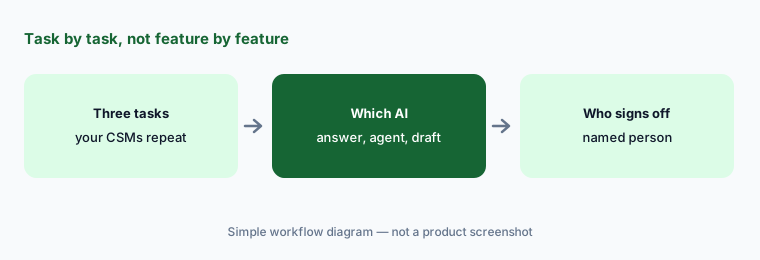
Primary workflow:
List the three CS tasks your team repeats weekly. Write which product’s AI would touch each and who still signs off. Bring the list to both demos and ask each vendor to show those three tasks, not its feature tour.
2. Team size and packaging: Essentials and Enterprise vs editions plus Agentic Essentials
What it is: Gainsight’s pricing page, as listed on 9 October 2026, shows two Customer Success plans with no prices. Essentials (“for growing businesses and Customer Success organizations looking to start fast”) includes 10 full users and 100 customers per user; Enterprise includes 20 full users and 200 customers per user and adds renewal and expansion forecasting and org mapping with sponsor tracking. Both list unlimited viewer licenses and “AI Insights, Automations” as included. Staircase AI, Skilljar customer education, communities, and product experience are separate products. ChurnZero publishes no plan table at all — its pricing address returned “Page not found” — but its June 2026 announcement says Agentic Essentials is available to its Professional and Enterprise editions as one annual subscription with a flat fee and a set allotment of AI credits.
So the two quotes are built differently. With Gainsight, the plan sets seats and customers per user, and the AI that reads emails and calls is a second product. With ChurnZero, the edition sets the platform, and almost all of the agent AI sits in one add-on that draws from a shared credit pool. Neither is cheaper by design; the shape of your team decides which quote is easier to compare.
Count before the demo:
Count your CSMs, the people who only view accounts, and your accounts per CSM. Ask both vendors in writing what that headcount costs and which AI features the quote includes.
3. Data model depth: who defines “at risk”
What it is: Both AIs answer from the data model you build, so model depth decides what they can say. Gainsight gives CS ops a deep model: the account Timeline, calls to action (CTAs) in Cockpit, Success Plans, health scores with weighted measures, custom objects and fields in Data Designer, and — since July 2026 — an Admin CLI that lets an AI agent such as Claude read rules and health score setup and write some configuration (Super Admin only). Gainsight’s release notes also say Essentials now allows 100,000 API calls a day. ChurnZero centres on ChurnScore health, plays, and journeys, and asks you to describe your business once in the Customer Intelligence Profile — products, segments, success definitions, commercial lines — which every agent and ChurnZero Connect read.
Deeper is not automatically better. A large CS organization with several segments and a dedicated admin uses Gainsight’s depth; a team of a few CSMs may never fill it in. ChurnZero’s profile is simpler to start, but its answers are only as good as the definitions you write there. In both products, decide who owns the definitions of “at risk”, “renewing”, and “healthy” before any AI uses them.
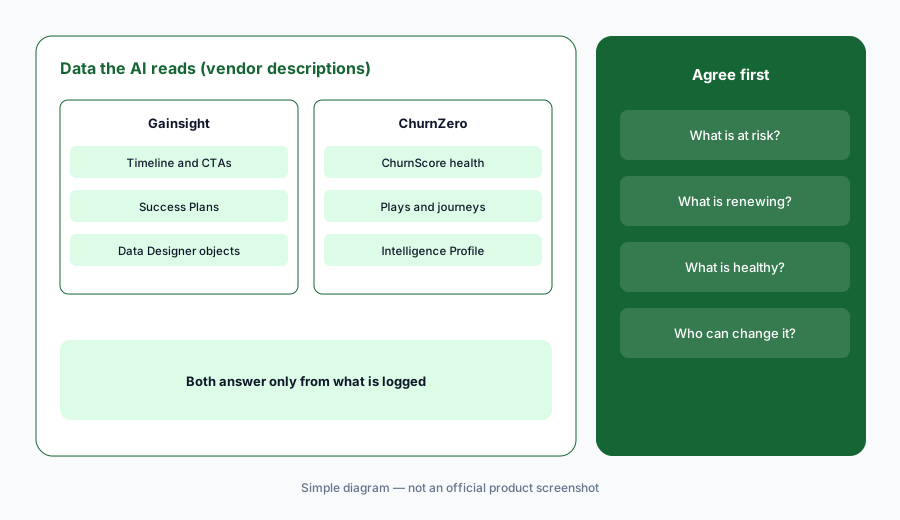
Write the definitions:
Write down how your team defines “at risk”, “renewing”, and “healthy” today. Ask each vendor where that definition lives in its product and who can change it.
4. AI that answers: Copilot and the Gainsight MCP vs Snapshot AI and ChurnZero Connect
What it is: Gainsight Copilot is a chat assistant in Gainsight CS. It reads an account’s Timeline, Company and Relationship records, open CTAs, Success Plans, health scores, and recently used reports, and honors your data permissions. Gainsight says it analyzes only the 50 most recent Timeline entries per account, so account-specific questions work better than broad ones; it is off by default and an admin turns it on. The Gainsight MCP lets Claude, ChatGPT, Microsoft Copilot, and — since 15 September 2026 — Salesforce Agentforce and Slack query Gainsight. ChurnZero’s Snapshot AI builds a one-click account brief in four parts (Background, Health, Relationships, Engagements). ChurnZero Connect, part of Agentic Essentials, gives Claude and ChatGPT governed access to live data and, ChurnZero says, maps questions like “how many enterprise customers renewing in the next 90 days are at risk?” to your own definitions and the asker’s book of accounts.
Both answer only from what is logged. If emails are not synced or meeting notes live elsewhere, the brief will sound confident about a thin slice of the relationship. Check each claim against the record before it goes into a QBR deck.
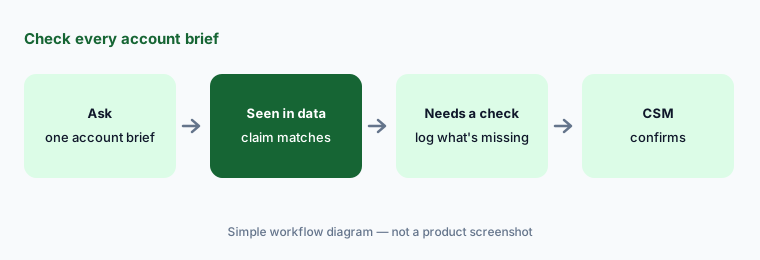
Check one brief:
Pick one account you know well. Ask Gainsight Copilot or ChurnZero’s Snapshot AI for a pre-QBR brief and mark every claim “seen in data” or “needs a check”.
5. Agents and drafts: Staircase AI and Journey Orchestrator vs the AI Marketplace and Pilot
What it is: Gainsight’s agents come mainly from Staircase AI, which reads emails, meeting transcripts, support cases, and product signals. Gainsight lists Risk and Expansion Analysts and launched a Handoff Analyst on 28 May 2026; Staircase agents can sit in the AI Cheat Sheet on each account page, but only for customers who bought Staircase. For drafts, Build with AI in Journey Orchestrator creates a draft program from a prompt and, Gainsight says, never publishes it. Agent Studio, powered by Claude, was announced on 28 May 2026 with a waitlist. ChurnZero’s AI Marketplace lists about twenty agents in three families — workflow agents that draft (Consult, Recap, Scribe, Pilot, Retrospective, handoff agents), signal agents that flag (Beacon, Echo, Harbinger, Spotlight), and enrichment agents that update records. An admin chooses which agents run, on which accounts, how often, and whether they suggest or act, and can place an agent inside a play with the Run Agent step.
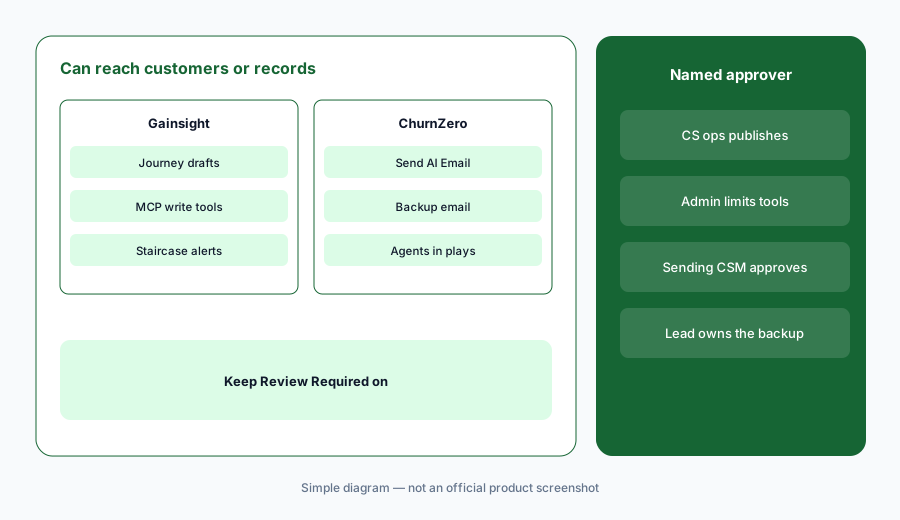
The step to watch is anything that reaches a customer. ChurnZero’s Send AI Email step, powered by Pilot, has Review Required on by default so the sending CSM approves each draft — but an admin can switch review off, and if AI is unavailable or credits run out, the backup email sends automatically. Gainsight’s MCP write tools and objects are all active by default until an admin switches them off in AI Tool Management. In both, write down which AI can send or write, and keep a named approver on each.
Name every approver:
List every place either product’s AI could send an email or write a record. Name the person who approves each one, and keep review switched on.
6. Where each fits, and when neither is the answer
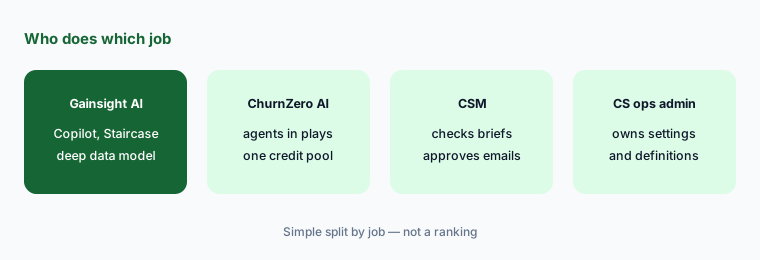
What it is: Gainsight fits CS organizations large enough to run CS as its own system — several segments, a CS operations team, a dedicated admin — who want a deep data model, Staircase AI on top of emails and calls, and an MCP that reaches Salesforce and Slack. ChurnZero fits subscription software teams that run many automated plays across a mid-sized book and want named agents and AI email working inside those plays, with one add-on and one credit pool. If your customers already live in your CRM, check what HubSpot Service Hub AI or Salesforce Einstein covers before adding a platform; teams that want a lighter notes-and-docs workspace look at Vitally, and an AI layer over existing tools is the pitch of Totango (now Odie).
Both vendors announce agents faster than most teams adopt them: Gainsight’s Agent Studio was “coming soon” in May 2026, and ChurnZero’s agent count rose from “more than 15” in June to about twenty in August. Judge each product on what your account team can show working on your data, not on the roadmap.
Judge what works today:
Ask each account team to run your three weekly tasks on a sanitized copy of your data. Count only outputs a CSM would send without rewriting, and mark every roadmap feature as “not yet.”
Pricing context (October 2026)
Gainsight does not publish prices (as listed 9 Oct 2026). Its pricing page shows Customer Success Essentials and Enterprise with “Request Pricing”: 10 vs 20 included full users, 100 vs 200 included customers per user, unlimited viewer licenses, and “AI Insights, Automations” included on both. Staircase AI, Skilljar, communities, and product experience are separate products, and Atlas is a services offer.
ChurnZero does not publish prices either (as of 9 Oct 2026). churnzero.com/pricing returned “Page not found” when we checked, and the site offers demos. ChurnZero’s June 2026 announcement describes Agentic Essentials as one annual subscription with a flat fee and a set allotment of AI credits for its Professional and Enterprise editions; every agent draws from one shared credit pool.
Uncertainty: Neither vendor showed a price on 9 October 2026, so we quote none; any figure elsewhere is someone’s quote, not a list price. Gainsight’s Agent Studio was announced with a waitlist, and Staircase features need a separate purchase. ChurnZero’s agent names and counts changed during 2026, and some of its release notes were behind a browser check when we read them, so confirm which agents are in your edition.
When it’s useful (honest take)
Gainsight is useful when CS is a full department with segments, a CS operations team, and an admin who will own the data model, Copilot settings, and AI Tool Management — and when you want AI reading emails and calls (Staircase) and an MCP that reaches Salesforce and Slack.
ChurnZero is useful when your CSMs already work through plays, emails and meetings are synced, and someone can own agent settings, the Customer Intelligence Profile, and the credit pool — with Review Required kept on for every AI email.
Less useful when (either one) your account data is thin — few synced emails, no meeting notes — because both AIs answer only from what is logged, or when nobody can own AI settings and approvals. In that case, start with Claude for customer success on sanitized notes and fix the data first.
Still choosing between Gainsight and ChurnZero? The $19 AI toolkit audit gives you a written plan for which tools to keep using and which to drop across your whole AI stack, including this pair.
Prefer to do it yourself? Spreadsheet — $9
Related options (educational)
| Need | Better home | Why |
|---|---|---|
| Deep CS data model, Staircase AI, MCP to Salesforce and Slack | Gainsight AI | Copilot, Staircase analysts, Admin CLI |
| Agents and AI email inside automated plays | ChurnZero AI | AI Marketplace, Pilot, Snapshot AI, Connect |
| Notes, docs, and meeting summaries in one workspace | Vitally AI | Lighter CS workspace with AI summaries |
| CS inside the CRM you already use | HubSpot Service Hub AI or Salesforce Einstein | Fewer systems; lighter health model |
| Product usage signals for health | Pendo AI or Amplitude AI | Usage data that feeds a health score |
| QBR drafts without a platform | Claude for customer success | No new seat; paste sanitized notes only |
FAQ
Is Gainsight or ChurnZero better for AI in customer success?
Neither in general, and this page is not a ranking. Gainsight offers a deeper data model, Copilot, Staircase AI as a separate product, and an MCP that reaches Salesforce and Slack. ChurnZero bundles about twenty named agents, AI credits, and ChurnZero Connect into Agentic Essentials and runs agents inside plays. Test both on the three CS tasks your team repeats weekly.
How are Gainsight and ChurnZero priced in October 2026?
Neither publishes prices. Gainsight’s pricing page lists Essentials (10 full users, 100 customers per user) and Enterprise (20 full users, 200 customers per user) with “Request Pricing”. ChurnZero’s pricing address returned “Page not found”; its Agentic Essentials add-on is an annual flat fee with AI credits for Professional and Enterprise editions.
Can either AI email customers on its own?
ChurnZero’s Send AI Email step can, if an admin turns Review Required off; it is on by default, and the backup email sends automatically if AI is unavailable or credits run out. Gainsight’s Journey Orchestrator Build with AI never publishes a program. Keep a named CSM approving every AI-written customer email in either product.
Is Staircase AI included with Gainsight?
No. Gainsight’s release notes say Staircase insights and the Staircase agents in the AI Cheat Sheet are available only to customers who have bought Staircase AI.
Can I connect Claude or ChatGPT to either platform?
Yes. The Gainsight MCP connects Claude, ChatGPT, Microsoft Copilot, Salesforce Agentforce, and Slack; all tools and objects are active by default until an admin restricts them. ChurnZero Connect, part of Agentic Essentials, gives Claude and ChatGPT governed access using your business definitions and permissions. Test with a question you can already answer from a report.
Optional next step (if seats overlap)
If CS pays for a platform’s AI add-on, a separate conversation-intelligence product, and general chat assistants that all draft the same QBR briefs, that overlap is worth mapping before renewal. Map the overlap with the $19 AI toolkit audit or the $9 AI toolkit spreadsheet. Email Audit $19 or Toolkit spreadsheet $9.
Checkout is live via Stripe. After you pay, we email delivery (spreadsheet) or intake next steps (audit).