Role guide · Product ops · ChatGPT Business · Oct 2026
ChatGPT for product ops (Oct 2026): launch checklists, in-app copy drafts, and survey summaries
Product ops role guide — a shared launch checklist GPT in a ChatGPT Business workspace that fills your own launch template from a feature brief, plus in-app copy variants and survey and NPS free-text summaries. Instructions forbid inventing numbers, dates, or owners. ChatGPT drafts; product managers approve every checklist, string, and summary. Companion to Claude for product ops and Gemini for product ops.
Who this guide is for
Product ops leads, launch managers, and PMs whose company already has ChatGPT Business (formerly ChatGPT Team — OpenAI renamed it on August 29, 2025) or Enterprise, and who want repeatable drafts for launch checklists, in-app copy, and survey comments. If your team works in Claude, see Claude for product ops; for Google Sheets and Docs, see Gemini for product ops. Product deep-dive: ChatGPT. Sibling role guides: ChatGPT for ops, ChatGPT for support, ChatGPT for knowledge.
Custom GPTs are being retired — read this first. OpenAI’s help center (read 9 October 2026) says custom GPTs are scheduled to retire on December 11, 2026 (February 11, 2027 for Enterprise workspaces with an approved deferral), that the change affects all ChatGPT plans, and that it recommends moving GPTs to plugins. New GPT creation and publishing are already unavailable on personal accounts (Free, Go, Plus, Pro); in Business, Enterprise, and Edu workspaces, creating GPTs depends on workspace settings. For affected Enterprise workspaces, OpenAI lists October 26, 2026 (planned) as the end of new custom GPT creation. Existing GPTs keep working until retirement. This guide still starts with a GPT because the SOP-style instructions are what you will carry into a plugin; section 6 covers the move.
Ground rules: ChatGPT never sets a launch date, approves a launch, or publishes copy — PMs approve every checklist, string, and summary, and the launch owner decides. Instructions must forbid inventing numbers, dates, owners, or customer quotes, and must mark gaps “Unknown.” Never paste customer names, emails, or account IDs from survey exports; use row numbers. Keep product work in the Business workspace, where OpenAI says it won’t train on your workspace’s data, not in personal accounts.
Major features (with how someone uses them)
Examples at a glance: each feature has a concrete example from a real job plus a short Try this you can run this week.
1. GPT launch checklist (primary)
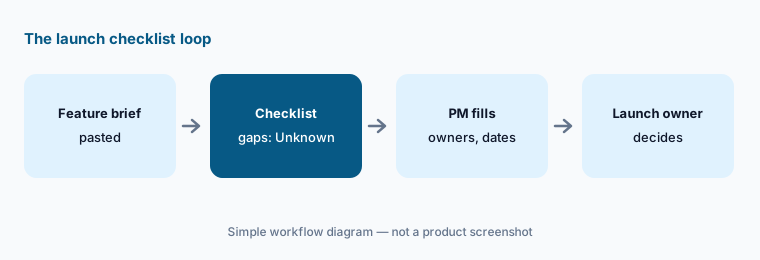
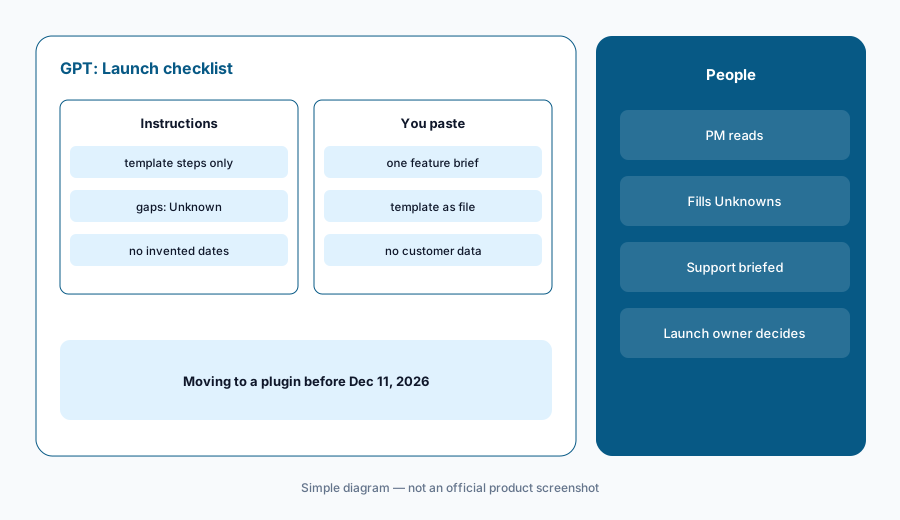
What it is: In a Business workspace where you are allowed to create GPTs, open the GPTs area, select Create, and use the configuration view. Name it Launch checklist. In Instructions, write the rules: use only steps from our launch template (attached as a knowledge file); copy each step’s wording exactly; fill a step only when the pasted brief says so; mark every missing owner, date, or decision “Unknown”; never invent numbers or dates; never say whether to launch. Attach your launch template and a definitions sheet as knowledge files, test in Preview, and share it with the product team only. OpenAI says GPT builders cannot see individual conversations people have with a GPT, and that GPTs do not use saved memory or custom instructions — each chat starts fresh.
The value is the “Unknown” lines. A checklist that comes back with twelve Unknowns tells the PM exactly which conversations to have before the review, which is more useful than a confident list that guessed a support owner.
Primary workflow:
GPT launch checklist. Instructions: only steps from our template; mark gaps “Unknown”. Paste one feature brief.
2. In-app copy variants with limits
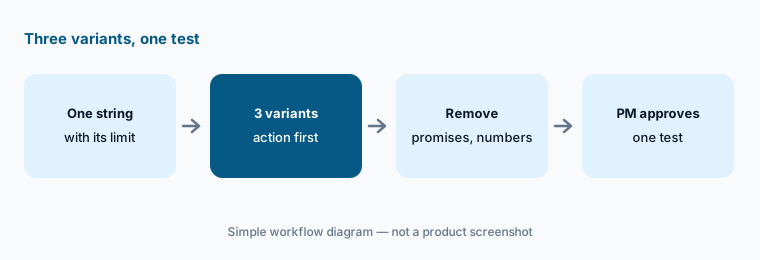
What it is: Paste one in-app message — a tooltip, a checklist item, an empty-state line — with its character limit, the user action it should lead to, and your voice guide. Ask for three variants within the limit, each naming the action in the first five words, and a one-line note on what each changes. Tell ChatGPT not to promise anything the feature doesn’t do and not to add numbers (“save 2 hours”) that aren’t in the brief.
Variants are cheap; tests are not. Pick one variant to test against the current copy in your onboarding tool, with a single metric written down first. If you use Userpilot or Appcues, their own AI can draft in place too; the rule is the same — a PM approves every live string.
Three variants, one test:
Paste one in-app string with its character limit and target action. Ask for three variants within the limit and no numbers that aren’t in the brief. Test one against the current copy.
3. Survey and NPS free-text summaries
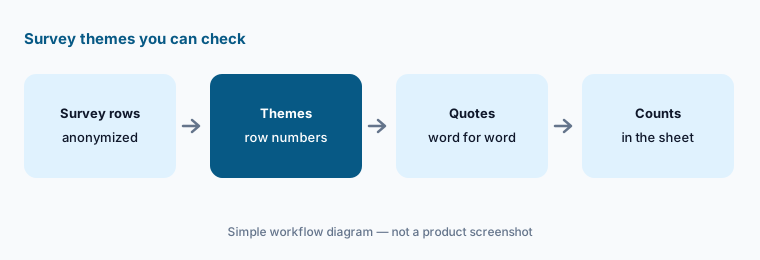
What it is: Export open-text answers with a row number and the score, remove names and emails, and paste or upload them. Ask for themes with the row numbers under each and one verbatim quote per theme — copied, not paraphrased. Put the counting in the spreadsheet: ask ChatGPT to list row numbers, then count them yourself. Instructions should say “never state a percentage or count you did not compute from the rows.”
Two checks keep the summary honest: open ten rows from the biggest theme to confirm they belong, and make sure every quote appears word for word in the export. A paraphrase in quotation marks is the most common way a summary misleads a roadmap meeting.
Quotes must match:
Upload one survey export with row numbers and no names. Ask for themes with row numbers and one exact quote each. Search the file for every quote before you share it.
4. Projects for one launch
What it is: A GPT is a reusable tool; a Project is a folder for one piece of work. OpenAI’s Business pricing page lists Projects, shared projects, and scheduled tasks on Business. Create one project per major launch, add the brief, the checklist output, and the copy decisions as files, and keep launch chats inside it so the context stays together. Share it with the PM, designer, and support lead working on that launch.
Projects are also a reasonable home for the launch checklist instructions if your workspace can no longer create GPTs: paste the same rules into the project’s instructions and attach the template.
One launch, one project:
Create a project for your next launch, add the brief and template, and keep every launch chat inside it. At launch, check whether anyone needed a file that wasn’t there.
5. Where product data belongs
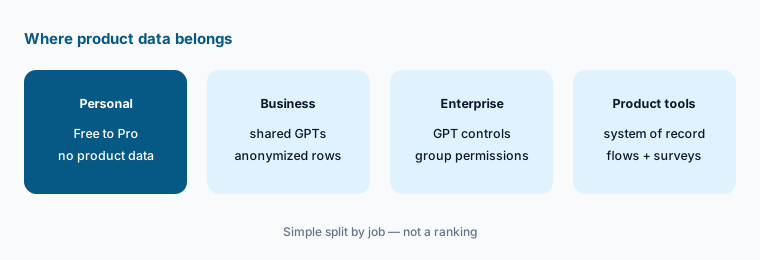
What it is: OpenAI says ChatGPT Business, Enterprise, and Edu data is not used for training by default, while consumer plans (Free, Plus, Go, Pro) may be, depending on your opt-out setting. Its Business pricing page lists SAML SSO, MFA, an admin console, and GPT analytics and management for Business; granular GPT controls and group permissions are listed for Enterprise only. Keep survey exports and briefs in the Business workspace, anonymize rows, and review any GPT or plugin that connects to outside apps — OpenAI says relevant parts of your input may be sent to those services, and it does not audit how they use your data.
Write the three rules:
Write three data rules for your product team’s ChatGPT use — what may be pasted, where, and who reviews connected apps — and pin them in your launch checklist GPT’s instructions.
6. Move the GPT to a plugin before December 11
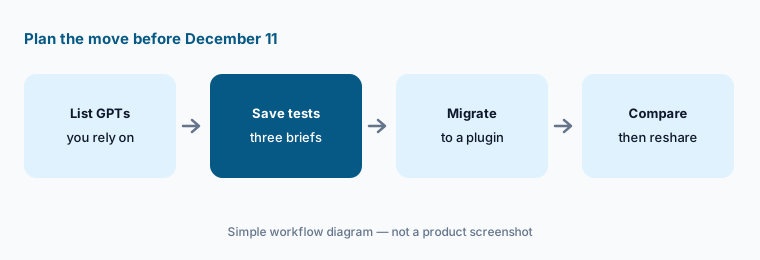
What it is: When migration is available for your account, OpenAI says you go to My GPTs and select Migrate to plugin. Under the planned workflow, the GPT’s instructions become a skill in the new plugin, knowledge files become reference files, and connected apps carry over as apps. The selected model, custom actions, and sharing settings do not carry over; migration uses the latest published version (drafts don’t transfer), the original becomes read-only, and the new plugin starts private. OpenAI recommends saving a few familiar prompts and comparing the plugin’s answers before switching. Its Business pricing page lists Plugins and Skills (beta) on Business.
For a launch checklist GPT, the test is simple: run the same three briefs through the GPT and the plugin and compare the Unknown lines. If the plugin fills a step the brief never mentioned, the “Unknown” rule did not survive the move — fix the skill before you reshare it.
Test the replacement:
Before December 11, 2026, save three feature briefs you have already run through your launch checklist GPT. After migrating it to a plugin, run the same briefs and compare the “Unknown” lines before anyone switches.
Pricing context (October 2026)
OpenAI’s Business pricing page and its ChatGPT Business help article (as listed 9 Oct 2026, USD for most countries): Standard seat $20 per user per month billed annually or $25 billed monthly; Premium seat $100 per user per month billed annually or $125 billed monthly, with 5x the usage of Standard and no 5-hour limit. Seat types can be mixed; a Business workspace needs at least two seats and is for teams of 2 to 200. Workspace credits can extend usage past included limits, and API usage is billed separately. Enterprise is priced through sales.
OpenAI says pricing may vary by country and currency. Personal-plan prices are not quoted here because personal accounts can no longer create GPTs and are not where product data should live. Full dated notes are on the ChatGPT deep-dive.
Uncertainty: Seat types, usage limits, and the GPT-to-plugin timeline can change. OpenAI says migration may reach accounts at different times, that its dates are subject to change, and that restrictions on creating GPTs are separate from retirement of existing GPTs; the October 26 creation cutoff is listed for affected Enterprise workspaces, with other plans expected to follow the same timeline. Skills is labelled beta on the pricing page.
When it’s useful (honest take)
Useful when your company already pays for ChatGPT Business or Enterprise, launches follow a written template, and someone owns the shared GPT (and its plugin replacement) and keeps its instructions current.
Useful when PMs need quick copy variants and survey themes with row numbers they can check, and counting stays in the spreadsheet.
Less useful when nobody will plan the December 2026 GPT retirement, survey data can’t be anonymized first, your onboarding or feedback tool already drafts the same copy and summaries in place, or anyone expects ChatGPT to set dates or approve a launch.
Paying for ChatGPT and a few other AI tools? The $9 AI toolkit spreadsheet lists every AI subscription you have, what each one costs, and how fast it pays for itself, so you can see which ones are worth the money.
Want someone to do it for you? AI toolkit audit — $19
Related options (educational)
| Need | Better home | Why |
|---|---|---|
| Readout checks and release notes in Claude | Claude for product ops | Projects with “not in the source” gaps |
| Feedback sheets, launch docs, and emails in Workspace | Gemini for product ops | Gemini in Sheets, Docs, and Gmail |
| Interview and feedback themes with source highlights | Dovetail AI | Chat answers you can trace to highlights |
| In-app copy drafted where it ships | Userpilot AI or Appcues AI | Flows and checklists with PM approval |
| Experiment and funnel numbers | Amplitude AI or PostHog AI | System of record for counts |
| Inventory before adding a seat | Stack map for product ops | One row per job and tool |
FAQ
How should a product ops team set up ChatGPT?
In a Business or Enterprise workspace, create a Launch checklist GPT (or project instructions, if your workspace no longer allows new GPTs) that uses only steps from your template, marks gaps Unknown, and never invents numbers or dates. Share it with the product team and have a PM approve every output.
Are custom GPTs going away?
Yes. OpenAI says custom GPTs are scheduled to retire on December 11, 2026 (February 11, 2027 for Enterprise workspaces with an approved deferral) and recommends migrating to plugins: instructions become a skill and knowledge files become reference files, while the model, custom actions, and sharing settings do not carry over. See OpenAI’s retirement FAQ.
Can ChatGPT summarize NPS comments without making up numbers?
It can sort anonymized comments into themes and list row numbers, but counts and percentages should come from your spreadsheet. Put “never state a count you did not compute” in the instructions and check every quote word for word against the export.
Is product data used to train OpenAI models?
OpenAI says ChatGPT Business, Enterprise, and Edu data is not used for training by default; consumer plans may be, depending on the opt-out setting. Keep survey exports and briefs in the Business workspace and review any GPT or plugin that sends data to outside apps.
What does ChatGPT Business cost in October 2026?
As listed on 9 October 2026: Standard seats $20 per user per month billed annually or $25 monthly, and Premium seats $100 annually or $125 monthly with 5x the usage, for teams of 2 to 200. See openai.com/business/pricing.
Optional next step (if seats overlap)
If product ops pays for ChatGPT, Claude, an onboarding tool’s AI writer, and a survey tool’s summaries that all draft the same copy and themes, fix that overlap before adding another seat. Map the overlap with the $19 AI toolkit audit or the $9 AI toolkit spreadsheet. Email Audit $19 or Toolkit spreadsheet $9.
Checkout is live via Stripe. After you pay, we email delivery (spreadsheet) or intake next steps (audit).