Role guide · Product ops · Claude · Oct 2026
Claude for product ops (Oct 2026): release notes, experiment readouts, and feedback themes with Projects
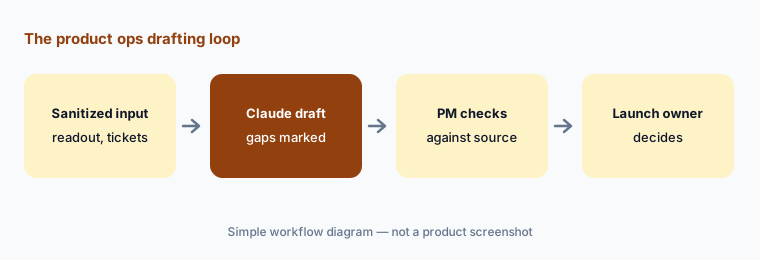
Product ops role guide — a product ops Project in Claude that drafts release notes from the tickets you actually shipped, reads an experiment readout and lists the claims the numbers don’t back, and sorts sanitized feedback into themes you can check. Claude reads what you paste and drafts; the product manager, the analyst, and the launch owner decide. Companion to ChatGPT for product ops and Gemini for product ops.
Who this guide is for
Product ops leads, product managers who run their own launches, and the analyst who gets asked “did the test win?” on a Friday afternoon. You already have Claude (or are choosing an assistant) and want help with the written side of product work: release notes, experiment readouts, and the feedback pile. If your team works in ChatGPT, see ChatGPT for product ops; if it lives in Google Sheets and Docs, see Gemini for product ops. Product deep-dive: Claude. Sibling role guides: Claude for customer success, Claude for data ops, Claude for ops.
How Projects work (Anthropic’s help center, read 9 October 2026): a project is a self-contained workspace with its own chat history and knowledge base. Files you add to project knowledge are used in every chat in that project, and project instructions apply to all of them. Context is not shared between chats unless it is in project knowledge. Projects are on every plan; Free accounts can create up to five, and paid plans switch project knowledge to retrieval when it nears the context limit, which Anthropic says expands capacity up to 10x. On Team and Enterprise you can share a project with colleagues as Can view or Can edit. Anthropic also says a new version of projects is in beta, starting with Claude Code; existing chat projects keep working, and this guide uses those.
Ground rules for this guide: Claude never decides whether something launches, ships, or rolls back — the launch owner does. It never invents a metric, a ticket, or a customer quote; anything it can’t find in what you pasted is marked “not in the source.” Never paste customer names, emails, account IDs, or support transcripts with personal details; replace them with a segment or a row number. Keep product work in a Team or Enterprise workspace: Anthropic says it does not use inputs or outputs from its commercial products to train models by default (unless you send feedback with the thumbs buttons).
Major features (with how someone uses them)
Examples at a glance: each feature has a concrete example from a real job plus a short Try this you can run this week.
1. Project product ops + readout claim check (primary)
What it is: Create a project called product ops. In project instructions, write the rules once: work only from what is pasted or in project knowledge; never invent numbers, tickets, or quotes; say “not in the source” when something is missing; and never recommend whether to launch. Add your metric definitions (what counts as an active user, a conversion, a retained account) and your readout template to project knowledge. Then paste one sanitized experiment readout — the summary, the table of results, and the stated conclusion — and ask which claim the data doesn’t support.
This is where Claude earns its seat: a readout often says more than its table shows. Typical findings are a “win” claimed on a secondary metric, a lift with no sample size or interval next to it, a segment result treated as the headline, or a test stopped early. Claude can point at those gaps in the text you pasted; it cannot rerun the analysis, and it should not be asked to pick the winner. The analyst who ran the test answers each point.
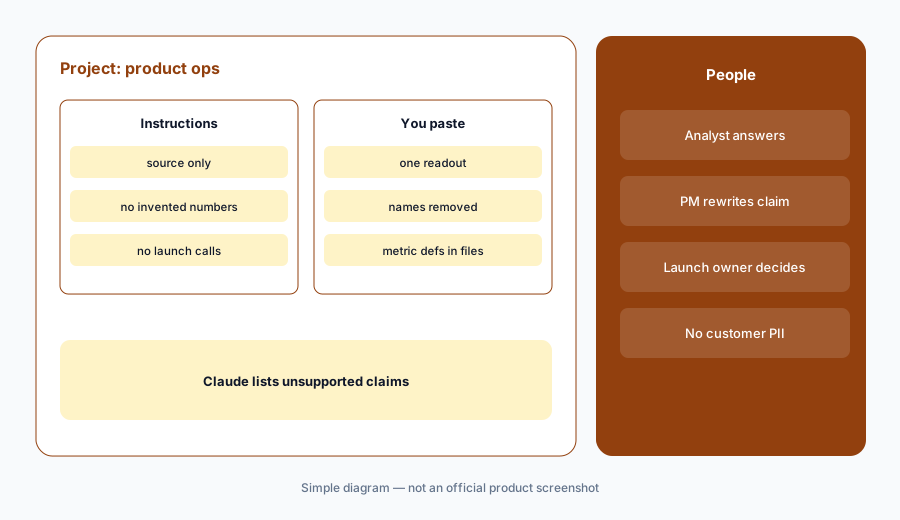
Primary workflow:
Project product ops. Paste one sanitized experiment readout. Ask what claim the data doesn’t support.
2. Release notes from the tickets you shipped
What it is: Paste the list of tickets closed in a release — title, short description, and the label your team uses for customer-facing changes — and ask Claude for release notes in your house format: new, improved, fixed. Tell it to use only the pasted tickets, to keep feature names exactly as written, and to list any ticket it could not explain in plain words as a question for the engineer. Add your release-note style guide and two past notes you liked to project knowledge so the tone stays consistent.
The risk with release notes is not bad writing; it is describing something that didn’t ship, or shipping a note for a feature behind a flag. Have the PM check every line against the release, and keep flagged features out until they are on for everyone who will read the note.
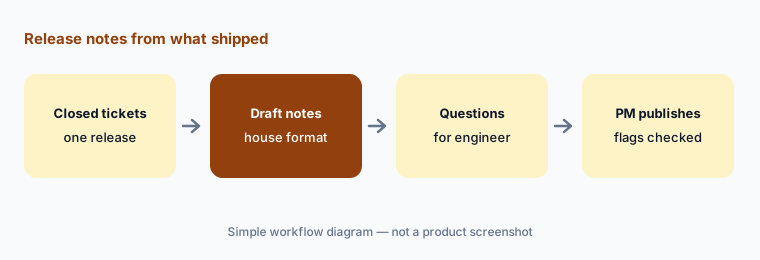
One release, one draft:
Paste the closed tickets from your last release. Ask Claude for release notes using only those tickets, with every unclear ticket listed as a question. Check each line against what is switched on for customers.
3. Feedback themes you can check
What it is: Export a batch of feedback — survey comments, sales call notes, support tags — strip names and account details, number each row, and paste it (or add it as a file to project knowledge). Ask Claude to sort the rows into five to eight themes, list the row numbers under each theme, and quote one row per theme word for word. Row numbers matter: they let you open the source and check the sorting instead of trusting a summary.
Counts from a chat are a draft. If a theme’s size will go into a roadmap discussion, count it yourself in the spreadsheet using the row numbers Claude gave you. If your team already keeps feedback in a research or feedback tool, Dovetail added a connector for Claude in April 2026 (per Dovetail’s changelog) that lets Claude search that workspace with your existing permissions — useful, but check its answers against the source highlights the same way.
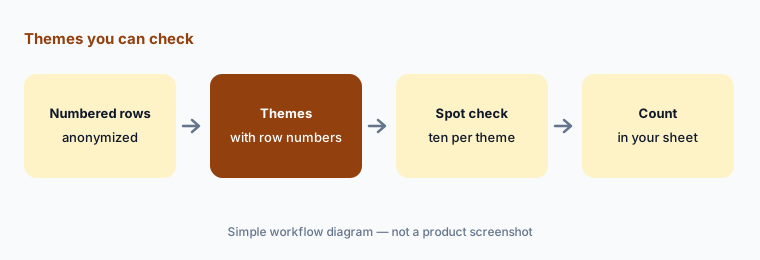
Themes with row numbers:
Paste 100 numbered, anonymized feedback rows. Ask Claude for five themes with the row numbers under each. Open ten rows from the biggest theme and move any that don’t belong before you count.
4. Launch briefs: questions, not a go/no-go
What it is: Before a launch review, paste the launch brief and your launch checklist template and ask Claude for the questions the brief leaves open: missing owners, no rollback plan, support not briefed, metrics without a baseline, docs not updated. Ask for questions only — not a recommendation. The launch owner takes the list into the review and decides.
Keeping Claude to questions is deliberate. A model that says “ready to launch” sounds like a decision even when it only means the brief is well written. Put “never say whether to launch” in the project instructions and remove any sentence that reads like a verdict before you share the output.
Questions only:
Paste your next launch brief and your checklist template. Ask Claude for open questions grouped by owner — no recommendation. Bring the list to the launch review and note which ones changed the plan.
5. Share the project with the product team
What it is: On Team and Enterprise plans, share the project with the PMs and analysts who use it. Give most people Can view (they can chat in the project and see its knowledge and instructions) and one or two owners Can edit (they change instructions and knowledge). Keep the project knowledge small and current: metric definitions, the readout template, the release-note style guide, and the launch checklist. Anthropic notes that project names and descriptions are not visible to Claude, so put rules in the instructions, not the description.
A shared project is only as good as its definitions. When a metric definition changes, the editor updates the file in project knowledge the same day and tells the team; otherwise every readout check uses the old definition.
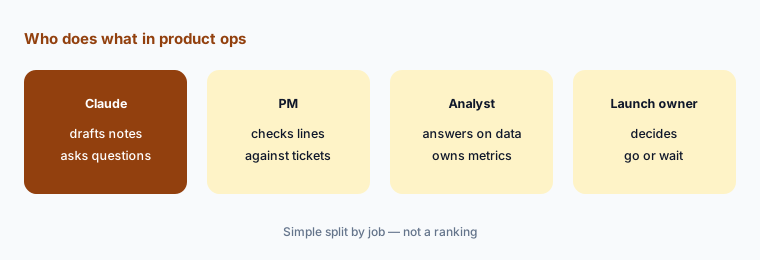
Two editors, everyone else views:
Share your product ops project with your PMs as Can view and one analyst as Can edit. Ask the analyst to add your current metric definitions file and date it.
6. What never goes into the project
What it is: Write a short list and pin it in the project instructions: no customer names, emails, phone numbers, account IDs, or contract values; no raw support transcripts; no unreleased financials; no credentials. Replace people with a segment (“mid-market admin”) and accounts with a row number. If someone pastes personal data by mistake, delete the chat and tell the project owner. Use the company’s Team or Enterprise workspace, never a personal Free, Pro, or Max account, for product data.
Anthropic’s commercial privacy article (dated 18 August 2026) says inputs and outputs from products such as Claude for Work are not used for training by default, but that conversations you send as feedback with the thumbs buttons may be stored for up to five years and used. Team and Enterprise owners can turn that feedback button off for the organization.
Pin the rules:
Add a “never paste” list of five items to your product ops project instructions, then paste a test row with a fake email address and check that Claude flags it.
Pricing context (October 2026)
Anthropic’s pricing page (as listed 9 Oct 2026, USD): Free $0 (projects up to five); Pro $17 per month with annual billing ($200 billed up front) or $20 billed monthly; Max from $100 per month. Team (2 to 150 people): Standard seat $20 per seat per month billed annually or $25 monthly; Premium seat $100 annually or $125 monthly, with 5x the usage of Standard. Enterprise: a seat price plus usage at API rates, listed as US$20 per seat per month billed annually with usage cost on top.
Project sharing is listed for Team and Enterprise only; Free, Pro, and Max projects are personal. For a product team that shares one project, that makes Team the starting point.
Uncertainty: Plan names, seat prices, usage limits, and the new version of projects can change; Anthropic says the new projects are rolling out in stages, and the Enterprise usage component depends on models and tasks, so it has no fixed monthly total. This is product education, not advice on your data policy.
When it’s useful (honest take)
Useful when your team already writes release notes, readouts, and feedback summaries by hand every week, someone owns the shared project and its definitions, and people are willing to check drafts against tickets, tables, and rows.
Useful when readouts tend to claim more than the data shows and you want a fast second reader before the review — with the analyst still answering every point.
Less useful when feedback can’t be anonymized before it reaches a chat tool, your product analytics or feedback tool already drafts the same summaries with links to the source, or anyone expects Claude to call the launch. The launch owner decides.
Paying for Claude and a few other AI tools? The $9 AI toolkit spreadsheet lists every AI subscription you have, what each one costs, and how fast it pays for itself, so you can see which ones are worth the money.
Want someone to do it for you? AI toolkit audit — $19
Related options (educational)
| Need | Better home | Why |
|---|---|---|
| Launch checklists and survey summaries in ChatGPT | ChatGPT for product ops | Business workspace; GPTs moving to plugins |
| Feedback sheets, launch docs, and emails in Workspace | Gemini for product ops | Gemini in Sheets, Docs, and Gmail |
| Interview and feedback themes with source highlights | Dovetail AI | Research repository with Chat and Agents |
| Product feedback tied to the roadmap | Productboard AI | Insights linked to features |
| Experiment results and charts | Amplitude AI or Statsig | System of record for the numbers |
| Plain spreadsheet plus a general assistant | Stack map for product ops | List jobs before buying another seat |
FAQ
How should a product ops team set up Claude?
Create a product ops Project with instructions that forbid invented numbers, tickets, or quotes and forbid launch recommendations. Add metric definitions and your readout template to project knowledge, share it on a Team plan, and paste only sanitized readouts, ticket lists, and numbered feedback rows.
Can Claude tell us whether an experiment won?
Not in this guide. Claude can read a readout and list claims the pasted data doesn’t support, such as a win on a secondary metric or a lift with no sample size. The analyst answers each point and the launch owner decides.
Can Claude write release notes from Jira or Linear tickets?
Yes, from the ticket list you paste: ask it to use only those tickets, keep feature names exact, and list unclear tickets as questions. The PM checks every line against what is actually switched on for customers before publishing.
Is product data used to train Claude?
Anthropic says inputs and outputs from its commercial products, such as Claude for Work, are not used for training by default; feedback you send with the thumbs buttons may be stored and used. Keep customer names and account details out of the project either way.
What does Claude cost for a product team in October 2026?
As listed on 9 October 2026: Team Standard seats $20 per seat per month billed annually or $25 monthly, Premium seats $100 annually or $125 monthly, for 2 to 150 people. Pro is $17 a month annually or $20 monthly but has no project sharing. See claude.com/pricing.
Optional next step (if seats overlap)
If product ops pays for Claude, ChatGPT, a feedback tool’s AI add-on, and an analytics copilot that all summarize the same survey, that overlap is worth a look. Map the overlap with the $19 AI toolkit audit or the $9 AI toolkit spreadsheet. Email Audit $19 or Toolkit spreadsheet $9.
Checkout is live via Stripe. After you pay, we email delivery (spreadsheet) or intake next steps (audit).