Role · Data ops · Claude · Oct 2026
Claude for data ops (Oct 2026): SQL review, metric definitions, and analysis write-ups with Projects
Claude isn’t a BI tool and doesn’t connect to your warehouse on its own. What it does well for data people is reading: a schema and a query, a messy metric definition, a page of results that needs a plain-English write-up. A Project keeps that context together. This page shows four jobs, each with a Try this, and keeps one rule throughout: you run every query yourself.
What this page covers
This page is for the analyst, analytics engineer, or ops person who already has a Claude plan (or is deciding on one) and wants to use it on everyday data work without pasting production data or trusting an unrun query.
The pattern is the same for every job: a Project named “Data ops” holds instructions (“flag double-counting risks; never claim a query was run”) and reference material (a sanitized schema, your metric glossary). You paste a query or a definition, Claude reviews or drafts, and you run, test, and decide. Claude’s plans include creating and editing files with code execution, but your warehouse remains the place numbers come from.
Plan facts come from claude.com/pricing, read on 5 October 2026. For live warehouse questions, see Genie vs Cortex Analyst or Hex.
Major features (with how someone uses them)
Examples at a glance: each feature has a concrete example from a real job plus a short Try this you can run this week.
1. Review a query for double-counting (primary)
What it is: Double-counting from a one-to-many join is the most common silent SQL bug in ops reporting. Give Claude the relevant table definitions (column names, keys, grain — not data) and the query, and ask what could inflate the totals. It’s good at spotting a join that fans out, a missing DISTINCT, or a filter applied after aggregation. It can’t know your data’s actual cardinality, so you confirm with a count.
orders, order_items, and shipments and her revenue-by-region query. Claude points out that joining shipments (several per order for split deliveries) before summing order_total will count split orders more than once, and suggests aggregating shipments first. She runs a count of orders with more than one shipment — 6% — applies the fix, and the total drops by the amount she expected.
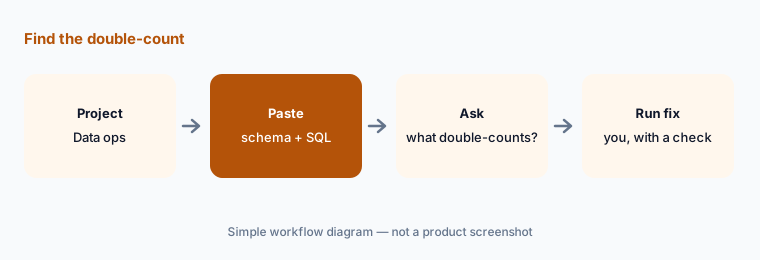
Primary workflow:
Create a Project called Data ops. Paste one schema and one SQL query. Ask what could double-count. Run the fix yourself.
2. Draft a metric definition people can agree on
What it is: Arguments about numbers are usually arguments about definitions. Paste how two teams currently calculate a metric (their SQL or spreadsheet logic) and ask Claude to write one definition in plain English plus a list of decisions the teams must make: what’s included, which date, which currency, how refunds count. The output is a draft for a meeting, not a decision.
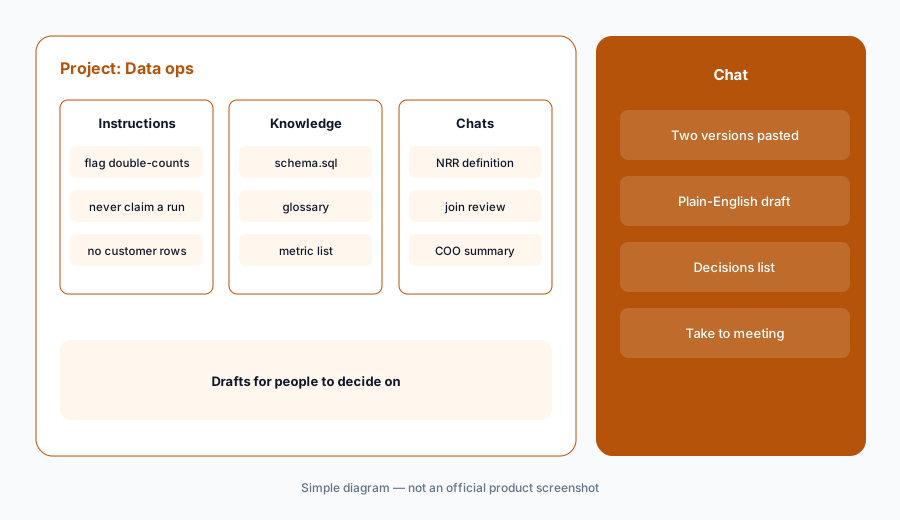
List the decisions:
Paste two versions of one disputed metric. Ask Claude for one plain-English definition and a numbered list of decisions. Take the list, not the definition, to the meeting.
3. Turn results into a write-up
What it is: Once you’ve run a query and checked the numbers, Claude can turn a results table into a short write-up for a non-technical reader: what changed, by how much, and what’s still unknown. Paste the results you verified, and tell it not to add numbers that aren’t in the table.
No new numbers:
Paste a results table you’ve already checked. Ask for a five-sentence summary with the instruction “use only numbers in this table; mark any guess as a guess.” Delete anything that isn’t in the table.
4. What stays out of the chat
What it is: Claude’s consumer plans (Free, Pro, Max) show the model-training setting as opt-out on the pricing page; the Team plan says no model training on your content by default. Either way, schemas and SQL are usually fine to share; customer rows, credentials, and connection strings are not. For live questions against the warehouse, use tools that run inside it.
Set the rule:
Write a three-line rule in the Project instructions: share schemas and SQL; never paste customer rows or credentials; never claim a query was run. Check one week of chats against it.
Pricing context (October 2026)
Anthropic publishes prices on claude.com/pricing. When we checked on 5 October 2026: Free $0 (Projects up to 5); Pro $17 per month with an annual subscription ($200 billed up front) or $20 billed monthly (Projects included); Max from $100 per month. Team (2 to 150 people): Standard seat $20 per seat per month billed annually or $25 monthly; Premium seat $100 annually or $125 monthly. Team adds central billing, SSO, and no model training on your content by default. Enterprise is seat price plus usage at API rates.
Uncertainty: Usage limits apply on every plan and Anthropic changes plan contents often. The pricing page’s feature table didn’t list project sharing for Free, Pro, or Max; check the Team column if you need shared Projects. Check the live pricing page before you buy.
When it’s useful (honest take)
Useful when you write or review SQL, own metric definitions, or explain results to non-technical people — and you’ll run every query yourself.
Less useful when you want live answers from the warehouse (use a warehouse assistant or BI tool) or your team can’t keep customer data out of the chat.
Paying for Claude and a few other AI tools? The $9 AI toolkit spreadsheet lists every AI subscription you have, what each one costs, and how fast it pays for itself, so you can see which ones are worth the money.
Want someone to do it for you? AI toolkit audit — $19
Related options (educational)
| Need | Better home | Why |
|---|---|---|
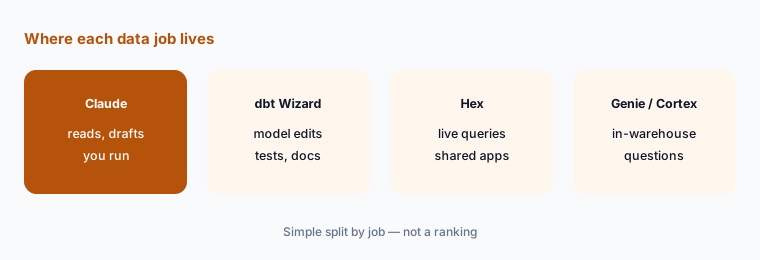
| SQL review, definitions, write-ups | Claude for data ops (this page) | Reads and drafts; you run queries |
| Projects setup in general | Claude Projects | Instructions and knowledge in one place |
| Model changes, tests, and docs in dbt | dbt Wizard | Diffs inside your dbt project |
| Live questions on warehouse data | Hex AI | Queries run where the data is |
| Plain-English questions inside Databricks or Snowflake | Genie vs Cortex Analyst | Warehouse-native assistants |
FAQ
Can Claude run SQL against my warehouse?
Not on its own. This page uses Claude to review and draft; you run queries in your own tools. For live questions, use a warehouse assistant or BI tool.
Which Claude plan includes Projects?
On 5 October 2026, claude.com/pricing listed Projects as up to 5 on Free and included on Pro, Max, Team, and Enterprise.
How much does Claude cost in October 2026?
Pro was $17 per month with an annual subscription or $20 monthly; Max from $100 per month; Team Standard $20 per seat per month annually or $25 monthly, Premium $100 or $125.
Is it safe to paste a schema into Claude?
Schemas and SQL usually contain no customer data, but follow your company’s policy. Don’t paste customer rows, credentials, or connection strings. Team plans don’t train on your content by default; consumer plans show training as opt-out.
Is Claude a replacement for a BI tool?
No. It helps you write, review, and explain. Official numbers should come from your warehouse and BI tools.
Optional next step (if seats overlap)
If a data team pays for chat seats, a notebook tool, and a BI copilot that all draft the same write-ups, that overlap is worth mapping. Map the overlap with the $19 AI toolkit audit or the $9 AI toolkit spreadsheet.
Both pages explain what you get and how delivery works before you decide.