How-to · Customer insight · Dovetail · Oct 18, 2026
Ask Dovetail Chat a research question, and check every insight against its source highlight
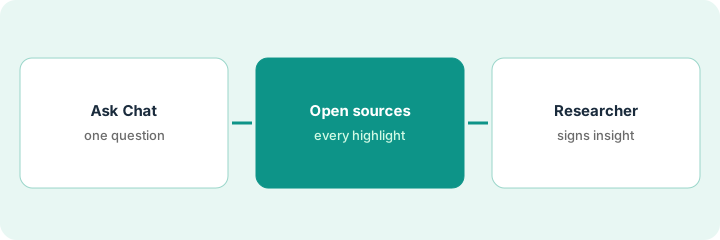
Dovetail Chat answers questions across interviews, calls, and tickets, in Fast or Deep research mode, with citations to highlights. The citation is the evidence; the sentence above it is a claim. This page shows how to ask one research question and share only the insights a researcher has checked against their source highlights.
Who this is for
UX researchers, research ops leads, and product managers who keep interviews and feedback in Dovetail. The job here is checking chat insights against source highlights. For letting Enterpret's Adaptive Taxonomy run weekly and having a named owner validate every taxonomy change — a different job — see Enterpret taxonomy change validation.
How to do it
This is a how-to, not a ranking of research tools. Per the Dovetail AI review, Chat has Fast and Deep research modes, Dovetail Agents became generally available in July 2026, and automatic redaction can run before analysis. Agents and Channels 2.0 (open beta) are not needed here. The ground rule: only a quote you can play or read in the source highlight counts.
1. Pick one question and set up redaction
What it is: Choose one research question with a decision behind it, and make sure redaction is on before Chat reads new material.
- Write the question as the decision it supports.
- Limit the scope to the projects or channels that matter.
- Ask a workspace admin to set automatic redaction to Suggest in Projects, so a researcher sees what will be hidden.
- Have your privacy owner check a sample of redacted transcripts.
- Write down what you already believe the answer is.
A research ops lead wants to know what slowed new admins down last month. Redaction is set to Suggest; she accepts the suggestions in two transcripts and writes her own guess: onboarding and permissions.
Write your question and your guess in one line before you open Chat.
2. Ask Chat in Deep research mode
What it is: Switch the mode selector to Deep research for a harder question across more evidence, and ask for themes with citations.
- Ask for the three main themes with cited highlights.
- Use Fast mode only for quick look-ups you will check the same way.
- Copy the answer into a working doc, one theme per row.
- Count how many different participants each theme cites.
- Do not share anything yet.
Deep research returns onboarding confusion, permission requests, and pricing questions, each with cited highlights.
Paste each theme into a sheet with columns for highlights cited, participants, and checked (yes or no).
3. Open every cited highlight, then share
What it is: The researcher opens each cited highlight in context, keeps or drops the theme, and shares only checked insights.
- Play or read each highlight in its transcript, not just the snippet.
- Drop any theme whose highlights don't say what the summary says.
- Flag a theme that rests on one participant speaking twice.
- Quote participants' words, never Chat's wording.
- Share the checked insights with the highlight links attached.
The first two themes hold up. The pricing highlights turn out to be one participant speaking twice, so she reports two themes and notes pricing as a single-participant signal.
Open two highlights per theme at minimum before you share it, and attach the links.
Pricing context (October 2026)
This how-to isn't a price sheet. Per the Dovetail AI review and Dovetail's pricing page (checked Oct 18, 2026), Dovetail shows Free at $0 per user per month (one channel, one project) and Enterprise at custom pricing. Dated October 2026.
Checked Oct 18, 2026 on the vendor’s own pricing page: Dovetail’s pricing page lists a Free plan at $0 per user per month and Enterprise as custom-priced.
Uncertainty: The only prices this site sells here are the optional $9 AI toolkit spreadsheet and $19 AI toolkit audit.
When this helps (honest take)
Useful when your team already keeps interviews or feedback in Dovetail and has someone who will open highlights before sharing themes.
Not useful when you run a handful of interviews a year, nobody will open highlights, or personal data can't be redacted before import.
Related options (educational)
| Need | Where to look | Why |
|---|---|---|
| Dovetail AI features | Dovetail AI | Primary path |
| Taxonomy changes in Enterpret | Enterpret taxonomy change validation | A different job |
| Dovetail and Enterpret side by side | Dovetail vs Enterpret | Compare the two |
| Recorded video claims | UserTesting insight summary clip check | Clips, not highlights |
| Research stack map | Stack map: research ops | Where Dovetail fits |
FAQ
Fast or Deep research mode?
Per our review, Fast gives quick cited answers for everyday questions and Deep research reasons across more evidence for harder ones. Check citations the same way in both.
Can I quote a Digital Twin in the readout?
No. Per our review, a twin is a persona for rehearsal. Only real participants' highlights belong in a readout.
How much does Dovetail cost?
Free at $0 per user per month and Enterprise at custom pricing on the page we checked; see the pricing section.
Are Dovetail Agents generally available?
Per our review, Dovetail made Agents generally available in July 2026. This routine uses Chat and highlights only.
Optional next step
If you want a one-page toolkit map for the tools you already pay for, use the optional $9 AI toolkit spreadsheet. If you want a short review of seat waste and unused tools, use the optional $19 AI toolkit audit. Neither is required to follow this how-to.