Tool · Recruiting · Sourcing · Oct 2026
Juicebox review (Oct 2026): PeopleGPT search and AI agents for sourcing
Juicebox is a sourcing tool: you describe the person you want in plain English, its PeopleGPT search turns that into filters and criteria, and it returns ranked profiles from more than 800 million people, with contact data and email sequences built in. Juicebox Agents can keep sourcing in the background. This page walks through each piece with a real sourcing job, a Try this, and where the recruiter has to check every profile.
What this Juicebox page covers
This page is for in-house recruiters, agency sourcers, and founders hiring without a sourcing team who want to know whether natural-language search saves real time. The question it answers: how does Juicebox find and rank people, what does each plan include, and where does a human have to read the profile before anyone gets a message?
PeopleGPT is the name of Juicebox’s search, and it is included in every plan, including Free; it is not a separate product. Juicebox says it searches more than 800 million profiles built from publicly available data across 30+ sources, with contact data (personal and work emails, phone numbers) for over 200 million of them. Plans add contact and export credits, mailboxes for outreach, ATS and CRM exports, and an optional Juicebox Agents add-on.
Everything below comes from Juicebox’s pricing page and help center as we read them on 6 October 2026. Juicebox’s own help center notes that AI features may have errors and that you should confirm key information — that is the right default for every profile it returns.

Major features (with how someone uses them)
Examples at a glance: each feature has a concrete example from a real job plus a short Try this you can run this week.
1. PeopleGPT search from a plain-English brief (primary)
What it is: Every search starts inside a project. You describe the candidate in your own words; Juicebox turns the prompt into filters and criteria for you to review, then runs a ranked search. Each profile gets a match label against your criteria: Good match (criteria met, either stated on the profile or inferred by AI), Potential fit (likely met, with some evidence missing), or Not a match (no evidence found). The recommended Review view puts the candidate’s background next to Juicebox’s match analysis, and you can click each criterion to see where on the profile the evidence came from.
“Inferred by AI” is the phrase to watch. An inferred match is a guess from job titles and company names, so open the profile before it reaches a shortlist.
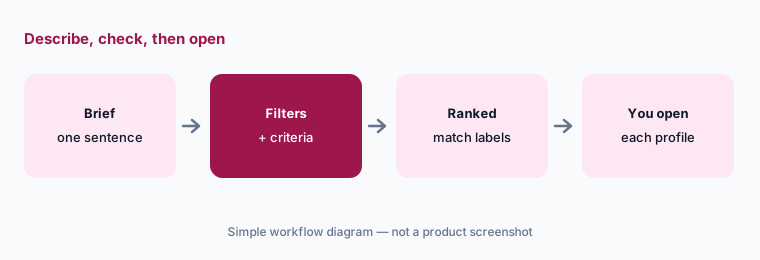
Primary workflow:
Describe one role in a sentence. Open the first 15 profiles. Mark how many you would actually message, and for each one you would not, note which criterion or filter let it through.
2. Filters, criteria, and memory
What it is: Juicebox separates filters, which narrow the pool with yes/no requirements such as location, title, years of experience, or company, from criteria, which rank the pool with natural-language requirements such as “3+ years at a SaaS company in a closing role.” Criteria are ordered from most to least important and can be saved as reusable presets. Its Knowledge Vault remembers your company’s recent hiring patterns, feeder companies, and target schools, plus your own search preferences, and may add “criteria added by memory” — hover the memory icon to see why. Admins can turn memory-enhanced criteria off for the organization.
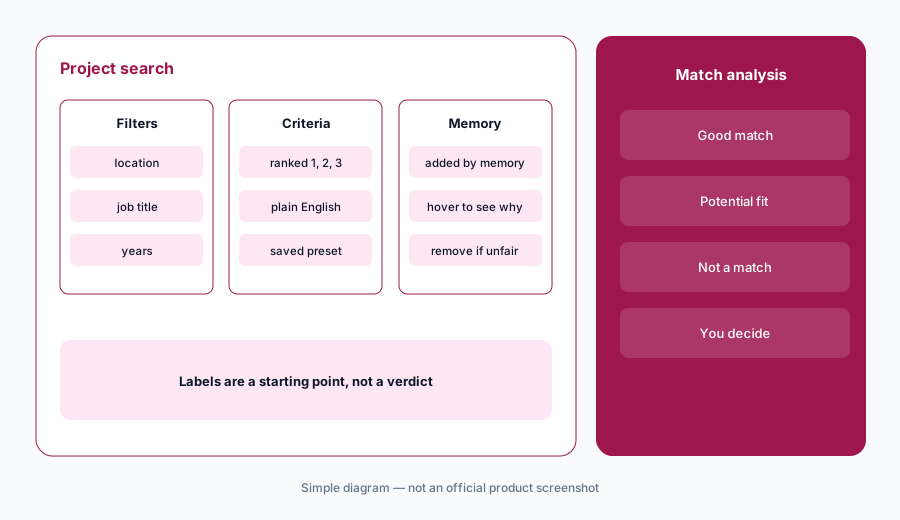
Check what memory added:
Open the criteria on your last three projects. Remove any criterion added by memory that is not a real job requirement — schools and former employers are common ones — and write down why.
3. Juicebox Agents: sourcing in the background
What it is: A Juicebox Agent lives inside a project and keeps sourcing against the criteria you set. You brief it in plain English, with a job description link, a LinkedIn profile to match, or an ATS job. Before searching, it reads connected tools (such as Google Drive, Notion, Granola, Metaview, and, on the Business plan, your ATS), maps the talent market, and shows a pool size and a qualified leads estimate. You mark profiles Looks Good or Give Feedback with a reason, and it learns from both. Outreach is optional: the pricing page says agents can be set to auto-email or auto-shortlist.
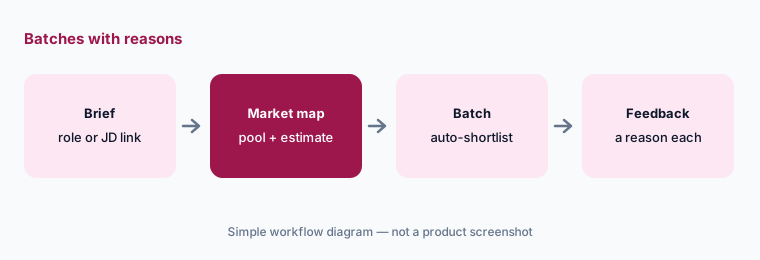
Shortlist before you send:
Run one Agent with auto-shortlist on and auto-email off for two weeks. Give a written reason for every profile you reject. Turn on auto-email only if you would have sent most of the last batch yourself.
4. Sequences, AI personalization, and do-not-contact
What it is: Sequences send multi-step email outreach from a connected Gmail or Outlook mailbox; LinkedIn connection requests, LinkedIn messages, and calls appear as tasks for you to do, because only emails are automated. AI Commands write a one- or two-sentence personal line per candidate when the email is sent, and you can generate a whole sequence with AI from a job description. You can add an unsubscribe link, preview, and send a test first. A company-level do-not-contact list blocks outreach to people at listed companies and excludes them from searches by default, and individual profiles can be tagged “Do not contact.”
Preview every AI line:
Before your next sequence, preview the AI Command line for the first 20 recipients. Fix the command if more than two lines are wrong, add an unsubscribe link, and check your do-not-contact companies are current.
5. Shortlists, Smart Reports, and hiring-manager review
What it is: Profiles you like go to the project shortlist. From there you can generate a Smart Report — an AI-written summary of selected profiles that you can edit, brand, download as a PDF, and anonymize so names and profile links are hidden — or send a review request to hiring managers, who get view-only access to that shortlist and approve or reject each candidate with optional feedback. The hiring manager decides who is worth a conversation; the report is a starting point.
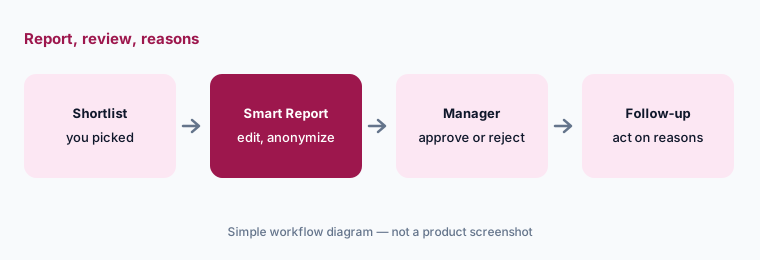
Review blind once:
Send one hiring manager an anonymized Smart Report of your current shortlist. Ask for a reason on every rejection, and compare the approvals with what they picked from named profiles last time.
6. Credits, exports, and the MCP server
What it is: Searches are unlimited on paid plans; what runs out is credits. Revealing an email costs one contact credit and a phone number three, and adding a profile to a sequence uses a credit for any newly revealed contact; you are never charged twice for the same contact. Export credits cover CSV or PDF exports, and direct ATS or CRM export is on the Business plan. Monthly-plan credits do not roll over; annual plans get the full year’s credits up front. The Juicebox MCP server, rolling out from 12 August 2026 on paid plans, lets tools such as Claude, ChatGPT, or Cursor read your recruiting analytics and create or calibrate agents, with each user signing in by OAuth every 30 days.
Reveal last:
For one week, reveal contact details only for profiles you are adding to a sequence. Compare contact credits used with the week before, and note whether reply volume changed.
Pricing context (October 2026)
Juicebox publishes plan prices. On its pricing page (checked 6 October 2026, USD per seat per month): Free $0 (limited searches, AI email templates, set up an Agent); Starter $119 monthly or $99 billed yearly (one seat, unlimited searches, 500 contact and 500 export credits a month, one mailbox); Growth $199 monthly or $179 billed yearly (up to five seats paid per seat, Talent Insights, 1,500 contact and 1,500 export credits per seat a month, three mailboxes per user); Business custom and annual only (unlimited contact credits, ATS/CRM integration, hiring manager seats, network sourcing, usage analytics, SSO, priority support). Juicebox Agents are an add-on at $199 per agent per month.
The yearly toggle on the pricing page shows a “15% off” badge. The free trial is usage-based with no time limit: up to 5 searches, 65 profile views, and 5 contact credits, and it ends at whichever limit you hit first. Paid plans auto-renew until cancelled.
Uncertainty: Prices are read from the October 2026 pricing page and can change; confirm at checkout. Agents that are sourcing, paused, or awaiting action each take an Agent seat. Juicebox builds profiles from public data and outreach goes to people who did not apply, so check your own obligations (for example GDPR or CCPA notices and opt-outs) before sending.
Before adding Juicebox seats, check what you already pay for: LinkedIn Recruiter, your ATS's sourcing features, and any sales contact database may already cover part of the same job. The $9 AI toolkit spreadsheet lists those seats and their cost side by side. See what the $9 AI toolkit spreadsheet covers or how the $19 AI toolkit audit works.
Want someone to do it for you? AI toolkit audit — $19
When it’s useful (honest take)
Useful when you source for hard-to-find roles across many companies, want to search in plain English instead of Boolean strings, and want contact data, sequences, and a hiring-manager review step in one tool. Useful too for agencies that need anonymized reports for clients.
Less useful when your team already pays for LinkedIn Recruiter seats and most of your candidates answer InMail, or you hire for a few roles a year. Less useful if nobody reads the profiles: inferred matches and AI-written lines look polished even when they are wrong. A recruiter decides who gets a message and who moves forward.
Related options (educational)
| Need | Better home | Why |
|---|---|---|
| Plain-English sourcing across the open web, with sequences | Juicebox (this page) | Published per-seat prices; Agents add-on |
| Agentic sourcing inside LinkedIn Recruiter | LinkedIn Hiring Assistant | Uses Recruiter seats and LinkedIn profiles |
| Sourcing and rediscovery inside your ATS | Ashby AI or Workable AI | One less tool if your ATS covers it |
| Recruiting agents next to interview notes | Metaview | Notes plus sourcing agents |
| Data enrichment and custom prospect lists | Clay | Built for sales lists; flexible tables |
| Sales-style contact database and sequences | Apollo.io | Prospecting, not candidate review |
Related comparisons
- Ashby vs Greenhouse: built-in ATS AI compared
- Stack map for recruiting ops
- ChatGPT for recruiting: outreach drafts and sourcing notes
- Gemini for recruiting in Docs and Sheets
- HireVue AI for screening and video interviews
FAQ
Is PeopleGPT a separate product from Juicebox?
No. PeopleGPT is the name of Juicebox’s natural-language search, and it is included in every plan, including Free.
How much does Juicebox cost in October 2026?
On 6 October 2026 Juicebox listed Free at $0, Starter at $119 per seat per month ($99 billed yearly), Growth at $199 ($179 billed yearly), Business as custom and annual only, and Agents at $199 per agent per month. Check juicebox.ai/pricing.
What do Good match, Potential fit, and Not a match mean?
They are Juicebox’s match labels against your criteria: met (stated or inferred by AI), likely met with some evidence missing, or no evidence found. Open the Review view to see where the evidence comes from.
Do Juicebox Agents email candidates on their own?
Only if you set them to. Agents can auto-shortlist or auto-email from a connected mailbox, with messaging and timing you control. A cautious start is auto-shortlist only, with a person reviewing each batch.
Where does Juicebox’s profile data come from?
Juicebox says it uses publicly available profile data compiled from 30+ sources and partners, refreshed regularly, with contact data for over 200 million profiles. Its Trust Center and privacy pages cover data handling.
Optional next step (if seats overlap)
If you pay for Juicebox seats, LinkedIn Recruiter seats, and a sales contact database — and more than one is sourcing the same roles — that overlap is worth a look. Map the overlap with the $19 AI toolkit audit or the $9 AI toolkit spreadsheet. Email Audit $19 or Toolkit spreadsheet $9.
Checkout is live via Stripe. After you pay, we email delivery (spreadsheet) or intake next steps (audit).