Tool · Recruiting · Greenhouse · Oct 2026
Greenhouse AI review (Oct 2026): Talent Matching, Greenhouse Notetaker, and fraud checks
Greenhouse is the applicant tracking system many companies adopt when they want structured hiring: interview kits, defined stages, and consistent feedback. Its AI features follow the same idea — the recruiter defines what matters, the AI sorts or drafts, and a person decides. This page walks through each piece with a real recruiting job, a Try this, and where it stops helping.
What this Greenhouse AI page covers
This page is for the recruiting lead or talent-ops admin at a company that runs (or is choosing) Greenhouse Recruiting, and for the people-ops generalist who inherited it. The question it answers: which Greenhouse AI features are worth switching on, what does each one actually do with candidate data, and where must a recruiter still read and decide?
Greenhouse’s AI work is spread across a few areas. Talent Matching sorts new applicants against a weighted calibration you define, and a newer Talent Matching assistant drafts that calibration from plain language. Greenhouse Notetaker records consented video interviews and drafts notes mapped to each interviewer’s feedback-form questions. The Candidate Insights Assistant answers questions about one candidate. The Real Talent suite adds fraud detection, a spam blocklist, and identity checks through CLEAR. And Greenhouse MCP lets approved AI tools work with Greenhouse data under each user’s permissions.
Greenhouse frames all of this as “keeping humans in control of every decision.” Everything below comes from Greenhouse’s pricing page, product pages, support articles, and the August and September 2026 release notes as we read them on 6 October 2026. Several features are still in open beta. This is product education, not legal advice — hiring AI rules differ by location.

Major features (with how someone uses them)
Examples at a glance: each feature has a concrete example from a real job plus a short Try this you can run this week.
1. Talent Matching with calibrations (primary)
What it is: Before Talent Matching does anything, a recruiter builds a calibration for the job: a weighted list of job-related skills, titles, industries, and minimum experience. Greenhouse then parses each resume and gives every candidate in the first Application Review stage a match label — Strong, Good, Partial, or Limited match — or Needs manual review when there is no readable resume or the candidate opted out of AI review. Candidates are grouped by label and then ordered by application date. Click a candidate and you see matched and missing skills, a short reason, and the matched terms highlighted on the resume. Both Talent Matching and resume parsing must be on, and editing a calibration recalculates labels for current candidates.
If you enable the candidate AI opt-out, applicants see an AI disclaimer on the job post with a link to manage their preference. Greenhouse says opted-out applications are labeled Needs manual review, are not evaluated, and any existing match result for that application is deleted. Greenhouse’s readiness guide asks you to write a policy for who creates calibrations, how labels inform action, and when people override them.
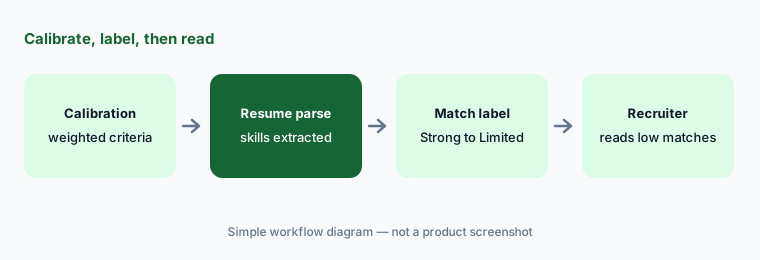
Primary workflow:
Build a Talent Matching calibration for one role. Open five candidates labeled Limited match and read their resumes yourself. If one should advance, fix the calibration rather than the candidate, then check how many other labels changed.
2. Talent Matching assistant (open beta)
What it is: Released in open beta in August 2026, the Talent Matching assistant is a chat panel on the Talent Matching page (“Configure with assistant”). You describe the person you are looking for, and it starts from the job post and the interview-kit attributes already set up for the job to draft two things: a suggested calibration (skills with importance levels, titles, minimum experience, and preferences such as “include similar roles”) and a set of suggested filters (location, keywords, application date range, and some advanced filters). You edit both, then click Apply setup. The difference matters: a calibration changes the order, while filters are hard constraints on who appears in the list at all.
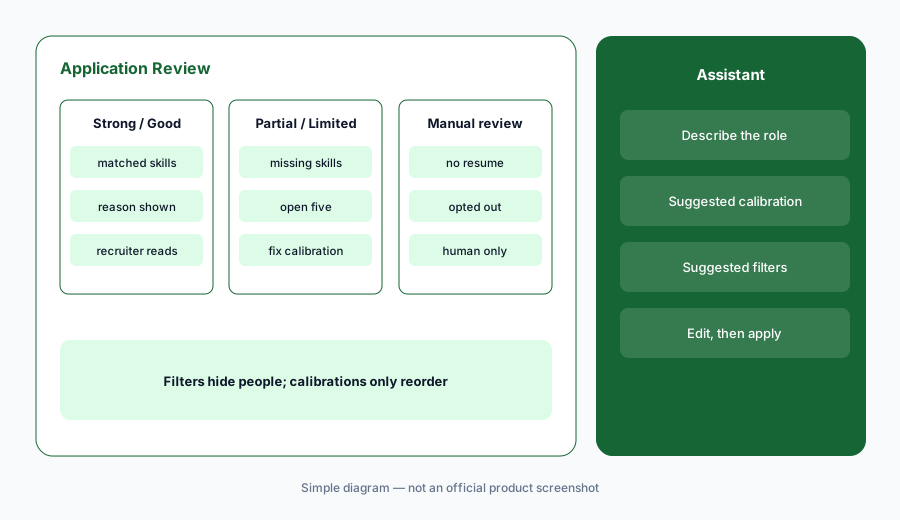
Filter check:
Ask the Talent Matching assistant to set up one role. Before you click Apply setup, delete every suggested filter you would not reject a candidate for on its own, and move nice-to-haves into the calibration as low-weight skills.
3. Greenhouse Notetaker
What it is: Greenhouse Notetaker became available on the Core, Plus, and Pro plans in August 2026. With candidate consent it joins Zoom, Google Meet, or Microsoft Teams interviews, records and transcribes them, and drafts notes and a summary mapped to the interviewer’s feedback-form questions, with clickable timestamps back to the recording. Interviewers add generated notes to their feedback with one click, then write their own assessment in Key Takeaways. Candidates give consent through self-schedule or availability requests and can withdraw it. Site Admins switch it on (it is off by default), control who can view recordings, and set retention up to 60 days. Since September 2026, transcripts and recording links are also available through the Harvest v3 API and Greenhouse MCP.
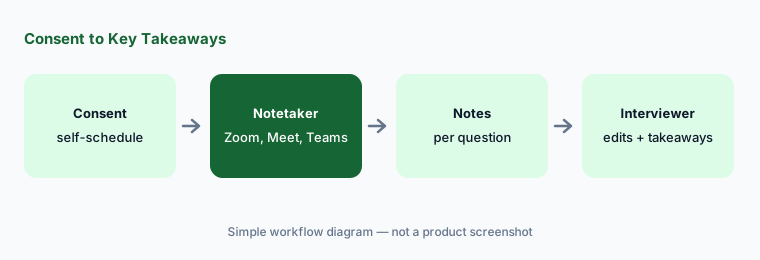
Timestamp check:
After your next interview with Notetaker on, click the timestamp behind three drafted notes. Fix any note the recording does not support before adding it to your feedback, and write Key Takeaways yourself.
4. Candidate Insights Assistant (open beta)
What it is: Also in open beta since August 2026 for Core, Plus, and Pro, the Candidate Insights Assistant answers plain-language questions about a single candidate from that candidate’s existing Greenhouse data — applications, submitted interview feedback, and how long they spent in each stage. Site Admins enable it from the AI Features menu, separately from other AI features. It saves tab-hopping; it does not add information that is not already in Greenhouse.
Prep, then verify:
Before one final interview, ask the Candidate Insights Assistant for open concerns from earlier rounds. Open the original feedback behind each concern, and only bring up the ones you can quote.
5. Real Talent: fraud detection, spam blocklist, and CLEAR identity checks
What it is: Greenhouse groups its trust features under Real Talent. Fraud detection screens applications using objective digital signals to flag possible identity misrepresentation. The spam blocklist is a control you configure to block known bad IP addresses, emails, or domains before applications reach recruiters. Identity verification runs through CLEAR: candidates confirm who they are with a selfie matched to a government ID, inside their MyGreenhouse profile. Admins choose which offices and departments require CLEAR. Greenhouse’s pricing page lists fraud and spam detection on the Plus plan, and support docs describe Real Talent as an add-on for the Core, Plus, and Pro tiers.
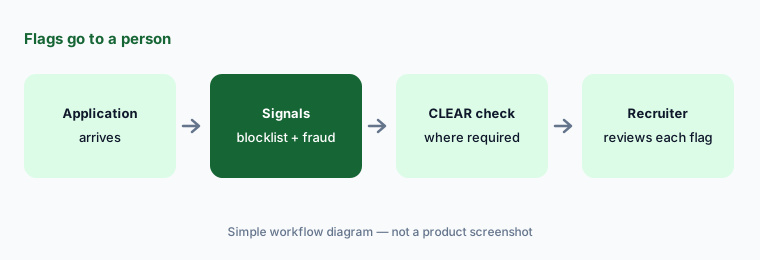
Flag policy:
Write a one-paragraph policy before turning on fraud detection: who reviews a flagged application, how fast, and what evidence is needed to reject. Then turn it on for one department only and review every flag for a month.
6. Greenhouse MCP, AI report filters, and drafting help
What it is: Greenhouse MCP (open beta) lets approved AI tools run workflows against Greenhouse data. In August 2026 access expanded beyond Site Admins to Job Admins, coordinators, and hiring managers, with access requiring both organization-level MCP scopes and the user’s existing permissions; in September Site Admins gained their own redirect URI allowlist in Dev Center. Elsewhere in the product, the Plus plan lists AI-powered report filters, and the plan table lists drafting help such as job post description suggestions, interview question suggestions, and interview-kit attribute suggestions. Greenhouse Analytics, a newer reporting area, was in open beta for all three plans as of September 2026.
Drafting help, edited:
Use Greenhouse’s interview question suggestions for one role. Delete any question that is not tied to a skill in the job post, and have a second interviewer read the remaining list before it goes in the interview kit.
Pricing context (October 2026)
Greenhouse does not publish prices. Its pricing page (checked 6 October 2026) describes three plans — Core (bring structure to hiring), Plus (optimize your operation), and Pro (manage hiring complexity) — and says pricing is customized by plan, hiring volume, organizational complexity, and the features you need. You get a number from a Greenhouse sales conversation.
On the plan table, Core lists sourcing and CRM, structured interview kits, the AI Notetaker, scheduling, reporting, SSO, and Talent Matching under Real Talent. Plus adds AI-powered report filters, the Business Intelligence Connector, sourcing automation, texting, and Real Talent fraud and spam detection. Pro adds unlimited CRM events, audit log, enterprise data configuration, and developer sandbox. Greenhouse’s support docs, however, describe Real Talent (including Talent Matching) as an add-on for these tiers — so ask your rep exactly which AI features your quote includes.
Uncertainty: We could not find any public Greenhouse price, so we quote none. Plan contents, whether Real Talent is bundled or an add-on for your contract, and which features are still beta (the Talent Matching assistant, Candidate Insights Assistant, MCP, and Analytics were open beta when we checked) all need confirming with Greenhouse before you budget.
When it’s useful (honest take)
Useful when you already run structured hiring in Greenhouse — interview kits, defined stages, consistent feedback — and inbound volume or note-taking is slowing the team down. Then Talent Matching gives recruiters a sensible reading order, Notetaker frees interviewers to listen, and the trust features help remote roles where fraud is a real problem.
Less useful when no one will own calibrations and read low matches, because a sort you never check can quietly push qualified people down the list. Less useful when you hire a few people a year — the plan and add-on cost will be hard to justify. And if your candidates are mostly hourly or high-volume, a conversational hiring tool built for that job may fit better than a structured-hiring ATS.
Paying for Greenhouse AI and a few other AI tools? The $9 AI toolkit spreadsheet lists every AI subscription you have, what each one costs, and how fast it pays for itself, so you can see which ones are worth the money.
Want someone to do it for you? AI toolkit audit — $19
Related options (educational)
| Need | Better home | Why |
|---|---|---|
| Structured hiring with calibrated match labels | Greenhouse (this page) | Talent Matching, Notetaker, fraud and ID checks |
| All-in-one ATS with criteria-based review and an assistant | Ashby AI | Citations, custom agents, published starter pricing |
| Interview notes and agents across any ATS | Metaview | Fills Greenhouse feedback forms via its extension |
| General meeting notes outside hiring | Fireflies or Zoom AI Companion | Fine for internal calls; set rules for candidate calls |
| Hiring inside an HR suite | Workday AI or Rippling AI | One vendor for people data |
| Writing job posts and interview questions only | ChatGPT for HR or Gemini for HR | Drafts from sanitized inputs; humans edit |
FAQ
What do Greenhouse Talent Matching labels mean?
Each new applicant in the first Application Review stage gets Strong, Good, Partial, or Limited match against your weighted calibration, or Needs manual review if there is no readable resume or the candidate opted out. A recruiter still reads and decides.
How much does Greenhouse cost in October 2026?
Greenhouse does not publish prices. Its pricing page describes Core, Plus, and Pro plans and says pricing depends on plan, hiring volume, complexity, and features. Ask sales, and confirm whether AI features are bundled or add-ons. See greenhouse.com/pricing.
Is Greenhouse Notetaker on by default?
No. Site Admins enable it under Configure, AI Tools. Candidates give consent through self-schedule or availability requests and can withdraw it, and admins can set retention up to 60 days.
Can candidates opt out of AI review?
Yes, if you enable the opt-out. Candidates see an AI disclaimer on the job post with a link to manage preferences. Opted-out applications are labeled Needs manual review and are not evaluated by Talent Matching.
What is the difference between a calibration and a filter?
A calibration is a weighted list of criteria that changes the order and labels. A filter is a hard constraint that hides candidates who do not match. Keep filters for true requirements only.
Optional next step (if seats overlap)
If you pay for Greenhouse Notetaker, a separate interview notetaker, and a company-wide meeting notetaker that can all join the same interview, that overlap is worth a look. Map the overlap with the $19 AI toolkit audit or the $9 AI toolkit spreadsheet. Email Audit $19 or Toolkit spreadsheet $9.
Checkout is live via Stripe. After you pay, we email delivery (spreadsheet) or intake next steps (audit).